
Industrial construction projects rely on precise measurements and instruments – from torque wrenches and pressure gauges to multimeters and temperature probes. Each of these tools must be properly calibrated on schedule to ensure accurate work, maintain safety, and meet regulatory standards. Poor calibration tracking can lead to delays, rework or even safety incidents if, for example, a torque wrench applies the wrong force because it was overdue for calibration.
Construction sites often span large areas with multiple crews, warehouses, tool rooms and field vehicles. A tool might be needed by the mechanical crew in the morning, used by quality control in the afternoon, and then returned to a laydown yard or workshop after use. If the site lacks a single, clear inventory system for all tools and their calibration status, information falls through the cracks. One team might assume an instrument is available and valid, only to discover later that it is still out for calibration or missing.
A shared, up-to-date view of tools and equipment – including where each item is stored and when it was last calibrated – is essential for efficient operations. This article explores best practices for tracking calibrated tools across multiple departments, and how modern inventory mapping solutions can provide the needed visibility. We will discuss common challenges in inventory accuracy, outline strategies to improve cross-team alignment, and demonstrate how a tool like CyberStockroom can tie everything together. By the end, construction inventory managers will have a clear roadmap for tightening their calibration controls and ensuring that every team has the right tool at the right time.
The Multi-Department Challenge
In many construction environments, different teams view the same tools through different lenses. For example:
- Warehouse/Stores Department: Focuses on the location and availability of each tool or equipment. They need to answer questions like “Where is the calibratable device?” and “Who last had it?” Their concern is preventing lost tools and ensuring nobody accidentally uses an instrument marked for special storage or isolation.
- Quality Assurance/Calibration Team: Cares about calibration status and validity. They ask, “Is this tool calibrated and in-spec?” or “When is it due for its next calibration?” If a quality inspector finds a tool without a current certificate, work must stop until it is verified. These teams need up-to-date records to ensure only valid tools go into service.
- Operations and Maintenance Supervisors: Are concerned with availability on demand. A foreman may ask, “Can my crew have a calibrated torque wrench by tomorrow?” or “Which calibrated multimeter is available now?” They rely on fast access to tools to keep schedules on track. Uncertainty about tool whereabouts or status can cause bottlenecks on critical tasks.
- Procurement/Purchasing: Looks at quantities and stock levels. When determining whether to order more tools or spare parts, they need to know, “Do we have additional units already on site that we can use?” and “How many of these tools are idle versus in use?” Without visibility, teams may overstock duplicates or scramble to buy new equipment that already exists somewhere on site.
- Project Management and Finance: Track overall resource utilization and costs. A project manager might wonder, “Is a lack of calibrated tools delaying our test schedules?”, while finance may ask, “Which parts of the project have inventory tied up, and how much are we spending on calibration?” They need consolidated information to make strategic decisions about scheduling, budgeting, and risk.
All of these questions must be answered from the same underlying inventory data. In practice, however, information often lives in silos: one team might use a spreadsheet, another a checklist, and a third calls around for status updates. This fragmented approach is error-prone. For example, a tool could be given different ID codes in different records (e.g. “TW-118” in maintenance log, “QC-77” on a calibration sheet), making reconciliation a nightmare. If departments maintain separate lists, one group may never know the true location or status of an item tracked elsewhere.
Key Takeaway: Different departments need different information about the same tools. Warehousing teams track where an item is, QA tracks how calibrated it is, and operations tracks who has it and when it will be returned. Without a unified system, these needs go unmet and problems arise at handoff points.
Building one shared inventory database is critical. When each calibrated instrument carries a single internal ID (beyond any manufacturer’s serial number) and that ID is carried through every record – from warehouse log to calibration certificate to equipment checkout – everyone in every department is literally “speaking the same language.” Instead of one team calling a torque wrench “MECH-TORQUE-09” and another tagging it “TW-118,” it might be given an asset number like EQ-0456. That number follows the tool no matter where it goes. With unique IDs and a centralized database, all teams can discuss “the same physical asset” without confusion.
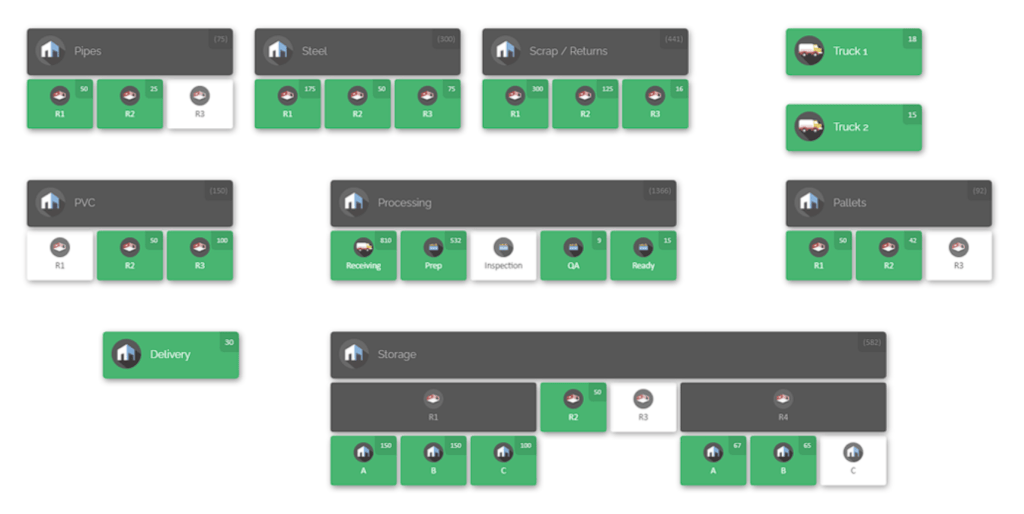
On a busy construction project, locations too should be mapped at an appropriate level of detail. The inventory map at the top of this article illustrates one approach: it breaks a facility into discrete zones (example: closets, shelves, bins, vehicles) and shows current stock counts. If locations are defined too broadly (e.g. “Site Warehouse” as one location), visibility still suffers. Conversely, over-detailed locations (every shelf as separate ID) can become hard to manage. The best systems allow hierarchies: for example, a warehouse building can contain rooms, which contain racks, which contain shelves, which contain bins. Teams can click or drill down to see the contents of any slot.
By visualizing the physical layout, an inventory map makes it obvious where each calibrated tool resides. Instead of logging into one software to see what’s in “Aisle 1” and calling a colleague for “Tool Cart 3,” maintenance staff would simply open the map, click on “Shed A”, and instantly see that two calibrated torque wrenches are in Bin 2. This unified map-and-list view bridges departmental gaps: everyone – whether they work in the office, the shop, or out on site – is looking at the same current inventory snapshot.
Best Practices for Calibration Inventory Management

Effective calibration inventory management depends on more than keeping a list of tools and their due dates. Industrial construction teams need a consistent system for identifying equipment, organizing storage locations, maintaining accurate records, and sharing reliable information across inventory, QA/QC, maintenance, and field operations. The following best practices help create that foundation, improving inventory visibility while reducing the risk of misplaced equipment, outdated records, and calibration-related disruptions.
1. Maintain a Centralized Inventory System: Ditch disparate spreadsheets and use a single, cloud-based inventory tool. When all teams update the same system, every movement or change to a tool is recorded once and instantly seen by everyone. For example, if QA sends a pressure gauge for calibration, they mark it as “out for calibration” in the system. No other team will try to use it until it’s marked back “in service.” A cloud platform ensures real-time syncing – if the warehouse adds a newly calibrated instrument back into stock, the operations manager sees it immediately. Without a central source of truth, one team’s “ground truth” can easily diverge from another’s.
2. Assign Unique Identifiers and Labels: Every tool or piece of equipment should have a unique ID barcode or RFID tag. This eliminates ambiguity. The ID should be affixed as a durable label on the tool or its case. Whenever the tool is received, issued, transferred between sites, or sent for calibration, staff should scan or enter that ID. Automated scanning is ideal: a simple barcode gun or mobile device camera can log transactions at the point of use. Even writing IDs in a notebook is prone to errors – human slip-ups when typing a serial number, for instance, can misplace data. Barcoding ensures that scanning a label updates the correct item’s record. Over time, the database builds an audit trail of each tool’s history.
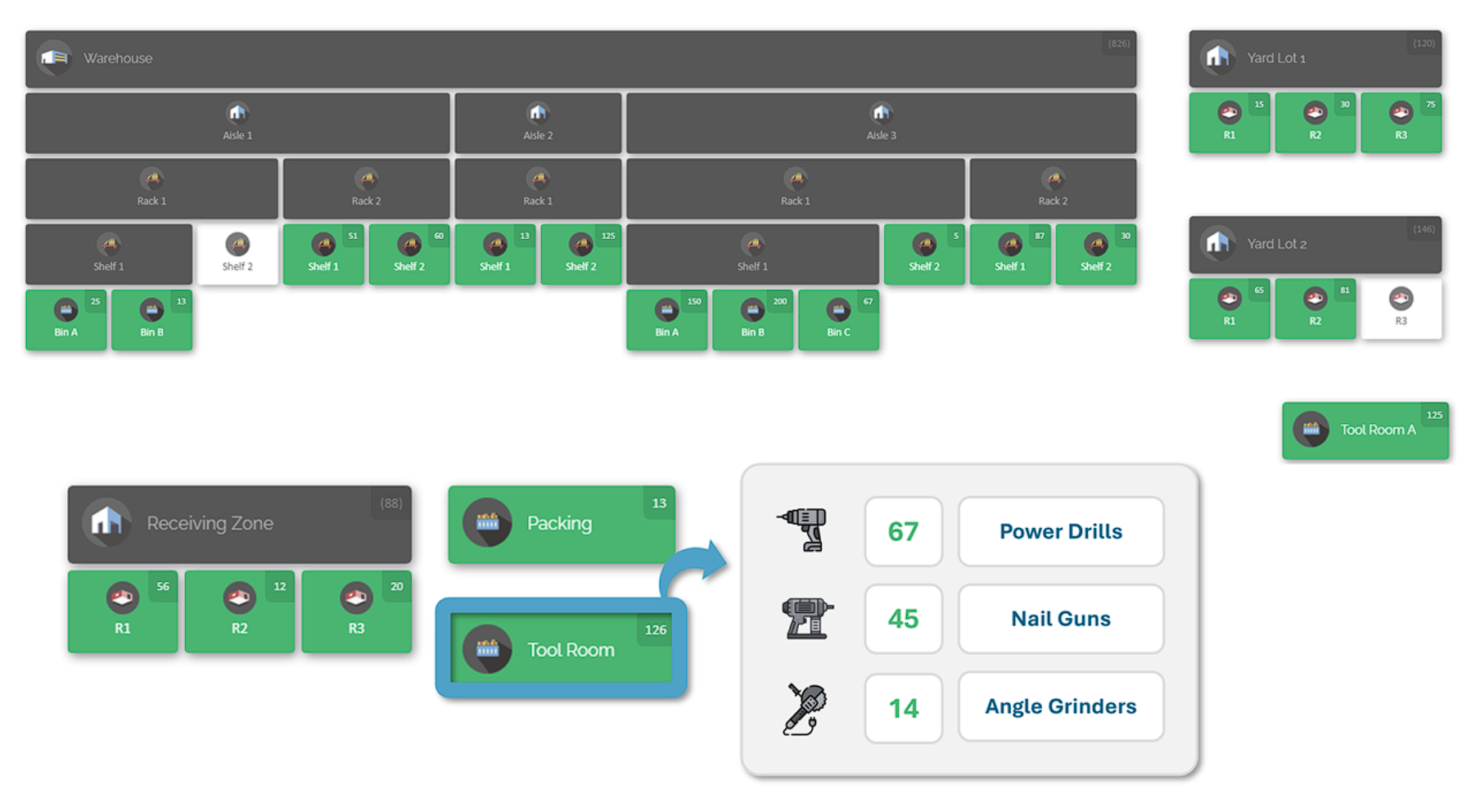
3. Organize and Label Physical Locations: Just as important as labeling tools is labeling their storage spots. Clearly mark each shelf, bin, rack, truck, or tool crib in your facility. On-site areas like laydown yards or maintenance trailers should have defined “zones.” The inventory map in this blog example shows named bins and shelves (“Shelf 1”, “Bin 2”, “Yellow Bin”) and even designated vehicles (“Red Truck”, “Jane’s Truck”). When staff move a tool, they not only scan the tool ID but also assign it to a destination location. Consistent slotting (keeping each tool in its fixed spot when not in use) avoids mix-ups. If an item must be stored temporarily elsewhere, staff update its location in the system. Over time, good physical organization means tools always end up exactly where the digital map expects them.
4. Capture Calibration Data as Part of the Record: In your inventory database, include fields for calibration information: last calibration date, next due date, who performed it, and any certification document. When a tool returns from calibration, the date should be updated immediately, and any certificate scanned or attached to its record. Some systems allow color-coding or status flags (e.g. green for “Calibrated – Good until [date]”, red for “Calibration Overdue”). By treating calibration status as a tracked attribute of each item, anyone viewing the inventory can answer “Is this tool valid?” in a click. Reports can also be generated on demand, for example listing all instruments due for calibration next week.
5. Conduct Regular Audits and Cycle Counts: Even the best systems require periodic verification. Schedule regular inventory counts to ensure the digital records match reality. In practice, instead of a single annual inventory, use ongoing cycle counts: count small subsets of tools every month or quarter. Focus first on high-value or high-use items (“A list” items) like core measurement tools, then less critical supplies. For example, if there are 50 torque wrenches on site, count 10 of them each month until all have been checked over a quarter. Use barcode scanners to speed the count: as each item is scanned, its presence and location are confirmed. Any discrepancies should be investigated immediately. Frequent counts catch errors early (a missing tool is found within weeks, not months), keeping the system accurate.
6. Standardize Check-In/Check-Out Processes: Calibrated tools often circulate between teams. Make it a routine that anyone who takes a tool out (for a job site or workshop task) officially checks it out in the system, and checks it back in when done. Some companies post a simple sign-out sheet or use a sign-out terminal, but better is a unified digital process. For example, when a technician removes a torque wrench from the shelf, they scan its ID in the system and select “Checked Out – Repair Dept”. Later, when returned, they scan again to mark it “In Stock”. This way, the history shows where the tool was, who used it last, and when it came back. With a paperless system, managers can run an “Items Checked Out” report to see what’s currently deployed and to whom. This discipline prevents “flight risks” of tools and ensures accountability.
7. Train and Align All Teams: The most advanced system fails if people don’t use it correctly. Provide training and written procedures so warehouse personnel, maintenance crews, QA inspectors and supervisors all understand their roles. For instance, QA staff should know to update the calibration status before releasing a tool; operations staff should report if they notice a tool missing or due; and procurement should update stock records when bringing new tools on site. Encourage a culture of shared responsibility: when everyone knows that using an outdated or uncalibrated tool can have serious consequences, they are more likely to follow protocol. Display simple dashboards or progress charts showing how on-time calibrations and inventory accuracy are trending – this can motivate teams to keep records clean.
By applying these practices, an industrial construction site can dramatically improve inventory visibility. Tools are no longer “invisible assets” but tracked items with clear status. As a result, teams spend less time hunting for equipment, ordering unnecessary spares, or scrambling for last-minute calibrations. Instead, they confidently pull up the inventory system and see: “Yes, calibrated Torque Wrench #12 is on Shelf A, and its next due date is in three months.”
Leveraging Technology for Visibility and Compliance

Beyond processes, technology plays a key role. The right software makes it far easier to implement the above practices. A modern inventory platform combines several functions: a centralized database, visual maps, barcode integration, and analytics. It ties together the pieces of the puzzle (location, status, history) for each part. Here are some capabilities to look for:
- Visual Inventory Maps: The most intuitive solutions offer a map or layout view of your facilities and storage areas. This is more than a picture; it’s interactive. By mapping your warehouse aisles, bins, rack levels, tool cribs, trailers or any on-site location, staff can quickly click or tap on an area to reveal what’s inside. This bird’s-eye view immediately tells you where every tool is and how many are at each spot. The map in the introduction is one example. With this “live blueprint,” you don’t need to run several reports or wander around physically – the software shows you the stock distribution at a glance.
- Cloud-Based Access: A cloud solution means everyone can see the same data from wherever they are. Managers in the office, technicians on site, or even remote stakeholders can log in (via PC browser or enterprise tablet) and get real-time updates. There’s no need to email spreadsheets back and forth or rely on once-a-day uploads. As soon as a tool is scanned into inventory, that information is available to all. This real-time synchronization is crucial during an active project: if a tool is checked out by one team, another team immediately sees it’s unavailable rather than wasting time hunting.
- Barcoding and Scanning: Effective systems support barcode scanning at every step. From receiving new tools to moving existing ones or marking calibration status, scanning reduces errors and speeds up operations. For example, when a batch of instruments arrives from the calibration lab, the technician can scan the barcodes to automatically update their status to “Calibrated – In Service”. Even rugged handheld scanners (or camera-equipped tablets) can integrate with the inventory software. This means zero manual re-typing – you scan once, and the system updates the correct item’s record. Automated capture through scanning turns a tedious administrative task into a quick, reliable action.
- Custom Fields and Data: Construction tools come with specific details – model numbers, calibration intervals, last calibration date, certificate numbers, etc. Good inventory software lets you customize item records to store all this. You might add fields for “Calibration Interval (days)”, “Last Calibrated On”, or “Usage Frequency”. Then you can sort or filter by these fields. For example, generate a list of all equipment due for calibration this month. Having this data directly in the inventory record means nothing slips through just because someone forgot to update a spreadsheet.
- Audit Trails and Accountability: Every action taken in the system can be logged. Who moved a tool, who updated its calibration date, when it was checked out or in – all these form a history. This audit trail is invaluable for both preventing losses and proving compliance. If an issue is discovered, you can trace back each tool’s journey and verify it was handled correctly. It also discourages negligence; people know that movements are tracked and discrepancies will be noticed. If something goes missing or a calibration is overdue, it will show up in the logs.
- Report and Alerts: Look for reporting features. The system should be able to flag low stock levels, show upcoming calibration deadlines, or even generate a summary of total inventory value. Some tools allow setting up alerts – for example, an automated notice when a critical tool’s calibration expires. These features turn raw data into actionable insights. Rather than manually crunching numbers, project teams can rely on the software to highlight issues before they become problems.
By leveraging these technologies, you transform inventory management from a back-office chore into a strategic asset. Rather than waiting until equipment fails or an audit uncovers a problem, you operate proactively. Maintenance schedules are met seamlessly, and departments can coordinate planning. When construction leaders commit to using the right tools (software and hardware) in their inventory processes, the entire project gains agility.
CyberStockroom: Unified Inventory Mapping and Calibration Visibility
While the above principles apply generally, it helps to see a concrete example of a system that has been designed for this challenge. CyberStockroom is one such inventory platform built around visual maps and multi-team visibility. Here’s how CyberStockroom’s features address the needs we discussed:
- Visual Maps of All Inventory Locations: CyberStockroom lets you create detailed, customizable maps of your entire inventory space. You can map a warehouse, instrument rooms, field laydown yards, equipment trailers, and more. Each container (closet, shelf, bin, pallet, rack) is represented on the map with its name. Stock counts appear right on each location icon. In practical terms, a QA manager could open the map and see that “Rack A – Shelf 2” has 5 calibrated gauges, while “Trunk B” has 2 spares. The map is interactive, so clicking on a location shows exactly which items are there by name and count. This bridges departmental gaps: no matter which part of the site people manage, they’re all looking at the same shared layout.

- Drag-and-Drop Transfers: Moving an item from one spot to another is as simple as clicking and dragging it on the map. Suppose you need to move a tool from the shop to a site trailer. In CyberStockroom, you would drag that tool’s icon from the “Shop Shelf” to the “Red Truck – Bin 1”. The inventory levels update immediately. This intuitive transfer means no more manual decrementing and incrementing of counts in two places. It also keeps an audit trail of each move.
- Centralized Data for All Teams: Because CyberStockroom is cloud-based, every department’s user interface is tied to the same data. When the maintenance team updates a calibration date, the warehouse team’s view is updated instantly. There are no offline copies floating around to get out of sync. If a tool’s calibration expires while it is checked out, the responsible manager sees it in the system and can flag it. Project planners seeing all inventory levels means they can forecast shortages before they happen. In short, CyberStockroom provides “one version of the truth” for the entire operation.
- Barcode Scanning and Check-In/Check-Out: CyberStockroom supports barcode scanning for rapid transactions. When an item arrives from calibration, a quick scan can mark it as returned in service. When crews borrow a tool, they can scan it to check it out and assign it to their job site location. Upon return, scanning again updates its whereabouts. This workflow ensures the digital record always matches reality. Importantly, CyberStockroom’s interface encourages immediate updates: if a scan is missed, the system will eventually prompt a location mismatch on the next audit.
- X-Ray Inventory Distribution: CyberStockroom offers a “X-ray vision” feature where you select a particular SKU or tool and instantly see every location it occupies. Imagine you label a specific torque wrench type as “Wrench Model X”. Clicking that item shows you it’s in three places (for example, 2 in Warehouse Shelf, 1 in Truck A, and 3 in Spare Parts). This visualization helps answer at once how widely that tool is distributed on site. It also helps locate backups if one unit is unavailable.
- Cycle Counts: Regular cycle counts help industrial construction teams maintain accurate inventory records without requiring a complete inventory shutdown. By counting selected tools, equipment, or storage locations on a recurring schedule, teams can compare what is physically present with what is recorded in CyberStockroom and identify discrepancies before they become larger inventory problems. This is particularly useful for calibrated tools that frequently move between warehouses, tool cribs, project areas, and other storage locations. Consistent cycle counting strengthens inventory accuracy, helps teams locate missing or misplaced equipment sooner, and keeps the visual inventory map aligned with actual stock on hand.
- Compliance and Audit Reporting: To meet quality and regulatory demands, CyberStockroom can generate reports on demand. Need a list of all instruments calibrated in the last year? Done. Need to verify that no tool was used past its calibration date during a critical phase? You have the audit trail. Because each action is timestamped, you can quickly demonstrate compliance in a project handover or an external audit. Instead of leafing through binders of certificates, everyone sees the status in the system. This saves countless hours and gives peace of mind that nothing was missed.

By incorporating CyberStockroom into your workflow, all the earlier best practices become easier to implement. The software’s map ensures everyone knows exactly where each tool is. Its data fields and alerts ensure calibration due dates are never forgotten. Its shared cloud database means one department’s update is another’s reality immediately. In essence, CyberStockroom operationalizes the concept of multi-department inventory visibility.
Implementation and Practical Tips
Adopting these strategies may seem like a big step, but it can be done in phases. Here are some tips for practical implementation:
- Start with a Baseline Inventory: Before going live, perform a one-time audit of all your calibration tools and equipment. Label each item with a unique tag, enter it into CyberStockroom (or your chosen system) with its initial data (current location, last calibration date, etc.). Also create the map of your sites: define each warehouse area, rack, truck, or yard zone. Initially, this takes effort, but it lays the foundation for all future tracking.
- Migrate Gradually: Once the initial data is in place, begin using the system for daily updates. For example, mandate that any time a tool leaves or returns from calibration, it is logged in CyberStockroom first. Let teams become comfortable using the app (or scanning device) for check-outs and returns. It may help to run the new system in parallel with old processes for a short period until everyone trusts the new workflow.
- Define Roles and Permissions: In the software, set up user accounts by role. Give the warehouse manager rights to add locations and receive inventory. Give QA staff permission to edit calibration fields. Create a user group for the project team to run reports. By tailoring access, you prevent accidental edits. For instance, only certain people should mark a tool as “retired” or “discarded”.
- Use Alerts and Notifications: Configure alerts for critical events. For example, have the system email the quality manager when a high-value instrument is two weeks from calibration expiry, or notify the warehouse supervisor when stock of a consumable (like sensor mounting parts) falls below threshold. These automatic nudges keep everyone proactive.
- Integrate into Daily Routines: Make checking the inventory system part of daily briefings. At toolbox talks or shift handovers, a quick glance at the dashboard can confirm that all critical tools are in good standing. If a planned job requires a special calibrated instrument, teams can pull it off the map ahead of time. The more the tool becomes a go-to reference, the more it will be relied upon.
- Review and Improve: Periodically review the system’s data. Are inventory counts matching reality? Are there recurring discrepancies in a certain area? Use the software’s analytics to identify pain points (for example, if one location often shows shortages, it might need better organization). Update processes as needed, such as retraining a team member who repeatedly misses scanning items. Continuous improvement will steadily raise inventory accuracy and compliance rates.
Benefits: Efficiency, Accuracy and Compliance

Investing time in better inventory tracking pays off across the board. Construction sites that implement these practices often see:
- Faster Retrieval and Tool Tracking: When a tool is needed, crews spend minutes (not hours) locating it. Reduced downtime means projects stay on schedule. Teams can also handle unexpected situations better: if a field instrument fails, the backup’s location is known instantly.
- Reduced Procurement Costs: With clear visibility, teams avoid ordering new tools they already have. The procurement department saves budget and storage space. Sometimes simply relocating existing stock between departments eliminates a shortage. Inventory rebalancing becomes routine instead of chaotic.
- Lower Risk of Non-Compliance: Accurate calibration records mean audits and inspections become straightforward. There is little risk of failing a regulatory check due to a missing certificate. If any issue arises, digital reports and attachments provide immediate evidence of compliance.
- Improved Safety and Quality: Using properly calibrated tools leads to more reliable construction outcomes (e.g. bolts tightened correctly, instrumentation readings trusted). This reduces rework and safety hazards. Quality departments can sign off on completed work more confidently, knowing that calibrations were never overlooked.
- Cross-Team Alignment: Perhaps most importantly, all departments are on the same page. The warehouse knows what the field needs; the project planner knows what inventory exists; the QA manager sees when tools are due for service. This collaboration reduces finger-pointing and guesswork. Everyone moves toward common goals rather than working at cross purposes.
Collectively, these gains strengthen the bottom line. Inventory carrying costs drop, operational efficiency rises, and the company’s reputation benefits from consistent quality.
Conclusion
Managing tools and equipment calibration for multi-department construction teams is a complex task, but it becomes manageable with the right practices and tools. Centralize your data, label assets and locations clearly, and use technology to automate updates. Conduct regular audits and keep everyone trained on the system. By doing so, you create a system where any team member can answer questions like “Where is that torque wrench?” or “Is this sensor still in calibration?” in seconds instead of hours.
A solution like CyberStockroom can make this process intuitive and visual. With its map-based inventory system, barcode support, and real-time updates, it puts powerful tracking in the hands of field and office staff alike. As a result, your construction teams gain the operational efficiency and inventory accuracy they need. With inventory visibility across departments, you reduce waste, avoid delays, and ensure safety and compliance on every job.
Effective calibration tracking ultimately means trust: trust that every instrument used is valid, and every decision is based on current data. By uniting your departments under a single inventory platform and following these best practices, you’ll transform calibration management from a headache into a competitive advantage.









Leave a Reply