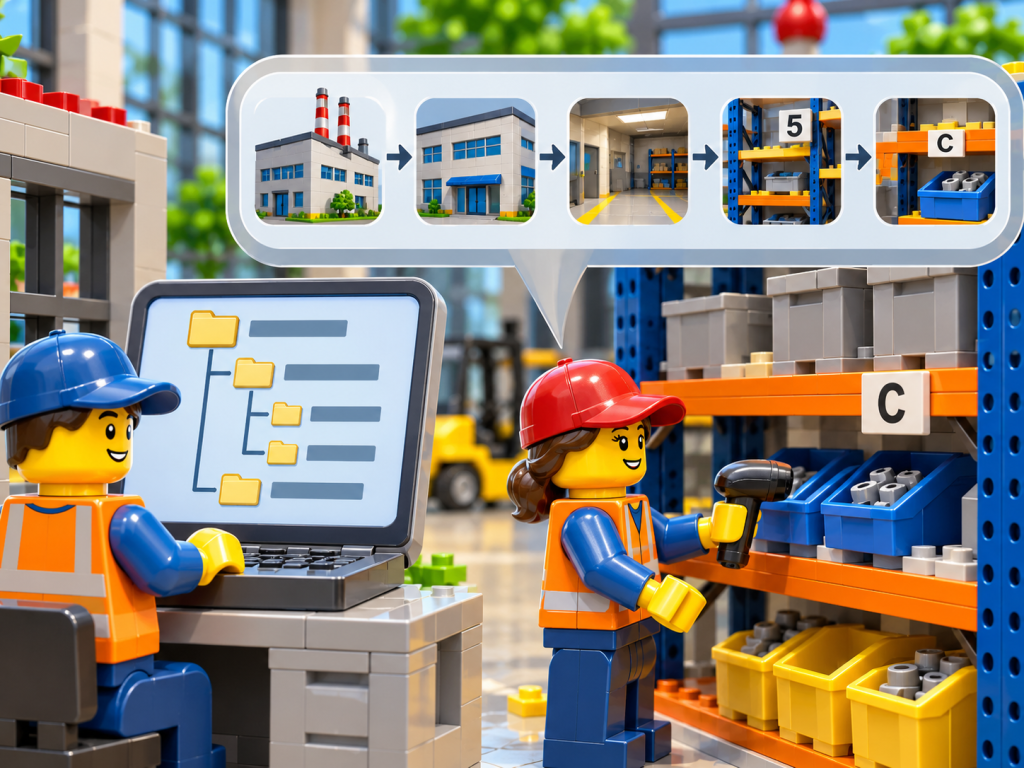
Choosing between CyberStockroom vs. Sortly is rarely a question about which product is better in the abstract. It is a question about how your team actually finds, moves, and counts parts, and about who needs to see that information when something goes wrong. In industrial construction, manufacturing, and maintenance environments, a part that cannot be located is functionally the same as a part that does not exist, and the cost shows up as idle crews, expedited freight, and duplicate purchases. This comparison walks through both platforms from the standpoint of inventory visibility across departments, because that is where most inventory management software decisions succeed or fail. As you read, keep your own storage areas, handoffs, and reporting habits in mind so that each difference translates into operational terms.
Sortly has earned a strong reputation as an approachable inventory management tool, particularly for small and midsize teams that want to organize items into folders, attach photos, and track quantities without a long setup process. CyberStockroom takes a different approach by centering the experience on a visual map of where stock physically sits, which changes how maintenance, procurement, warehouse, and project teams interact with the same records. Neither philosophy is wrong, but each rewards a different kind of operation. In the sections that follow, we first cover the best practices that make multi-department visibility possible, and then we evaluate how each platform supports them. By the end, you should be able to decide which tool fits your workflow, your physical layout, and your team’s habits.
See the CyberStockroom Inventory Map in Action
Before getting into the details of the comparison, it helps to see what a map-centered inventory looks like in practice. The demo map above shows how stock can be organized around physical locations, so a user can see not only that a part exists but exactly where it sits. This is a meaningful distinction, because most inventory frustration does not come from missing records; it comes from records that describe quantities without describing places. As you explore the map, notice how quickly a question such as “where are the spare flange gaskets?” turns from a conversation into a click.
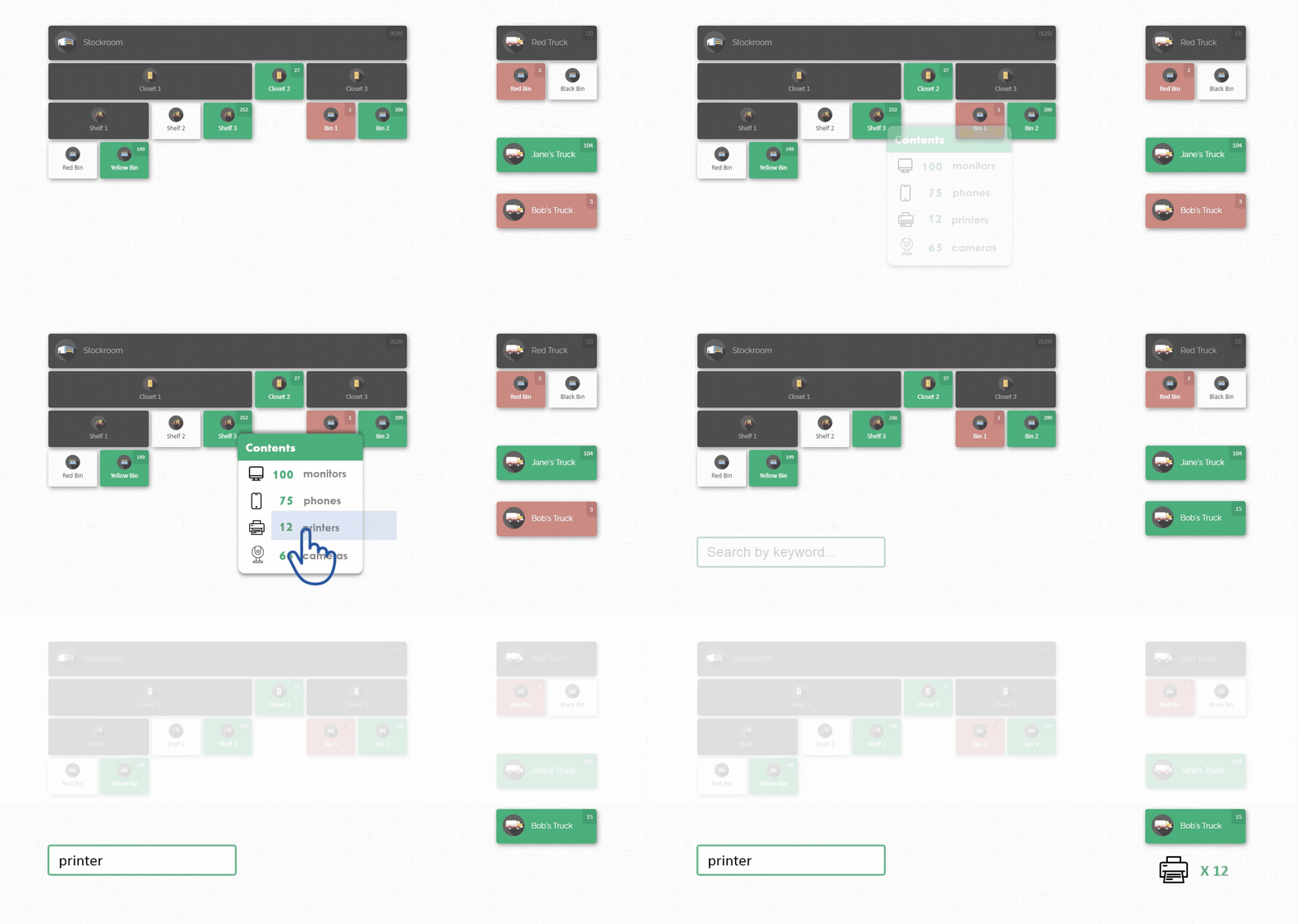
Keeping that visual model in mind will make the rest of this article easier to follow. Throughout the comparison, we will return to the same practical question: when a planner, a technician, a buyer, and a supervisor all need to know about the same part, how quickly and how consistently can each of them get the answer? Tools differ most in the moments when several departments depend on one piece of information at the same time. With that framing in place, we can move into why cross-department visibility deserves so much attention in the first place.
Why Inventory Visibility Across Departments Matters
Inventory visibility is the ability of everyone who touches a part to know what is on hand, where it is stored, and what condition it is in, without having to ask another person. In many industrial operations, that visibility is fragmented, because each department keeps its own version of the truth. Maintenance may track critical spares in a notebook, procurement may rely on purchase history, and the warehouse may trust whatever it counted last quarter. As a result, the same part can appear to exist in three places or in none, depending on whom you ask.
The financial consequences of fragmented visibility are easy to underestimate because they are spread across many small failures. A technician who cannot find a bearing orders another one, a project manager pays rush shipping on a part that was sitting in a different building, and an auditor discovers that carrying costs have quietly inflated. Each event feels like an isolated mistake, yet together they represent a systematic loss that grows with every additional department and storage area. In practice, the larger the operation, the more expensive it becomes to rely on memory and informal communication. This is especially important when schedules are tight and downtime is measured in thousands of dollars per hour.
Visibility also affects trust, which is harder to measure but just as valuable. When people believe the inventory system is wrong, they build side systems, hoard parts, and stop updating records, which makes the system even less accurate. Breaking that cycle requires a tool and a process that make the correct answer easy to find and easy to maintain. Building on this idea, the next section outlines the best practices that consistently produce reliable, shared visibility.
Finally, cross-department visibility is not only a technology problem; it is an alignment problem. Departments have different vocabularies, different urgency levels, and different definitions of what counts as available stock. A planner may consider a part available the moment it is received, while a technician considers it available only after it is staged near the work area. Unless those definitions are reconciled, even the best software will display numbers that people interpret differently, which is why the practices below matter as much as the platform you choose.
Best Practices for Improving Inventory Visibility Across Departments

The first best practice is to establish a single source of truth for every part, which means one record, one location, and one owner. When two teams maintain separate lists for the same item, discrepancies are inevitable, and resolving them consumes time that should go toward production or maintenance. A practical way to begin is to choose the system that will hold the authoritative record and then retire every parallel spreadsheet on a scheduled date. In practice, this step feels uncomfortable for a week and then saves hours every month. Once teams trust the shared record, they naturally stop keeping private copies.
The second best practice is to define a consistent location structure that reflects how the physical space is actually laid out. Whether you store parts in a tool crib, a mezzanine, a yard, or a set of bays and racks, every storage point should have a clear, unique name that every department understands. For example, a naming pattern that moves from site to building to area to shelf lets a new hire find a part without asking for directions. Inconsistent names such as “back room,” “old cage,” and “storage B” are the enemy of accuracy because they mean different things to different people. A disciplined structure turns location tracking from an art into a routine.
The third best practice is to standardize how parts are described. Part names, categories, units of measure, and key attributes should follow rules that are written down and enforced, so that “1/2 inch ball valve,” “valve, ball, 0.5 in,” and “BV-12” do not become three separate records. Consistent descriptions make search reliable, reduce duplicate purchasing, and allow different departments to find the same item using the words they naturally use. It also helps to include a short list of attributes that matter in your industry, such as size, material, rating, or manufacturer. When descriptions are consistent, the value of every other feature in the system increases.
To make these practices concrete, consider the following short checklist that teams can use when preparing for a rollout or an audit:
- Assign a single owner to each storage area and each part category.
- Name every location using one agreed pattern, from site down to shelf or bin.
- Write down the rules for part names, categories, and units of measure.
- Set a recurring cycle count schedule that prioritizes critical and fast-moving items.
- Define who is allowed to add, move, and adjust records, and who can only view them.
A checklist like this is useful only if it is treated as a living standard rather than a one-time exercise. Each item reinforces the others, because clear ownership supports consistent naming, and consistent naming supports reliable counts. Teams that review the list quarterly tend to catch drift early, before it grows into a major accuracy problem. With these fundamentals defined, we can turn to the criteria that should guide any comparison of inventory tools.
What to Look for When Comparing Inventory Management Software

A fair comparison begins with the problem you are trying to solve, not with a feature list. If your biggest pain is that people cannot physically find parts, then location clarity should outweigh nearly everything else. If your biggest pain is tracking consumables and reorder points across a small team, then simplicity and speed of data entry may matter more. Writing down your top three problems before you open any product demo prevents you from being dazzled by capabilities that you will never use. In practice, teams that do this exercise make faster and more confident decisions.
Next, evaluate how each tool represents the physical world. Some platforms model storage as a tree of folders and subfolders, while others model it as a spatial layout that mirrors the site. The difference affects how new users learn the system, how quickly a part can be found, and how easily the structure can be changed when operations evolve. It is worth asking how the tool handles the awkward cases, such as parts stored in more than one place, items staged temporarily near a job, or areas that are reorganized mid-year. These edge cases reveal more about a platform than its marketing page ever will.
Then consider who will use the tool and how often. A platform that only inventory specialists can navigate will not deliver cross-department visibility, no matter how powerful it is. Look for a tool that a maintenance planner, a buyer, and a project superintendent can all understand after a short introduction. This is especially important in industrial construction and manufacturing, where turnover on crews and contractors can be high and training time is limited.
Finally, weigh the total cost of adoption, which includes subscription cost, setup effort, data cleanup, and training. A lower sticker price can be offset by weeks of manual configuration, while a slightly higher price can be justified by faster time to value. Ask each vendor how long a typical team takes to go from first login to a usable, trusted inventory. With those criteria in mind, we can examine Sortly more closely.
Sortly at a Glance: Strengths and Typical Use Cases
Sortly is widely known as a straightforward inventory management tool built around a folder-style hierarchy. Users create folders for locations or categories, add items inside them, and record quantities, photos, notes, and custom details for each item. The experience is intentionally simple, which is why many small businesses, field-service teams, and property or equipment managers adopt it quickly. Because the learning curve is gentle, a team can often begin entering inventory on the same day it signs up.
The strengths of this model are speed and familiarity. Most people already understand folders from everyday computer use, so organizing stock into nested groups feels natural. Sortly also emphasizes visual identification through item photos, and it supports labeling and scanning workflows that help teams move quickly through counts. For a business with a modest number of items and one or two storage areas, this combination can be more than enough. As a result, Sortly is often a sensible first step for teams that are leaving spreadsheets behind.
The model begins to show strain as operations grow in complexity. A folder tree describes how items are grouped, but it does not necessarily show where those groups sit relative to one another in a real facility. When an operation spans several buildings, outdoor areas, and departments with different needs, the folder structure can become deep, and finding a part may depend on remembering which branch someone chose when they set it up. In practice, the quality of the experience depends heavily on the discipline of whoever designed the hierarchy.
It is also worth noting that Sortly’s design reflects its target audience, which is generally teams that value ease of use over heavy customization of physical space. That is a legitimate and valuable positioning, and many users are well served by it. The question for industrial teams is whether a hierarchy of folders captures the way their storage actually works. To answer that, we need to look at the alternative approach taken by CyberStockroom.
CyberStockroom at a Glance: A Map-Centered Approach
CyberStockroom is built on the idea that inventory is a physical thing and should be organized the way it exists in space. Rather than asking users to imagine where a folder lives, it lets teams represent their storage areas visually and place stock on that representation. This makes location tracking a first-class part of the experience instead of an attribute buried in a record. For industrial construction, manufacturing, and maintenance operations, where “where is it?” is often the most urgent question, this is a natural fit.
In practice, a map-centered approach reduces the translation step that slows people down. A technician looking for a spare does not need to know the name of a category tree; they can look at the layout and see where the part is stored. A buyer checking whether a purchase is necessary can confirm on-hand stock in the same view the warehouse uses. Because everyone is looking at the same picture, conversations between departments shift from “which list are you looking at?” to “let’s go get it.”
CyberStockroom is also focused rather than sprawling. Its strength lies in inventory mapping, visibility, location tracking, and stock organization, and it concentrates on making those capabilities clear and dependable. That focus is an advantage for teams whose main challenge is knowing what they have and where it is. Instead of learning a large suite of unrelated modules, users work with a tool that is designed around the problem they actually have.
With both platforms introduced, the more interesting question is how their underlying organizing models differ in daily use. That difference is the core of the CyberStockroom vs. Sortly decision, so it deserves a careful look in the next section.
Folder Hierarchies vs. Location-Based Organization
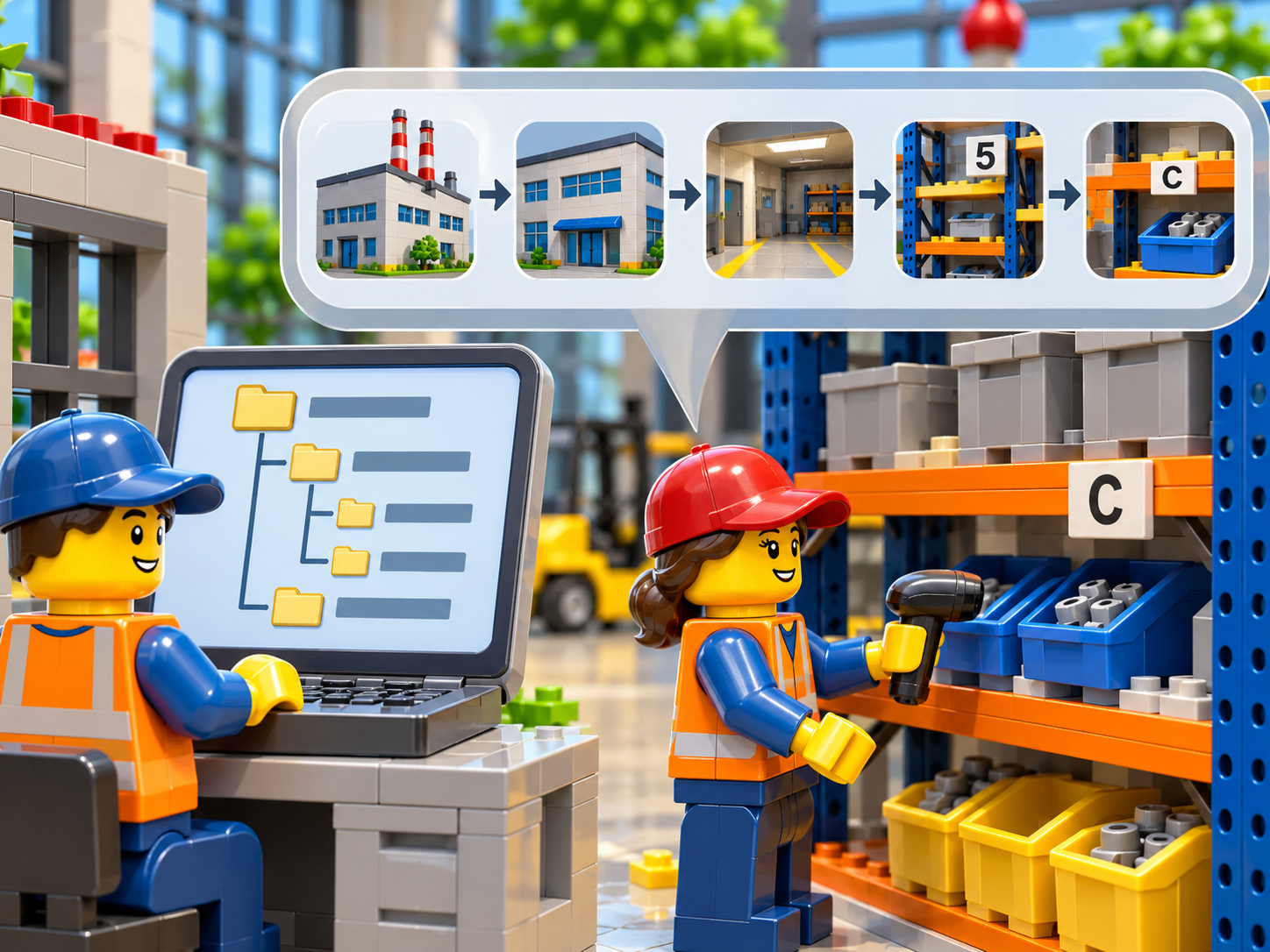
A folder hierarchy organizes inventory by grouping. You might create a top-level folder for each site, a second level for each building or department, and a third level for shelves or categories. This approach is flexible and easy to learn, and it works well when the grouping logic is obvious and stable. The challenge is that grouping is an abstraction, and abstractions require people to agree on the rules and follow them every time.
Location-based organization, by contrast, ties each item to a place that can be seen. Instead of asking whether a part belongs under “Electrical” or “Spares,” the question becomes where the part physically sits. This is a more objective basis for organization, because the answer does not depend on interpretation. In practice, it reduces the number of judgment calls that individual users must make, which in turn reduces inconsistency across departments.
Consider a plant with a maintenance cage, a main warehouse, and an outdoor storage area. In a folder model, a pump seal might be filed under maintenance, even though a copy is also stored in the warehouse and a third is staged near a repair job. A planner searching under the wrong folder may miss two of the three, and the purchase order that follows is unnecessary. In a location-based model, the same seal is visible wherever it sits, so the planner can see all three at once and decide accordingly.
Neither model is universally superior, and some teams will find that a hierarchy is perfectly adequate. The advantage of the location-based approach grows with the number of departments, the number of storage points, and the cost of a missed part. For operations where those factors are high, the visual model tends to produce faster searches and fewer duplicates. This sets the stage for a closer look at how CyberStockroom supports multi-department visibility specifically.
How CyberStockroom Supports Multi-Department Parts Visibility
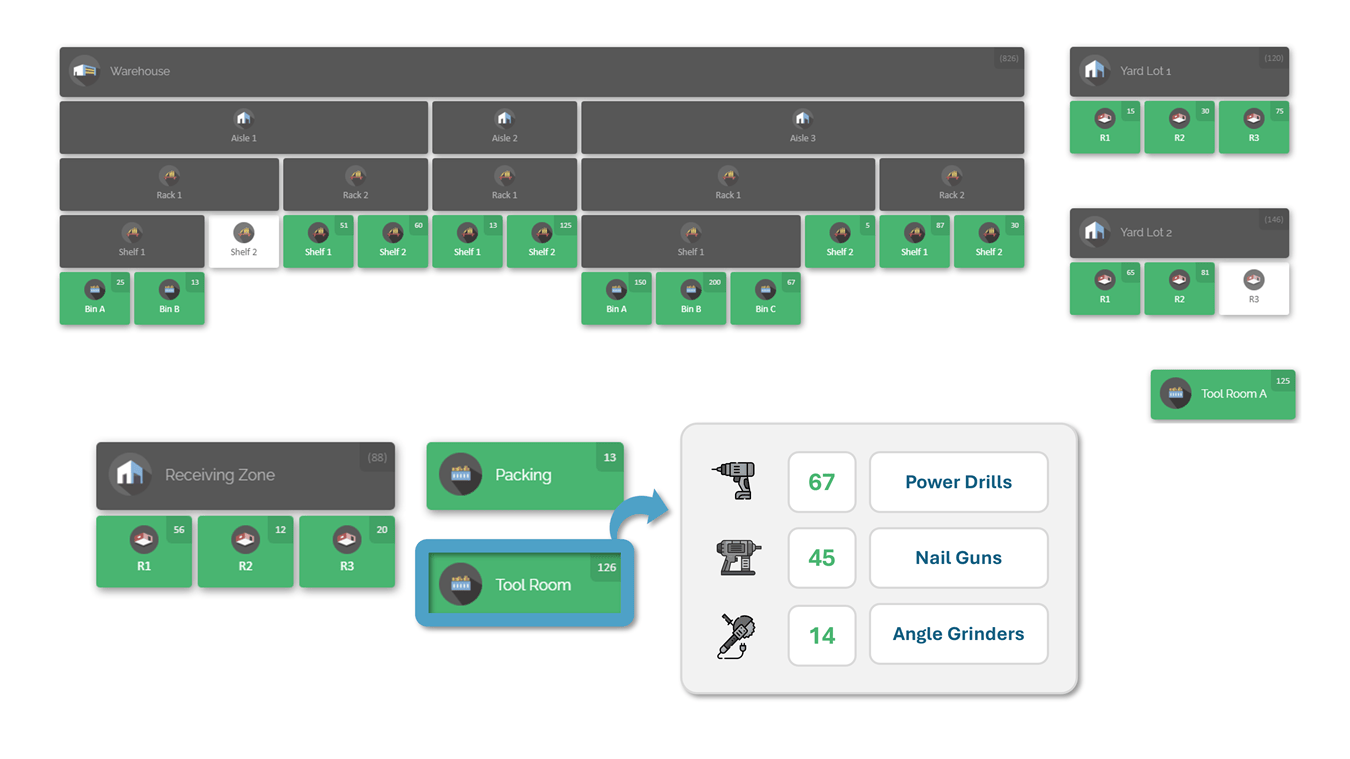
CyberStockroom enables teams to place their stock on a visual map of their real storage areas, so every department sees parts in the context of where they actually live. Instead of reconciling separate lists, maintenance, procurement, warehouse, and project staff work from one shared picture of the inventory. This directly addresses the single-source-of-truth best practice discussed earlier, because there is one place to look and one record to trust. As a result, the arguments about whose spreadsheet is right tend to disappear. The shared view becomes the starting point for every conversation about parts.
With CyberStockroom, you can organize locations in a way that mirrors your site, which supports the consistent location structure that accurate inventory depends on. Storage areas can be laid out and labeled so that a new team member immediately understands where things are, even without a tour. This is especially valuable when contractors, temporary crews, or newly transferred staff need to find parts quickly. Because the structure is visible, it is also easier to spot gaps, overcrowded areas, and locations that have no clear owner. In effect, the map doubles as a tool for improving the organization itself.
Search and location tracking work together in CyberStockroom to shorten the path from question to answer. A user can look for a part and see where it is stored, which removes the back-and-forth that usually happens between departments. For example, a procurement specialist who is about to place an order can confirm whether the part already exists on site and exactly where, before spending money. Likewise, a technician preparing for a shutdown can verify that critical spares are in their expected places and flag any that are missing. These small checks prevent the duplicate purchases and last-minute scrambles that erode efficiency.
CyberStockroom also supports stock organization in a way that respects the different needs of each department without splitting the data. A warehouse team can think in terms of racks and bays, while a maintenance team thinks in terms of equipment areas, and both are looking at the same underlying records. Because the information is shared rather than copied, updates made by one team are immediately reflected for the others. This is what cross-team alignment looks like in practice: different perspectives, one consistent set of facts.
Taken together, these capabilities map closely onto the best practices outlined earlier. A single shared record supports accuracy, a visible location structure supports consistency, and an intuitive layout supports adoption across departments with different levels of technical comfort. CyberStockroom does not try to be everything to everyone; it concentrates on making inventory visible, locatable, and well organized. For teams whose primary challenge is parts visibility, that clarity is the point. The next section tests both platforms against realistic scenarios to show where those differences matter most.
Head-to-Head Scenarios: Finding and Verifying a Part
The most revealing way to compare two inventory tools is to run them through the situations your teams face every week. The first scenario is the urgent search, in which a technician needs a replacement part during a breakdown and every minute of downtime is costly. In a folder-based tool, the technician must recall or guess which folder holds the part, and success depends on whether the person who built the structure shared that logic. In CyberStockroom, the technician can search for the part and see its position on the map, which shortens the path from need to retrieval. In practice, the difference may be only a few minutes, but multiplied across dozens of events a year, those minutes become a meaningful operating advantage.
The second scenario is the purchasing check, where a buyer must decide whether to order a part or use stock already on site. Buyers rarely walk the storage areas, so they depend entirely on what the system tells them. If the tool shows a quantity but not a clear location, the buyer may hesitate to trust it and order anyway, just to be safe. When the tool shows where each unit is stored, the buyer can ask a specific person to verify a specific shelf, which makes confirmation fast and credible. This is especially important when lead times are long and a duplicate order ties up working capital for months.
The third scenario involves planning for a shutdown, turnaround, or major construction phase. Planners need to confirm that every required component is on site, correctly stored, and accessible before the work window opens. A hierarchy of folders can provide the totals, but it may not make it obvious that half of a required quantity sits in a separate building. A visual layout makes that dispersion apparent at a glance, which allows the planner to consolidate parts or arrange transfers well before the deadline. As a result, surprises during the event itself become much less common.
The fourth scenario is onboarding, which is often overlooked in software comparisons. A new storekeeper or contractor must become productive quickly, and the speed of that ramp-up depends on how intuitive the system is. Sortly’s simplicity is a real asset here, particularly for small teams with a limited number of items. CyberStockroom’s map offers a different kind of intuitiveness, because anyone who has walked the site can recognize the layout and navigate it without memorizing a category scheme. Which advantage matters more depends on whether your storage is simple and compact or spread across several areas and departments.
Inventory Accuracy: Counts, Corrections, and Confidence
Inventory accuracy is not a feature that a tool can switch on; it is the result of habits supported by a tool. The best platforms make the right behavior the easy behavior, so that people update records at the moment they move a part rather than days later. In both Sortly and CyberStockroom, accuracy begins with clear organization, because it is hard to count what you cannot find. When every item has a defined home, counting becomes a matter of visiting known places instead of hunting for stray stock. This is why location clarity and accuracy are so closely linked in industrial operations.
A practical accuracy program relies on cycle counting rather than annual wall-to-wall counts. Cycle counting means checking a defined portion of the inventory on a regular schedule, with higher frequency for critical and fast-moving items. In a map-centered tool, a counter can move through the layout area by area, which gives the process a natural route and makes it easy to see which zones have not been checked recently. In a folder-based tool, the same program is possible, but the counter must work through the hierarchy, which may not match the physical walking path. Over time, a count route that follows the space tends to be faster and less error-prone.
Correcting discrepancies is the other half of accuracy, and it is where cross-department visibility pays off. When a count reveals that a part is missing, the next step is to determine whether it was moved, consumed, or misfiled. If maintenance, the warehouse, and project teams all work from the same shared records, the trail of changes is easier to follow, and the answer is usually found quickly. If each department has its own copy, the investigation turns into a negotiation. In practice, one shared source of truth shortens every reconciliation.
Confidence is the final outcome that accuracy is meant to produce. Teams that trust the numbers stop padding orders, stop hoarding spares, and stop maintaining parallel lists, all of which reduce cost and effort. Building that confidence requires visible, consistent, and easily verified information, which is exactly what a well-organized location structure provides. Whichever platform you select, measure success by how often people say “the system is right” rather than by how many items it holds. That perspective leads naturally to the question of how well each approach aligns different departments.
Cross-Team Alignment: Getting Maintenance, Procurement, Warehouse, and Projects on the Same Page

Alignment starts with a shared language, and a shared language starts with a shared picture. Departments often disagree not because they hold different facts but because they describe the same facts in different terms. When a part is shown on a visual layout, the vocabulary problem shrinks, since a location is a location regardless of the department that is looking at it. This is one of the quieter benefits of a map-centered approach like CyberStockroom’s. People can point to the same place on the same screen and understand each other immediately.
Alignment also depends on clear ownership and predictable handoffs. Every storage area should have a responsible person, and every movement of stock between areas should be recorded by the person who moves it. For instance, when materials are transferred from a central warehouse to a project area, the record should change at the moment of transfer, not at the end of the week. Tools that make location updates quick and visible encourage this discipline, while tools that make updates tedious invite shortcuts. Over time, the habit of recording moves in real time becomes part of the culture.
Sharing information across departments also requires thoughtful permission and access practices. Not everyone needs the ability to edit every record, but everyone who depends on parts needs the ability to see them. A common and effective pattern is to give broad viewing access to planners, buyers, and supervisors while limiting editing to those responsible for physical handling. This keeps the data clean without hiding it from the people who need it to do their jobs. In practice, openness to view and discipline to edit is the combination that sustains long-term accuracy.
Finally, alignment is reinforced by routine communication that uses the inventory as its reference point. Weekly planning meetings, pre-shutdown reviews, and purchasing approvals all become more efficient when participants can open the same inventory view and discuss real stock. Instead of debating whose numbers are correct, the group can spend its time deciding what to do about the numbers. Teams that adopt this habit often find that meetings shorten and follow-up tasks become clearer. With alignment addressed, it is fair to consider where each platform is the stronger choice.
Where Sortly Is the Stronger Fit
Sortly is a strong choice for teams that prioritize simplicity, speed, and a low barrier to entry. If your inventory consists of a manageable number of items in one or two locations, a folder-based structure with photos and quantities can serve you very well. Small contractors, specialty trades, and service companies that carry tools and supplies in vehicles or a single shop often fit this profile. For them, the ability to start quickly and keep things light is more valuable than a detailed representation of physical space. In those cases, recommending anything more elaborate would be overkill.
Sortly is also appealing when the primary need is tracking items for individuals or small crews rather than coordinating a large, multi-department operation. Because its model is familiar and its interface is approachable, it tends to be adopted by users who have little time for training. Teams that already think in terms of categories, such as tools, consumables, and equipment, will find the folder metaphor natural. If your organization values mobile-friendly workflows and quick item entry in the field, Sortly’s design philosophy aligns with those priorities. These are legitimate strengths, and a candid comparison should acknowledge them.
The key is to be honest about the size and complexity of the operation you are managing. A tool that is perfect for a five-person crew can become cumbersome when it must support a planner, a buyer, a warehouse lead, and several project supervisors across multiple storage areas. That does not mean the tool has failed; it means the needs have outgrown the model. Reviewing your requirements annually helps you notice when that shift is happening. When it does, a location-centered platform deserves serious consideration.
Where CyberStockroom Is the Stronger Fit
CyberStockroom is the stronger fit when the central question in your operation is “where is it?” and when several departments need the same answer. Industrial construction firms, manufacturers, and maintenance organizations with multiple storage areas, equipment zones, and teams frequently face exactly this situation. In those environments, the cost of a missed part is high, and the value of seeing stock in its physical context is correspondingly large. A map-centered view turns scattered records into a coherent picture that different roles can read the same way. This is where CyberStockroom’s design delivers the most benefit.
It is also a strong fit for organizations that are struggling with inconsistent organization. If your teams use different names for the same areas, keep private lists, or rely on a few experienced people who remember where everything is, a visual structure can bring order without a heavy training burden. Because the layout reflects the real space, new users learn it by looking rather than by reading documentation. This reduces dependence on tribal knowledge, which is a significant risk when experienced staff retire or move on. In practice, capturing that knowledge in a shared map is a form of operational insurance.
CyberStockroom’s focus is another reason it suits certain teams well. Because it concentrates on inventory mapping, visibility, location tracking, and stock organization, it avoids the clutter that comes with trying to do everything. Teams that want a clear, purposeful tool for knowing what they have and where it is will appreciate that clarity. If your goal is to improve visibility across departments rather than to build a sprawling software environment, that focus is an asset. The practical result is a tool that people actually use, which is the true test of any inventory system.
A Practical Evaluation Checklist for Your Team
Before committing to either platform, it is wise to run a structured evaluation using your own data and your own people. A demo with sample items can look impressive, but it will not reveal how the tool handles your naming conventions, your storage quirks, or your handoffs. The best approach is to load a representative portion of your inventory, invite a few users from different departments, and observe how they perform real tasks. This short pilot will surface strengths and frustrations that no feature comparison can predict. In practice, two weeks of realistic use is usually enough to see a clear pattern.
The following questions can guide that pilot and help you compare the platforms consistently:
- How long does it take a first-time user to find a specific part and identify exactly where it is stored?
- Can a buyer confirm on-hand stock and location without asking another department?
- How easily can the location structure be changed when an area is reorganized?
- Does the tool make it simple to record a move at the moment it happens?
- Can new team members become productive after a short introduction?
Each of these questions connects to a best practice discussed earlier, which means the answers reveal how well a tool will support your goals over time. Record the results in a simple scorecard so that the decision rests on observations rather than impressions. It is also helpful to ask pilot users what they would miss if the tool were taken away, because that response reflects real value. Teams that follow this process tend to choose with greater confidence and to adopt more smoothly.
Rolling Out Improved Inventory Visibility: A Step-by-Step Approach
Whichever tool you select, the rollout determines whether visibility actually improves. A thoughtful sequence begins with defining the physical structure, continues with cleaning and loading data, and ends with building habits. The steps below outline a practical order that works well in industrial settings:
- Walk the site with representatives from each department and agree on location names and boundaries.
- Clean the existing parts list by removing duplicates, standardizing descriptions, and confirming units of measure.
- Build the location structure in the tool so that it mirrors the real layout.
- Load a first group of critical and high-value items, and verify their locations on the floor.
- Train users in short sessions focused on the tasks they perform most often.
- Establish a cycle count schedule and review results at a regular meeting.
This order matters because each step builds on the one before it. Agreeing on names before loading data prevents rework, and verifying locations on the floor ensures that the first records are trustworthy. Starting with critical items delivers visible wins quickly, which builds momentum and encourages broader participation. Resist the temptation to load everything at once, since a smaller, accurate inventory is far more useful than a large, doubtful one.
After the initial rollout, sustain the gains with a few simple routines. Review a short list of metrics, such as count accuracy, time to locate a part, and the number of duplicate purchases avoided, so that improvement is visible to leadership and staff. Hold a brief monthly review to resolve naming drift, reassign orphaned areas, and retire obsolete items. When a department struggles, treat it as a design problem rather than a discipline problem, and adjust the process to make the right behavior easier. Over several months, these routines convert a new tool into a durable operating practice.
Common Mistakes to Avoid When Switching Inventory Systems

One of the most common mistakes is migrating messy data into a clean new tool without first cleaning it. Duplicate records, inconsistent descriptions, and outdated quantities do not improve simply because they have been moved, and they quickly undermine trust in the new system. A short cleanup effort before the migration pays for itself many times over. In practice, teams that skip this step often find themselves rebuilding the inventory a few months later. Taking the time up front is almost always faster in the long run.
Another mistake is designing the location structure from a desk rather than from the floor. Structures created in a conference room tend to reflect how people think the space works, not how it truly works, and they miss the odd corners where parts accumulate. Walking the site with the people who handle the parts every day reveals those corners and produces a structure that people recognize. This step also builds buy-in, because the users see their own knowledge reflected in the result. As a result, adoption is smoother and records are more accurate from the start.
A third mistake is failing to define ownership and update rules. When no one is responsible for an area, its records drift, and drifting records erode confidence in the entire system. Assign a clear owner to each storage area, specify who may edit records, and make recording moves a standard part of the handling process. Pair these rules with brief reminders and periodic audits so that good habits persist beyond the initial enthusiasm. With these precautions, even a simple tool can deliver outstanding results, and a purpose-built one can deliver even more.
Final Verdict: CyberStockroom vs. Sortly
The comparison of CyberStockroom vs. Sortly ultimately comes down to the shape of your operation and the nature of your biggest inventory problem. Sortly offers a simple, approachable, folder-based experience that works well for small teams and straightforward inventories. CyberStockroom offers a map-centered approach that makes physical location visible to everyone, which is especially valuable when multiple departments depend on the same parts. Both can improve on spreadsheets and memory, but they do so in different ways and for different kinds of teams.
If your inventory is compact, your team is small, and speed of setup is your top priority, Sortly is a reasonable and sensible choice. If you manage several storage areas, coordinate maintenance, procurement, warehouse, and project teams, and lose time or money when parts cannot be located, CyberStockroom is likely to serve you better. The deciding factor is rarely a single feature; it is whether the tool matches the way your people think about and move through physical space. Running a short pilot with your own data will make that match clear.
Whichever path you choose, remember that software supports visibility but does not create it on its own. The best results come from a single source of truth, a consistent location structure, standardized descriptions, clear ownership, and regular counts. When those practices are paired with a tool that makes inventory easy to see and easy to maintain, departments stop working around the system and start working together through it. For teams ready to see their parts, locations, and stock organization in one shared view, exploring CyberStockroom’s inventory map is a practical next step.








Leave a Reply