
In a large manufacturing operation, parts and supplies are often spread across multiple storerooms, warehouses, and workshop areas. Without a single, unified view of where every item is, teams end up duplicating inventory, losing track of parts, and scrambling to fulfill production needs. Imagine instead a digital inventory map: a dashboard where you can see all your sites and sub-locations (workshops, spare parts closets, service vehicles, and warehouses) laid out, with quantities shown at each spot. Such a visual map makes it easy to pinpoint exactly where a crucial component lives and how much is on hand.
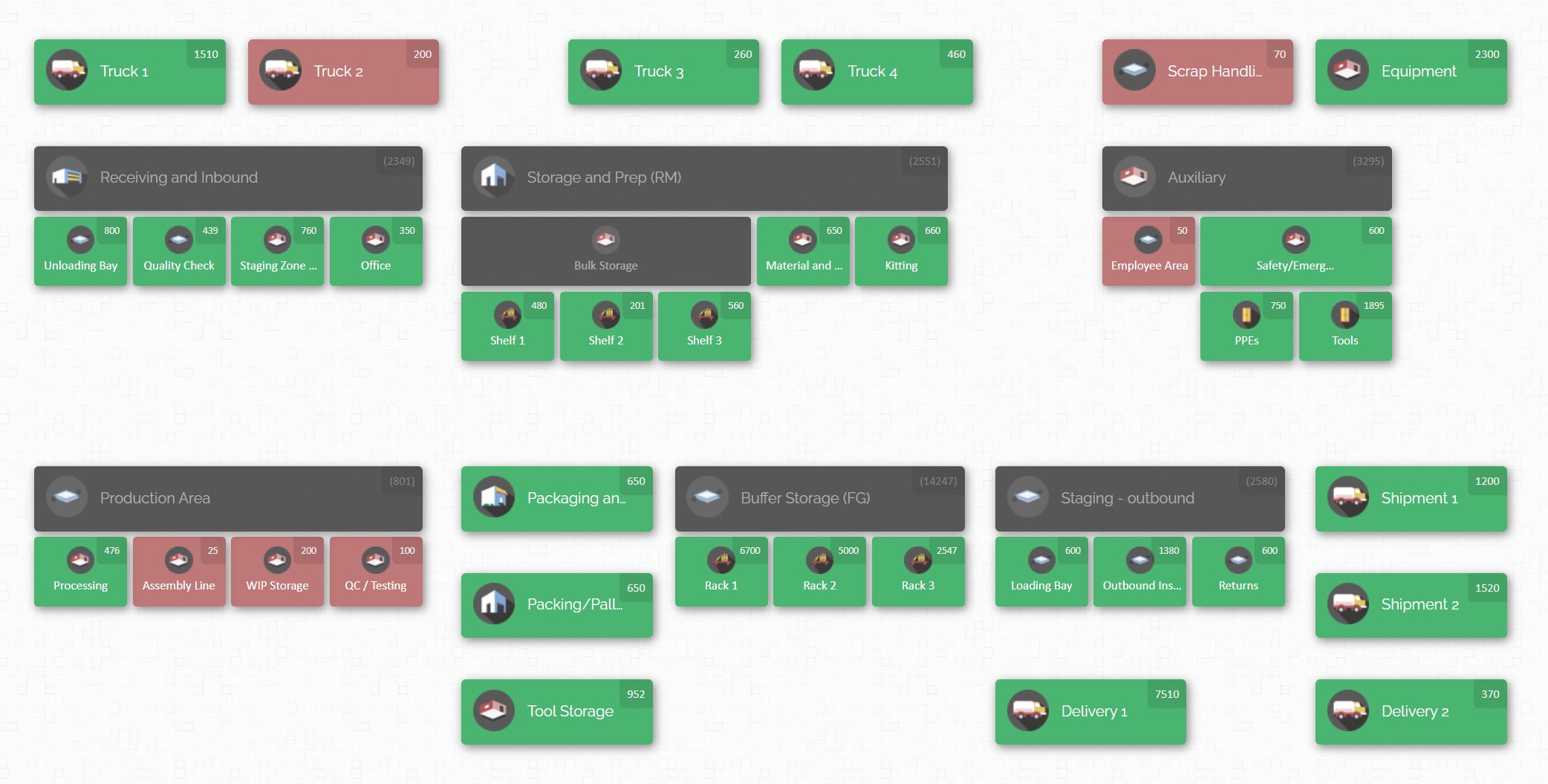
Consolidating inventory is about creating this unified picture and, when appropriate, physically merging stock from separate sites. It might mean moving rarely-used parts into one central store or simply managing all locations in a single system. In practice, inventory consolidation helps eliminate duplication, reduce carrying costs, and improve customer service by ensuring the right stock is available when and where it’s needed. In this article, we explore when consolidation makes sense and how to execute it effectively. We cover best practices for parts visibility, key performance metrics to track, and a step-by-step consolidation plan. We’ll also show how a map-based platform like CyberStockroom can support multi-site visibility by giving every department a clear, shared picture of inventory. Throughout, the goal is to give inventory teams a comprehensive guide to merging stock across multiple locations without sacrificing control or service levels.
Why Consolidate Inventory Across Sites?
As manufacturers grow, it is common to accumulate multiple stockrooms or warehouses: perhaps one at each plant, a supply yard at a construction site, extra storerooms on upper floors, and vehicles carrying spare parts to the field. While having local stock can speed up operations, spreading inventory too thin also creates hidden problems. Inventory consolidation – unifying stock management (and sometimes the physical stock) – can bring major benefits:
- Lower Inventory and Redundancy. Separate sites often unknowingly duplicate slow-moving or spare parts. If Site A has 5 units of a rare valve and Site B also has 5, you have 10 idle items instead of 10 truly needed. By merging inventory data (and possibly physically moving parts), you avoid these redundancies. One consolidated stock means fewer obsolete parts cluttering shelves.
- Improved Stock Balance. Consolidation makes it easier to balance inventory. If one plant runs out of a bearing while another has excess, you can transfer stock instead of expediting new orders. Viewing consolidated stock lets planners redistribute parts as demand shifts, ensuring no site is left short while others hold surplus.
- Streamlined Processes. With a single system or consolidated stock, procedures (receiving, picking, transfers, cycle counting) can be standardized. Teams follow the same workflows instead of reinventing processes at each location. This reduces confusion and errors caused by “tribal knowledge” at different sites.
- Greater Scalability. As operations expand (opening new plants, stores, or field offices), having an established consolidation strategy allows seamless growth. A centralized inventory system can absorb new sites without chaos. The same best-practices, map layouts, and metrics apply across all locations, making scaling up much smoother.
Of course, consolidation isn’t always right for everything. It’s most beneficial when multiple locations handle common parts or materials that can safely be managed together. If some sites truly need unique, dedicated inventory (for highly specialized processes), maintain those locally. The key is to identify the overlap.
In practice, companies often keep critical slow-turning items in a consolidated store and reserve some fast-moving emergency stock locally. The goal is to merge stock across sites wherever it reduces waste and complexity, while still keeping production uninterrupted. Reduced Overhead and Carrying Costs. Running multiple facilities or storerooms incurs rent, utilities, and staffing expenses for each location. Every facility needs security, lighting, and often a small team. Consolidating into fewer sites means these overheads drop. You also carry less safety stock overall when you see all stock centrally; rather than each site holding extra “just in case,” you can hold enough for total demand.

Here are some scenarios when inventory consolidation makes sense:
- Multiple Warehouses or Workshops, Similar Parts: When different plants or departments use the same raw materials or spare parts, consolidating inventory can significantly cut costs. For example, if two factories both use an uncommon sensor, keeping one shared stock is more efficient than both overstocking it.
- After a Merger or Acquisition: When one site acquires another, you may inherit duplicate warehouses. Consolidating stock from the acquired company into your existing system avoids needless carry costs and confusion.
- Distributed Construction or Project Sites: In industrial construction, you might have laydown yards or service units at each project. Consolidating the inventory of similar parts (scaffolding pieces, electrical components, safety equipment) gives a global view of total materials and simplifies reallocation between projects.
- Service Vehicle Stock: If technicians carry spare parts on vans or trucks, having that vehicle inventory synchronized with your main stores prevents “phantom stock” and missed replenishment. Consolidation means the van’s on-board spares appear in your overall stock counts.
- Seasonal or Cyclical Needs: Some industries have intense seasonal production (e.g., building materials) where one central store can buffer seasonal swings for multiple plants. Consolidating for inventory lets you optimize for seasonal demand peaks without each location maintaining excess off-season stock.
The cost of not consolidating can be high. Multiple small stocks breed miscommunication: one department might order an item that another already had. Maintenance crews can’t easily share parts across sites. Stockouts at one plant cause emergency shipping while another warehouse has idle units. By merging inventory data—and, where possible, the physical stock—into a cohesive system, the business gains visibility and control to tackle these issues head-on.
Key Challenges of Decentralized Inventory
Before diving into how to fix the problem, it helps to understand the pitfalls of keeping inventory in silos. Common headaches include:
- Data Inconsistency: When each site records inventory separately (often with its own spreadsheets or legacy system), you rarely have a single source of truth. One warehouse’s count of 10 units of Part X might not match another’s report of 8 units in the same part. Discrepancies occur easily if transfers aren’t logged promptly or if counts are infrequent. This fragmented data means managers don’t truly know total company stock until after labor-intensive reconciliation.
- Blind Spots in Visibility: Without a centralized view, a parts planner or production scheduler might not realize that needed stock sits unused at another site. This poor visibility leads to unnecessary emergency purchases or production delays. Conversely, you might over-order because one location had under-reported its stock. Every silo of inventory creates a blind spot where stock appears missing or overstocked in isolation.

- Operational Delays and Errors: When engineers and technicians can’t see multi-site inventory, they tend to hoard parts “just in case” or over-request to avoid shortages. Warehouses might duplicate reordering or fail to optimize stock transfers. Without cross-department coordination, two teams might pull the same part without realizing it. Spreadsheets get emailed around, increasing the chance of data entry mistakes.
- Excess Costs: Multiple inventory sites multiply the carrying cost of safety stock. Each location needs buffer stock against uncertainty, but consolidated inventory lets you reduce that total buffer. Also, multiple sites mean higher aggregated costs for space, utilities, and travel between facilities. Products shuttling between sites in undirected transfers add shipping and labor costs.
- Inventory Imbalances: Some locations end up perpetually understocked (causing production slowdowns or supplier rush fees) while others have excess. For example, one department may see frequent stockouts of a certain part, prompting express orders, while another department nearby has stock gathering dust. These imbalances tie up capital inefficiently and decrease service levels.
- Compliance and Auditing Issues: Auditing multiple stock rooms separately can leave gaps. Regulators or safety officers might inspect one inventory site at a time, and lack of consolidated records can flag compliance issues. On the other hand, centralized inventory tracking simplifies audits by showing a complete, historical log of all inventory movements.
Understanding these challenges underlines the need for consolidation and improved visibility. The next sections discuss operational metrics and processes that target these issues head-on.
Critical Inventory Metrics
To manage consolidated inventory effectively, it’s essential to track the right metrics. These Key Performance Indicators help teams gauge accuracy, efficiency, and responsiveness. Some of the most important KPIs include:
- Inventory Accuracy (%): This measures how closely recorded stock levels match the actual physical stock. High accuracy (ideally above 97-99%) means your system can be trusted. Low accuracy indicates that your processes (receiving, transfers, picking) are introducing errors. After consolidating stock, maintaining a precise count through cycle counting is critical; it prevents the entire system from drifting off truth.
- Order Fill Rate / Stockout Frequency: How often do you fulfill internal or external orders from existing stock? A high fill rate (near 100%) means you rarely lack parts. For internal part requests (e.g. maintenance or production requisitions), tracking fill rate shows whether consolidation and sharing are effectively meeting demand. Frequent stockouts (missed fills) trigger urgent orders and can be costly. Consolidation should aim to improve fill rate by making all relevant parts visible and accessible.
- Inventory Turnover: This is the rate at which inventory is used or sold and replenished over time (often calculated as cost of goods sold divided by average inventory value). Low turnover means items sit too long (tying up capital); high turnover means inventory moves quickly. After consolidating, you should watch turnover by category or site. Consolidation allows reducing slow-moving inventory and focusing capital on faster-moving parts.
- Carrying Costs: This reflects the capital tied up in inventory, including storage, insurance, and obsolescence costs. By merging duplicate parts across locations, you lower carrying costs per unit of need. It’s useful to monitor carrying cost per dollar of inventory before and after consolidation to quantify savings.
- Cycle Time for Replenishment: This measures the time from placing a replenishment order (or transferring stock) to having the inventory in hand at the requesting site. Consolidation can impact lead times: central stock might require an extra transit time to reach a site. Monitoring replenishment cycle time helps evaluate whether the consolidation strategy is still meeting production and service needs. If it grows too long, consider holding safety stock for critical items even when stock is centralized.
- Utilization of Space: In a warehouse setting, this metric tracks how efficiently shelf or pallet space is used. Consolidation may allow better organization and higher-density storage. Track space utilization to identify if consolidation has freed up or better utilized existing capacity.
- Number of Location Transfers: Merging stock often increases the need for inter-site transfers. While beneficial overall, it’s still an operational activity. Tracking how many transfers are happening, and the time/cost for each, gives insight into whether your consolidation processes are efficient or becoming a bottleneck.
- Days of Supply on Hand: Also known as turnover days or stock cover. It shows how many days you could operate before running out of each item. Consolidated inventory should aim for an optimal days-of-supply: neither excessive (tying cash) nor insufficient (risking stockouts). Monitoring this across sites tells you if consolidation is balancing inventory correctly.
By regularly reviewing these KPIs in a dashboard or report, inventory managers can see how consolidation affects operations. For example, an increase in fill rate combined with a drop in total carrying cost is an excellent sign that consolidation is working. Conversely, if replenishment times soar or inventory accuracy declines after merging, you may need to adjust workflows or stock levels.
Best Practices for Multi-Site Inventory Visibility

Achieving true visibility of parts across all departments and locations requires more than just tracking numbers. It takes implementing robust practices and technology to turn data into insight. Below are key strategies:
1. Centralize Data with a Unified System
The single most effective practice is to use one system or platform for all inventory data. Whether it’s a cloud-based inventory management system or a comprehensive warehouse management module, having all sites feed into one database creates a “single source of truth.” This unified approach ensures that any stock received, issued, or transferred at one location is immediately reflected across the organization. Instead of emailing spreadsheets between departments, everyone from maintenance crews to procurement sees the same updated data.
For example, when a service technician checks out a part from the site storeroom, that decrement is recorded centrally. If production needs that part at the main plant, the planner sees the updated stock level instantly and knows to transfer or reorder accordingly. If each department used separate logs or software, those decisions would lag or be based on outdated information. Centralization also means one chart of accounts for items: make sure SKU codes and part numbers are consistent across sites. This prevents confusion where the same item is called “Bolt-A” in one location and “Bolt-123” in another.
2. Use Visual, Map-Based Inventory Tools
Instead of burying data in spreadsheets, adopt a visual approach that reflects real life. A map-based inventory system (like CyberStockroom) lets teams see the layout of all facilities and storerooms on a schematic. Each warehouse floor, storeroom shelf, or bin can be represented as a node on the map. The map dashboard shows quantities at a glance – often with color indicators for low or high stock levels. For example, a section might glow red when inventory is below a threshold. Users can click on a zone to drill down into specific parts or see which department it belongs to.
Such visualization bridges the gap between digital records and physical reality. Inventory managers can navigate the map much like Google Maps for warehouses: zoom into a building, then into a shelf, and spot exactly where a given item sits. This drastically cuts “search time” because instead of scanning through report after report, a person immediately knows which site holds the part and how much. It also highlights imbalances visually: you might instantly notice one warehouse icon blinking (low stock) while another shows ample inventory.
With a unified visual platform, cross-department transparency skyrockets. Purchasing, operations, and maintenance staff are all looking at the same map. For instance, if the maintenance department in Building A needs a valve, the maintenance manager sees not only Building A’s stock but also that Building B has extra units. They can then coordinate a transfer rather than scramble to place a rush order. In short, visual dashboards turn hidden data into actionable insight and keep everyone aligned.
3. Implement Real-Time Tracking
To keep data reliable, capture inventory events the moment they happen. Use barcode scanning at key touchpoints: when goods are received, when stock is moved between locations, and when parts are issued for use. A quick scan updates the central system immediately, so the inventory map stays current. Mobile scanning eliminates transcription errors and ensures no movement goes unrecorded. For example, when an operator receives a pallet of components, scanning each box on arrival will raise the on-hand counts in real time. If that same operator later moves those boxes to a subsidiary storeroom or onto a service van, scanning at the dock and at the van logs the transfer instantly.
Even in areas without barcode labels (say, an old-generation storeroom), handheld scanners or terminals can reduce manual entry. For departments like field service, consider equipping technicians with a scanner to scan parts issued from their truck. This way, the central system knows exactly which vehicle is carrying each part.
4. Standardize Labels, Processes, and Nomenclature

Technology alone isn’t enough if organizational practices are chaotic. Institute strict naming conventions and procedures. Every item must have one unique identifier (SKU or part number) known across all departments. Avoid duplicate names or multiple codes for the same part. If necessary, reconcile and merge duplicate records before consolidation begins. Similarly, every storage location – warehouse, cabinet, shelf, vehicle – needs a label or code that is the same in the system and on-site signage. When locations are labeled, transfers and counts become straightforward: workers can scan “Location A” and “Location B” with confidence that the system won’t confuse them.
Alongside labeling, write clear Standard Operating Procedures (SOPs) for inventory activities. Define exactly how goods move. For instance:
- Receiving: When new material arrives, check it against the purchase order, then scan and log it before placing it in stock.
- Internal Transfers: If a part needs to move from Warehouse 1 to Warehouse 2, users must initiate a transfer in the system (either by scanning on a tablet or via desktop) and physically move the goods afterward.
- Issuing and Returns: Any part taken for production or maintenance is checked out of inventory in the system. If unused parts return, they must be checked back in with the correct location.
These procedures should be uniform at all sites. Training everyone on the same workflows prevents situations where one team bypasses the system (e.g. writing on sticky notes or not reporting usage) and breaks visibility. Document the processes in a shared manual or SOP guide. When staff in any department follow a common “playbook,” you ensure that no inventory transaction go
5. Conduct Regular Cycle Counts and Physical Audits
Even the best systems and processes can drift over time. To catch discrepancies early, perform routine cycle counts. Instead of doing an infrequent full inventory (which is disruptive and often inaccurate), schedule frequent small counts. For example, count the entire bulk inventory of fast-moving parts weekly, or split the warehouse into zones and count one zone per week so that every location is counted over a quarter. If multiple departments manage different areas, set up a rolling schedule so their teams audit each other’s sections impartially.
During counts, compare the physical count to the system’s recorded quantity. Investigate every mismatch immediately. If the system says 50 widgets but you find 45, determine whether it was a data entry mistake, a theft, or maybe an unrecorded use. Because inventory is consolidated, an error in one site can throw off the entire organization’s data, so it’s important to resolve issues quickly. Many consolidated inventory systems let you initiate a count on screen (e.g. mark 50 as expected, then “adjust” to the actual count of 45) and leave a comment. This audit trail of adjustments further improves accountability. Over time, tracking count variances will reveal process weaknesses (perhaps a supplier repackaged incorrectly, or certain items were never scanned out).
In addition to cyclical counting, perform occasional full or group audits, especially after major moves or system changes. For example, after first merging inventories, a full audit of the combined stock can verify the accuracy of migration. Then continue with smaller counts to maintain that accuracy.
6. Establish Reorder Points and Alerts
One advantage of consolidated inventory data is better planning. Use the system to set reorder points for critical parts based on historical usage across all sites. A reorder point is the on-hand quantity that should trigger replenishment. For instance, if your combined sites consume 10 units of a part per week and you want a two-week safety buffer, set the reorder point at 20 units. When total stock across sites drops to 20, the system flags it.
Set safety stock levels for each location if you still hold local buffers. The consolidated system can track how total inventory compares to these site-specific safety levels and alert you when one facility is getting low. Similarly, configure alerts for overstock situations or if the stock at one site exceeds an expected maximum (which might indicate a counting error or unexpected returns).
Alerting also extends to usage patterns. If one department suddenly starts pulling a part much faster than predicted, the system can warn planners to investigate – perhaps that part is now used on a new product line. By setting up these data-driven “eyes and ears,” you eliminate surprises. Everyone knows what levels demand attention, and the consolidated system ensures no alert is missed because it watches all locations simultaneously.
7. Make Data-Driven Decisions and Track Performance

With consolidation, you gather a wealth of data from across the enterprise. Leverage analytics to continuously refine inventory strategy. For example, track trends in inventory accuracy, turnover, and fill rate by category or location. If the consolidated data shows that Inventory Accuracy has slipped from 98% to 94%, you know immediate action is needed – maybe more staff training or process tightening. If overall carrying costs remain high, analyze which parts contribute most to this cost. You may decide to reduce stock for slow movers or switch suppliers for bulky items.
Use reports to compare departmental performance. Perhaps the assembly department’s storeroom consistently has fewer discrepancies than maintenance. Sharing these insights fosters accountability. Rather than blame a specific site, focus on outcomes: one team’s efficient practices can be adopted by others.
Key metrics to include in dashboards might be:
- Total stock value by location, to see where capital is tied up.
- Days of inventory on hand for fast-moving items.
- Fill times for internal requisitions by department.
- Percentage of parts meeting lead time objectives (does the system show “short shipments”?).
Review these metrics in regular inventory meetings. Use them to drive continuous improvement. For example, if a particular critical part runs out often, perhaps increase its safety stock or find an alternate part. If audits reveal chronic miscounts in one area, that may indicate a flawed process or need for clearer labeling.
8. Train and Align Teams Across Departments
Finally, all these tools and processes require people who know how to use them. Invest in training every department on the new consolidated system. Whether it’s a maintenance tech checking inventory on their iPad, or a warehouse clerk doing a cycle count on the main platform, they should be fully comfortable with scanning, logging, and locating items in the system. Create quick reference guides or short videos showing how to perform common tasks. Encourage cross-training: let someone from procurement sit with the warehouse team to see how parts are moved, and vice versa. This builds empathy and understanding of how each team uses inventory.
Communication is key to cross-department alignment. When consolidating, explain to each team why this is happening and how it benefits everyone. For instance, maintenance might appreciate knowing they can quickly tap into another site’s surplus; procurement will like not having to place emergency orders; finance will like the cost savings. Emphasize that the goal is not to restrict access, but to give everyone accurate information so the right decisions are made faster.
By following these best practices – unifying systems, visualizing inventory, standardizing processes, auditing diligently, and keeping everyone informed – manufacturers achieve much higher parts visibility and efficiency. The next section will illustrate how a platform built on these principles can support your multi-site inventory strategy in concrete ways.


CyberStockroom: A Map-Based Solution for Multi-Department Visibility
To bring the above best practices into action, consider tools designed specifically for high-visibility inventory management. CyberStockroom is one such platform that exemplifies many of these capabilities without needing a manual citation. It centers on an interactive inventory map that mirrors your actual operations.
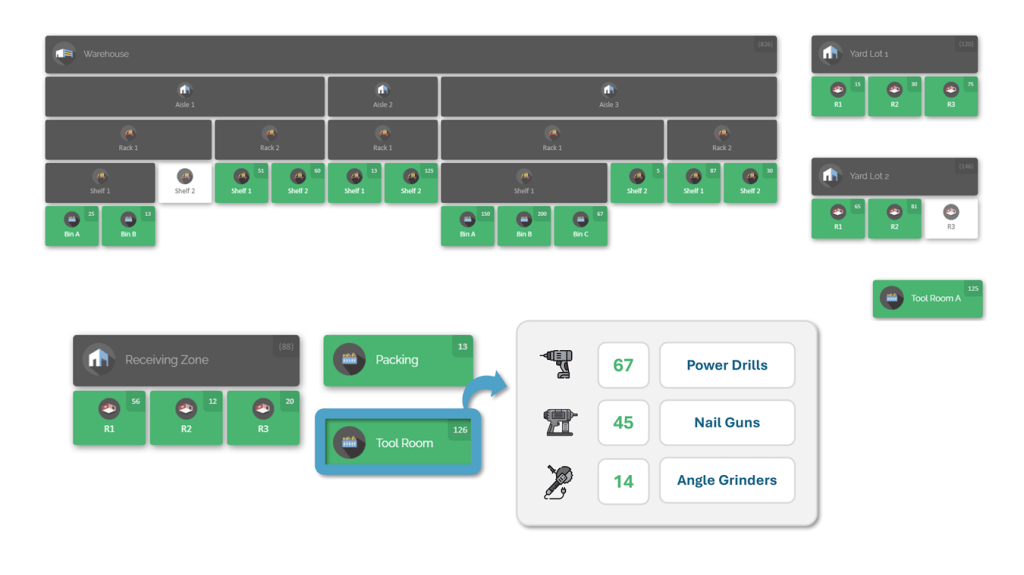
With CyberStockroom, you start by creating a digital map of your network: add every warehouse, storeroom, office, vehicle trunk, yard, or even floor of a building as a location on the map. Each location can be a parent or child of others (for example, a plant contains workshops; a vehicle is considered a location within the fleet). This map becomes the central dashboard for the entire team. When you click on any area of the map, a panel shows the current stock there.
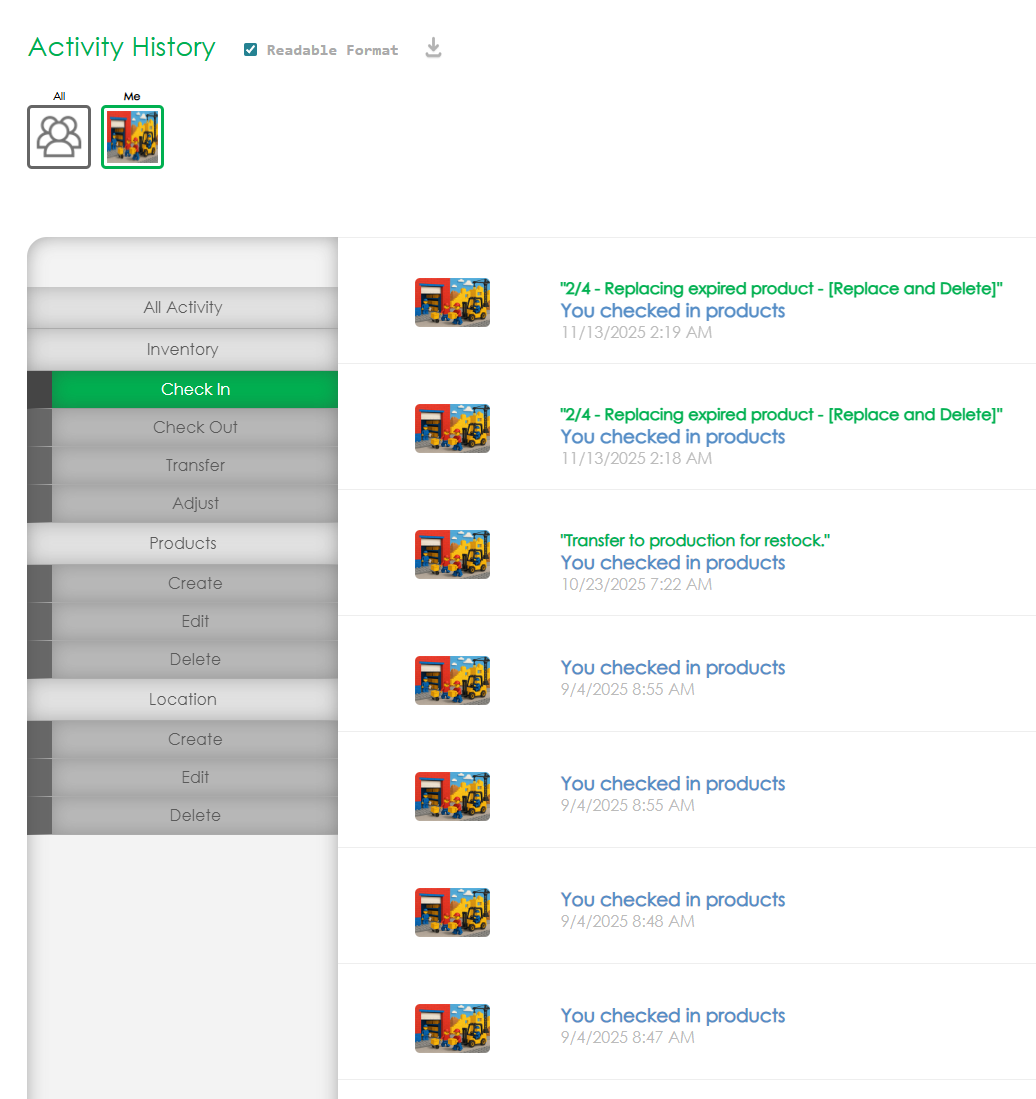
Behind the scenes, every movement is logged. As parts are received, transferred, or issued, the map is updated in real time. CyberStockroom captures a detailed activity history: who did the transfer, from which location to which, and how many units. This provides complete traceability across departments. If a department notices something is missing, the log lets managers pinpoint exactly when and where it happened, greatly simplifying audits.
The interface is designed for intuitive operation. For instance, imagine moving a batch of bearings from the central warehouse to the maintenance shop: you simply drag the bearing icon on the map from the warehouse location and drop it onto the shop location. The system automatically records that transfer and adjusts the counts instantly. For bulk actions, CSV import lets you upload a whole list of inventory adjustments at once (useful during initial consolidation to load stock quantities from an audit sheet).
All users – whether on the factory floor or a corporate office – access the same live data (the system is cloud-based). This means if a maintenance engineer in the workshop scans some parts into a job, everyone else sees that change immediately. There’s no lag or confusion from separate databases. Role-based permissions ensure that each department can only perform the actions appropriate for them: some may only view stock, others can move or edit quantities, but all see the same baseline inventory.

Several built-in features illustrate CyberStockroom’s focus on visibility:
- Custom Fields: You can tag parts with fields like “criticality” or “supplier” so that teams across departments can filter and sort inventory based on their needs. A project manager might filter to see all items tagged for a particular job site, for example.
- Cycle Counting Module: Audits are straightforward: you select a count area on the map and enter the new counts. The software highlights discrepancies instantly.
- Alerts and Reports: Users can define low-stock thresholds per part and site. When inventory dips below that threshold, it will be indicated on the map. Likewise, summary reports can be generated to show stock valuation per location.
- Spare Parts and Trunk Stock Workflows: For teams maintaining vans or field kits, CyberStockroom supports “trunk” locations. Each service vehicle’s inventory is tracked as a location on the map. Before dispatch, a technician can plan which parts to load. Invoicing or replenishing a vehicle then updates the map so back at headquarters everyone sees what each truck has.
By embedding all inventory processes in a visual map, CyberStockroom ties together the earlier best practices. It delivers that single source of truth so departments no longer work in isolation. It makes parts visible instead of hidden in overstuffed cupboards. And it keeps the entire team aligned: if inventory planning is needed, managers simply look at one dashboard to know what each department, plant, or store has available, instead of chasing spreadsheets or phone calls.

Step-by-Step Inventory Consolidation Plan
Bringing all these ideas together, let’s outline a structured plan to actually consolidate inventory across your sites. This step-by-step approach guides you from preparation through execution and follow-up:
- Audit and Clean Up Data: Before moving anything, verify what you have. Generate inventory lists from each site. Reconcile item names and SKU codes so every location uses the same item definitions. Identify duplicate or obsolete parts across sites. This clean data set will populate your consolidated system. Remove or retire items that are obsolete to avoid clutter.
- Analyze Usage and Demand: Review historical usage for each part by location. Determine which parts are high usage everywhere and which are only needed in one area. Some parts might justify dual-stock because they deplete rapidly; others (slow-moving spares) might be better kept only at a central store. Use ABC analysis (classifying items by usage value) to decide which parts to pool and which to leave at local stores. Involve stakeholders from each department to confirm assumptions (for example, the maintenance team might insist on local stock of critical spares despite low usage).
- Plan the Consolidation Strategy: Based on the analysis, decide what to do with each inventory category:
- Centralize: Move stock of certain categories (e.g. all lighting components, all safety gear, all rarely-used machine parts) into one or few locations. This might mean merging two smaller warehouses into one, or designating one main spare parts depot.
- Decentralize: Some parts still may need to remain at multiple sites due to space constraints or immediate demand (e.g., everyday consumables that run out quickly). In these cases, standardize the quantities each location holds and ensure each uses the central system’s data for reordering.
- Buffer Stock: Decide if each site gets a small local buffer of critical items as insurance. For instance, if a part takes 7 days to ship from central, maybe keep a 3-day supply locally for emergencies.
- Set Up the Unified System/Inventory Map: Implement or configure your inventory platform (e.g. CyberStockroom) to include all locations. Create the digital map of facilities, floors, racks, etc. Assign each physical location a code in the system. Import the cleaned master inventory list. At this stage, perform an initial inventory count at each location and load those quantities into the system (using CSV import or manual entry). This establishes your starting point: one live, consolidated view of all stock.
- Physically Transfer Stock (if Applicable): Organize the physical moves. It’s best to schedule transfers during a low-activity period to minimize disruption. Use the system to generate transfer orders: for example, if Warehouse A had 50 of a part and you decide to consolidate to Warehouse B, mark 50 units as moving in the system. Have staff transport the parts and verify via scanning on arrival. Depending on volume, you might do one bulk move or several smaller moves, but ensure each move is recorded. Update the map after each move.
- Revise Reordering and Restock Procedures: With the new consolidated inventory, adjust your procurement rules. For instance, if a part’s reorder point was maintained at each site, you now have one reorder point for the combined stock. Set up new purchasing agreements or distribution methods. Inform vendors about changes if supplies will now be shipped to a single location. Make sure the ordering department has access to the unified data when planning purchase orders.
- Train and Communicate: As stocks are consolidated, run training sessions on the new processes and system. Show users in each department how to find items on the map, how to log transfers, and how to check out stock correctly. Emphasize any new SOPs (e.g., “always scan parts in/out of the central warehouse, even if going to the floor of the same building”). Provide cheat sheets or intranet documentation for reference.
- Monitor and Adjust: In the weeks following consolidation, monitor your KPIs closely. Watch for unexpected stockouts or overstock alerts. Solicit feedback from users: if a site complains certain critical items are not accessible quickly enough, consider tweaking buffer levels. Compare inventory accuracy before and after to ensure the data migration was successful. Regularly review the map dashboard to ensure no location is off the radar.
- Institute Continuous Improvement: Finally, make consolidation an ongoing practice rather than a one-off project. As new items are introduced or demand patterns change, periodically revisit whether stock locations still make sense. Use quarterly reviews of inventory data and financial metrics to spot new opportunities to merge or redistribute stock. Encourage departments to suggest improvements. With everyone’s input and a flexible system, your consolidated inventory model will evolve to stay aligned with business needs.
Empowering Operational Efficiency and Alignment

An effective inventory consolidation strategy is not just an IT project – it’s an operational transformation that touches purchasing, warehousing, production, maintenance, and even finance. When done correctly, it yields significant improvements:
- Faster, Smarter Decisions: With every department looking at the same consolidated inventory map, teams can make quick decisions. If production needs a part immediately, planners see all sources at once: “We have 20 units at Plant 2 and 5 at Plant 3, so we can either transfer or reassign production accordingly.” This speeds up responses and avoids costly downtime.
- Greater Accountability: With shared visibility, every team knows inventory is managed publicly, not “hidden” in a silo. This encourages accountability for following procedures. For instance, if maintenance staff know that any parts they order are visible to finance, they’ll be more judicious and timely in reporting usage.
- Aligned Goals: Consolidation often forces teams to speak a common language. Procurement and operations align on which parts are essential and at what levels. Finance can confidently rely on inventory valuation, since counts are accurate and synchronized. Sales and customer service benefit too: if spare part sales are integrated into the system, the sales team can see true availability when promising delivery dates.
- Lean Growth: When a new department or site is added, the process for bringing inventory on board is already established. Instead of building a new spreadsheet regimen, you simply add the new location to the map and start recording its stock. This leaner approach means expansion doesn’t require duplicating efforts but is absorbed into the existing framework.
Throughout this journey, a visual, cloud-based platform ties everything together. It serves as the nerve center of your inventory strategy. By laying out your entire operation on one screen – all sites, all departments – it creates a culture of transparency. Everyone, from the night-shift forklift driver to the CFO, sees the current state of inventory. Issues become immediately visible to the right people.
One CIO from the manufacturing sector put it aptly: “Once our inventory was all on one map, problems that used to take days to debug were clear in minutes. Seeing stock levels, transfers, and usage flow in real time kept all our teams on the same page.” This level of alignment is exactly what consolidation aims to achieve.
Conclusion
Inventory consolidation – the process of merging stock across multiple sites and unifying its management – is a strategic step for any industrial operation aiming to improve efficiency, accuracy, and cross-team collaboration. It tackles fundamental issues like duplicated parts, hidden stock, and inconsistent data. By consolidating inventory, you reduce costs (less redundant stock, lower facility overhead) and boost service levels (improved fill rates, faster fulfillment).
Key to a successful consolidation is adopting best practices: centralize all inventory data in one system, use real-time tracking and standardized processes, and empower teams with a visual map of stock. Metrics must be defined and watched, and staff should be trained to embrace the new workflows. With each step, you close the gaps between departments and sites.
A solution like CyberStockroom exemplifies these practices by offering a map-based, cloud-hosted inventory platform. It allows you to digitally reconstruct your world of warehouses, workshops, stores, and vehicles. From that bird’s-eye view, you can drag and drop stock, scan barcode transactions, run cycle counts, and set alerts — all while everyone in the organisation stays synced to the same live data. This kind of tool doesn’t introduce capabilities you don’t have; instead, it amplifies every ounce of visibility and control you already want by making the information intuitive and accessible.
Ultimately, inventory consolidation is not just an IT change but a commitment to operational excellence. It requires coordination, analysis, and change management. However, once achieved, the results are transformative: inventory accuracy rockets up, costs come down, and your entire team moves with confidence knowing exactly “what we have and where it is”. By following this guide – applying best practices and leveraging a visual inventory solution – your organisation can turn the challenge of multi-site inventory into a competitive advantage.









Leave a Reply