
Efficiently handling scaffolding and formwork inventory is essential for any large construction project. These systems involve hundreds or thousands of components—panels, beams, tubes, props, clamps and more—that move between workshops, warehouses, job sites, and staging yards. Without a clear system, critical parts can go missing, causing costly delays. Teams across departments (procurement, warehouse, field crews, project managers) must have full visibility into what parts are in stock, where they are located, and how they are allocated. In practice, this requires unified inventory visibility and disciplined processes. Using tools like an interactive inventory map can bring all parts and locations into one shared view.
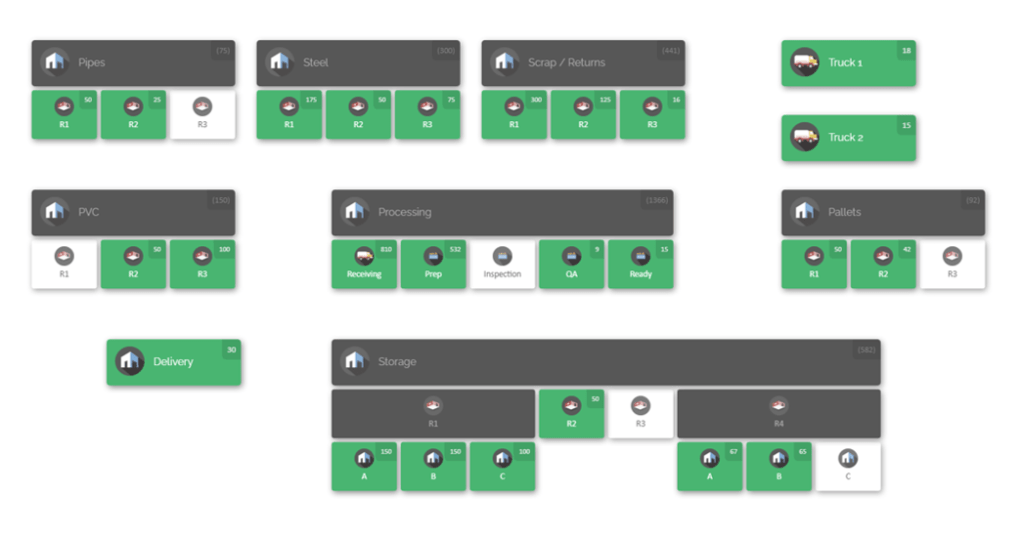
A visual inventory map can show exactly where every scaffolding section or formwork panel is stored. In a map-based interface, a warehouse, yard, or job site is laid out with shelves, racks, and zones labeled. A warehouse manager can zoom into any area and immediately see counts of each item. This bird’s-eye view turns scattered site storage into a navigable layout, making it much faster to locate needed equipment. Modern inventory mapping software provides this kind of map-driven control, giving large projects a “digital twin” of their inventory space. By adopting such tools and best practices, construction teams can reduce waste, prevent stockouts, and keep projects on schedule and on budget.
Challenges of Scaffolding and Formwork Inventory
Scaffolding and formwork inventories present unique challenges on large projects. These components are heavy and often reused across jobs, meaning they travel frequently between shops, yards, and active sites. For example, a major building project might need dozens of scaffold platforms and hundreds of tubes and clamps. Each time a scaffold section is delivered, erected, dismantled, or stored, the inventory count should change. Without proper tracking, teams can lose track of pieces during moves.
Furthermore, components of scaffolding and formwork come in many types and sizes. Different frame sections, braces, beams, tie rods and panels must fit together correctly. Inconsistent naming or labeling can cause confusion: if one crew calls a part “Frame-A” and another uses “Scaffold Frame 1000,” the same item might be logged twice or missed altogether. Large projects often involve multiple subcontractors and crews working simultaneously. One crew’s missing piece could be on another crew’s site without either side knowing.
Security and environmental protection are also concerns. Scaffolding kits and formwork panels are expensive; theft or damage (for example, from weather exposure) can strain project budgets. On sprawling construction sites, unsecured parts in laydown yards or trucks are easy to misplace. If a needed beam or shutter panel cannot be found on short notice, work may stall as teams search or order replacements.
Finally, coordination between departments is critical. The procurement team needs accurate on-hand counts to avoid over-ordering, while field crews need timely deliveries of parts. Warehouse staff must know which parts to stage, and project managers must see a consolidated view of all assets across all locations. Achieving this requires cross-team alignment on inventory data and clear processes for managing moves. These challenges demand robust inventory management practices—combining standard operating procedures with technology—that give full visibility over the entire scaffolding and formwork inventory from procurement through deployment.
Key Principles of Effective Inventory Management
Several core principles help construction teams gain control over complex inventories:
- Centralized, real-time data: Use a single system of record for all inventory. When every department logs transactions in the same platform, everyone sees up-to-date counts and locations. This eliminates “blind spots” where one warehouse might overstock because it doesn’t know another yard has surplus.
- Standardized identification: Assign each part a unique ID or SKU, and use barcodes/QR codes. Clear naming conventions and labels ensure that all teams refer to items the same way, reducing confusion and duplicate records.
- Physical organization: Designate and label storage zones by part type or project. Group similar items together on shelves or in bins so crews can find things quickly. Keep storage neat and close to where materials are used.
- Consistent processes: Develop clear procedures for receiving, checking out, transferring, and returning items. Every movement should be recorded. For example, when scaffold parts are delivered to a site, the receiving crew scans them “into” the system; when the scaffold is dismantled, the parts are scanned “out.” A standardized workflow across all sites means nothing skips the tracking system.
- Regular audits: Conduct routine cycle counts and inspections. Even with good procedures, errors happen. By periodically counting selected items and comparing to system records, teams catch and correct discrepancies before they grow.
- Cross-team communication: Ensure that procurement, operations, engineering, and finance teams all share one view of inventory. Collaboration tools or dashboards that update in real time allow department leaders to align budgets, reorder points, and project schedules based on the same data.
- Emphasis on visibility: Use visual tools (like interactive maps and dashboards) so team members can literally see inventory. A graphical map of the warehouse or yard brings the data to life and helps everyone “see” where things are instead of interpreting spreadsheets. Visual indicators (color-coded alerts for low stock, diagrams of aisles, etc.) make anomalies obvious at a glance.
These practices serve as a foundation. In the sections below, we dive into specific strategies and processes that implement these principles for scaffolding and formwork management.
Standardize Part Identification and Cataloging

The first step is to create a single source of truth for every scaffolding and formwork component. Each item type should have a standardized code and description. For example, every scaffold tube might be labelled by length and model (e.g. “TUBE-6FT-ModelA”), every base jack by part number, and every formwork panel by size and system (e.g. “PANEL-2×4-FastWall”). Use consistent naming and avoid ambiguous abbreviations. Maintain a master parts list or catalog that defines each code clearly.
Label physical parts with barcodes. When inventory arrives at your workshop or yard, tag it immediately. For instance, affix a durable barcode label to each formwork panel and scaffolding frame. The code links to the central inventory system. Now, when a piece is moved or used, crews scan it with a barcode scanner or mobile device. Scanning ensures the system always knows exactly which individual piece moved and where it went. If barcoding every tube is impractical, at least barcode the containers or pallets holding them, and log each container’s contents precisely.
Consistent labeling extends to storage locations as well. Clearly label aisles, racks, bins and yard zones. For example, a rack might be “Rack A” for long beams, or a yard zone “Zone 5: Scaffolding Parts”. When transferring items, crews should scan or record the origin and destination location along with the part. In this way, the system always knows not just what moved, but from where to where. Standardized labels on parts and locations enforce discipline: crews can only scan items that the system recognizes, which prevents “unknown” inventory from falling off the radar.
A well-maintained parts catalog does more than just inventory tracking—it helps in procurement and maintenance planning too. When components have unique codes, you can track usage statistics (such as which parts are used most per project) and quickly identify replacements when wear occurs. For example, if you tag aluminum formwork panels by code, after several concrete pours you’ll know exactly how many times each panel was used, helping you schedule maintenance or replacement proactively. Over time, these standardized identifiers become the backbone of all inventory and asset management activities.
Centralize Inventory Data in One System
With all scaffolding and formwork parts clearly identified, the next best practice is to keep that information in one unified platform. In modern operations, this means using a centralized inventory management or warehouse management system instead of isolated spreadsheets or siloed databases. A centralized system creates one source of truth that spans warehouses, yards, trucks, and job sites.
When every department logs inventory movements into the same system, that eliminates data silos. For example, if the warehouse team enters a shipment of scaffolding sections into inventory, the project manager and procurement lead can see that update immediately. Similarly, when a site crew checks out materials, the inventory count drops in real time for everyone else. This unified view prevents the classic problem of one team over-ordering because they didn’t realize another team already had surplus stock.
Cloud-based systems are particularly powerful for construction firms with multiple locations. They let stakeholders access inventory data from any office or site with internet. A supply chain manager in the home office can check stock levels at all laydown yards. A foreman on a remote site can use a tablet to verify if a needed formwork panel is available in the local warehouse or needs to be shipped. By centralizing all inventory transactions—receipts, transfers, issues, and returns—you eliminate “offline” records and outdated versions. Everyone sees the current counts.
Even if you do not use a dedicated software, the goal is the same: gather all inventory data into one organized system. That may mean migrating scattered spreadsheets into a single database or choosing a construction-focused inventory app. Whatever the tool, it should allow all teams to update and view inventory continuously. When a scaffolding crate arrives on site, someone should record it right away in the system. If every location and department contributes to the same inventory record, you eradicate blind spots.
Key benefits of a central system includes spot on reports and transparency. For example, procurement staff can run a report showing parts on order versus parts on site, so they don’t overbuy or miss reorder points. Finance and planning get the inventory accuracy needed for budgeting. In short, a single, shared inventory system aligns all departments on the same data, empowering faster and more confident decisions.
Visual Inventory Mapping for Warehouses and Yards
A powerful way to improve parts visibility is through inventory mapping – creating an interactive visual representation of all storage locations. Instead of navigating data tables or paper lists, teams use a map-based interface to see where every item is located. This approach is especially useful for large construction inventories. Imagine a digital map of your main workshop: it shows racks of formwork panels, shelves of clamps, and bins of scaffold couplers. A laydown yard map might depict container positions, open storage zones, and staging areas. In each zone, the map displays current stock counts.

A map-based inventory tool provides a clear layout of your space. Each area (such as a warehouse aisle, truck bed, or yard fence line) becomes an interactive zone on the map. Click on a storage rack or outdoor zone, and you instantly see a list of all items stored there and their quantities. This transforms searching for equipment into a quick visual process. Rather than sending workers to search by foot, a manager can pinpoint the item on the map and direct them straight to the location.
Using visual mapping software accelerates many tasks:
- Faster item retrieval: Instead of reading through text inventories, field crews can quickly locate needed parts on the map and head directly to them.
- Fewer lost items: Every bin or rack has a defined place on the map. If a piece isn’t where it’s supposed to be, the absence on the map shows immediately as a discrepancy.
- Space optimization: The map highlights unused areas or crowded zones. Managers can shuffle inventory on-screen to free space or repurpose underutilized zones.
- Simplified training: New team members grasp the layout more easily by exploring a map than learning abstract codes and lists. They see where deliveries enter, where tools are staged, and how stock flows.
- Enhanced coordination: With a shared visual view, a foreman can say “Look at the map under Yard Zone 3, the panels you need are right there by the fence.” This common reference reduces the need for lengthy written directions or calls.
For scaffolding and formwork management, mapping is a game-changer. It lets you group items logically on the map (for example, separate formwork systems from standard scaffolding parts, or allocate zones by project phase). One real-world example is to have “Staging Zone A” on the map represent where newly arrived scaffolding is kept before distribution, and “Return Zone B” for used materials coming back. Another is to map a laydown yard by project blocks or by material type (pipes vs. plywood panels). This way, teams can visually segregate materials by use case.
CyberStockroom: A Map-Based Solution for Multi-Department Visibility
Implementing all the strategies above is much easier with the right tool. CyberStockroom is an example of an inventory management solution built for exactly this purpose. It provides a unified, map-driven platform that ties together every inventory best practice. With CyberStockroom, you create a 2D digital twin of your operation: draw out warehouses, yards, trucks and storage areas as interactive maps on the screen. Then assign products to those locations. The result is one live interface where every department can see exactly what’s stored where.
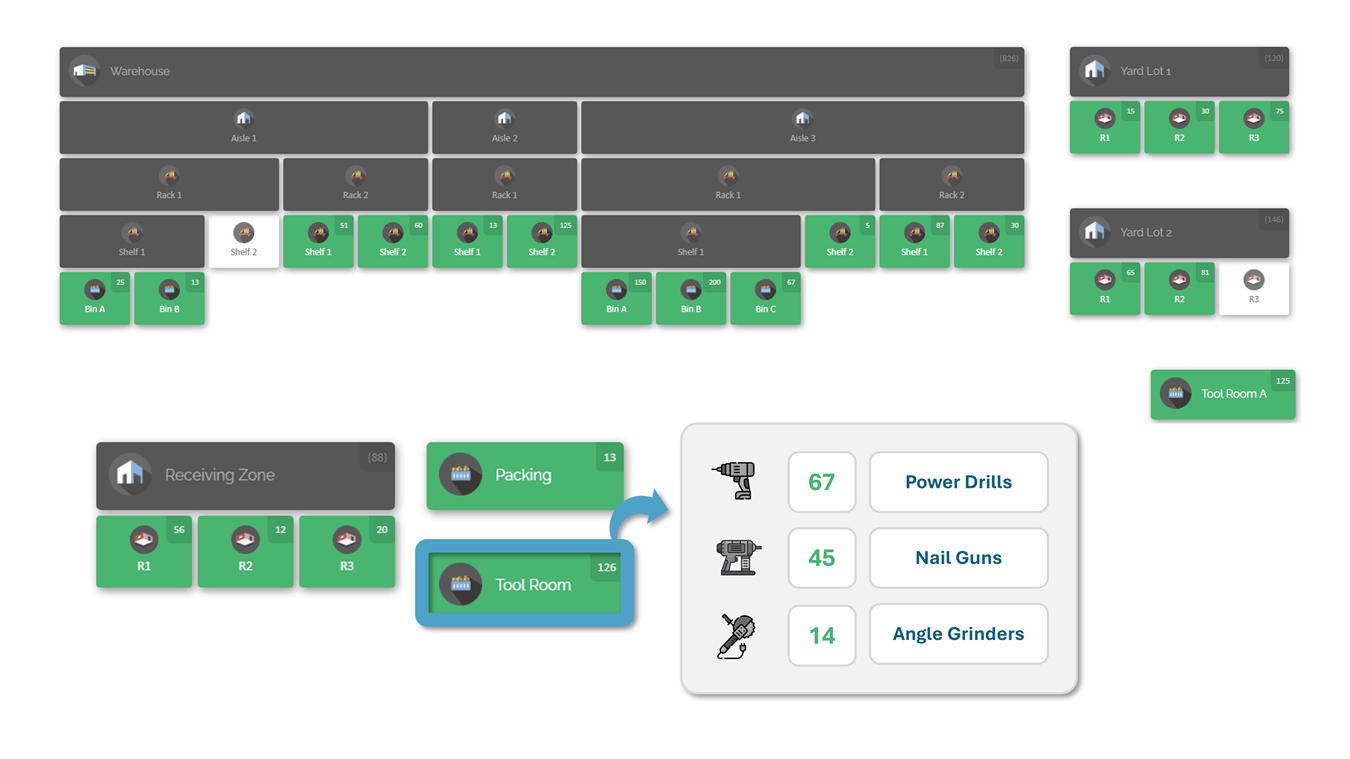
For instance, CyberStockroom lets you design a multi-level map of a scaffolding yard. You could map “Main Warehouse” with labeled racks of formwork, a “Laydown Yard” with zoned areas for piles of tubes, and even each “Job Site” with its own map showing containers and tool cribs. Each location holds real-time inventory data. When a scaffolding crate is scanned into “Yard Zone C,” that crate’s contents appear on the map at that zone. If it’s later moved to “Site A – Street Crib,” you simply drag it across the map or scan a transfer, and the system updates.
One of the most valuable features is the drag-and-drop interface. Teams can move inventory between any two locations by dragging an item icon on the map from one spot to another. Behind the scenes, the system logs a transfer: no paper forms needed. This visual transfer makes it easy to follow the standard check-in/check-out workflows. Managers can watch items fly across the map as they change hands, providing instant clarity. If an item should not move (for example, if a container door opens without logging a scan), the map will not permit a transfer, helping enforce procedures.
CyberStockroom is cloud-based, so it functions as the centralized platform all teams use. When a warehouse worker scans new formwork panels in, those counts update live in the system. A project manager on site can refresh the map view on their laptop and see the new panels in the warehouse. Similarly, when a site foreman receives scaffolding parts, the check-in immediately appears in the platform. Because everyone sees the same map and data, departments like procurement, operations, and finance stay aligned. There’s no “I thought they had 20 braces” confusion – the system shows exactly 15 at “Site B – Climb Tower Area” and 10 at “Warehouse Deck Level,” for example.
CyberStockroom also supports barcoding and batch tracking. You can import your parts list and even upload images of each component. When you scan a barcode, the corresponding part appears on the map automatically. Custom fields let you add specifics like serial numbers, set identifiers, or condition notes (especially useful for used formwork panels). Each scan and transfer is time-stamped and attributed to a user, building an audit trail. This level of detail enhances accountability – you can see not only where an item is, but who moved it and when.
Because it’s map-driven, CyberStockroom greatly speeds up on-site searches. Need to find a missing scaffold deck? Rather than walking the yard, the team checks the map, which shows all deck pallets and highlights empty spots. If something’s missing, it immediately stands out. Moreover, the system can highlight low stock thresholds. Imagine an alarm popping up on the map when scaffold couplers on “Site C” drop below 5. Someone can zoom into that location and initiate a reorder before crews even notice a shortage.

In summary, CyberStockroom exemplifies these inventory best practices in one package. It makes parts visibility multi-department and real-time by design. You get a shared visual interface that reflects the physical world of your construction project. All the features – drag-and-drop mapping, barcode support, real-time updates – align perfectly with the processes described above. Adopting such a solution turns complex, high-traffic scaffolding operations into clear, manageable systems, so teams spend less time hunting for equipment and more time building.
Location Tracking and Check-In/Check-Out Procedures
Accurate location tracking underpins visibility. On a job with thousands of parts, it’s not enough to know total counts; you must know where each part is at any moment. Establishing rigorous check-in/check-out processes ensures the inventory system stays up-to-date. In practice, this means requiring that all movements of scaffolding and formwork are logged in real time using the standard IDs and map described above.
For example, when new materials arrive at a warehouse or yard, the receiving crew should scan each item (or pallet of items) into the system. The system records what was received, how many, and which location (warehouse bay, yard container) it was placed in. This initial check-in makes the items available in the system for anyone to see. Similarly, when materials are sent out to a site, workers must scan them as “checked out” and capture the destination location (for instance, a site name or truck number on the inventory map). The checkout entry temporarily moves that quantity out of the source location and into transit or the destination.

While on site, further scanning continues. If scaffolding is built and then dismantled, the returned parts are scanned back into the inventory system, ideally at a designated return staging area. Each scan updates the map and inventory counts live. These transfers are often best done with mobile barcode scanners or tablets, so crews can log movements on the spot. If scanning every piece seems onerous, prioritize critical items (large panels, specialty parts) and scan containers or kits that hold smaller pieces.
The idea is to mirror the flow of materials in the physical world with data entries in the system. Treat each tool crib, container, or vehicle like a storage location on the map. Whenever an item leaves or enters that location, log it. This way, warehouse staff, site foremen, and managers always share the same status: if a beam has been checked out for a scaffolding assembly, it no longer shows as “in stock” in the warehouse, and the site can report that it was received. If someone forgets to scan, that becomes an exception to investigate.
Implementing these workflows requires discipline but pays off in transparency. A consistent check-in/check-out process means you never have to wonder how many or where things are—you log that as soon as the parts move. Some companies even enforce requiring a scanned record before letting items leave the yard (for example, a gate scanner that records items on trucks). While it may seem bureaucratic at first, this practice becomes habit and dramatically cuts down on lost or misplaced items. Over time, the system’s data gets more reliable: trends like which items move most frequently, or which locations see the most traffic, become visible.
Clear Storage Organization

Beyond electronic tracking, a well-organized physical layout is critical. Design your warehouse, yard, and containers with clear zones and pathways. For scaffolding and formwork, it’s common to set up storage areas by component type or project use. For instance, have a section of the warehouse dedicated to formwork wall panels, another for deck panels, another for scaffolding tubes, and another for fittings. Each zone should be prominently labeled on the floor or aisle signs and match the labels on the map.
- Designate zones by type: Group similar items together (e.g. all scaffold planks, all ladder sections, all panel props). This way, crews know where to look. Mark these zones with visible signs, and record them on the inventory map.
- Use racks and shelves: When space is tight, rack shelving or stacking racks maximize vertical space. Store bundles of tubes or stacks of panels neatly on racks that are labeled with their contents. This prevents random piles on the floor.
- Place items close to use point: Store heavier or frequently used parts (like formwork supports) near loading areas or exit points to reduce handling. For example, if a particular panel type is used first in every pour, keep it by the staging area. This reduces wasted walking and speeds up picking.
- Weather protection: Scaffolding and formwork often sits outside between uses. Provide shelters or cover stacks with tarps. Keep metal parts off the ground to avoid corrosion. Covering sensitive inventory (like plywood formwork boards) and storing metal items on pallets reduces weather damage and maintains stock condition.
- Accessibility and safety: Keep main walkways and vehicle lanes clear. Emergency exits and aisles should never be blocked. Follow basic warehouse safety to reduce accidents during inventory tasks. If a zone is cluttered, it becomes harder to count and more prone to mistakes.
Assign one person or a small team responsibility for the storage area. This person’s role is to enforce the layout rules and keep everything in order. For example, the yard manager might be tasked with ensuring new scaffolding deliveries go into the correct zone, that labels remain visible, and that periodic cleanups happen. Accountability helps keep the system from degrading. When everyone knows who is “the inventory boss,” it’s clear where to report issues or get clarifications.
A clear physical organization reduces the cognitive load on inventory systems. When everything has a designated spot, even if a crew were to misplace an item within that zone, they still look in the right area. It also simplifies map-building: you can draw neat rectangles on your inventory map that correspond to each zone. In short, good storage planning complements digital tools by making the real-world layout intuitive and aligned with the way inventory is tracked.
Real-Time Tracking and Reporting
With standardized processes and a mapped inventory system in place, the next best practice is to monitor stock levels and transactions in real time. Any delay in updating counts can lead to stockouts or hidden shortages. Modern inventory tools automatically update as soon as a part is scanned or transferred. For example, when a crew completes a scaffold erection and scans out the pieces, the software instantly adjusts the on-site inventory levels and notifies procurement if a threshold is crossed.
Set up reporting and alerts for key events. For instance, configure the system to flag when quantity of a critical item falls below a safety stock level. This might happen when formwork panels reach a low point and it’s time to reorder.
Dashboards and analytics are equally important. A good inventory system can generate on-demand reports showing total stock by category, upcoming reorders, usage trends, and discrepancies. For large projects, one useful view is parts by location: a table or chart that shows how many pieces of each key component are in Warehouse A vs. Yard B vs. Site C. This multi-site snapshot ensures all departments see the same picture. For example, if a site manager reports “We need 50 scaffold clamps”, a quick look at the dashboard can confirm if those clamps are available in the central yard or if they must be ordered.
Another helpful metric is accuracy percentage, which compares the recorded inventory vs. physical counts. By routinely monitoring this, teams can gauge the health of their process. If accuracy dips below an acceptable threshold, it signals a need for investigation (maybe more training, or more frequent cycle counts). Showing these metrics by project or crew can also foster friendly competition or accountability among teams.
Finally, build in frequent data reviews. A weekly or monthly inventory review meeting can leverage the system’s reports. Gather procurement, field, and warehouse representatives to go over stock levels for upcoming phases. This collaborative review ensures that planned deliveries, site reallocations, and maintenance schedules all align with the latest data. In essence, the real-time tools feed straightforward information to decision-makers, making inventory a transparent part of project management rather than a hidden concern.
Cross-Department Collaboration and Communication

Effective inventory management bridges gaps between teams. Procurement, operations, project management, finance and safety teams all have a stake in inventory data, but each may use it differently. Breaking down silos and enabling easy information flow is a best practice in itself.
- Shared dashboards: Develop simple dashboards or reports that each department needs. For example, procurement might want a view showing total remaining stock of each formwork panel type across all sites; operations might prefer seeing stock by location; safety might focus on critical safety items (guardrails, anchor bolts). If everyone can access one dashboard platform, these views can be customized per role but all draw from the same data.
- Regular coordination meetings: Even with great software, occasional human touchpoints help. Monthly “materials alignment” meetings can ensure teams are aware of changing needs. For example, if construction acceleration means scaffolding will be needed sooner than planned, the site manager can flag that and the warehouse can prepare. Conversely, if one site finishes early and has surplus materials, they can notify the central inventory team to redeploy that stock elsewhere.
- Process handovers: Make sure that when one department completes a task, the next team automatically gets updated info. A common example is the handover from receiving to stores. As soon as warehouse staff log a delivery, that record should trigger updates to project schedules and costing modules. Many systems can auto-notify inventory clerks or project engineers when expected materials arrive, cutting down on follow-up emails.
- Accountability: Assign ownership of key inventory items. High-value components (like heavy formwork beams or specialty scaffolding pieces) might have an assigned custodian or crew. While using the shared system, tagging who signed out an item adds accountability. If a part goes missing, the logs show who last had it. This instills discipline among crews to scan every transaction.
By aligning workflows, you make inventory data a shared resource, not a departmental secret. No longer does one team hoard information; everyone uses the same live data. The result is less double-ordering (one manager won’t duplicate another’s requisition) and fewer painful surprises (like a site waiting on parts no one knew were missing). In practice, clear communication combined with technology means that inventory becomes part of every department’s conversation, from the daily crew toolbox talks up to executive planning reviews.
Accurate Inventory Audits and Counts
No system is perfect out of the box. Even with barcodes and maps, physical count errors or missed scans can creep in. That’s why regular audits and cycle counts are vital. The goal is to catch errors quickly and correct them before they snowball into major discrepancies.
Instead of an annual full warehouse count, use cycle counting. Divide the inventory into manageable groups and count them on a rotating basis (for example, count all scaffolding tubes in aisle 1 one month, all formwork panels in aisle 2 the next, and so on). Prioritize high-value and high-turnover items for more frequent counts. During each cycle count, compare the physical count to what the system shows. If a difference is found, investigate immediately: Was it a recent scan missed? A duplicate record? Sometimes a quick recount or checking delivery slips can resolve it. The key is to find and fix the root cause (like a broken scanner or a misunderstood procedure) so it doesn’t happen again.
In addition to scheduled counts, perform spot checks after major moves. For example, after a big scaffolding return or delivery, have a supervisor inspect and count a sample of what was logged. If workers are checking in dozens of couplers after a teardown, one supervisor might verify the count of a random box of 100 couplers against the system. This kind of quality control reinforces accuracy.
Keep records of all audits. Over time, you’ll develop metrics like “inventory accuracy” (what percentage of items match the system) or “cycle count variance rate.” If you see accuracy drifting downward, it might indicate a need for retraining or process improvement. Reports on these KPIs drive continuous improvement. Also, highlighting improvements boosts morale: teams see that doing accurate counts and scans pays off in smoother operations, rather than seeing audits as pointless bureaucracy.
Ultimately, rigorous counting and reconciling is what turns an inventory system from “mostly right” into a trusted resource. For scaffolding and formwork, where each missing bolt or panel can hold up a job, maintaining a high accuracy (often 95–99% on key items) makes the difference between proactive planning and reactive scrambling.
Forecasting and Planning Inventory Needs
Large construction projects don’t consume materials at a steady rate; usage varies by project phase, weather conditions, and schedule changes. To keep inventory levels in check, use the data you’ve gathered to forecast demand and align deliveries with project timelines. This means looking at your actual usage history and upcoming project plans.
For example, if in previous high-rise projects you used 200 formwork wall panels in the first month and 150 in the next, you can start with a similar plan. But refine it with actual counts: after month 1, if you only used 180 panels, you might adjust to 130 for month 2. The inventory system’s reports (which can show historical usage by week or month) are invaluable here. Also factor in project specifics – a taller floor or a complex façade may need extra temporary materials.

Set dynamic reorder points for components based on this forecasting. A reorder point is the inventory quantity that triggers a new purchase. For consumable items or ones that must always be on hand (like safety platforms or cross-braces), calculate the reorder point by considering lead time. For instance, if your supplier needs two weeks to deliver a special formwork component, reorder when stock falls to the two-week usage level. The key is aligning purchases so that new material arrives just as the old stock runs low (“just-in-time”), avoiding excess sitting in the yard but also preventing outages.
Coordinate closely with the project schedule. If a concrete pour is scheduled for two weeks from now, make sure all required formwork arrives before the forming crew starts. Inventory software can help by linking to project timelines (through simple schedule tracking or integrated modules). At a minimum, use calendar cues: trigger orders well in advance of anticipated use based on the known schedule.
Planning also means accounting for variability. Have contingency in place for weather delays, material shortages, or expanded scope. Keep a little extra of frequently used items, and track trends (for example, “We needed 20% more scaffolding frames on the third story than estimated”). Each project teaches new consumption patterns. By feeding this data back into planning, each subsequent project’s procurement becomes more accurate.
Finally, review supplier performance as part of planning. If certain components consistently arrive late or in wrong quantities, it affects your inventory forecasting. Build good vendor relationships and communicate your needs clearly. Some firms even share their stock levels or schedules with key suppliers (without revealing all details) to help suppliers align their production. While broad system integrations are not required, a simple practice like sending weekly order updates or forecasts to suppliers can improve reliability and therefore inventory control.
Training and Accountability
All the technology and procedures in the world only work if people follow them correctly. Therefore, invest in training and culture around inventory management. Make sure every team member understands why full visibility matters. When staff see that proper inventory management saves labor and avoids firefighting, they buy into the system.
Begin with comprehensive training for anyone who handles parts or data. Show them how to use barcode scanners or tablets, how to check items in and out of the system, and how to navigate the inventory map. Use real scaffolding and formwork pieces in training scenarios so the learning is concrete. Also train them on why they do this: for instance, explain that scanning a scaffold beam into inventory means the next crew can find it and keep to schedule, or that missing this step could cause production to stop. This helps convert a chore into a valued task.
Refresher sessions are also useful, especially when you change any processes. If a new crane lift plan means parts are delivered differently, update the scanning protocol and train crews again. Periodic safety meetings or toolbox talks can include a quick reminder about inventory procedures (for example, “Remember to scan this new tool set into the truck before leaving! It takes 30 seconds and keeps our records accurate.”).
Accountability is enforced by visibility and policy. Make it clear that missing scans or unlogged transfers are not acceptable. For high-value parts, require a double check: for example, two people count and sign off on the checkout of a set of steel beams. Many firms institute simple rules, such as “no delivery leaves without a gate pass showing the materials scanned out.” When combined with the inventory map and system logs, individuals can be held accountable for lost items. This accountability is not about blame; it’s about showing that compliance prevents chaos. Celebrate teams that achieve near-perfect inventory accuracy or spot and fix problems early. Positive reinforcement fosters a culture where inventory tracking is seen as part of everyone’s job, not an optional burden.
Empowered and well-trained teams become inventory advocates. They understand that scanning a barcode is as important as using any tool or wearing proper safety gear. This collective mindset is the final piece that makes all the best practices stick.
Conclusion
Managing scaffolding and formwork inventory on large construction projects requires a blend of disciplined processes and the right technology. By standardizing part identification, centralizing data, mapping inventory visually, and enforcing check-in/out workflows, teams can achieve full visibility across all departments. Regular audits and data-driven planning keep the system accurate and aligned with project timelines. Training staff and fostering a culture of accountability ensure these practices become routine.
The payoff is significant. When every scaffold plank, panel, and prop is tracked and visible, project teams avoid the crippling delays of missing materials. Costs stay in check because excess over-ordering is avoided. Crews find what they need instantly, rather than waste hours searching. In short, inventory shifts from being a daily headache into a competitive advantage.
Innovative tools like CyberStockroom tie all these best practices together. With a map-based, cloud platform, all departments share one live view of inventory. The result is operational efficiency, inventory accuracy, and cross-team alignment. Large projects run more smoothly when stock levels and part locations are crystal clear to everyone involved.
By applying these strategies—clear cataloging, location tracking, visual mapping, and strong processes—construction firms can fully modernize their scaffolding and formwork inventory management. The result is smarter projects: delivered on schedule, on budget, and without the uncertainty of missing materials. The blueprint for success is visibility at every step, and these best practices provide that blueprint for any project’s inventory team.









Leave a Reply