
In the construction industry, tracking equipment inventory visually across all active sites is essential for efficiency and safety. Managing construction equipment and parts across multiple job sites can otherwise be a daunting challenge. Without clear visibility, critical tools and machinery can go missing, causing costly delays and frustration.
Imagine crews searching for a drill that’s actually waiting in the storage shed on a different site, or teams ordering duplicates of equipment that’s already sitting unused elsewhere. Relying on spreadsheets or disconnected systems creates blind spots that slow projects down. By contrast, a visual inventory tracking approach gives managers a single, intuitive view of every part and piece of equipment across all locations.
Best Practices for Multi-Department Inventory Visibility
Achieving full inventory visibility across multiple departments is one of the biggest operational challenges in construction and industrial environments. Equipment, tools, spare parts, and consumables constantly move between warehouses, laydown yards, maintenance shops, and active jobsites. Without a clear system for tracking these movements, teams quickly lose visibility into what is available, where items are located, and who is currently using them.

The result is familiar across many operations: duplicate purchases, unnecessary downtime, delayed projects, misplaced equipment, and growing frustration between departments. Field crews may believe inventory is unavailable while another department is holding excess stock. Warehouse teams may struggle to maintain accurate counts because transfers are not consistently recorded. Managers often rely on spreadsheets, phone calls, or institutional knowledge rather than a centralized view of inventory.
Improving multi-department inventory visibility requires more than simply counting stock. It requires a structured process that combines standardized inventory practices, clear location tracking, and visual organization across every active site and storage area. When inventory becomes visible in real time, teams can coordinate more effectively, reduce wasted movement, improve accountability, and make faster operational decisions.
The following best practices help construction and industrial organizations create a more connected inventory environment where every department works from the same accurate view of inventory availability and location.
- Centralize Inventory Data: Use one unified system to record all parts and equipment across every department and site. Ideally, choose a cloud-based platform where each team logs transactions. This single source of truth means that when a truck leaves the yard, the warehouse staff, project managers, and procurement team all see the updated stock levels immediately. By keeping data consolidated, you eliminate silos and ensure that everyone – from maintenance to production – makes decisions based on the same information.
- Use Real-Time Tracking: Implement instant tracking for every inventory movement. Whether it’s via barcode scanning, QR codes, or updating counts directly in the system, make sure stock levels refresh in real time. For example, if a part is issued to a field crew, recording that transaction immediately updates the inventory count across all locations. This prevents the lag and errors of manual entry, so every department can trust that the inventory they see on screen reflects reality.
- Standardize Labeling and Processes: Ensure every part, tool, and storage location has a unique identifier and that all teams follow the same procedures. For instance, require that incoming goods are scanned in and bin locations are recorded in the system before use. Define clear workflows for receiving, storing, picking, and returning items so nothing slips through the cracks. Standard processes and labels make training easier and prevent parts from “falling off the radar” due to human error or inconsistent practices.

- Visualize Inventory with Maps and Dashboards: Go beyond lists and spreadsheets by building an interactive layout of your facilities and sites. Map out warehouse aisles, yard sections, tool cribs, and storage rooms with digital floor plans. A visual dashboard can then show exactly what parts are in each location at a glance. Instead of cross-referencing multiple reports, teams can navigate the map to find items. This map-based approach helps everyone spot discrepancies quickly and keeps each department aligned and informed.
- Conduct Regular Audits and Cycle Counts: Schedule periodic checks of your stock to verify accuracy. For example, count fast-moving or critical items weekly and rotate counts through slower-moving inventory on a monthly or quarterly cycle. When conducting these audits, compare physical counts to system records and investigate any mismatches immediately. Regular auditing keeps data reliable – when managers in any department pull inventory reports, they can trust that the numbers match reality.
- Set Reorder Points and Automated Alerts: Define minimum stock levels for your key materials and configure the system to notify you when supplies dip too low. Automated alerts can trigger emails or on-screen notifications for specific teams. For instance, if spare fuses in the electrical shop fall below the safety stock level, the maintenance team receives an alert to reorder. This proactive approach prevents painful stockouts and keeps the workflow steady – every department knows when to act.
- Train and Align Your Teams: Ensure that everyone who handles inventory understands the system and its importance. Provide training so all staff know how to receive parts, log usage, and update the system correctly. Encourage communication between departments: for example, if one team consumes stock that affects another, they should note it in the inventory system. You might assign an “inventory champion” in each group to oversee accuracy and coordination. When teams are aligned and accountable, inventory stays accurate and nothing goes unnoticed.
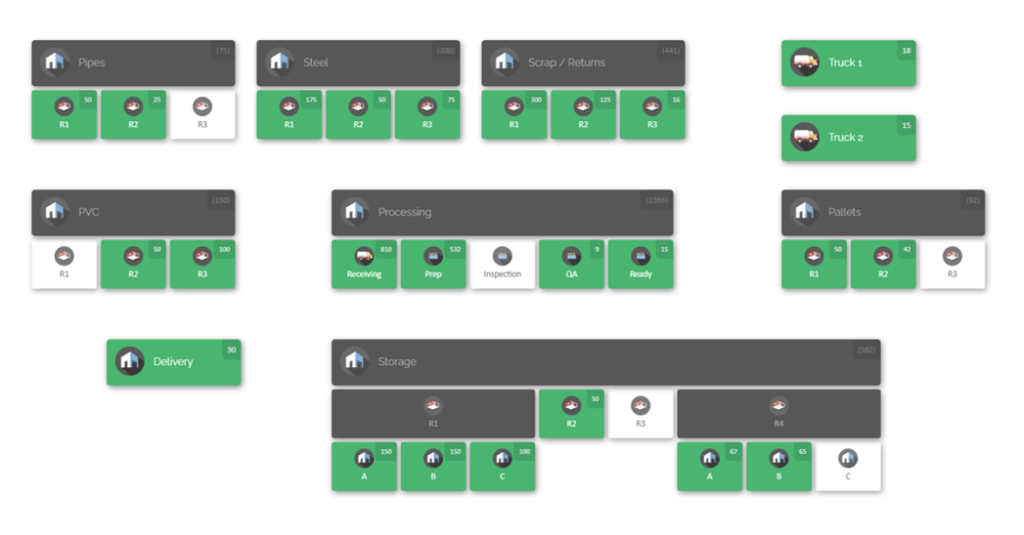
In practice, a visual map can break a complex site into logical zones for different teams. For example, one area might be labeled “Framing Crew” and another “Electrical Crew”, each with its own stored tools and supplies. The image below illustrates such a construction site map divided into work areas. Each zone lists the inventory it contains, making it easy for supervisors and crews to see which site holds which resources. This kind of map-based layout lets anyone click on a section and immediately know what’s there.
For instance, the framing crew area shows drills and lumber, while the electrical crew area lists its power tools and wiring. By visualizing inventory this way, teams can find needed items without confusion. The map also highlights if any area is low on critical parts, prompting timely transfers or orders.
Step-by-Step Implementation

- Survey and Map Locations: Begin by listing every place you store parts and equipment — warehouses, yards, project sites, maintenance shops, etc. For each location, sketch a simple floor plan or map. Note shelves, bins, storage rooms, and work areas. Understanding where inventory actually lives is key to translating that layout into a digital system.
- Choose a Visual Inventory Platform: Select a cloud-based inventory system designed for multi-site operations and mapping. This software should let you draw your facilities and define locations on a map. A platform like CyberStockroom, for example, specializes in creating interactive site maps. Ensure it supports real-time updates and can be accessed by all departments.
- Create Digital Site Maps: In the chosen system, build out your site layouts. Draw or import floor plans for each site, then label areas (aisles, bins, containers, yards). For instance, you might create a map of your warehouse aisle-by-aisle, or outline each crew’s storage zone on a construction site. These digital maps form the “homes” where each part will live.
- Import and Assign Inventory: Bring your existing inventory data into the system. Use import tools or CSV files to load all your parts, equipment, and assets along with their quantities. Assign each item to a specific location on the map based on where it is stored now. For example, place all electrical conduits in the “Electrical Supply Room” on the warehouse map. This initializes the system with your real-world stock.
- Label and Tag Everything: Print barcode labels for your parts and locations. Stick barcodes on toolboxes, pallet racks, and bins, and attach labels to each item or asset. Also label your mapped locations (shelf codes, rack numbers, yard zones). These labels will let teams quickly scan items and locations during operations. Consistent labeling across all sites means your system will always know exactly where to look.
- Train Staff and Start Scanning: Train team members in each department on the new processes. Show them how to use handheld scanners or mobile devices to scan items when they are received, used, or moved. Make sure everyone follows the standard workflow (e.g. “scan incoming parts in, place them in the mapped bin, then scan again”). Initially, supervise the first few days to iron out issues. The goal is that from day one, every inventory change is recorded in the system.
- Begin Routine Operations: Use the software for day-to-day work. When parts arrive on a site, scan them and place them on the map. When crews take equipment or materials for a job, scan and drag those items from the “stock” location to the “in-use” location on the map. Perform cycle counts by scanning zones or running quick count audits from the system. Over time, the system will accumulate a live audit trail of all movements.
- Monitor and Optimize: Regularly review dashboard reports and alerts. If inventory discrepancies or shortages appear, investigate and adjust processes. Update maps as facilities change (e.g., if you add a new storeroom or yard, map it in the system). Continuously refine your locations and reorder points based on usage patterns. By keeping the system up to date, you ensure each department always works with accurate information.
CyberStockroom: A Visual Solution for Multi-Site Inventory
Modern inventory platforms can automate and enforce the best practices above. CyberStockroom is one example built from the ground up for visual, multi-site tracking. Its features include:
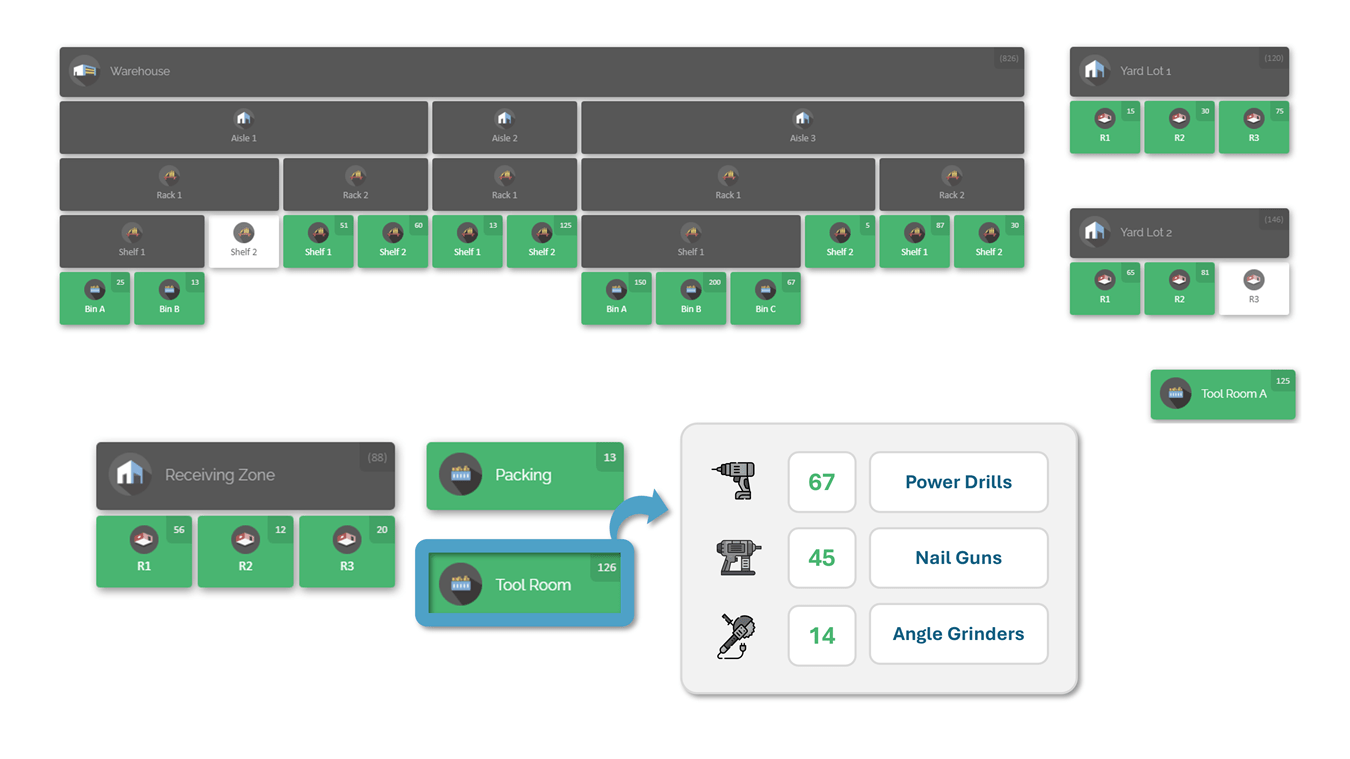
- Interactive Inventory Maps: CyberStockroom lets you build detailed, interactive maps of your entire operation. You can draw any warehouse floorplan, laydown yard, or jobsite layout and define zones (e.g. “Framing Crew Area” or “Warehouse Aisle 3”). Each location on the map displays the exact stock levels stored there. For example, a supervisor can click on the “Framing Crew Area” and instantly see that it contains 50 drills and 200 lengths of lumber. This visual link between physical locations and inventory counts eliminates guesswork and makes finding items intuitive.

- Cloud-Based Real-Time Updates: Because CyberStockroom is cloud-hosted, any update syncs across all devices immediately. When a technician scans a barcode to check a tool into a site, the map and stock counts update in real time for everyone. This ensures that whether a team member is on a computer in the office or a tablet on the jobsite, the inventory shown is always the latest. Instant visibility like this keeps field teams, warehouse staff, and managers all aligned: they’re literally looking at the same live data.
- Drag-and-Drop Inventory Transfers: Moving stock between locations is as simple as dragging icons on the map. If you need to allocate 10 generator batteries from the warehouse to a jobsite, you just drag the battery item icon from one map area to another. CyberStockroom automatically records the transfer and updates quantities. This intuitive method speeds up routine transfers and virtually eliminates entry mistakes. When teams move items visually, they are more likely to follow protocol, and the system always stays up to date with minimal effort.
- Multi-Level and Multi-Site Mapping: CyberStockroom handles any organizational structure. You can nest maps (for example, City > Site > Building > Shelf) so that every part has a precise “home” in the system. A single dashboard view can display multiple sites at once. This means a regional manager could survey dozens of job sites on one screen. Individual departments or crews can then zoom into their own site’s map to manage local stock. The result is perfect cross-team visibility: everyone sees the big picture and their own focus area simultaneously.
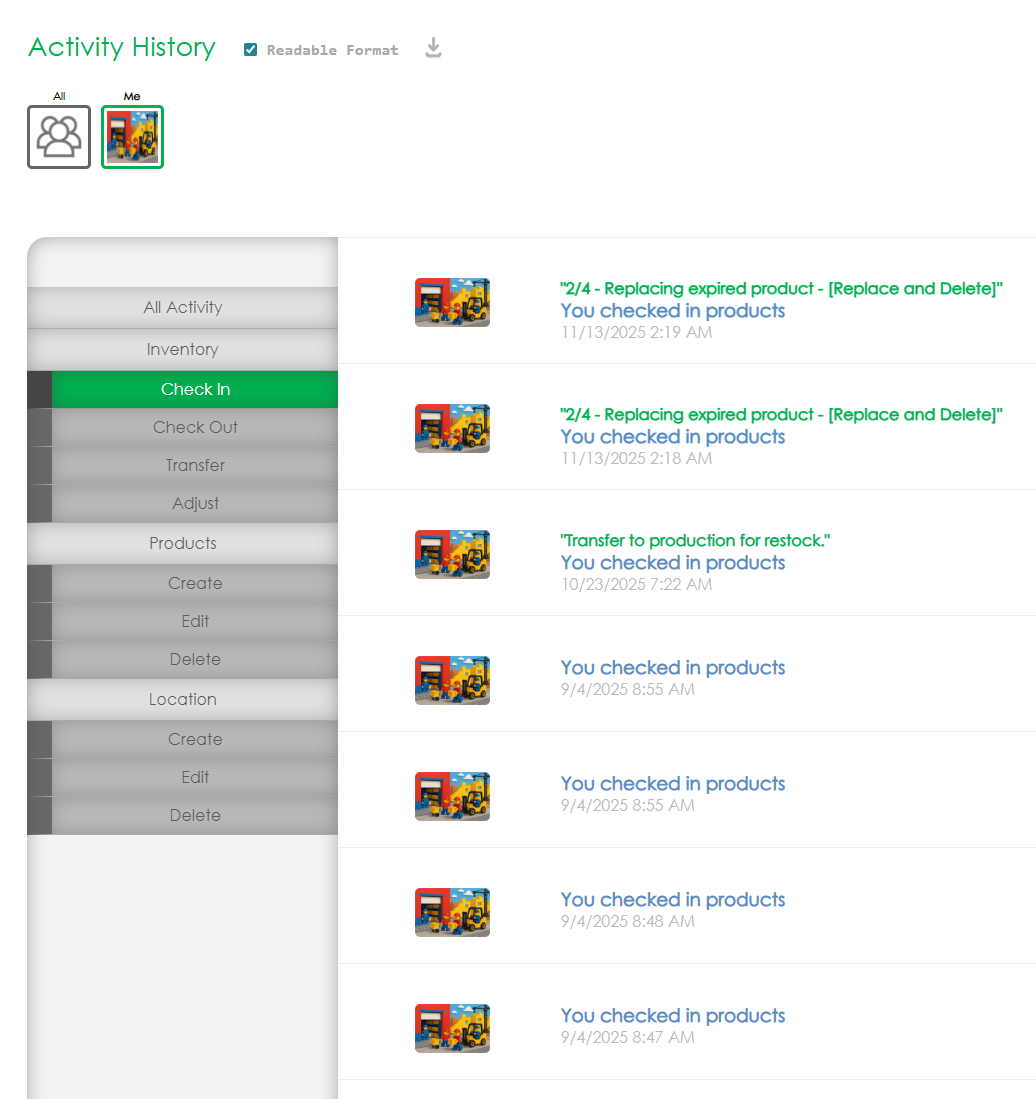
- Activity History and Accountability: Every inventory action in CyberStockroom is logged with details (who moved what, when, and where). This audit trail provides accountability and helps catch issues early. For instance, if a part is misplaced, you can trace its last known movements. Managers and auditors can run reports on usage by department or site, quickly spotting unusual patterns (like a sudden drain on a particular item). Knowing that every change is recorded also encourages careful usage; teams understand that the system tracks inventory loss and adjustments.
By organizing inventory visually and assigning it to teams, CyberStockroom directly solves the multi-department visibility challenge. Everyone on the project can see not just how many parts are available, but also who is holding them. This dramatically reduces wasted time and miscommunication. For example, if a project manager sees that the HVAC crew has extra ductwork fittings, they might redirect it to another site rather than ordering new stock. These kinds of cross-team efficiencies are built into the visual approach.

Conclusion
Full parts and equipment visibility is no longer a luxury – it’s a necessity in today’s complex construction and manufacturing environments. By applying the best practices above – centralizing data, real-time tracking, standardized processes, mapping, audits, and team alignment – you can achieve near-total visibility of your inventory across departments and sites. A visual inventory platform like CyberStockroom makes these practices practical: teams get a clear dashboard of their entire operation, managers see updates instantly, and everyone works from one shared view of truth. The payoff is significant: fewer lost tools, faster order fulfillment, reduced downtime, and smoother coordination between crews and departments. Start by mapping your locations and stocking the digital map. As you implement these methods and tools, you’ll turn inventory from a blind spot into a strategic advantage, driving efficiency and cost savings in every project.









Leave a Reply