
A factory stockroom that works on day shift but falls apart at night is not really organized. It is a set of coping mechanisms held together by a few experienced people who “just know where things are”. The moment those people are off shift, on leave, or pulled into urgent work, the cracks appear: search time spikes, wrong parts get issued, urgent jobs get delayed, and “temporary” stashes quietly become permanent.
What it takes for every shift to find what they need
Multi shift stockroom success is not one improvement. It is a system with three layers that must agree with each other.
The physical layer is the layout, racking, bins, lighting, work surfaces, and traffic flow. It determines how quickly people can move and how safely they can handle materials. Guidance on materials handling and storage repeatedly stresses that stored materials must not create hazards, storage areas should be kept free of accumulated materials that create trip and fire risks, and equipment capacity must be displayed and not exceeded.
The information layer is how you describe locations and items so that the same words mean the same thing on every shift. The clearest, most durable advice in location system design is simple: every physical space used for picking or backstock should have a location name, and every location should be clearly labelled. When that is true, both stocking and picking become teachable, repeatable work instead of guesswork.
The behaviour layer is the standard work that keeps the first two layers true over time: receiving, putaway, issue, return, adjustment, cycle counts, housekeeping, and change control. Without this layer you get drift: items move but records do not, labels peel and are not replaced, and people workaround “because it’s faster”. A central idea of workplace organisation methods is that the aim is a clean, orderly environment where there is a place for everything and everything is in its place, and the hard part is standardising and sustaining the discipline.
When you are trying to support every shift, two failure modes show up more than anything else:
- Tribal knowledge dependence. If the stockroom only works when one person is present, then the system is not designed, it is memorized. The goal is to make the stockroom legible to a new person at two in the morning with no coaching. That is why visual solutions and clear labelling reduce orientation time and search time: they transfer “knowing” from people’s memories into the workplace itself.
- Uncontrolled exceptions. Every stockroom has exceptions: urgent maintenance, substitute parts, supplier backorders, packaging damage, return to vendor, quarantine, and staged kits. The shifts that struggle are the ones that treat exceptions as “outside the system”. A shift friendly stockroom designs exception paths intentionally (and labels them clearly).
Designing a physical stockroom that supports speed and safety
A factory stockroom is not just storage. It is a service centre for production and maintenance. That means the layout must prioritize retrieval time, accuracy, and safe handling, not maximum density at any cost. Safety guidance on materials storage repeatedly emphasizes that stored materials must not create hazards, storage areas should be kept clear of accumulations that cause tripping or contribute to fire risks, and stacking must be stable and self supporting.
Start with the “why” of layout: reduce decision points, reduce travel, reduce lifting strain, reduce congestion, and make it hard to put things back in the wrong place.
Create zones based on workflow, not on history
Even if your factory does not ship customer orders from the stockroom, you still have a flow: receiving, inspection, putaway, issue, staging, returns, and disposal. General warehouse layout guidance repeatedly highlights principles like accessibility, movements that are necessary and direct, and avoiding crossing transport and work lanes. Those principles apply in factories too, because crossing paths create both delays and safety risks.

A practical zone set that works for most factories looks like this:
- Receiving and inspection. A clearly marked space where items land before they are accepted into stock. “Goods receiving” guidance normally includes checking quantity, condition, and allocating to a space in the warehouse, which is exactly what factories need to protect stock accuracy.
- Quarantine and “do not issue”. A visible holding area for suspect, damaged, or unverified items.
- Putaway staging. A short term buffer for items that are accepted but not yet placed into their final bin.
- Main storage. Structured racking, shelving, cabinets, and bins.
- Point of issue. A counter or workstation where items are issued, labelled, and documented.
- Kitting and staging. A secure area for pre pulled kits and planned work. Kitting best practice guidance often recommends keeping this area separate and organised with clear identifiers to prevent parts “walking off” and to protect planned work.
- Returns and rework. A place for items coming back from the floor: unused parts, wrong issues, or items to be inspected before returning to stock.
- Write offs and disposal. A location that makes it easy to remove obsolete or damaged stock so it does not drift back into active bins.
Put fast movers where the work is
A common storeroom best practice is to store fast turning parts up front for quick access, with slower moving or bulky parts further back. That sounds obvious, but it guards against a real multi shift problem: night shift tends to take shortcuts when they are rushed, and “further back” items are more likely to get left in temporary spots. Reducing distance for common picks is a prevention tool, not just an efficiency play.
Store heavy and bulky items low and accessible
Location planning guidance consistently notes that larger and heavier items make more sense on the floor or lower shelving for safer, more accessible picking. This also reduces the temptation for unsafe reaches on ladders when supervision is lighter on off shifts.
Make aisles and handling space a design requirement, not a leftover
Two things can be true at once: you want to store more, and you need room to move without collisions or pinned hands. Safety guidance on materials handling stresses providing sufficient clearance for mechanically moved materials and keeping passageways clear of obstructions and trip hazards. Racking guidance also notes aisles should be wide enough for safe loading and unloading. Design the space around the equipment that will actually operate there, and protect the aisles from becoming overflow storage.
Always display load limits and inspect racking
Good racking guidance states the system should clearly display maximum safe working loads and specified load configurations, and that inspections should be regular and formally carried out by a competent person at least annually. This is not just compliance. It is operational reliability, because a damaged rack leads to blocked aisles and emergency moves that destroy location discipline.
Build “work surfaces” into the stockroom
A recurring source of stockroom chaos is doing tasks in the aisle: unpacking, relabelling, splitting packs, or counting items on top of bins. That scatters packaging and loose parts. Set aside benches for receiving checks, repack, and kit building. Then make it standard work that these tasks do not happen in aisles. The result is fewer trip hazards and fewer misplaced items.
Control lighting, cleanliness, and visibility
Visual management only works if people can see. Racking guidance includes ensuring adequate lighting to enable safe loading and unloading, and workplace organisation methods emphasise cleanliness and inspection as part of keeping order. This matters more on night shift, when fatigue is higher and vision is poorer.
The physical layout is the foundation, but it cannot carry the whole system. The next step is the language of the stockroom: locations.
Location naming and labelling that survives shift changes

If you want every shift to find what they need, your location system must pass one test: it must work for both putaway and picking.
Many teams build a “picker friendly” layout but forget that the stockroom falls apart when putaway is inconsistent. Location planning guidance highlights this directly: it is not just pickers, stockers and those responsible for putaway must also know bin locations to place stock in the appropriate places. Every physical space used for picking or backstock should have a location name, and every location should be clearly labelled.
A strong bin location system has five characteristics.
- Uniqueness. One location code maps to one physical place. No duplicates, no “temporary” suffixes, no unofficial overflow behind the official bin.
- Hierarchy. A location is readable from large to small: zone or area, aisle or row, rack or bay, level or shelf, position or bin. A common structure explicitly follows that pattern so people can drill down from “where in the stockroom” to “which bin”.
- Consistency. The same segment order, separators, and naming rules apply across the entire stockroom. Guidance in bin naming repeatedly warns that confusing or frequently changing systems disrupt operations. Consistency is what allows cross training between shifts and reduces the learning curve when people move between areas.
- Visibility. Labels must be readable at the point of use. Label best practices repeatedly point to standardised formats, visible placement, and durable materials to withstand warehouse conditions. This is not “nice to have”. If labels fall off, your precise system becomes a guessing game again.
- Scan friendly input. Even when you are not running a full warehouse management system, scanning based workflows reduce manual typing errors and speed up transactions. Barcode based inventory tracking is widely described as improving accuracy by reducing manual data entry, and scanning is often faster than typing during receiving, stock takes, and issuing.
A practical approach to design a location code that people actually use looks like this.
- First pick your segmentation. For most factories, five segments are enough: Area, Aisle, Bay, Level, Bin. That matches common guidance.
- Then standardise on format. Decide where separators go, whether letters are used for zones, and whether numbers are fixed width with leading zeros. Fixed width numbering is critical because it keeps labels aligned, improves sorting, and reduces misreads on fast shifts. Location examples in bin naming guidance commonly use fixed digit positions for racks and bins.
- Finally define label rules.
- Where the label sits on the rack or bin. Make it uniform so people know exactly where to look, even when tired.
- What the label contains. At minimum, a human readable code plus a scannable code.
- What the label is made of. Use materials that survive temperature swings, dust, handling, and cleaning.
- When labels are replaced. Make replacement part of weekly standard work, not a heroic fix after a crisis.
There is one more ingredient that determines whether labels are trusted: the moment when a shift discovers the label is correct.
That is why the first month after rolling out a location system should include “trust building” routines: frequent spot checks, fast correction of wrong labels, and visible rules that everyone follows. Workplace organisation guidance often notes that measuring time required to locate items before and after improvement is a concrete way to identify benefits and build momentum.
CyberStockroom in the middle of the system
Stockroom organization usually fails for one reason: the physical stockroom and the recorded stockroom drift apart. Once that happens, people stop trusting the record. When people stop trusting the record, they stop using the system. Then every shift becomes a fresh hunt, which is exactly what you are trying to eliminate.
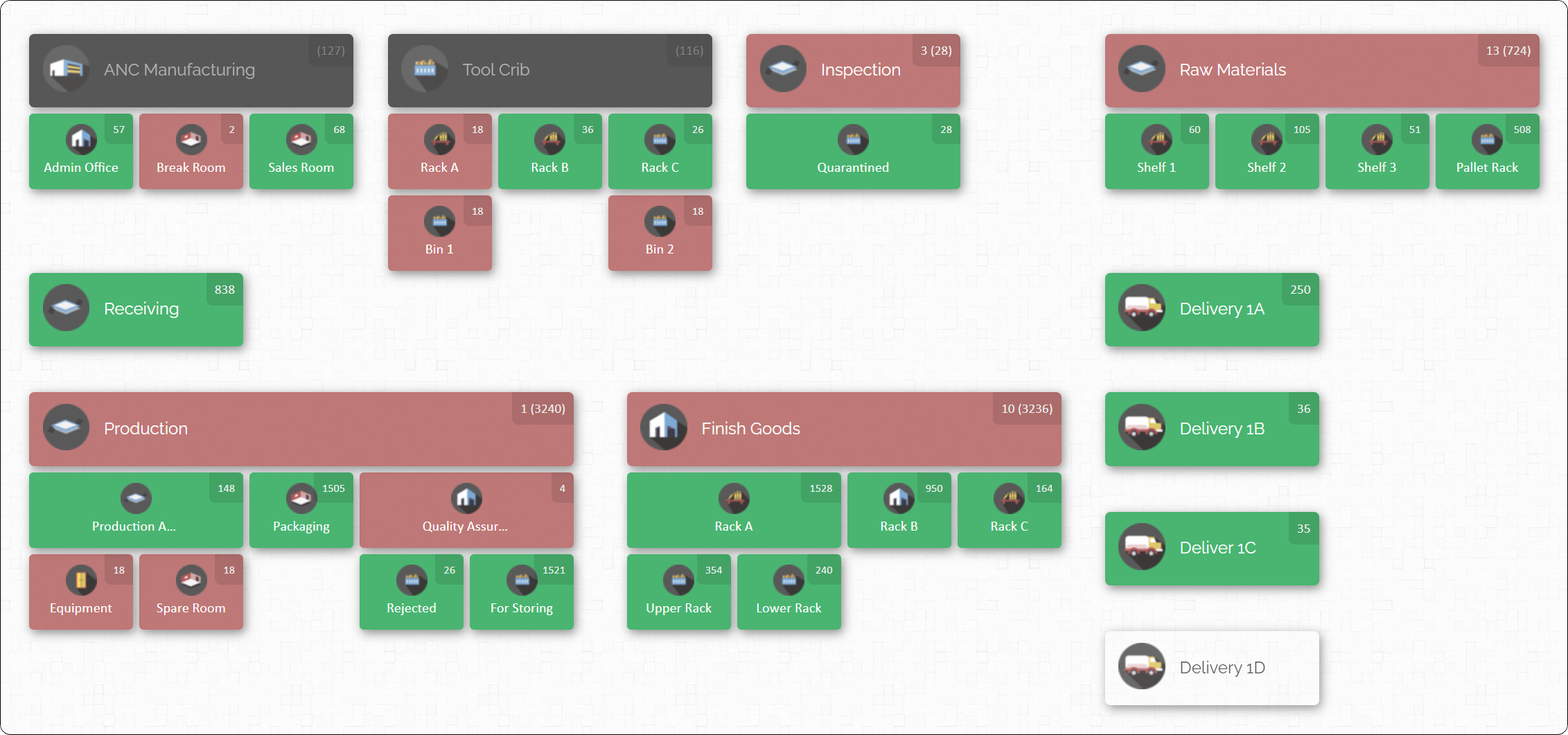
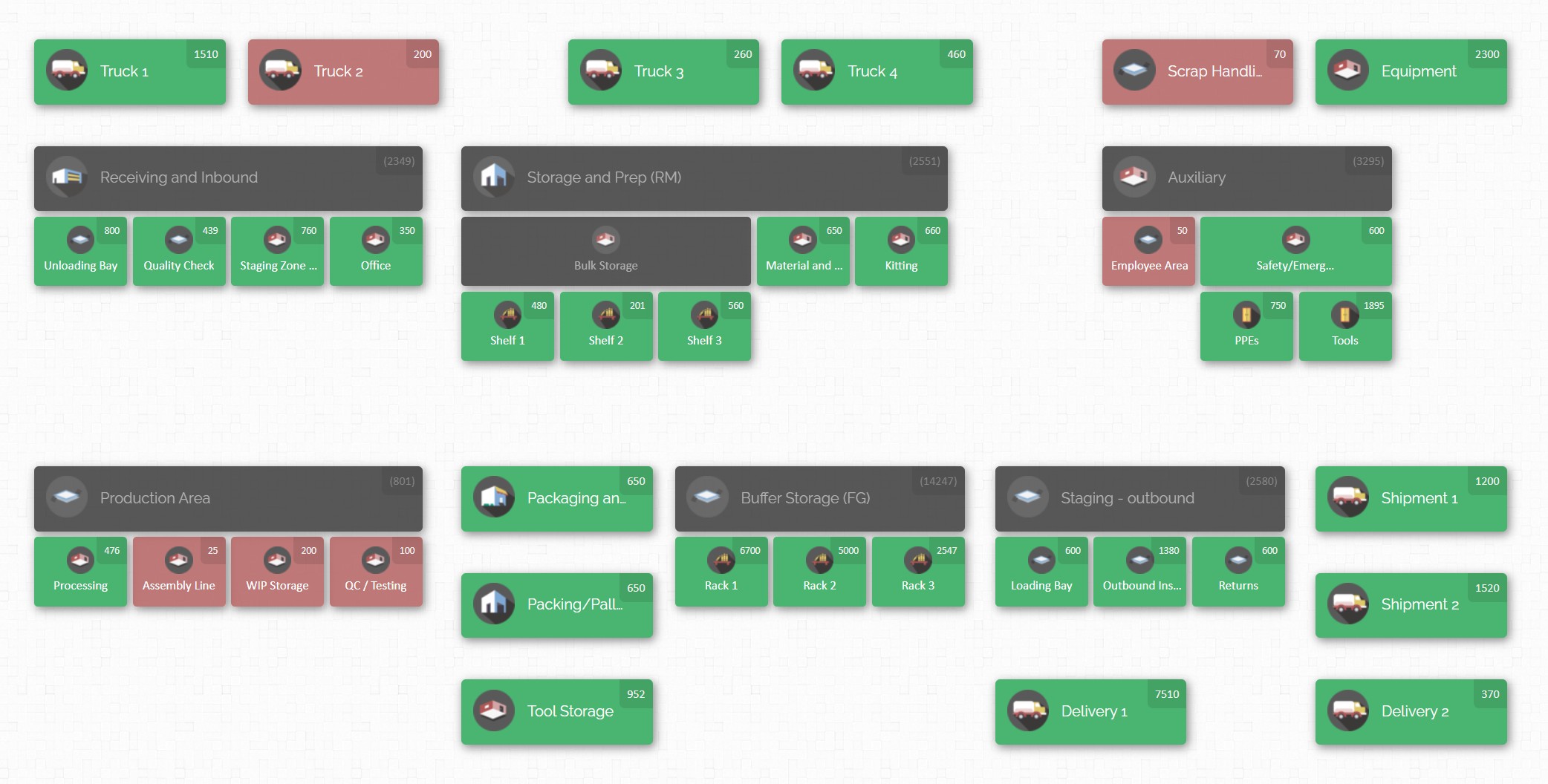
This is where a visual inventory map can change the feel of the stockroom. The core idea described in CyberStockroom’s own guidance is that instead of starting with a list of products, you start with a location map that gives a bird’s eye view so you can answer: how many of what do I have where.
Here is how CyberStockroom aligns to the best practices in this article, without asking you to change the fundamentals.
It makes “locations first” the default. A recurring best practice in location planning is that every physical space used for picking or backstock should have a location name and be clearly labelled.
CyberStockroom is designed around locations and sub locations as the structure of the map, which fits this principle directly.

It supports multiple ways to load your catalogue, which helps you start clean. There multiple ways to add items, including manually, barcode scanner input, or spreadsheet upload. The help guidance shows that you can upload many products via a spreadsheet (CSV) instead of entering one by one, which is useful when you are migrating from ad hoc lists.
It ties labels and scanning into everyday work, not special events. In CyberStockroom, barcode scanners behave like keyboards, any textbox accepts scanner input, and scanners can be used to search, check in, check out, and transfer products. This matters for shift work because it reduces the friction of recording movements. If recording is slow, the busiest shift will skip it first.
It supports fast transaction styles for high volume moments. The “Quick Scan” can handle large number of back to back transactions without slowing down, including check ins, check outs, and transfers. High volume moments are exactly when night shift will otherwise resort to “I’ll do it later”, which is how drift begins.
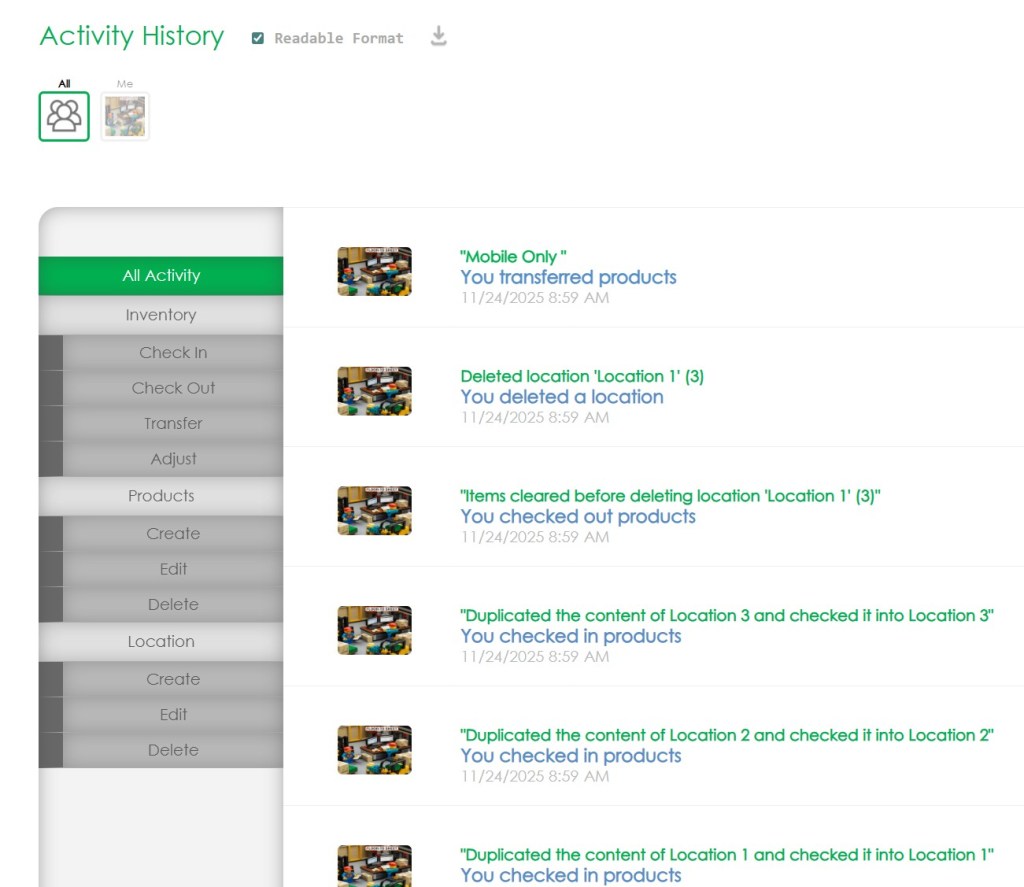
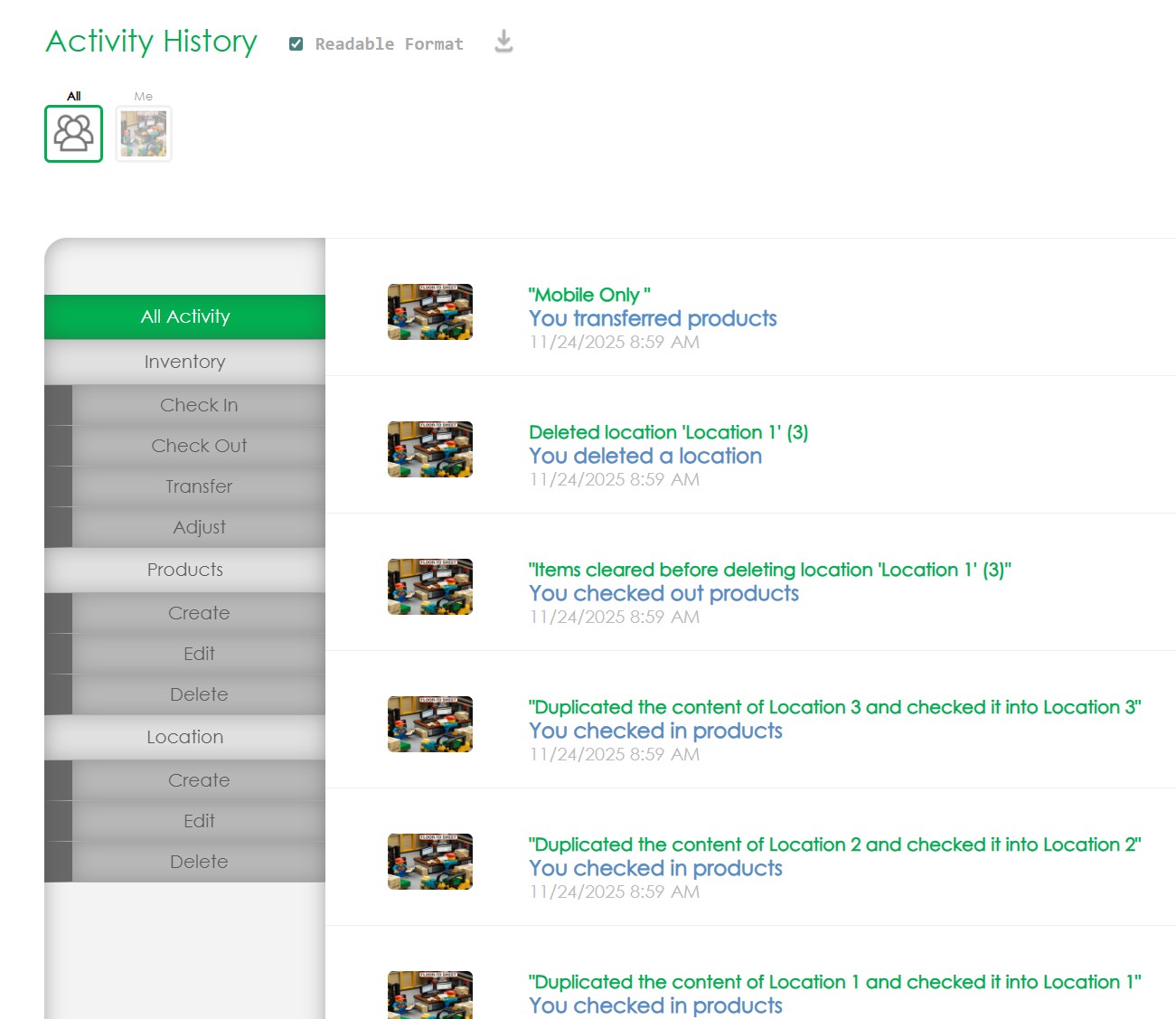
It records activity history so you can solve problems instead of blaming shifts. The activity history records the transactions with details, including check in, check out, transfers, adjustments, product and location changes, and user, date, and time. You can filter by date, location, product keyword, user, and comments. This is a practical tool for root cause review: not to punish, but to fix the steps that keep creating errors.
It gives product distribution visibility, which reduces searches and duplicate buying. You scan or select a product and see its distribution. Viewing a product’s distribution across locations, including quantities shown per location and filtering the map to show distribution. Operationally, that means fewer phone calls and fewer aisle walks to confirm whether something exists.
A useful way to think about CyberStockroom in a manufacturing stockroom is that it can act as a shared visual “reference point” that makes your physical standard visible: zones, bins, quantities, and transactions. This supports the central goal of this article: reduce dependence on memory so every shift can perform the same work the same way.

Process rules that stop the stockroom from drifting
A well labelled stockroom can still fail if the processes for receiving, putaway, issue, and returns are not designed for real shift conditions. The system must be easier to follow than to bypass.
The most practical lens is to treat every movement as one of four transaction types: check in, check out, transfer, adjust. CyberStockroom’s own help content frames standard inventory management around checking products in and out of locations, transferring between locations, and recording adjustments and comments. Even if you are not using CyberStockroom, those four transactions match the physical reality of stockrooms.
Build your process rules around these transactions.
Receiving and acceptance
The receiving step is where accuracy is cheapest to protect. Receiving guidance commonly includes verifying quantity and condition and allocating to space. In factory terms, “allocate” means: assign a location, label it, and make the location visible to the next shift. The failure pattern to avoid is signing in stock but leaving it on a pallet that blocks an aisle, because then night shift will move it “somewhere” and the location will be lost.
A strong receiving routine has three “musts”:
- No item enters main storage without a defined putaway location.
- No item enters main storage without an identification method that matches your catalogue (part number, description, and unit of measure).
- No pallet or tote is left in an aisle as overflow storage. Safety guidance explicitly calls for keeping storage areas free from accumulated materials that cause trip hazards and keeping passageways clear.
Putaway standard work

Putaway is where multi shift consistency is won or lost. The goal is that two people on different shifts put the same item in the same place without discussion.
To get there, define one rule: the first location is the home, anything else is overflow, and overflow is labelled and time boxed. Bin naming guidance warns against shortcuts that create confusion and disrupt operations. Overflow is not banned, but it becomes part of the system, not outside it.
If you have chronic overflow, treat it as a design signal. Either the bin sizes are wrong, min max is wrong, or the catalogue needs rationalisation.
Issue and return discipline
Open access stockrooms feel faster until you calculate the waste: duplicate purchases, lost tools, wrong parts, and emergency orders. That is why storeroom best practice guidance often stresses secure access and ensuring people go through the correct check out process, and it recommends charging parts to an asset or work order so you can understand where parts go.
You can implement this discipline without turning the stockroom into a bureaucracy:
- Make issue the default and make “self serve but recorded” the back up. For example, a staffed counter on day shift and a clearly defined self serve procedure on off shifts. What matters is that check out is recorded, not how many steps it takes.
- Standardize transaction comments for the most common reasons: work order number, asset tag, job number, line number, or maintenance ticket. CyberStockroom explicitly supports leaving comments after transactions and retaining them in activity history search. Even without the platform, your process can apply the same principle: comments are not optional when stock is leaving the controlled area.
- Make returns a designed lane, not a shame pile. Returned items should go into a labelled returns area, be inspected, then either be put back into the correct bin or be dispositioned. This prevents the classic night shift trap: leaving returned items on a bench “for someone to handle” and then forgetting.
Kitting for planned work and repetitive jobs
Kitting is one of the most effective ways to help every shift, because it converts many small picks into one controlled action. Storeroom guidance often recommends keeping the kitting area secure and separate, with clear organisation such as numbered or colour coded bins, and ensuring parts do not leave without a work order attached.
A shift friendly kitting practice has two rules:
- Kits have a physical home (staging rack or cabinet section) and a clear identifier.
- When a kit is broken (a part is removed early), the break must be recorded and replenished, or the kit is marked incomplete. The worst outcome is a kit that looks complete but is missing a critical component.
Cycle counting to prevent the yearly “inventory panic”

Cycle counting is consistently described as a method to confirm physical inventory matches records by performing regular counts of specific items, and it is positioned as an auditing process that improves stock record accuracy without stopping operations for a full count. For multi shift factories, this matters because you cannot “pause the plant” easily, and the shift that gets blamed for stock issues is often the one working when errors are discovered. Cycle counting turns stock accuracy into a controlled routine.
To make cycle counting work across shifts:
- Count by location, not only by item. Location counts reveal the true problem: wrong putaway or wrong bin labelling.
- Set frequency by ABC classification. Higher criticality and higher usage items should be counted more often. ABC based cycle counting is a standard technique in storeroom best practice guidance.
- Treat every discrepancy as a process signal and correct the upstream cause. The purpose is not to “fix the number”, it is to stop the same error happening next week.
Reorder points and two bin control for small consumables
For low value, high usage items like fasteners, gloves, tape, and fittings, two bin control is a common, practical method: you draw from the first bin until it is empty, which triggers replenishment, while the second bin covers demand during lead time. This approach is widely described as being used for small, low value items that can be stocked in bulk and provides an internal signal when stock is running low.
This is a powerful “every shift” tool because it reduces judgement calls and turns replenishment into a visible trigger.
Shift handover built for the stockroom
Factories are full of shift handover practices, but the stockroom is often left out. That is a mistake, because stockroom issues are exactly the kind that cascade: a missing part becomes a delayed job, which becomes downtime, which becomes overtime, which becomes rushed receiving the next day.

Safety guidance on shift handover defines the goal as accurate, reliable communication of task relevant information across shift changes to ensure continuity of safe and effective working. It also breaks effective handover into three elements: preparation by outgoing personnel, a handover exchange, and cross checking by incoming personnel as they assume responsibility.
For a stockroom, this translates into a tight handover routine that takes minutes, not half an hour.
- Outgoing shift prepares. The outgoing shift updates the “exception board” (physical or digital) before handover. Only exceptions go here, not routine work. Typical stockroom exceptions include:
- Items received but not yet put away.
- Stockouts or low stock items that will impact the next shift.
- Open kits staged for planned work.
- Damaged bins, missing labels, or blocked aisles.
- Urgent issues pending (a critical part requested but not yet issued).
- Any location changes (a bin moved, a rack reconfigured).
- Handover exchange happens face to face where possible. The same safety guidance explicitly recommends face to face, two way handover with joint responsibility and both verbal and written communication. For stockrooms, the “written” element can be a short log entry or a checklist. The key is that incoming staff can ask questions and challenge unclear notes.
- Incoming shift cross checks. Cross checking does not mean recounting the stockroom. It means verifying the exceptions: walk the receiving staging area, confirm kits are secure, check that aisles are clear, and verify the top priority low stock situation. This matches the guidance that incoming personnel cross check information as they assume responsibility.
- If you do only one handover improvement, do this: create a stockroom shift handover checklist that fits on one page and is completed every shift change. Many checklist templates exist in the broader manufacturing world; the value is not the template, it is consistency at every shift change.
To keep it real for factory life, design the checklist around the three most expensive stockroom failures:
- Safety hazards (blocked aisles, unstable stacks, damaged racking).
- Unrecorded movements (items moved without a corresponding transfer or check out).
- Uncontrolled exceptions (kits, returns, quarantine, receiving overflow).
Measuring success and sustaining the system without bureaucracy
The best stockroom organisations do not rely on willpower. They rely on simple metrics, short routines, and visible standards.
Workplace organization guidance points out that one of the most direct ways to prove benefit is to measure how long it takes to locate items before and after improvements. That is a perfect “every shift” metric because it captures the lived experience of operators and maintenance techs.

Here are metrics that matter in manufacturing stockrooms, and why they work.
- Time to locate and issue a part. This is your core promise. Measure with time studies for a small set of common items, and repeat monthly. If it rises, something drifted.
- Stockout driven expedites or emergency buys. A key goal of inventory management best practices is balancing enough critical parts to avoid downtime while avoiding excess stock. Expedites are a clear counter signal.
- Inventory accuracy and cycle count performance. Cycle counting guidance defines the purpose as confirming physical counts match records and improving stock record accuracy without shutdowns. Track discrepancy rate and the time to resolve root causes.
- Putaway compliance. The simplest version is a weekly audit of a small sample: does the item in the bin match the bin label and the catalogue description, and is it recorded in the correct location. This ties directly to the “every location has a name and is labelled” principle.
- Aisle and hazard compliance. Safety guidance is clear that storage areas should be free of accumulations that create trip hazards and that passageways must remain clear. A short end of shift walk that checks for blocked aisles and unstable stacks prevents drift.
Sustainment also requires ownership. If the stockroom belongs to “everyone”, it belongs to no one. A practical ownership model for multi shift factories includes:
- One primary stockroom owner accountable for layout, location standards, and catalogue integrity.
- Shift level caretakers on each shift responsible for housekeeping, label replacement, and exception reporting.
A simple change control rule: location codes and zone structure do not change casually. If you need to change them, you change the label, the map or record, and the training reference at the same time. This prevents the “frequently changing system” problem that disrupts operations.
When software is part of your system, use it to support governance, not replace it. Activity history and transaction comments can be used to review what happened and why, and user roles can align access with responsibility. That is how you keep accountability clear without adding layers of policing.
Rollout plan for a shift friendly stockroom

A stockroom overhaul that tries to do everything at once usually fails for one reason: production keeps running. The stockroom must keep serving the plant while you reorganise it, which means you need a rollout that protects continuity.
A practical rollout uses four phases, each with a tight definition of “done”.
Stabilise safety and flow. Clear aisles, remove trip hazards, define receiving and returns lanes, and post load limits where required. Safety guidance prioritises clear passageways, stable storage, and displayed capacities. This phase can be achieved quickly and makes everything else easier.
Define locations and labels. Pick the naming convention, label every location, and create the rules for label format, placement, durability, and replacement. This phase is the turning point because it makes the stockroom readable to every shift.
Standardise the transactions. Lock in receiving, putaway, issue, return, and adjustment routines. If you are using CyberStockroom, this is where check in, check out, transfers, quick scan, and comments become normal work. If you are not, the same transaction logic still applies. The goal is that movements are recorded as they happen so shifts do not inherit surprises.
Sustain with audits and handovers. Implement the shift handover checklist, start cycle counting, and set weekly audits for housekeeping, label condition, and putaway compliance. This is where the system becomes stronger than individual habits.
If you keep one idea in mind through all phases, make it this: design the stockroom for the hardest moment, not the easiest one. The hardest moment is not a calm Tuesday morning. It is a breakdown at night, when the team is short staffed, supervision is lighter, and the plant needs parts now. A stockroom that holds together then will work the rest of the time.









Leave a Reply