
In modern industrial organizations, teams often manage supplies, parts and tools spread across multiple sites and departments. Without real-time, unified visibility, it is easy for critical parts to be misplaced or overlooked. A cloud-based inventory system solves this by giving everyone one shared view of stock levels and locations. With an interactive map of your entire operation, managers and technicians instantly know exactly what is on hand, where it is, and which department or project it belongs to. This guide explains how adopting cloud inventory systems and best practices improves operational efficiency, inventory accuracy and cross-team collaboration across multi-site industrial operations. We also show how CyberStockroom visual mapping features enable these improvements in real time.
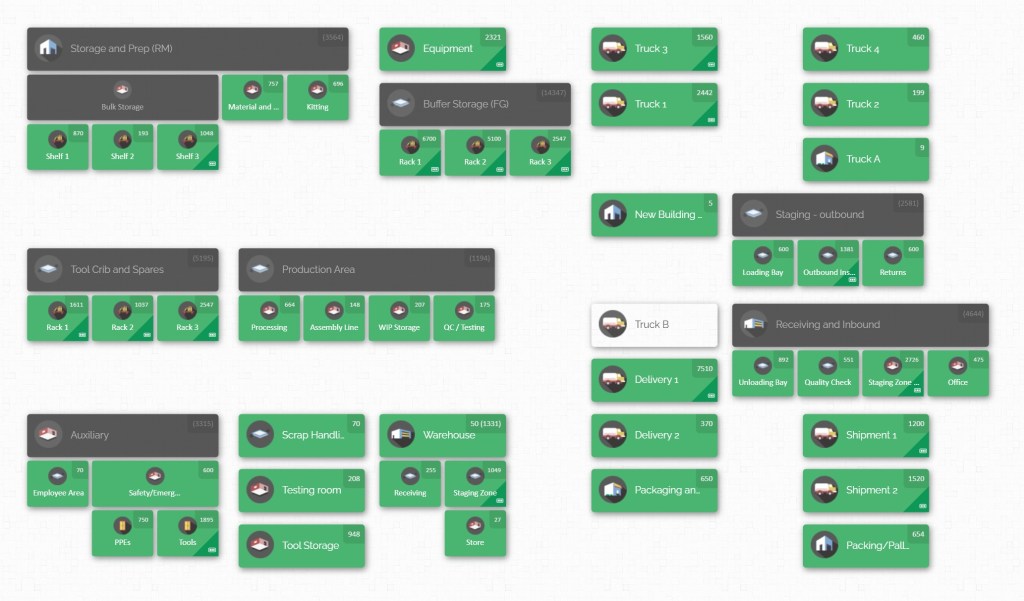
Cloud inventory platforms use the internet to host a single “source of truth” for all inventory data. Any update – whether it’s recording a delivery, consuming parts on a job site, or transferring stock between facilities – is entered once into the cloud system. Within seconds, that change is visible company-wide. As a result, the warehouse team, maintenance crew, production planners and site supervisors all see the same current data on parts and materials. This shared visibility cuts delays (no more waiting for emailed spreadsheets) and prevents the confusion of multiple conflicting inventories. In the sections below we explore common challenges in multi-site inventory management, outline best practices for visibility and control, and describe how cloud solutions like CyberStockroom meet those needs with mapping and tracking tools.
Challenges in Multi-Site Industrial Inventory Management
Managing inventory for an industrial company with multiple plants, warehouses, yards and job sites is complex. Each location may have its own procedures, storage layout and stock needs. Departments such as maintenance, engineering and production might all store common parts but use different systems or spreadsheets to track them. This situation leads to data silos and fragmented information. For example, a factory floor might reorder a replacement motor from its local stock, not knowing that one is available at the regional warehouse. Meanwhile, a second warehouse may be unaware that the parts department has already consumed inventory on a nearby site. These miscommunications create stockouts, overstocks and delays.
Some specific obstacles include:
- Disconnected systems and processes: Without a unified inventory platform, each team or site may rely on manual logs, separate software or local spreadsheets. Reconciliation across these systems is error-prone and slow.
- Lack of real-time updates: When inventory records are updated periodically (daily or weekly), the data is stale by the end of the day. A part used in the morning may still appear in stock in the afternoon reports. This delay causes mistakes – for example, ordering new supplies when perfectly good stock is just in transit.
- Inconsistent part identification: Different sites or departments often use varied naming conventions or part numbers. The same bolt or motor might be labeled differently in each department’s system, making consolidated tracking nearly impossible.
- Geographical and environmental factors: Industrial operations may span urban factories and remote construction sites. Some locations have poor network connectivity. Equipment can move by truck, rail or crane. All this makes tracking stock flows challenging without an always-on cloud solution.
- Human error and lost items: When staff check materials out to jobs or out of maintenance stores, forgetting to log those transactions creates phantom inventory (where the system thinks items are available but they are not). In multi-site operations, this is exacerbated by multiple handoff points.
These challenges hurt operational efficiency. Time is wasted verifying inventory levels, teams overspend on rush shipments, and production can halt when needed parts vanish. For large projects or continuous manufacturing, even small delays or inaccuracies can escalate into major costs. To overcome this, best-in-class operations turn to robust, cloud-based inventory management that spans all sites and departments.
Benefits of Cloud-Based Inventory Systems for Multi-Site Operations

Cloud inventory systems transform how multi-site industrial companies manage stock by centralizing data and enabling instant sharing. Key benefits include:
- Unified, real-time visibility: As soon as a part is received, consumed, or moved, the cloud system updates across all sites. Every stakeholder – from procurement to field teams – sees the same live information. This eliminates uncertainty about where inventory resides at any moment.
- Accessibility from anywhere: Being cloud-hosted means data is accessible via web browsers (or browser-like interfaces) on any device. A supervisor on a job site can check stock levels in a remote warehouse, and a plant manager can approve purchases while travelling. This geographical freedom was impossible with on-premise systems or paper logs.
- Improved inventory accuracy: Automatic updates and validations reduce human errors. Scanning barcodes when parts move ensures the system matches reality. If everyone checks inventory through the same cloud portal, discrepancies between sites are quickly spotted and corrected. Better accuracy, in turn, lowers carrying costs (less safety stock needed) and minimizes stockouts.
- Streamlined cross-team collaboration: Cloud platforms break down information silos. Maintenance crews, project managers, and logistics all work from the same data set. Shared dashboards and alerts keep teams aligned. For example, if a truck is en route with new supplies, both the receiving warehouse and the ordering department can track its status.
- Data-driven decision-making: Centralized cloud data enables analytics and smarter planning. Managers can run reports that compare stock turnover rates between sites, identify slow-moving items, or forecast demand based on actual usage trends. This intelligence guides better purchasing and helps balance inventory where it’s needed most.
Together, these advantages support operational efficiency by cutting waste (both time and materials) and ensuring the right parts are available when needed. They also enhance inventory accuracy by synchronising records, so teams trust the data. Finally, by giving all departments a common platform, cloud systems foster cross-team alignment – everyone “speaks the same language” in terms of stock numbers and locations.
Best Practices for Multi-Site Inventory Visibility
To make the most of a cloud inventory system and ensure multi-site visibility, industrial teams should follow these proven practices:
- Centralize inventory in one platform: Use a single cloud-based inventory database for all locations and departments. This centralization eliminates data fragmentation. Every stock movement or balance update – whether from a factory warehouse, a construction yard, or a service vehicle – feeds into the same system. Centralized data means a purchase order placed by one team will immediately reflect in the available balance for others. It also simplifies managing user permissions and reporting: one login provides the full inventory picture.
- Standardize part codes and categories: Define a uniform naming convention and categorization scheme across the company. For example, ensure that every department uses the same SKU for identical items. When every site labels parts consistently, the cloud system can aggregate and compare stock across locations accurately. Consistency might involve using universal product numbers, harmonized units of measure, and predefined categories (e.g. fasteners, valves, safety gear). This prevents duplicated entries and makes data entry intuitive for staff at any location.
- Implement real-time scanning and data capture: Equip teams with barcode scanners (or devices with camera scanners) at each site. When an item arrives, is taken from stock, or is moved, it should be scanned into the system immediately. This live data capture eliminates lag between physical movements and the recorded inventory. For example, if a technician checks out a motor from the onsite maintenance cabinet, scanning it right away updates the cloud database so the warehouse knows the motor has been deployed. Using scanning also reduces keying errors and ensures that counts stay accurate.
- Visual mapping of locations: Create a digital map or floor plan for each site within the cloud system. Map out warehouses, shop floors, laydown yards, equipment rooms and any storage areas. Assign each shelf, bin or zone a unique location code on the map. This spatial mapping helps teams see exactly where stock lives. For instance, a map-based interface lets a user click on “Building A Warehouse – Rack 4” to see all parts stored there. Visual layouts also speed up picking and receiving operations: workers follow map cues rather than navigating disjointed lists. CyberStockroom’s drag-and-drop map builder makes this easy by allowing managers to design custom layouts that mirror real facilities.
- Regular audits and cycle counts: Schedule frequent physical inventory checks (cycle counts) at all sites to catch any discrepancies early. Even with real-time tracking, unexpected issues like theft, damage or mis-scans can cause errors. A best practice is to perform targeted audits on critical or fast-moving items and full counts during slow periods. These audits reconcile the actual stock on shelves with the cloud records, keeping the system accurate. Classify inventory by value or criticality (for example, an ABC analysis) so higher-value or high-use parts get checked more often. Over time, regular audits train staff to trust and maintain the cloud data’s integrity.
- Optimize warehouse and site layouts: Organize physical spaces so that high-demand items are easy to reach. For example, keep fast-moving parts near the shipping area or production line, and group similar items logically. On a cloud map, clearly label zones (receiving, staging, storage, shipping) with color-coded tags or categories. An efficient layout speeds up picking and restocking and reduces handling errors. It also supports real-time updates because workers spend less time searching for items to scan; a clear location system means they can confirm stock where it belongs.
- Streamline transfers between locations: Plan and execute inter-site transfers using the cloud system’s tools. When moving inventory from one plant to another, create a transfer order in the system. The cloud platform can track the item as it leaves the source location, is in transit, and arrives at the destination. Consolidate shipments whenever possible to save transport costs. For example, if multiple job sites need similar parts, gather them in one truck load. Always log these transfers in the system (e.g. by scanning parts before loading and after delivery), so stock counts stay aligned across sites. This discipline prevents double-counting (where both sites think they have the same item) or lost shipments.
- Foster cross-team communication: Use the shared visibility that cloud inventory provides to align departments. For example, hold regular coordination meetings where each team reviews the inventory dashboard before planning their week. Encourage teams to post notes or updates in the system (if the software allows) about upcoming usage. If a project scope changes suddenly (common in construction or manufacturing), communicate those changes immediately in the inventory platform so orders or reservations can be updated. By keeping procurement, production, maintenance and other teams in sync on inventory status, you eliminate redundant orders and ensure priorities are understood by all.
- Automate alerts and replenishment: Configure the cloud system to alert responsible parties when stock of a part falls below a threshold. These low-stock notifications should reach both the local site manager and any central planner. Some systems let you automate reorder suggestions based on historical usage and lead time. Even without full automation, simply having an in-cloud “watch list” of critical parts keeps everyone proactive. Ensuring that everyone follows up on alerts speeds up restocking of needed items before they cause downtime.
- Use data to forecast and plan: With accurate, consolidated inventory data, teams can analyze trends. Look at usage patterns across sites to forecast demand. For seasonal operations or project-driven environments, use past schedules to predict future needs and order accordingly. For example, if a maintenance team knows a shutdown is coming, they can bulk-order spares ahead of time and distribute them via the cloud system to each plant. This planning avoids emergency rush orders. Over time, tracking usage in real time improves forecasting accuracy and aligns procurement with actual operations.
Following these practices helps create a lean, synchronized inventory operation. It boosts operational efficiency by reducing wasted motion (no one is searching for “lost” parts) and optimizing stock levels. It improves inventory accuracy, since standardised data and frequent audits keep the cloud records reliable. Crucially, it builds cross-team alignment because every department references the same up-to-date stock information, reducing finger-pointing and guesswork.
Operational Efficiency and Inventory Accuracy Through Visibility

When inventory data flows smoothly through the cloud, industrial operations run faster and leaner. Real-time visibility and mapping turn static stockrooms into dynamic resources. Some practical impacts include:
- Faster order fulfilment: With up-to-the-minute stock counts, warehouse pickers immediately see if an order can be filled or if they need to reroute. Mobile-enabled scanning (or even integrated handheld scanning if available) means confirmation of picking happens in seconds. This speed ensures production or field teams wait less for materials. Fewer backorders and expedited shipments translate directly to cost savings.
- Reduced downtime: In manufacturing and construction, unscheduled downtime is extremely costly. Real-time cloud inventory helps prevent machine stoppages or work delays caused by missing parts. For example, a maintenance crew needing a specific pump bearing can check the central system before heading out. If the part is available at another site, they can have it ready on site before the job, rather than discovering the shortage during emergency repairs. The result is more continuous operations and better use of personnel.
- Lower carrying costs: Excess inventory ties up capital and space. Cloud systems help identify where surplus stock sits – often a common issue across sites. For instance, one plant might have 100 of a particular sensor in stock while a second site is frequently back-ordered for that sensor. Central visibility shows this mismatch. Companies can then transfer some stock instead of ordering anew. Over time, this cuts total inventory levels without risking stockouts, freeing up cash and warehouse space.
- Improved accuracy and reduced shrinkage: When every transaction is logged in the cloud, discrepancies become obvious. If parts go missing at a jobsite, the audit log may show they were checked out there and not returned. Knowing this, supervisors can tighten controls. For example, CyberStockroom’s loss and theft prevention features use scan-based check-in/out and location assignment to hold teams accountable for parts they use. This transparency usually cuts inventory shrinkage significantly.
- Enhanced compliance and traceability: Industrial sectors often have audit and compliance requirements (for quality control, safety or regulatory reasons). Cloud inventory systems automatically record who accessed or moved each item, when and where. During a compliance audit, managers can quickly generate reports from the system rather than manually reconstruct events. Detailed, timestamped inventory logs mean every part can be traced from receipt to usage or dispatch.
- Better utilization of warehouse resources: Visual mapping and multi-site tracking help management use space efficiently. By seeing the actual layout of each facility on a map, operations can identify underused areas. For example, if one site has ample shelf space while another is overflowing, inventory can be rebalanced. A cloud map might even alert planners when rack capacity is reaching its limit, prompting preventative re-shelving. This dynamic visibility ensures physical assets like racks, bins and trailers are optimally used.
Each of these outcomes reinforces the others: accurate stock data accelerates decision-making, while efficient processes keep data current. Cross-team visibility means orders and movements are coordinated, so processes flow smoothly between departments. In short, real-time cloud inventory systems turn reactive, paper-based workflows into proactive, data-driven operations.
Aligning Departments with Shared Inventory Data
In a multi-department industrial organization, collaboration is key. When one department’s activities rely on another’s supplies, misalignment can cause delays. Cloud inventory solutions bridge these gaps by providing a single source of truth. For example:
- Maintenance and Operations: Maintenance teams often draw parts from operations’ stock. With shared cloud visibility, operations planners instantly see any large withdrawals by maintenance. If maintenance checks out consumables to fix machinery, the system reflects it, so operations knows the parts are on use and can reorder proactively. If maintenance schedules an overhaul, they can pre-book needed spares in the inventory system and reserve them in the cloud.
- Procurement and Field Teams: When field engineers request urgent parts, procurement can verify availability in the system before ordering more. If an item is on hand at a regional warehouse, the engineer can be directed there to pick it up or have it shipped. Conversely, if procurement has allocated budget for materials, they can immediately see on the map which site needs it most. This two-way visibility stops redundant purchasing.
- Production and Distribution: Manufacturing planners need raw materials just as warehouses need inventory reports. Cloud mapping helps here: a production line’s material requirement shows up as a planned withdrawal on the system, alerting warehouse staff to prepare the transfer. Once used, the consumption registers, so distributors don’t keep holding unused inventory in buffer. By syncing usage across departments, companies keep work flowing without costly idle stock.
- Project Teams and Logistics: In construction or large projects, various teams (electrical, structural, HVAC, etc.) rely on a shared pool of parts. CyberStockroom lets you assign inventory to specific projects or crews on the map. For instance, a dashboard may show “Electrical Crew – Job 42” with its allocated stock and what remains. Other teams will see that allocation, preventing accidental double-use. Logistics planners, meanwhile, use the global map to route deliveries to the correct site’s yard. This clarity keeps multiple departments coordinated.
To make alignment natural, organizations should also cultivate communication around the shared data. Cloud systems often include features like comments or notes on inventory transactions. Teams can annotate why a rush order was placed or who last moved a critical item. Even without chat, the transparency itself promotes accountability – each department knows their activity is visible to others. In practice, many companies also hold periodic “inventory sync” meetings or send automated cloud reports to department heads. The key is: when inventory information is easily accessible, teams adjust their workflows to use it, tightening coordination.
CyberStockroom: Visual Mapping for Multi-Department Visibility
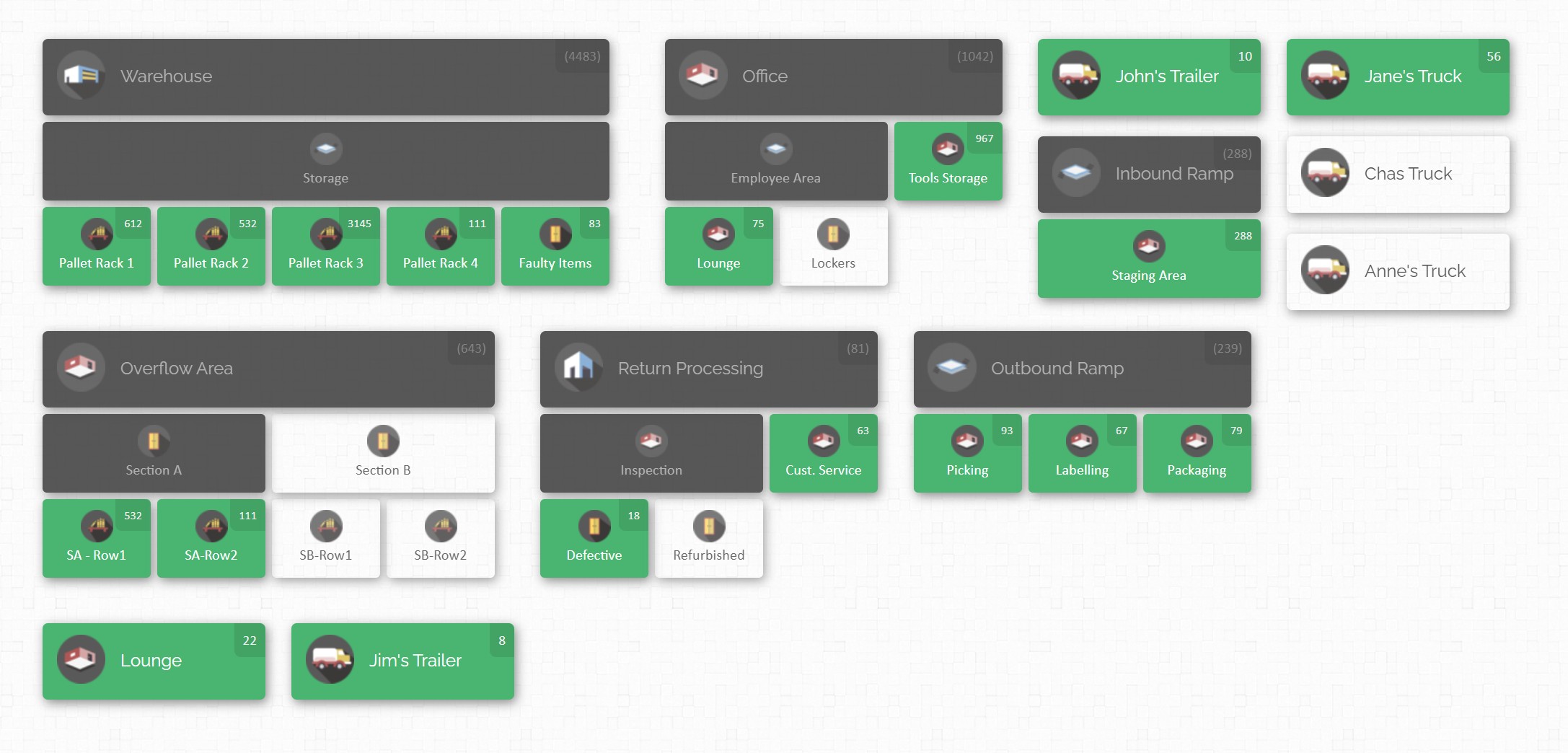
CyberStockroom is a cloud inventory platform designed specifically for industrial environments, with features that directly address these best practices. Instead of a list of stock counts, CyberStockroom presents your entire inventory on intuitive visual maps, giving every department the visibility and control they need.
With CyberStockroom, all locations and departments share one live map. You can build maps for warehouses, yard lots, job sites, process stages or even individual teams. For example, create a map layer for the central warehouse (showing aisles, racks and shelves) and separate layers for each project site or maintenance storage area. Each part and tool is placed on the map exactly where it lives. Because the platform is cloud-based, any change – such as receiving a shipment or using parts on a project – updates the map in seconds for all users. This means sales, procurement, field crews and logistics all see the same picture.
Key CyberStockroom capabilities include:
- Multi-Site Visual Mapping: Connect every warehouse, workshop, field office or yard on a single screen. The software lets you “zoom out” to view your network of sites or “zoom in” to see detail at any location. For example, a plant manager can view the “Multi-Site Map” to compare stock levels between Plant A, Plant B and the main distribution center. Project managers can toggle between a warehouse map and a site map to see how many parts have shipped to each site. This all-in-one mapping transforms siloed lists into one cohesive map-based inventory.

- Real-Time Cloud Updates: Because CyberStockroom lives in the cloud, all teams have instant access. A site foreman who completes a material delivery can immediately scan received items; the cloud map updates to reflect that stock is now at that job location. Dashboards in the system automatically recalculate totals so no one has to wait. The central project office sees the update as soon as it happens, ensuring dispatchers and planners are always working with current data.
- Interactive Inventory Dashboard: CyberStockroom’s interactive inventory map uses color-coded locations to display stock status at a glance. Users can click on any location block to view stored products and quantities. This visual dashboard helps warehouse staff, maintenance teams, and managers quickly locate parts, identify low-stock areas, and improve inventory visibility across departments and facilities.
- Green: The location contains products.
- Gray: The location is empty, but one or more sub-locations contain products.
- White: The location is completely empty.
- Red: Stock has fallen below the set threshold, indicating a need for replenishment.
- Drag-and-Drop Transfers: Moving inventory between locations is as simple as dragging a part on the map from one area to another. This removes manual data entry errors. Suppose you need to transfer pipe fittings from Warehouse A to a construction site. In CyberStockroom’s map, you just drag the fitting icon from one map zone to the other. The system logs the transfer and updates stock counts. A ledger of these transfers (Activity History) is kept automatically, so you always have an audit trail of which items moved where.
- Barcode Scanning and Data Capture: CyberStockroom fully supports barcode to minimize mistakes. Parts and storage zones can have barcode labels. When a worker scans an item during check-in or check-out, the system automatically places it on the correct map spot and adjusts inventory levels. This integration of scanning keeps the digital map perfectly aligned with the physical world. Any user (using a tablet or industrial scanner interface) can update the map with a swipe or click, making sure counts stay accurate.

By using CyberStockroom, companies eliminate many visibility gaps. For instance, a maintenance supervisor can create a “Maintenance Tools” map covering all shops. When tools move between job sites, they always scan out of one location and into another. The maintenance team and inventory clerk both see the tool’s new home instantly. Similarly, a production planner can open the “Raw Materials” map and plan upcoming runs knowing that steel, concrete, or component stock counts are current. In all cases, CyberStockroom’s mapping features ensure that inventory accuracy is built into everyday operations.
Putting the System into Practice: Implementation Steps

To fully leverage a cloud inventory system like CyberStockroom across multiple sites and departments, follow a structured rollout:
- Inventory and Location Audit: Begin by cataloguing what you have and where. Walk through each warehouse, yard, and equipment room to verify existing stock counts. As you do, note how areas are organized – aisle names, bin labels, department zones, etc. This audit ensures you start with a clean slate and helps design your maps.
- Design Visual Maps: Using the information from the audit, create digital maps that mirror each physical site. CyberStockroom provides a drag-and-drop interface for this. Define buildings, floors, storage racks, and room zones. Don’t forget non-traditional “locations” like jobsite laydown areas or field trailers – these can all be mapped. Assign each map area a meaningful name (e.g. “Plant 1 – Zone A”), and if desired assign color codes by department or function. A clear map design at launch reduces confusion later.
- Import Inventory Data: Next, populate the system with your existing inventory items. Prepare data exports (CSV or spreadsheets) from any old systems or records. CyberStockroom supports bulk import, so you can upload SKUs, descriptions and initial quantities. Make sure each item references the new map location names. At this stage, standardize any inconsistent part names. For example, merge duplicate SKUs and fix any mismatches (like “bolt ½ inch” vs “bolt 12mm”). Getting the base data right upfront is key to long-term accuracy.
- Set Up Users and Permissions: Add your team members into the system, assigning roles (e.g. admin, manager, technician). Define who can see which maps and perform which actions. For instance, a warehouse user may have rights to update counts in the warehouse maps but only view other departments. CyberStockroom allows setting granular access by location or function, so each person only sees relevant areas while management retains the big picture.
- Implement Barcode Labels: Wherever possible, label shelves, bins and high-value items with barcodes or QR codes that match the new system’s location identifiers. This physical tagging enables easy scanning. You can generate printable labels within CyberStockroom for consistency. Training crews to use scanners (or mobile device cameras) with these codes greatly speeds data entry and reduces mistakes.
- Staff Training: Organize training sessions for all teams. Show warehouse staff how to receive, pick and transfer inventory using the cloud platform. Teach technicians how to check parts in and out via scanning or on-screen updates. Emphasize the importance of real-time updates: if stock arrives or is used, it must be logged immediately. Provide clear written procedures (in the system or manuals) on scanning workflows. Well-trained users are critical, as even the best software depends on consistent data entry by people.
- Parallel Operation and Adjustment: For a short transition period, it’s wise to run the new cloud system alongside old processes. This lets you catch any data issues. Compare reports (like total stock by site) from CyberStockroom with your legacy records. Investigate and resolve any mismatches. During this phase, encourage feedback and adjust map layouts or category setups if needed.
- Go Live and Continuous Improvement: Once confident, fully switch over to the cloud system. Disable old methods to force adoption. Continue to monitor inventory accuracy by doing random cycle counts and verifying the cloud totals. Use dashboards to identify any user training gaps. Over time, explore advanced features (custom workflows, integration with procurement systems if applicable) to further optimize inventory control.
By following these steps, teams can bring all departments into sync under the new cloud platform. The initial effort pays off in smoother, faster operations and vastly improved visibility.
Conclusion
Achieving true inventory visibility across multiple sites and departments requires more than spreadsheets and separate logs. It demands a unified, cloud-based approach with tools that simplify complex operations. By centralizing data, standardizing processes, and leveraging visual mapping, industrial companies can drastically improve efficiency, accuracy and teamwork. Cloud inventory systems enable this by providing a single pane of glass for the entire organization’s stock.
CyberStockroom exemplifies how a modern solution meets these needs. Its real-time mapping, multi-location tracking and collaborative features align perfectly with the best practices outlined above. With CyberStockroom, teams in manufacturing, maintenance, construction and warehousing all work from one live inventory canvas. The result is fewer stockouts, faster audits, leaner operations and a clear strategic advantage.
By embracing these technologies and methods, inventory and operations managers can transform their multi-site operations. Each department gains confidence in the data, silos break down, and the entire organisation moves more fluidly. In the world of industrial operations, where delays and errors translate to significant costs, a robust cloud inventory system is not just a convenience – it’s essential for staying competitive and resilient.








Leave a Reply