
Imagine a clear visual layout of your entire operations: warehouses, assembly lines, storage racks, yard zones and even delivery vehicles all represented on one dynamic map. In this guide, we will explore how monitoring stock in real time across departments can transform production workflows. Good inventory visibility means everyone – from procurement and warehouse teams to production planners and maintenance staff – sees the same picture of what parts and materials are available and where they are located.
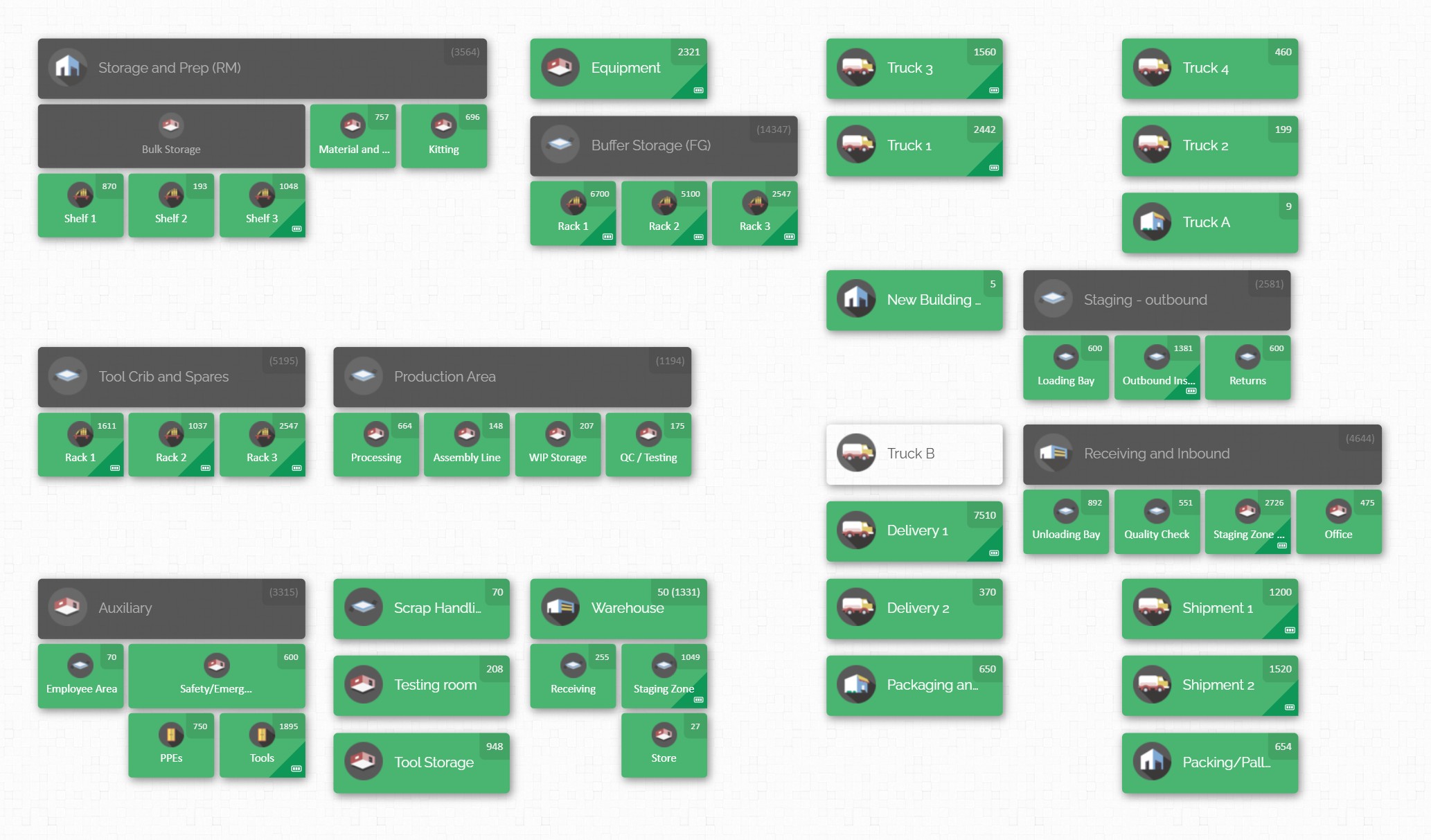
Real-time stock monitoring on a production line ensures that every department has up‑to‑the‑minute information. When parts arrive at the factory, move through assembly, and leave for customers, each movement updates the master inventory. This visibility means materials won’t sit hidden in forgotten bins, and teams won’t over-order or run short unexpectedly. Throughout this article we will cover best practices for achieving cross-department inventory visibility and operational efficiency.
The Importance of Inventory Visibility in Manufacturing
High inventory visibility is the foundation of modern manufacturing operations. It bridges the gap between departments (like procurement, production, warehouse, and maintenance) so that everyone makes decisions based on the same data. For example, if the assembly line needs 200 screws and the warehouse manager shows 180 available, a visible system alerts both teams to adjust orders or reallocate stock before production stalls. Without this clarity, one team might assume parts are on hand while another has already used them, leading to costly delays or excess ordering.
When companies have poor visibility, problems ripple through the operation. Production delays occur if a needed component is unexpectedly out of stock. Excess inventory builds up if teams overcompensate for uncertainty, tying up capital and warehouse space. Communication breakdowns become common – for instance, maintenance crews might call multiple storerooms to find a part, wasting time. In contrast, real-time monitoring keeps everyone aligned. Supply chain disruptions, customer rush orders, or last-minute design changes can be managed smoothly when inventory data is current. Modern manufacturers rely on real-time stock visibility to hit production targets, meet delivery promises, and keep multiple projects on track.
Inventory visibility isn’t just about counting parts; it’s about organizing information. A machine shop may have dozens of floors or sheds, each with thousands of parts. Being able to quickly see where those parts are – down to the exact bin or piece of equipment – turns inventory tracking from a guessing game into a systematic process. In the sections that follow, we will outline common challenges that hurt visibility and then present best practices to overcome them. We will also explain how a visual inventory mapping system (like CyberStockroom) supports each of these practices. By following these guidelines, your organization can achieve much higher inventory accuracy, improved team alignment, and a more efficient production line overall.
Common Challenges in Cross-Department Stock Monitoring

Achieving clear inventory visibility across departments is easier said than done. Many manufacturing operations face recurring obstacles:
- Siloed data and systems: Each department often maintains its own records – spreadsheets, legacy software, or even paper logs. Procurement might have a list of outstanding orders, the warehouse has an inventory tally, and production uses its own work order list. These disconnected systems create blind spots. One team’s update may never reach another, so no single person can answer “What do we actually have in stock right now?” without consulting multiple sources. This leads to confusion and duplicate work.
- Manual processes and errors: When inventory moves are recorded by hand, errors creep in. Counting parts at receiving or hand-recording stock usage on the shop floor can result in typos or missed entries. Over time, these errors accumulate, and the official counts no longer reflect reality. One manager might think 1,000 bolts are available, while actually 400 of them are held for quality testing – a gap only discovered the hard way. Poor data accuracy in turn erodes trust; teams may ignore the system and rely on phone calls or personal memory.
- Delayed or batch updates: In many factories, updates to inventory are done in batches (daily or weekly) or after major shifts. By the time someone enters the day’s receipts or finishes updating the system, hours of production may have passed. This lag means inventory levels are always out of date by the time they are seen. If a production manager checks stock levels at 10am, the numbers might already be wrong by noon due to unrecorded material use.
- Lack of real-time tracking: Without accurate tracking, movements of materials – say from a raw material store to the production line – go unrecorded until someone reports them. This creates a period of “black box” operations where actual stock positions are unknown. Complex operations like just-in-time delivery or Kanban systems break down if inventory flow can’t be monitored continuously.
- Uncoordinated cross-team communication: Even with good data, if teams do not share updates or make decisions collaboratively, visibility remains poor. For example, maintenance might reserve spare parts for equipment service without logging it, or production might consume parts faster than planned without alerting purchasing. If teams don’t have a shared system or process to communicate stock needs and usage, each department ends up with a different picture of reality.
- Multi-location consolidation: Companies with multiple warehouses, shops, or field sites face additional hurdles. Different locations may use different counting methods or have varying levels of rigor. Consolidating these records manually is time-consuming and prone to mistakes. For example, combining inventory sheets from five job sites each night may still miss units that were miscounted or newly moved. Without centralized reporting, a manager can never easily query “Total stock of part X across all sites” to make decisions on reordering or redistribution.
These challenges lead to negative consequences. Common issues include: production lines halting due to “phantom stockouts” (where the system says stock is available but it isn’t physically present), rushed emergency purchases that inflate costs, and excess work-in-progress inventory sitting idle because planning wasn’t coordinated. The next sections outline best practices for overcoming these obstacles and building a reliable, efficient stock monitoring process across departments.
Best Practices for Multi-Department Inventory Monitoring

Improving visibility and alignment among teams requires a combination of disciplined processes and the right tools. The practices below – organized into logical steps – are proven in manufacturing and inventory operations. Each can be implemented regardless of your software system, then reinforced by using a visual inventory platform.
1. Standardize and Streamline Inventory Processes
- Define clear control points. Identify key moments in your workflow where inventory status changes: receiving shipments, putting items into storage, issuing materials to the line, finishing goods packing, etc. At each control point, establish a step that updates the inventory record. For example, require scanning or recording the count each time goods are shelved or moved. Consistent processes mean everyone follows the same procedure, reducing errors.
- Use one central system or master file. Wherever possible, operate from a single master inventory database or sheet. Instead of separate spreadsheets in each department, centralize the data. This could be a shared file or an inventory software system that everyone accesses. The goal is to have one “source of truth.” Even if separate teams handle different stock categories (e.g. production supplies vs. maintenance spares), they should enter data into the same system so totals and locations are unified.
- Train and enforce discipline. Train all staff involved in inventory handling on the standard processes. Ensure that receiving clerks, warehouse pickers, production assemblers, and maintenance personnel understand how and when to update stock data. Consider checklists or job aids at each station. Periodic spot-checks or audits can enforce compliance. When employees see errors fixed and understand their role in keeping the system accurate, the data will improve.
- Implement barcode or scanning workflows. Even without fancy tech, barcode scanning is a straightforward way to eliminate manual entry mistakes. Equip receiving and production teams with barcode scanners or mobile devices (like tablets) to scan items as they move. Scanning can record a transaction in real time (e.g., “100 units of part X moved from Y location”). This cuts down on typos and makes updates immediate. If barcodes are not feasible for some small parts, at least use controlled counting methods (like weigh scales for bulk items) and have a double-check for critical counts.
2. Real-Time Tracking and Automated Updates
- Move from batch updates to live data. Whenever possible, update inventory counts at the moment stock moves. For instance, instead of waiting until the end of the day to log all usage, aim to record consumption or additions as they happen. This may involve handheld scanners, mobile devices, or shop-floor terminals. The closer the update time is to the actual event, the fewer “blind gaps” you’ll have. In a busy plant, even an hour’s delay can lead to conflicting information.
- Embrace technology for immediate visibility. If your team already uses barcode scanners, consider integrating them with a digital inventory system that shows changes instantly. For example, when a lot of components is consumed on the line and scanned, the central inventory levels should drop in real time for everyone to see. Real-time alerts (like low-stock notifications) can prompt procurement or planners to act before a shortage becomes critical. Avoid manual reconciliation steps after the fact; instead, look for solutions that push updates live.
- Central dashboard or summary views. Use a digital dashboard or consolidated report that displays current stock levels by location and category. This becomes a quick reference for managers and team leads. For instance, a production supervisor might have a daily snapshot of the on-hand quantities of all parts needed for this week’s work orders. A warehouse manager can see inventory inflows and outflows in real time. Central dashboards eliminate the need for constant cross-checking of separate lists.
3. Organize Inventory and Locations Visually
- Create an intuitive location structure. Break down your space into clearly defined zones (warehouse A, line 1 storeroom, truck stock 5, etc.) and sub-locations (racks, shelves, bins, lockers). Assign each area a unique identifier or name. This means even physically large facilities become navigable: a worker can say “Part 123 is in Warehouse-East, Row 3, Bin 12.” Consistent naming and hierarchy prevents confusion (no more “Row 1” in two places).
- Map out workflows and storage. Consider diagramming the entire facility: receiving dock, quality check, storage areas, production cells, finished goods area, etc. This visual representation (a layout plan) helps teams see how materials flow. For example, if raw materials arrive at a loading bay and then move to an inventory shelf, the map shows exactly that route. Once you have a map, you can use it as a guide for training and also as the foundation of a digital inventory map. Mapping supports space planning too – unused racks or poorly utilized zones become obvious on a visual layout.
- Label and categorize parts. Clearly label each part with a code, description, and place it in a designated spot. Group similar items logically (all electrical fittings in one area, mechanical parts in another, consumables by type, etc.). Use physical labels or color codes on shelves to match categories. This systematic organization ensures that anyone can find and restock items consistently. Good categorization also makes reporting easier (you can quickly see how many fasteners vs. electronic parts are in stock, for instance).
- Implement cycle counts and audits. Even with digital tracking, periodic physical counts are a best practice. Schedule regular cycle counts (counting small subsets of items each week) or full inventories quarterly. These confirm that the system data matches reality. Cycle counting can be done per department or per location: for example, every week one storage aisle is counted and reconciled. Use the counting process as a training moment as well: it’s a chance for team leads from different departments (warehousing and production, say) to work together and notice discrepancies. Audits should follow any big changes (new system launch, plant expansion, etc.) to verify all locations were set up correctly.
4. Coordinate Cross-Team Collaboration
- Shared planning and review meetings. Bring procurement, production planning, warehouse, and maintenance teams together regularly (daily or weekly) to review inventory reports. During these meetings, the live inventory dashboard or map can be the focal point. This ensures that everyone hears the same information. For example, if sales says an urgent order is needed, production can immediately highlight the parts it will consume, and procurement can flag if stock is low. These touch-points keep teams aligned and prevent surprises.
- Visible alerts and dashboards on shop floors. Put simple indicators where people work: Kanban cards, stock level boards, or digital displays. If a production cell sees on a board that “Feedstock A – 30 units left” it might trigger someone to place a replenishment order before it hits zero. When people in different areas operate with shared visual cues, it naturally synchronizes their actions. Avoid hidden spreadsheets; instead use wall charts, intranet widgets, or tablets on the floor that show key inventory stats in real time.
- Role-based access and updates. Ensure each team has the right access to the system. Warehouse staff should be able to update receiving and transfers; engineers and maintenance should log spares used; production should check items into jobs; and supervisors should monitor levels. Grant appropriate permissions so that when someone makes a change (checking out a part to assembly, for example) it’s recorded under their name. This accountability means teams trust the updates. Also make sure that any new updates (like adding a custom part or location) are visible to all relevant teams immediately.
5. Plan Inventory and Avoid Bottlenecks
- Set reorder points and safety stock. For critical components, especially those used on the production line, establish minimum stock levels. The inventory system should warn planners when levels drop to this threshold. For example, if a particular bearing is needed every week, maintain a buffer to cover lead time from suppliers. This helps avoid emergency orders. Clearly defined reorder logic (with input from all departments) means fewer unexpected shortages.
- Use demand forecasting and production plans. Integrate production schedules into inventory management. If production team knows next month they will build 100 machines, those parts can be flagged for ordering. Conversely, if an order is canceled, materials can be released. Cross-referencing sales and production plans with inventory ensures everyone is preparing for the same demand. Avoid letting one department work from forecast while another goes by gut feeling.
- Lean and just-in-time (JIT) techniques. Where suitable, adopt lean methods like Kanban pull signals or JIT deliveries for regularly used parts. For instance, a small bin on the assembly line might hold parts for two hours of work; when it empties to a certain level, the warehouse brings another batch. These physical triggers, when backed by the inventory system, keep stock moving smoothly without large piles. However, lean only works if inventory data is accurate – thus tying back to the need for disciplined tracking.
By following these practices – standardizing processes, tracking stock in real time, organizing physical inventory, coordinating teams, and planning intelligently – a manufacturing business can greatly improve inventory accuracy and efficiency. Teams will spend less time hunting for parts or correcting mistakes, and more time producing value. In the next section, we look at how a visual inventory solution can put all of these ideas into action, providing a user-friendly interface and real-time data sharing that supports exactly these best practices.
CyberStockroom’s Visual Inventory Mapping for Teams
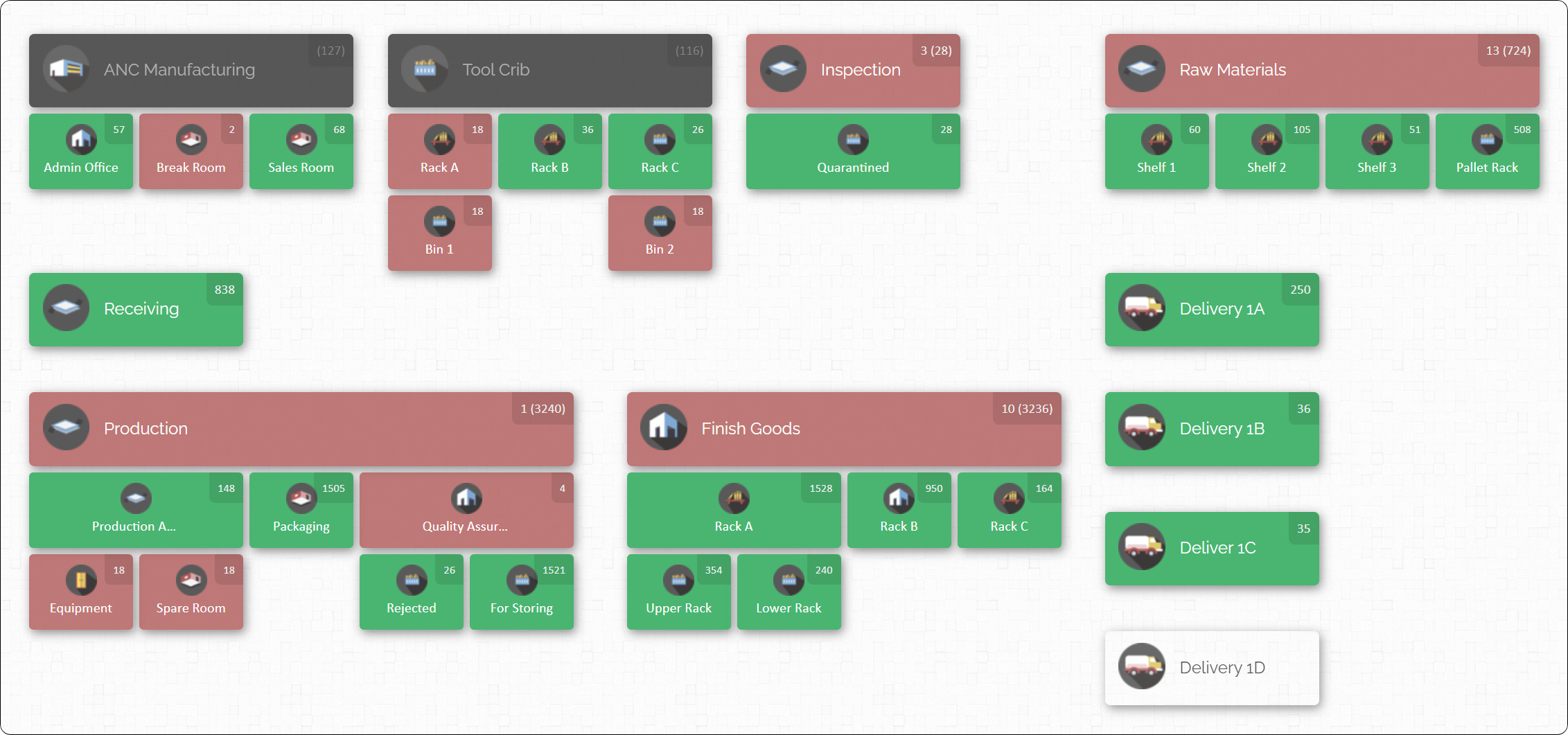
To implement real-time stock monitoring and visibility, many manufacturers turn to modern tools that go beyond spreadsheets. CyberStockroom is a visual inventory mapping platform designed for exactly this purpose. Unlike traditional inventory systems that focus on lists and tables, CyberStockroom lets you build an interactive map of your entire operation – warehouses, production lines, yard areas, trucks, or any locations – and then attach inventory to each location. Here’s how it supports the practices discussed above:
- Visual Layout of Locations: You can draw or upload your facility’s layout and label every room, rack, bin, yard zone, or even equipment location on the map. Each location on the map becomes clickable. When a user clicks on a location, they see a summary of all items stored there, along with quantities. This means every team member can literally point and click to see who has what stock. For cross-department alignment, this is invaluable: the maintenance manager can click on the spare parts storeroom and see exactly how many filters or fasteners are available, without having to call the warehouse. A map-driven view ensures everyone interprets locations the same way.

- Multi-Department Access: Because the map is cloud-based, every department accesses the same live map. A technician in the maintenance shop and a warehouse supervisor in a different building can both log in and see the latest stock updates. Inventory adjustments made by one team instantly reflect on the map for all others. For example, if a stockroom clerk checks out ten pressure gauges for a job, that change is visible immediately to production planners and purchasing. There’s no waiting for daily reports; updates are real-time, which reinforces cross-team communication.
- Drag & Drop Transfers: CyberStockroom makes it easy to move items between locations on the map. Say the production team needs to move parts from storage to the assembly bench. Instead of manually recording the change in a log or spreadsheet, the user can simply drag products from one location on the map to another. The system then automatically updates the quantities at both locations. This intuitive move speeds up physical transfers and ensures the database stays accurate. Team members no longer have to fill in complicated forms – instead, a simple drag-and-drop on the map completes the transaction.
- Check-in/Check-out and Scanning: The platform supports inventory check-in and check-out operations with ease. When new stock arrives (say materials delivered to the warehouse), staff “check in” the items to the warehouse location on the map. Likewise, when components leave (for a job or the line), they are “checked out.” You can use a barcode scanner to scan products during these actions, which updates quantities automatically. This mimics the best practice of using scanning at control points. Because CyberStockroom records the user and time of each action, it maintains a full audit trail of who moved what and when. This helps auditing and accountability.
- X-ray Vision of Stock Distribution: One unique feature is the ability to see the distribution of a particular part across all locations. By selecting a product, CyberStockroom can highlight every location that contains it and display the quantities. This is like giving management X-ray vision into the inventory. For instance, if a critical motor bearing is running low in one workshop, the map instantly shows if any other location has spares available. Teams can then plan transfers or emergency orders before production has to stop. This global product view tightly supports cross-location visibility – multiple warehouses or job sites are no longer independent silos.
- Custom Fields and Product Images: To further align departments, you can add custom information for each item. For example, you could store a supplier name, manufacturer part number, or shelf-life date in the product’s custom fields. Each part can also be associated with a photo or blueprint image. This means different teams can share extra context – a maintenance crew might upload a photo of a machine part, making it easy for production to verify they are looking at the same component. Visual cues and custom data reduce confusion when parts have similar names or when specifications matter.
- Cloud-based and Mobile-friendly: CyberStockroom runs in a web browser from any computer or tablet. Your inventory map and data live in the cloud, so teams can log in from the factory floor, offices, or even off-site (for example, construction yard or field office). Being web-accessible means anyone with login permissions can see inventory on the go. This supports field teams or off-site managers who need updates. All changes are automatically synced in the cloud, ensuring there is truly one single source of up-to-date data.

Using these capabilities, CyberStockroom effectively implements all the best practices we covered. It enforces standardized location naming, replaces paper workflows with digital scans, and provides the shared dashboard that cross-department teams can rally around. The interactive map becomes the everyday interface: instead of asking where something is or recounting inventory, people simply use the map. This speeds up operations and reduces miscommunication.
Enhancing Efficiency and Alignment with CyberStockroom

By integrating CyberStockroom into your process, teams can achieve significant improvements in efficiency and accuracy:
- Faster Retrieval and Fewer Errors: With the map, staff no longer wander looking for parts. They see exactly which bin or site holds the needed quantity. Fewer “lost” items means fewer last-minute rush orders or downtime. In effect, CyberStockroom supports faster item retrieval by making stock locations instantly visible. Combined with scanning check-out, the likelihood of recording errors is greatly reduced.
- Improved Space Utilization: The visual layout helps spot underused areas. Teams can rearrange racks or shed layouts within the map to find better storage arrangements. CyberStockroom also lets you see on the map if some zones are nearly empty while others are overflowing. This insight leads to better warehouse organization – a practical application of the best practice “optimize storage space.”
- Real-Time Coordination: Maintenance, production, and procurement teams share a single inventory picture. A technician needing a spare part can see if it’s in stock without picking up a phone. Once they remove it on the map, procurement and production planners see the change. This removes false stockouts and miscoordination. For example, if production uses a lot of a certain component unexpectedly, purchasing sees the inventory dip in real time and can trigger replenishment quickly.
- Simplified Audits and Training: During inventory audits or cycle counts, the map serves as a guide. Auditors can click through each location on the map to verify counts, and discrepancies stand out immediately. For new employees, learning where items belong is easier when they have an intuitive map interface rather than a long list of bin numbers. In one step, CyberStockroom helps simplify onboarding and training on inventory – newcomers can explore the mapped environment to get familiar.
- Centralized Control for Multiple Sites: If your business has multiple warehouses or even vehicles and tools sites, CyberStockroom can unify them. Each site is just another map or layer. Managers get a bird’s-eye view of all locations. They can compare stock levels across factories or yards, plan inter-site transfers with drag-and-drop, and ensure excess supplies aren’t quietly sitting idle in one place while another runs low. This mirrors the best practice of consolidating data from multiple locations into one system.
In summary, CyberStockroom translates the theoretical best practices into practical features. Instead of debating whose spreadsheet is right, teams see one consistent picture. Instead of filling forms to move stock, they drag icons on a map. With stock monitoring embedded in day-to-day workflows, efficiency naturally improves.
Conclusion
In today’s fast-paced industrial environment, real-time stock monitoring on the production line is no longer optional – it’s essential. Without accurate, visible inventory data, any factory will experience delays, waste, and cost overruns. By adopting disciplined processes (such as scanning at inventory control points, regular cycle counts, and centralized data entry) and leveraging visual tools like CyberStockroom, organizations can achieve exceptional inventory accuracy and transparency.
An integrated map-based inventory system aligns all departments around the same information. Warehouse teams, production planners, maintenance crews and management can collaborate seamlessly because they are all looking at the same live map. This cross-team visibility means fewer emergencies and more predictable operations. Parts no longer magically disappear or get double-ordered, since the map records every transfer and check-out.
As a next step, inventory teams should consider piloting these practices in a pilot area or production cell. Set up the map for that area, train the team on scanning and transfers, and see how much faster you can find parts or detect low stock. Over time, expand the system plant-wide and eventually across all facilities. With constant improvement and refinement, your inventory operation will become a model of efficiency.
Ultimately, achieving real-time stock monitoring on the production line requires both culture and tools: a culture that values data accuracy and teamwork, and tools that make it easy to record and visualize data. By combining lean inventory methods with a powerful visual mapping solution, manufacturing companies can ensure their production lines run smoothly, costs stay under control, and all departments move forward in sync.








Leave a Reply