
Efficient warehouse receiving sets the tone for every downstream operation. When incoming shipments are handled carefully and accurately, inventory records stay reliable and every department – from production to maintenance to shipping – has confidence in knowing what parts are available, where they are, and when they arrived.
By contrast, errors at receiving – miscounts, mispicks, or misplaced goods – quickly cascade into delays, stockouts, and frustration across the plant.
The Warehouse Receiving Process
Receiving is far more than unloading trucks – it is the initial checkpoint that confirms orders, counts and conditions are correct before inventory hits the shelves. A streamlined receiving process typically follows these steps:
- Documentation and Planning. Before each shipment arrives, gather and review its paperwork: purchase orders, advance shipping notices, packing lists and bills of lading. Confirm the expected items, quantities, and arrival time with the supplier or carrier. Planning means the receiving team can allocate the right space and equipment in advance (such as reserving docks for a large delivery) and be ready to match goods to orders immediately.
- Staging and Unloading. Direct incoming shipments to a designated receiving area or staging zone. This should be a clean, organised space near the dock. Trained staff unload vehicles safely using forklifts, pallet jacks or lift gates. Unload systematically (for example, back-to-front in the truck) to maintain order. Immediately check for obvious damage to boxes, pallets or labels as you unload – early detection of crushed cartons or broken seals lets you address issues before items mix with good stock.
- Inspection and Verification. With goods off the truck, it’s time for a detailed check. Verify that the received items match the expected SKUs and quantities on the documentation. Many modern warehouses scan barcodes or RFID tags on each pallet, box or item as they are inspected. Scanning links every piece to the system in real time, instantly flagging any discrepancy (for example, an unexpected part number or the wrong amount). A simple tally or checklist can help receiving staff tick off that each item is correct and undamaged. If something doesn’t match – say a box contains the wrong part or a pallet is short by five units – stop the process, note the variance, and follow up with procurement or the supplier.
- Data Entry into Inventory System. After physical counts and inspections, update the warehouse management or inventory system. In the best practice scenario, scanning has already logged the items in automatically. Otherwise, manually enter each receipt: record the product codes, quantities, batch or lot numbers, and location information. This immediate entry eliminates the backlog of work and keeps electronic records in sync with reality on the floor.
- Put-Away and Storage. With receipts registered and tagged, move each item to its proper storage location. Use shelving, bins or pallet racks designated for that part. Ideally, your system or map should suggest optimal spots (for example, placing fast-moving parts near packing stations). Clearly label each bin, shelf and aisle in the warehouse so staff know exactly where to put incoming goods. Prompt put-away serves two purposes: it keeps the receiving area clear for the next shipment, and it makes products available quickly for use or shipment. As items are stowed, confirm their final locations in the system so anyone (from a machine operator to a buyer) can instantly find them later.
By following each step of the process methodically, you build a solid foundation for inventory accuracy. Skipping or rushing any step – say, putting goods away before verifying counts – opens the door to errors that ripple through the organisation. Below, we explore the most common pitfalls at receiving and how to prevent them.
Common Receiving Errors and Challenges

Even experienced teams can make mistakes when faced with the day-to-day rush of trucks and palettes. Here are frequent errors at the point of entry and why they matter:
- Mismatches with Purchase Orders. One very common mistake is receiving items that don’t match the order (in SKU or quantity). For example, the shipment might contain extra units of one part or missing items of another. If unchecked, this leads to confusing inventory records. Production may think they have parts that never arrived (or vice versa), causing halted assembly or unexpected shortages. The root cause is often miscommunication or a packing error. Verifying every box against the purchase order – ideally with barcode scans – stops this error at the dock.
- Damaged or Defective Goods. Rough handling can result in broken or damaged parts by the time they reach the dock. Missing seals, dents, or moisture can compromise items. If not noticed immediately, damaged goods could be stored and later used in production, causing machine failures or customer complaints. Quality checks right at receiving – a quick visual inspection and, if feasible, sample testing – allow damaged items to be quarantined or returned before they pollute good stock.
- Counting Errors. Simple math mistakes happen when counting manually, especially under pressure or with large volumes. Overcounts mean you think you have more stock than you do; undercounts do the opposite. Both harm inventory accuracy. For example, if ten bolts arrived but only eight were entered into the system, your ledger won’t match reality. The fix is to use scanning devices that tally quantities instantly. If you must count by hand, have one person count and another verify, and always double-check before finalising records.
- Put-Away Mistakes. Once items are received, storing them incorrectly is a hidden source of errors. If a pallet of components is placed in the wrong bin or tagged with the wrong location, future pickers will never find it. This effectively “loses” parts in the warehouse. Always label each part and bin, and confirm via scan that the location code in the system matches where the forklift driver just delivered it. A final glance at the bin label or map before unloading can prevent this mix-up.
- Missed Updates to Systems. In some warehouses, received inventory is held in limbo (on paper or whiteboards) until someone inputs it later. The longer that delay, the greater the risk of discrepancies. Another team might see outdated stock levels, or worse, multiple data sources could conflict. Best practice is real-time updating: scanning each receipt as it’s processed means the system stays current. This avoids situations like production orders being started on old data or procurement reordering supplies that are already in-house.
- Scheduling and Congestion Issues. Often overlooked, poor scheduling causes its own errors. If multiple trucks arrive at once without a plan, the receiving dock can become chaotic. Pallets get piled, labels smudged, and even shipments sent to the wrong bay. Conversely, if the receiving team is idle waiting for a truck, focus can slip when it finally arrives. Setting clear delivery windows and communicating them to carriers smooths the flow. When staff know precisely when to expect each load, they can prepare space and resources, reducing rushed mistakes.
- Communication Breakdowns. Receiving often touches several departments: purchasing sends the order, the dock handles the unload, operations needs the parts, and accounting needs the documentation. If these teams do not talk, errors slip through. For example, purchasing might not immediately inform operations of a late shipment, so production keeps expecting a part that’s delayed. Or accounting might record a bill of lading without confirming receipt of goods. Regular handovers, shared dashboards or short meetings can keep everyone aligned on what’s arriving and when.
Each error above, if unaddressed, degrades the accuracy of your entire inventory. In practical terms, that can mean unplanned downtime on the shop floor, expedited shipments to replace “lost” parts, and frustrated staff chasing phantom stock. The antidote is a disciplined, technology-backed process – which we outline next.
Best Practices for Accurate Warehouse Receiving

Implementing well-defined routines and using the right tools can turn the chaotic task of receiving into a smooth, reliable operation. The following best practices help prevent errors, increase efficiency and improve overall visibility of your parts from the very first scan:
- Establish Clear Standard Operating Procedures (SOPs). Consistency is key. Develop a written SOP for every step of receiving – from greeting the driver to final data entry – and train your team to follow it. Include checklists for what paperwork to collect, how to inspect goods, and how to report problems. For example, an SOP might require that every shipment be verified against its purchase order, that damaged pallets be set aside, and that each item gets a barcode scanned before storage. By making these steps routine, you eliminate guesswork and personal shortcuts. Regularly review and update SOPs to incorporate new learnings or changes in workflow, ensuring they stay effective over time.
- Leverage Barcode Scanning (or RFID). Manual data entry is error-prone, especially under workload stress. Using barcode or RFID scanning speeds up processing and greatly reduces mistakes. As each carton or pallet arrives, scan its barcoded shipping label and all items inside. This immediately updates your WMS or inventory system with the precise count and location. Barcodes tie items to orders and streamline matching. If an SKU scans in with a different quantity than expected, the system flags it instantly. Many modern operations even use mobile scanners or handheld terminals that automatically record each scan, making the process almost foolproof. Integrating scanning into receiving makes it easy to reconcile discrepancies on the spot rather than fixing them later.
- Match Shipments to Orders Rigorously. Always verify that incoming goods exactly match the purchase order or advanced shipping notice (ASN). This means checking each SKU, size, lot number, and quantity. If your system supports it, process receipts directly against open POs so that any extra or short items are highlighted in the data. Require that drivers present complete paperwork, and train receiving staff to cross-reference line by line. A mismatch discovered at the dock can be communicated immediately to procurement to claim a credit or send a replacement, rather than going unnoticed. This practice not only prevents inventory errors but also strengthens supplier accountability.
- Inspect for Damage and Quality Issues. Beyond counting, visually inspect all items for damage before accepting them into inventory. This includes looking for crushed packaging, broken seals, or water damage on crates. For sensitive or high-value parts, consider random sample testing at receiving. Have a protocol for recording and quarantining any defects: note them on the delivery paperwork, take photos if needed, and inform quality control or purchasing. Promptly communicating with the supplier for damaged items can expedite returns or claims, ensuring that only good parts are stocked. Training your team to spot and document issues at the point of entry prevents defective goods from disrupting production or needing expensive recalls.
- Optimize the Receiving Area Layout. A tidy, well-organized dock area boosts efficiency and reduces errors. Keep the receiving zone uncluttered so trucks can back in easily and staff can move around safely. Mark clearly defined spaces for incoming pallets, empty containers, and rejected goods. Store essential tools (forklifts, pallet jacks, label printers, scanners) nearby so employees don’t waste time fetching them. Use visible signage and floor markings to guide where different types of goods go upon unloading. The faster and safer goods move off the dock, the lower the risk of counting mistakes or items getting mixed up. In short, a structured environment supports a structured process.
- Label Everything and Use Consistent Location Codes. Every shelf, bin and rack in your warehouse should have a unique code. When received goods are put away, label their container or package with the destination location’s code. If items came in mixed (multiple SKUs on one pallet), ensure each is quickly separated and labeled. Clear labeling means that even if a shift change occurs, the next team knows exactly where to scan items. It also allows new hires or temp workers to follow instructions without confusion. Consistent coding (for example, “WH1-RM-A3” for Warehouse 1, Raw Materials, aisle A3) eliminates ambiguity. Good labeling practices cut down on wrong-location put-aways and make all inventory movements traceable.
- Double-Check Critical Steps. Build redundancy into the process for high-risk points. For instance, require two people sign off on counts for particularly large or valuable shipments. Have a second operator verify that the receiving documents (like packing lists) match the system entries before closing out a delivery. Even a quick peer review can catch a missed box or a barcode that didn’t scan properly. Many leading warehouses also use receiving checklists – short forms that list key items to verify. Checking off each step and keeping the list for records makes it hard to skip any step under pressure.
- Train Staff Thoroughly. Technology and SOPs are only as good as the people using them. Invest in regular, hands-on training for your receiving team. Cover equipment operation (like safe forklift use), data entry software, scanning devices, and the importance of accuracy at each step. New employees should shadow experienced team members until they’re proficient with the receiving workflow. Refresher courses can prevent complacency and keep everyone up to date on process changes. Well-trained staff perform tasks faster and with fewer mistakes, and they’re more likely to spot and correct errors they do see.
- Communicate Across Departments. Receiving doesn’t happen in a bubble. Keep open lines of communication with purchasing, production, maintenance and shipping. For example, if a key component is short by five units, production planners should know right away to adjust schedules. Similarly, if shipping or production has a question about an unusual item on the dock, involving them immediately can resolve issues before the inventory record is created. Regularly review inbound performance with cross-functional teams: share KPIs (like receiving accuracy or dock-to-stock time) and discuss bottlenecks. When everyone understands the impact of errors, teams are more aligned to help prevent them.
- Implement Continuous Improvement. No process is perfect from day one. Periodically audit the receiving workflow. Analyze past errors to identify root causes: Was a particular supplier always sending incomplete orders? Is one shift making more mistakes? Use data (discrepancy reports, scanner logs, etc.) to spot patterns. Solicit feedback from the warehouse crew – they often know where the process drags or fails. Then refine SOPs or tools accordingly. A culture that encourages improvement will steadily raise accuracy. For instance, after noticing a trend of put-away errors, one warehouse might institute spot checks by a supervisor, leading to a measurable drop in misplaced items over time.
- Track Performance Metrics. Measure the outcomes of your practices. Common metrics include Receiving Accuracy Rate (percentage of receipts entered without error), Dock-to-Stock Time (how long it takes inventory to be stowed), and Discrepancy Rates (mismatches found per delivery). Dashboard these KPIs for management to track. When the team sees their accuracy numbers or turnaround times improving, it provides positive reinforcement. Conversely, a spike in errors immediately signals where attention is needed. Using data in this way shifts focus from vague effort to concrete results.
By adopting these best practices, you can turn receiving into a strength rather than a bottleneck. Accurate, timely check-in of goods ensures that downstream processes—order fulfillment, production scheduling, maintenance—have a rock-solid starting point. It also builds trust in your data, so purchasing won’t over-order and management won’t worry about phantom stock. And because receiving is often the first impression of your warehouse’s professionalism, getting it right can elevate performance across the entire operation.
Ensuring Multi-Department Parts Visibility

Warehouse receiving doesn’t only affect the dock crew; its impact radiates through every department. In a manufacturing environment, parts visibility across departments means that everyone – from maintenance techs to assembly workers to procurement officers – can see the same accurate picture of inventory. Achieving this requires bridging information silos and aligning processes beyond the warehouse:
- Centralize Inventory Information. Use a single, unified system or platform to record all inventory movements. Whether items flow through a central warehouse, a tool crib, or multiple workshops, data from every location should feed into one database. Cloud-based inventory software is ideal for this: it lets all departments update and view stock levels in real time. When receiving staff log an arrival in the system, a materials planner in engineering can immediately see it. Centralization prevents “hidden stock” in departmental spreadsheets and ensures decision-makers work off the same data.
- Map Locations to Departments. Define storage locations by department or function. For example, raw materials, production line stores, and maintenance bins each have their own area or code. In the inventory system (or map), label these zones clearly. Then, when received goods are put away, associate them with the correct departmental location. A drill bit destined for machine maintenance should be placed in “Maintenance Tools – Bin A” instead of a general stock location. This way, maintenance staff scanning or checking inventory will see it right there. With this discipline, departments know where to look for parts relevant to their function, yet still contribute to the unified inventory count.
- Real-Time Updates and Notifications. Encourage or automate real-time updates so that all teams share live visibility. For instance, set up notifications or dashboards: the production manager gets an alert when a critical part arrives, the purchasing clerk sees when a shorted order has been replenished, and the maintenance supervisor sees the remaining count of spare bearings in the maintenance stockroom. The more instant the update (e.g. via scanned receipts), the fewer surprises. Shared digital displays or mobile alerts (on supervisors’ tablets, for example) ensure everyone stays on the same page.
- Cross-Team Collaboration. Make inventory responsibility a shared endeavour. Scheduling regular coordination meetings (even quick daily huddles) between receiving, production and planning teams can catch issues early. For example, if production discovers a damaged part in use, they can immediately check with receiving if a replacement shipment just arrived or is expected. Similarly, if purchasing must expedite an order, communicating this across departments ensures resources are allocated properly. A company-wide culture that values inventory accuracy—where everyone feels ownership of the data—greatly reduces the “my warehouse, my data” mindset.
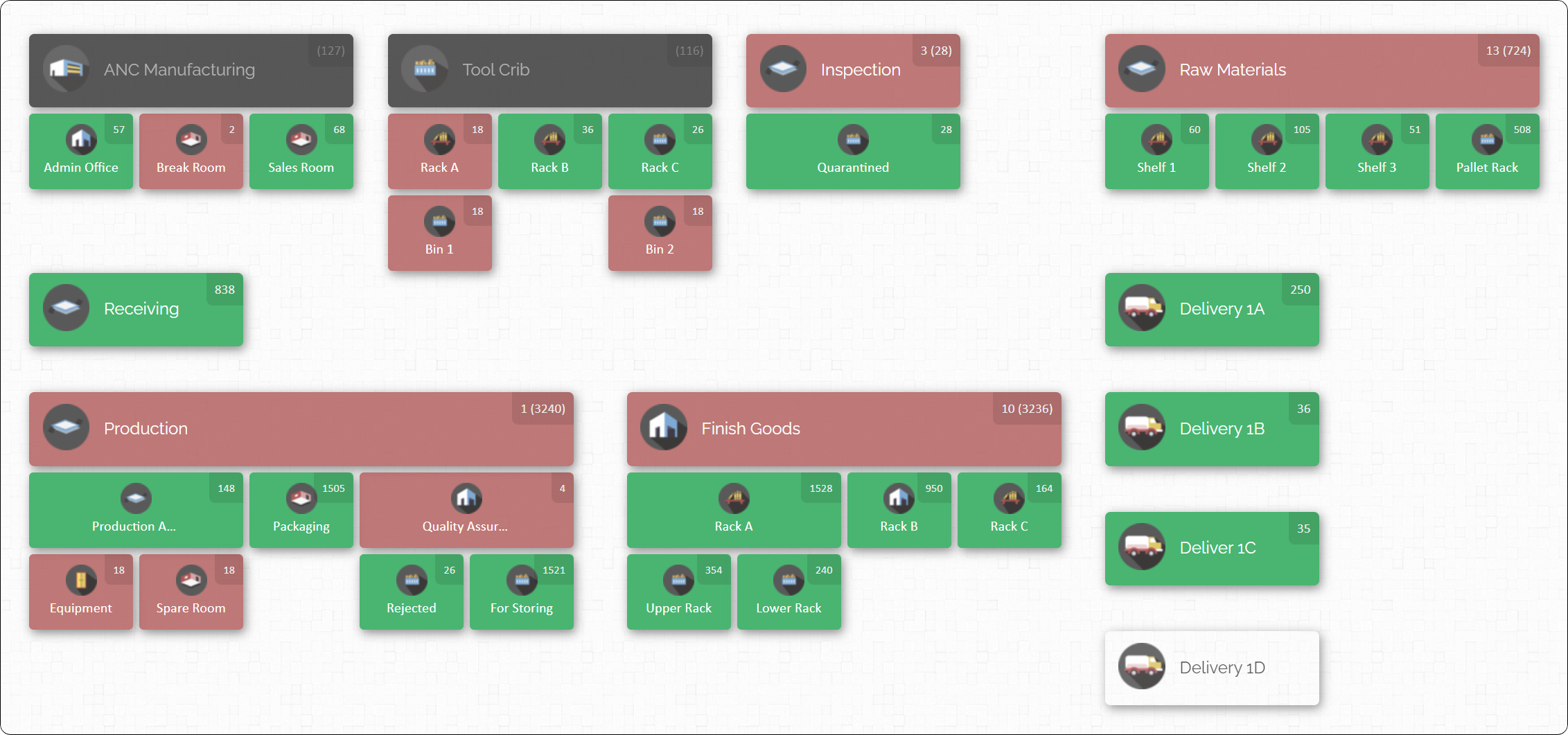
- Structured Physical Layouts. Physically organize your facility so that departments know where each other’s inventory is. In some operations, shared stockrooms exist. In others, departments have their own mini-warehouses. Even then, maintain clear signage and standardized location coding across the site. For example, use zone prefixes like “WH–” for the main warehouse, “AS–” for assembly shop, or “MT–” for maintenance. This uniform system ensures that when items move (say, from receiving to production), everyone understands the location labels. If the floor plan is visualised on a map (as in Fig. 1 above), each department’s areas can be colour-coded or labelled for instant recognition.
- Empower Departments with Access. Give key department personnel access to the inventory system’s features. Maintenance might need to draw down stock and log usage; production might want to forecast parts on hand; procurement needs visibility of reorder levels. By enabling departmental logins or views (with permissions), everyone from shop floor clerks to project managers can query the same data. Training these users on how to interpret the inventory map or reports fosters alignment—whether a technician is looking for a specific bolt or a buyer is checking raw material buffers, they see the same authoritative information.
- Implement Periodic Joint Inventories. Encourage cross-departmental cycle counts or inventories. For instance, once a month, have a mixed team (operators, warehouse staff, supervisors) count all items of a certain critical part across shops. This not only verifies numbers but also brings different teams together around a shared goal of accuracy. After the count, discuss any discrepancies as a group. Such collaborative audits improve trust in the data and surface process issues affecting multiple teams.
- Shared Reporting Metrics. Track and share inventory-related metrics across the organisation, not just within warehousing. For example, inventory accuracy percentage or number of parts lost vs. found. If production sees that only 92% of “on-paper” parts are actually available, they’ll join the effort to tighten controls. Public dashboards or company emails about inventory health make it part of the bigger picture: an error at receiving becomes a visible problem that hinders everyone, not just a dock issue.
By aligning teams around common inventory data and processes, you transform warehouse receiving from a isolated task into part of a cohesive system. When departments trust that the parts count and locations are correct, they make faster, better decisions – whether it’s running a production run, performing maintenance, or planning purchases. Full parts visibility means far fewer surprises, less redundant ordering, and smoother operations plant-wide.
Leveraging Technology in Receiving and Inventory Management

Technology plays a pivotal role in error prevention and visibility. Here are key technological tools and methods that enhance receiving accuracy and parts visibility:
- Warehouse Management Systems (WMS) or Inventory Software. A robust WMS underpins almost every modern best practice. It enforces process steps (like mandatory scans), records data, and can tie into purchasing and production systems. When choosing a system, look for one tailored to manufacturing environments, capable of handling multiple inventory types (raw, WIP, finished goods, spares). Cloud-based solutions eliminate isolated spreadsheets and let everyone access the latest data from anywhere on the network.
- Barcodes and Scanners. These are the workhorses of error reduction. Every part and package should carry a barcode. On receipt, scanners automatically capture product codes and serial or lot numbers. Even better, use portable barcode scanners or mobile devices at the dock and storage areas. This approach replaces manual entry with instant recording. It makes the receiving process fast, reliable and auditable. Scanners can also be used on the shop floor or in other departments to track consumption, further unifying data.
- RFID and Automated ID (where appropriate). For high-throughput or high-value operations, consider RFID tagging. With RFID readers at dock doors or aisles, pallets can be identified without line-of-sight scanning. For example, a gate scanner could capture all tagged items on a pallet as it passes by. This isn’t needed everywhere, but for very fast moving warehouses it can significantly cut scanning time. Note, however, to use RFID properly you still need a central system to interpret those reads and update inventory.
- Digital Dashboards and Alerts. Go beyond raw data screens. Use digital dashboards that highlight key information: pending shipments to receive, current receipts, low stock alerts, and inventory discrepancies. For instance, set up an alert that notifies the purchasing team immediately if a critical part arrives short or damaged. Similarly, a dashboard can display ‘awaiting put-away’ items so nothing lingers forgotten in the receiving dock. These visual signals help teams prioritize action and catch errors as they occur.
- Maps and Visual Layouts (Inventory Mapping). A map-based inventory interface is extremely valuable. Instead of a list of location codes, a graphical layout of the facility lets you click on zones or bins to see their contents. On receiving, staff can visually drop items into the mapped location; in turn, any user (say, a line manager) can visually scan for parts on the map. This “real-time bird’s eye view” bridges the gap between digital data and physical space. It speeds up finding parts and highlights discrepancies (for example, if a location is highlighted as empty when it shouldn’t be). Many companies find that visual maps dramatically improve accuracy because they align with how people naturally perceive a space.
- Mobile-friendly Access. Ensuring that inventory data is accessible on mobile devices (tablets, smartphones) allows teams on the move to update and verify on the spot. For example, a maintenance worker can check stock levels on a tablet while walking through a storeroom, or a receiving supervisor can approve a count on a handheld terminal right at the dock. Note: this does not necessarily mean a special mobile app needs to be developed – often a responsive web interface is sufficient. The key is that updates happen at the source, not hours later back in the office.
- Analytics and Machine Learning (advanced). Some companies go further by using analytics to identify error patterns or predict stock needs. For instance, anomaly detection can flag if a department suddenly uses far more of a part than usual (possible overuse or theft). Predictive algorithms can optimize reorder points based on usage trends. While not strictly necessary for a basic receiving process, analytics can turn good data into strategic insight over time.
The ultimate effect of these technologies is to make manual errors nearly impossible and to keep everyone informed. However, technology must be applied correctly, alongside the right processes. For example, scanning only works if every item is barcoded in the first place. Maps only help if locations are kept up to date. But with disciplined practices in place, these tools multiply your accuracy and visibility.
CyberStockroom: Enabling Unified Inventory Visibility
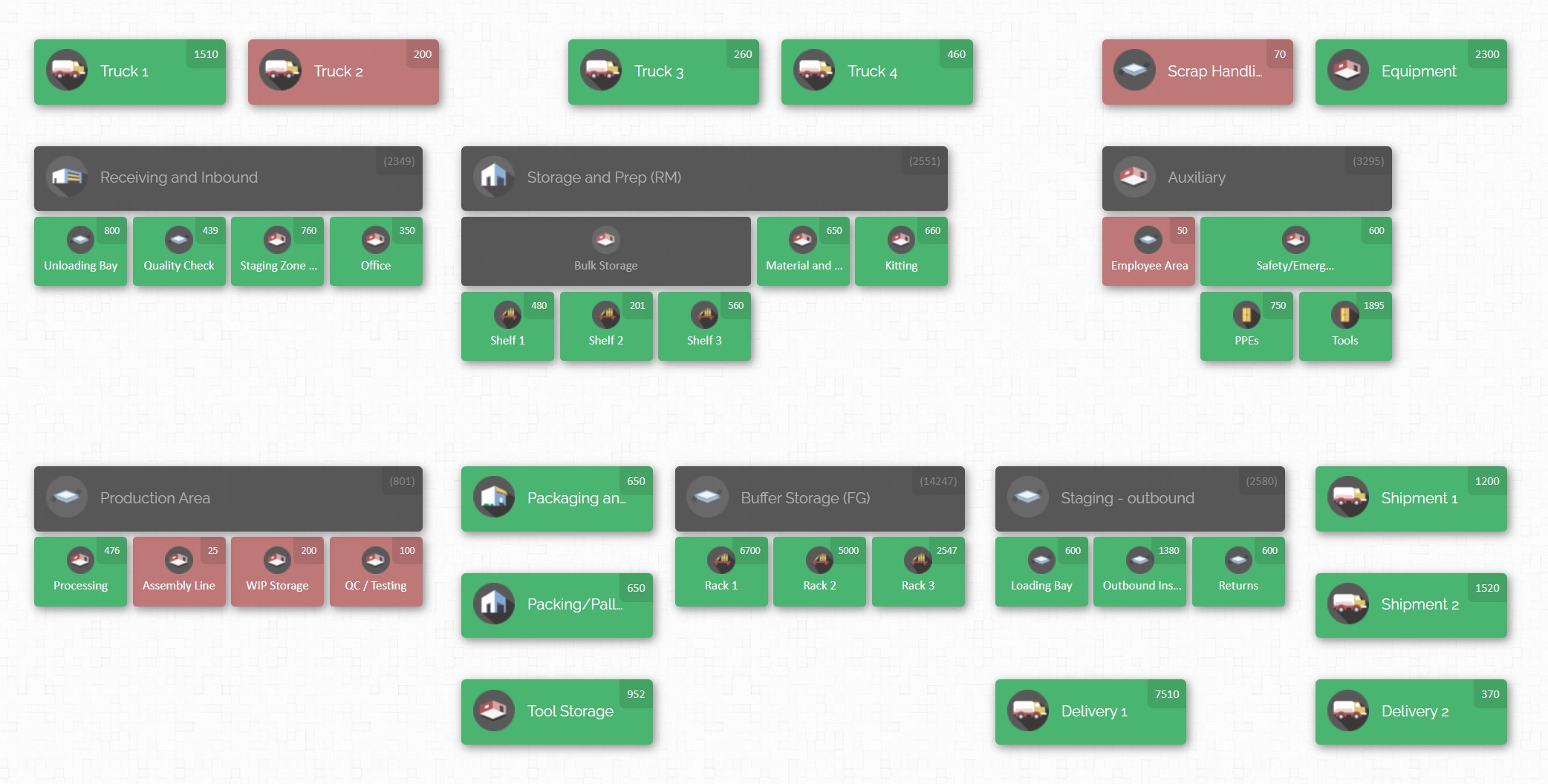
Modern challenges in manufacturing call for modern tools. One example of an inventory solution designed around visibility is CyberStockroom (a cloud inventory mapping platform). Unlike traditional systems that just list numbers, this type of software builds on best practices by giving every team a shared visual dashboard of stock. Here’s how a tool like this supports full parts visibility across departments:
- Interactive Facility Map. CyberStockroom allows you to create a 2D digital twin of your whole operation – warehouses, storerooms, even trucks or equipment rooms can be mapped as locations. On one screen, you see all these areas laid out. When receiving staff scan and place an item, they simply drag it to the correct spot on the map. Instantly, that part’s quantity and location are logged. Now both the warehouse team and, say, the maintenance crew see the same map. The maintenance department’s stockroom appears just another zone on that map, with its own counts. If someone in maintenance uses a part, they can scan it out and the map updates in real time. Every department essentially “taps into” one live inventory source.

- Real-Time Updates for All. Because CyberStockroom is cloud-based, updates happen instantly for everyone. As soon as an item is received and scanned, managers and floor staff across shifts see the new level. This means production planners or project leads can check stock on their laptops before even stepping onto the floor. If an emergency repair requires a particular part, the maintenance team can look at the map to see if any stock is available nearby. There’s no waiting for an end-of-day report – visibility is immediate.
- Multi-Location and Multi-Department Alignment. The system is not limited to one building. If you have parts stocked in different warehouses or site-specific stores, each location is on the unified map. Cross-department usage is simple: for instance, if a project team borrows parts from the main inventory, those parts are moved on the digital map to a “Project Zone” under that department’s name. Everyone retains visibility of quantities, but now the system also knows who has them. This prevents accidental duplication – one department will see that “green PCB connectors” are sitting in the electrical shop instead of ordering new ones again.
- Custom Organization Structure. CyberStockroom’s map is fully customizable. You can represent physical layouts accurately so that staff find the interface intuitive. Labels, icons or even background images (e.g. a blueprint of your factory) can be used. Locations can be nested – whole building → aisle → shelf → bin – giving any user, in any department, a precise sense of “where.” Because it mimics the real floor plan, training new staff is quicker: they don’t have to memorize codes, they just click the visual zones.
- Streamlined Receiving Workflow. The receiving process plugs directly into this system. When a shipment arrives, a clerk logs into CyberStockroom and initiates a receipt. As boxes are opened, items are scanned and dragged to their locations. The software immediately logs the timestamp, user, and location move. This tight coupling means there’s no separate “data entry later” step – the act of scanning and placing is the data entry. If a scanned item doesn’t match the expected PO (maybe the wrong SKU), the software can flag it right then for review. By digitalising receiving on the map, errors like mis-put-aways or missed entries become glaringly obvious.
- Accountability and Audit Trails. Every action in the system is logged. When a department takes parts out of inventory (say maintenance pulls spares for a repair), it’s recorded who did it, when, and from where. This level of accountability encourages careful use of stock and makes tracing issues easier. If parts go missing or are used up unexpectedly, managers can retrace steps through the logs, which often leads to process improvements or identifies training needs in specific areas or shifts.
In effect, CyberStockroom (or any well-implemented visual inventory solution) operationalises the principles we’ve discussed. It enforces standard procedures through the map interface, it harnesses scanning to eliminate manual errors, and it unifies everyone on one platform. Most importantly, it makes parts visibility tangible. The inventory is no longer just numbers in a report; it’s boxes and bins on a screen that everyone recognises. By adopting such a tool as part of the process, a company can achieve full alignment of warehouse and departmental inventory data.

In sum, modern inventory software transforms theoretical best practices into everyday reality. When teams use a shared map-based system, they don’t have to remember which sheet or database to check – they simply look at the map and see exactly what’s in stock, in real time, wherever it is. This clarity massively reduces confusion and errors after the point of entry.
Conclusion
Receiving accuracy isn’t just a warehouse concern – it underpins the whole manufacturing operation. By treating the receiving dock as the critical nexus of quality control, documentation and communication, companies can eliminate a host of downstream problems. We’ve outlined concrete best practices – from establishing SOPs and using barcode scanners, to organising the receiving area and coordinating teams – that together build a robust process.

At the same time, ensuring that parts data flows seamlessly to every department is equally vital. Centralised systems, visual inventory maps, and real-time updates break down silos so that engineering, production, maintenance and purchasing all work from the same facts. When everyone shares one source of truth for inventory, miscounts don’t sneak through unchecked and no part gets “lost” to a single department’s ledger.
Ultimately, blending disciplined receiving procedures with the right technology yields reliable inventory control. Warehouse teams can process goods quickly and correctly; plant managers can trust stock levels; maintenance crews can find spares when needed; and planners can make decisions without second-guessing the data. As a result, lead times shrink, waste drops, and customer orders flow out without hiccups.
Adopting these best practices – and considering modern solutions that visualise inventory – empowers your entire organisation with confidence in its parts. The goal is simple: zero surprises at the dock, and full visibility in every department. With diligence and the right tools, this goal is well within reach.









Leave a Reply