
Preparation that prevents panic later
Most teams start an inventory system change by comparing software features. That is understandable, but it is rarely the reason implementations go wrong. The rough transitions come from rushed scope, messy item data, unclear processes, and people who are not ready for new ways of working.
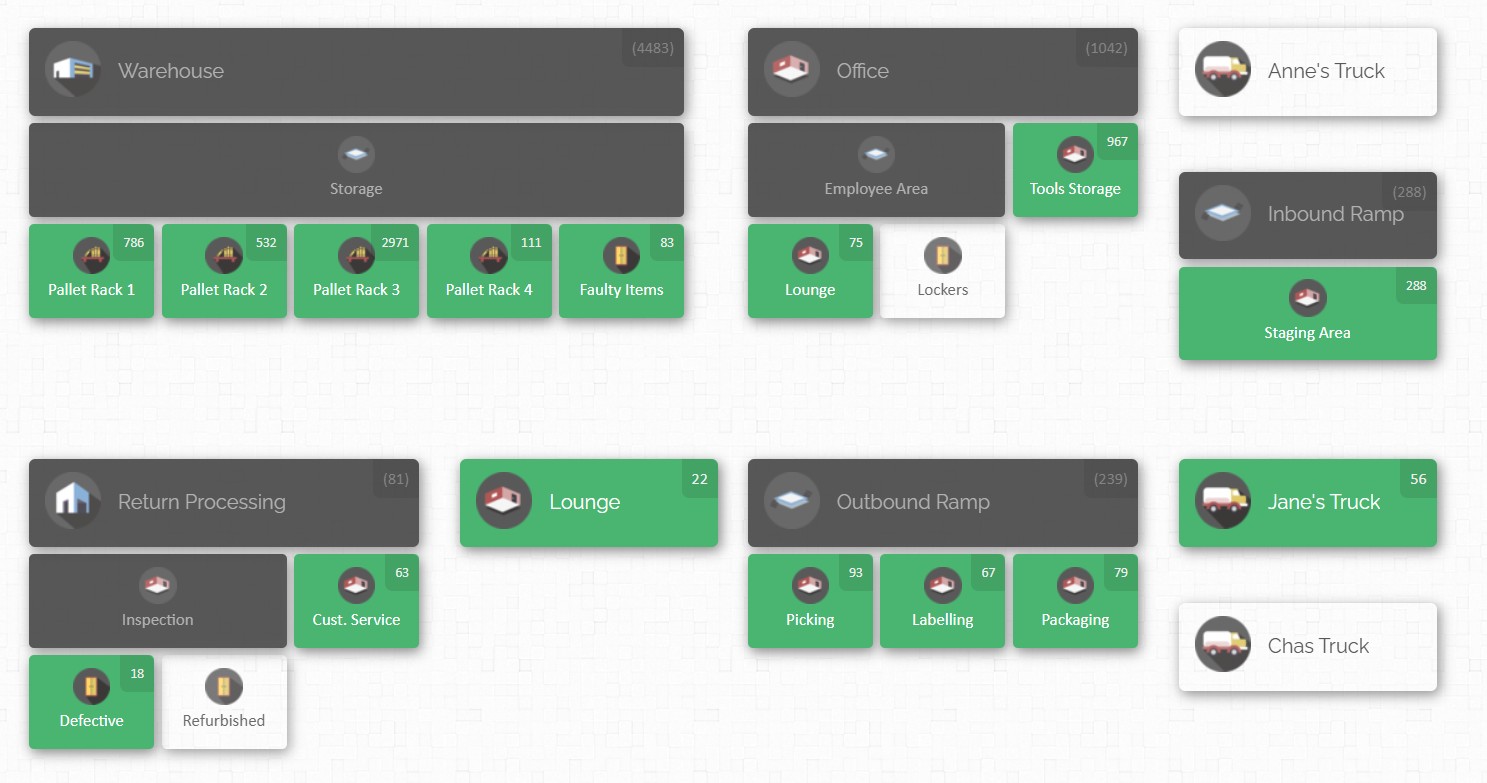
A smooth transition starts by treating implementation as a business change programme with a clear aim, clear owners, and a clear definition of “done”.
Start with the business case you can explain in one minute
If your stakeholders cannot repeat the reason for the change, they will not support the hard parts (data clean-up, labelling, training, and compliance). A practical one-minute business case usually connects to outcomes like:
- Fewer stockouts and fewer urgent “where is it?” escalations in ops.
- More accurate inventory records (so purchasing stops ordering duplicates).
- Faster picking and issuing (because locations are clear, not guessed).
- Better control and accountability for high-value items (because activity is tracked and auditable).
This is also where you set your baseline. Pick a small set of measures you can actually track before and after go-live. Inventory accuracy is a common start, and cycle counting is often recommended as an ongoing way to keep accuracy from slipping.
Define scope in plain language, not “modules”
Scope creep in inventory projects often looks harmless at the start:
“While we’re at it, let’s track tools… and consumables… and returns… and vendor bins… and who borrowed what… and attach manuals… and maybe revise all naming conventions.”

The danger is not ambition. The danger is trying to change too many things at once without a staged plan. Implementation guides for warehouse and ERP rollouts repeatedly stress the value of structured phases, from scoping through testing, go-live, and post-launch support.
A simple way to keep scope realistic is to lock three lists:
- Launch scope (must-have): what must work on day one for operations to continue.
- Near-term scope (next): improvements that can wait until the system is stable.
- Later scope (nice-to-have): valuable ideas that should not block go-live.
This approach protects momentum without killing ideas.
Choose an implementation approach that fits your risk tolerance
There is no universal “best” rollout style. The right choice depends on site count, inventory complexity, and how expensive downtime would be.

A “big bang” cutover is the all-at-once switch. It can be faster, but it concentrates risk into one moment.
A phased rollout introduces the system step-by-step (for example, one site, one store room, or one product category at a time). It can reduce risk and help the team learn, but it requires discipline to manage a hybrid period where old and new ways temporarily coexist.
A pilot-first approach is often the easiest way to protect credibility. You pick one area with real activity, not a “toy” area, and launch there first. The aim is learning: validate workflows, labels, training materials, and reporting before scaling.
Build a cross-functional team with one clear owner
Inventory is not owned by one department. It touches purchasing, operations, finance, maintenance, and sometimes customer-facing teams.
A practical team structure includes:
- Executive sponsor: clears roadblocks, sets priority, protects time.
- Inventory process owner: decides how receiving, issuing, transfers, and adjustments should work.
- Data owner: responsible for item master data quality and location structures.
- Operations champions: the people who will train others and keep standards alive after launch.
- IT or systems support (if needed): supports access controls, device setup, and security.
This is also where stakeholder communication stops being “nice to have”. The Project Management Institute highlights communication planning as a core project discipline, because projects fail when stakeholders do not understand what is changing and when.
Data and process foundations that make the system usable
A new inventory management system does not clean up bad processes by itself. It tends to expose them.
If the organisation has inconsistent SKUs, informal location names, unclear units of measure, and a habit of “fixing it later”, the new system will simply show that chaos in higher definition. Implementation guidance across inventory and warehouse system projects consistently calls out assessment, data migration, verification, and training as critical, not optional.
Process mapping that focuses on the moments that matter
You do not need a 60-page process document to improve inventory management. You need clarity on the transactions that keep inventory truthful:
- Receiving
- Put-away
- Transfers
- Issue or consumption (check-out)
- Returns
- Adjustments
- Counts (cycle counts and periodic full counts)
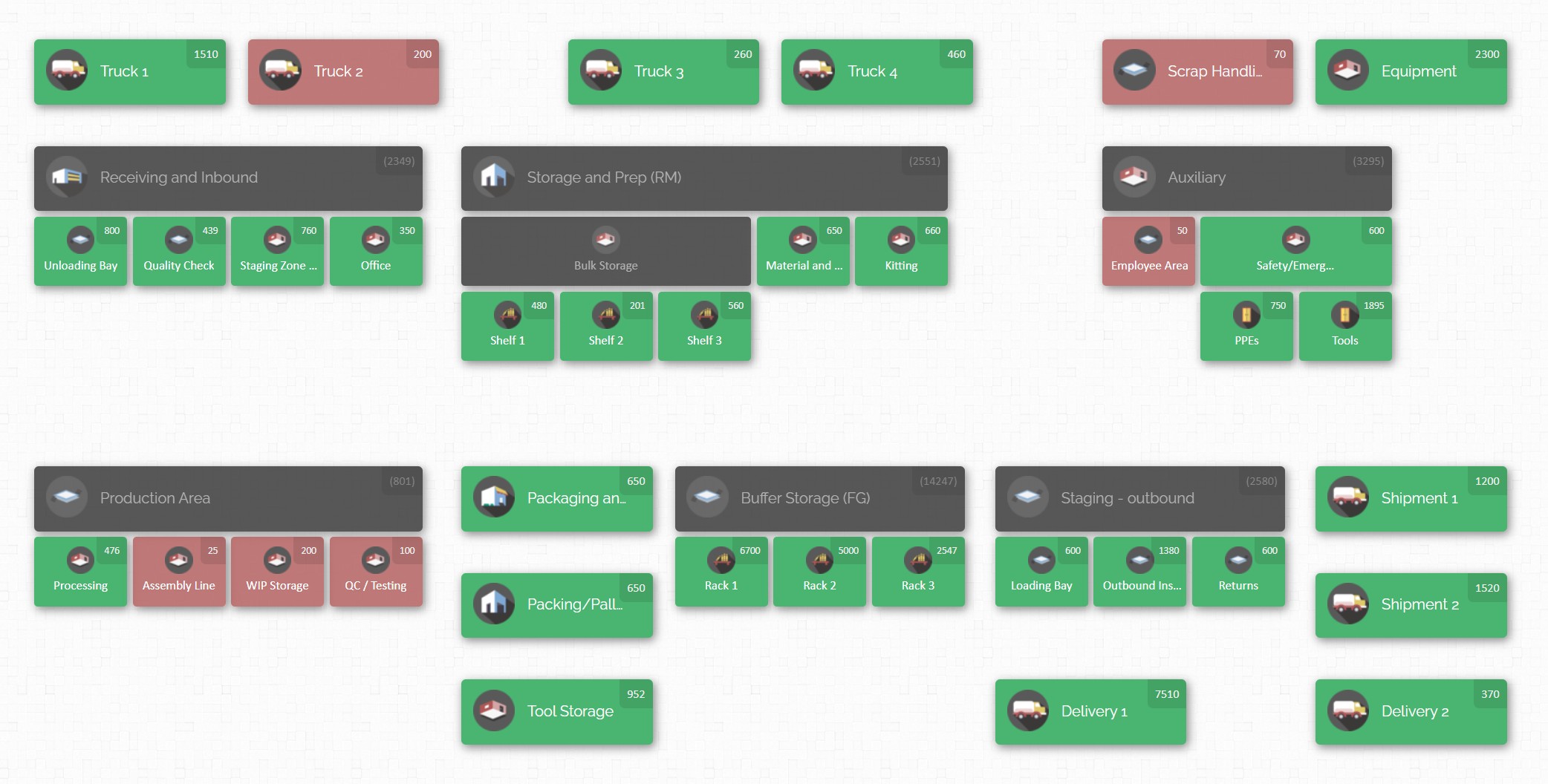
The practical test: can two different people perform the same transaction the same way and get the same result? If not, create a standard.
Item master data that supports real operations
Your item master is the vocabulary of the whole system. When it is ungoverned, everything downstream suffers.
Inventory platforms typically depend on consistent identifiers and attributes, such as SKU or product number, description, unit of measure, and location. CyberStockroom’s guidance also stresses the importance of unique identifiers and encourages deliberate SKU or product number design, including optional serialisation concepts when needed.
A practical clean-up pass often targets:
- Duplicate items (same thing, different names)
- Old items that should be archived
- Units of measure that do not match how stock is issued (box vs each)
- Non-standard naming that breaks searching and reporting
Location design that matches how people walk the site

If locations do not match what the team sees physically, the system will never be trusted.
This is where map-based systems can change behaviour, because the “where” becomes part of how people think about inventory, not a hidden field in a table. CyberStockroom help content describes building a map from simple (a few locations) to complex (down to shelf and bin), depending on your need for precision.
A useful rule is to build locations to the level where misplacement becomes expensive. For low-cost consumables, a general bin may be enough. For high-value tools, calibrated equipment, or regulated items, you usually want tighter location granularity.
Data migration that starts with “what is true”, not “what is recorded”
Data migration is where inventory projects quietly win or quietly fail. It is not only about moving rows from one file to another. It is about starting the new system with quantities and locations that the business can rely on.
Data migration checklists commonly emphasise preparation, cleansing, test migrations, and validation, because errors in early migration stages can echo for months.
For inventory specifically, many migration playbooks recommend a physical inventory or careful reconciliation close to cutover. The logic is simple: if you start the new system with incorrect quantities, you may spend a long time arguing with the system instead of using it.
Inventory reconciliation is fundamentally the act of comparing what is physically present versus what the system says is present, then investigating discrepancies until the numbers make sense.
Labelling and barcode standards you can keep up with
If you plan to use barcodes (and most teams do), decide these early:
- What gets a label: products, bins, shelves, rooms, or all of the above
- Barcode format rules (length, characters, meaning)
- Who prints labels, and how replacements are handled
- Where labels are placed so they survive real use
A barcode inventory system works because scanning reduces manual entry and speeds up transactions. Barcode guides describe the “ecosystem” as linking barcodes to products, locations, and transactions, so system records reflect reality.
Barcode scanners can be used broadly across the platform because scanners behave like keyboard input, and text fields accept scanner input. They also describe generating barcodes for products and map locations, plus printing those barcodes from within the system.
CyberStockroom as a map-first approach to smoother transitions
Many inventory tools start as lists and numbers. CyberStockroom pushes a different starting point: build an inventory map first, then manage products and movements through that map. Its help documentation presents the map as a way to keep the core question visible: “how many of what do I have, where?”
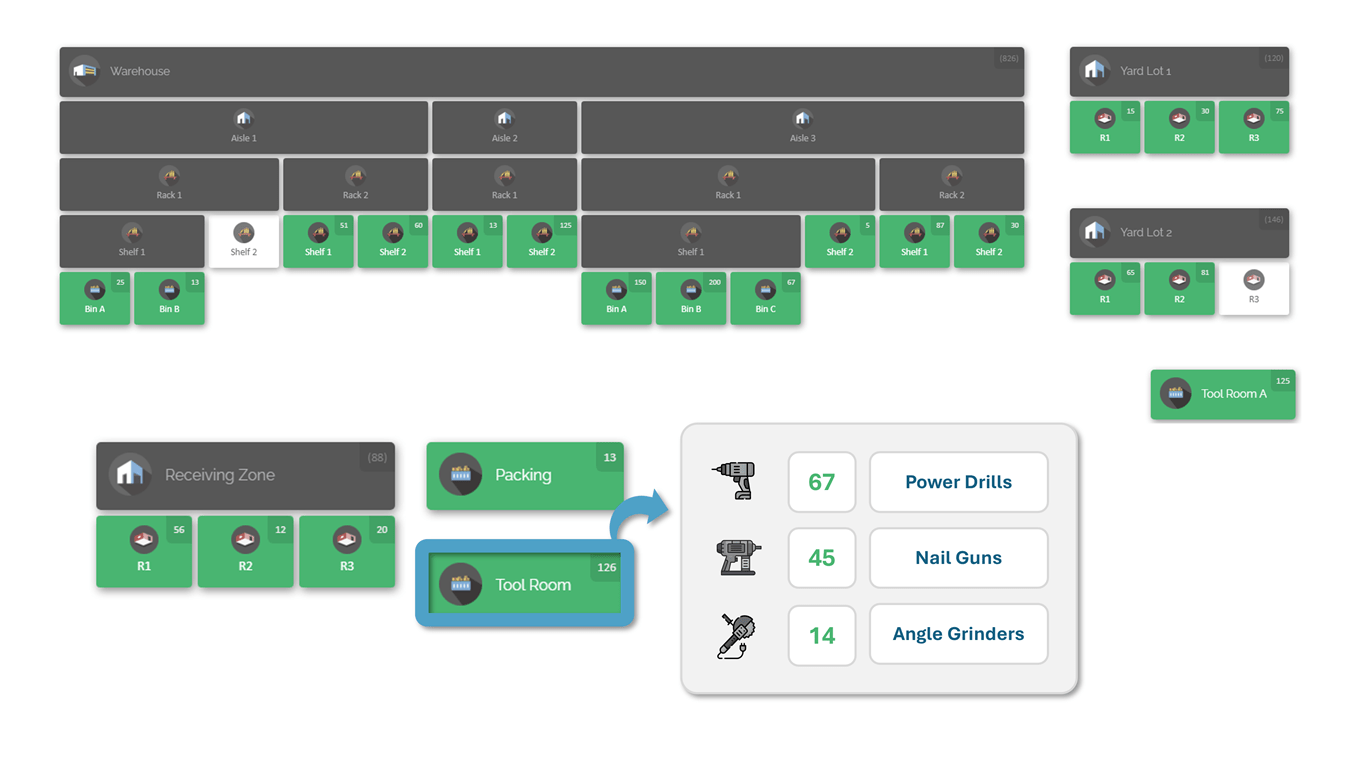
That map-first design can be particularly useful during implementation, because the map becomes a shared reference point for the team while processes are being standardised.
Start simple, then add detail where it pays off
CyberStockroom’s “simple vs complex” guidance is practical: you can begin with only a few high-level locations, or you can model every shelf and bin. The right choice depends on whether you need to pinpoint exact placement or simply understand distribution at a broader level.
A smooth transition often uses a “simple first” tactic:
- Launch with a map that is accurate and complete at the major-location level.
- Train the team on standard check-in, check-out, and transfers.
- Then add sub-locations over time as your team builds confidence.
This reduces early debate about perfection, while still protecting accuracy.
Use the map for people, not only places, when lending is part of the business
A common inventory pain point is not “where is the item in the warehouse”. It is “who has it”.
CyberStockroom explicitly notes that map locations can represent employees, vendors, or customers, which can support lending or assignment workflows where ownership matters as much as storage.
If your operation issues tools to technicians, supplies to teams, or equipment to projects, treating “people” as inventory locations can make transactions simpler to understand and audit.

Bring spreadsheet inventory into the system without weeks of retyping
Many organisations begin with spreadsheets. CyberStockroom provides an “upload from spreadsheet” workflow, positioning it as a way to move products into the system in bulk rather than creating items one by one. The same page also notes the option to send a catalogue for upload assistance.
Even if you do not use CyberStockroom, the principle still matters: bulk loads reduce time, but only if you clean the source file first.
Make core transactions easy
Daily usability decides whether a new inventory management system becomes “the way we work” or “that tool we open during audits”.
CyberStockroom’s help guidance lays out check-in and check-out from a start menu or directly from the map, then selecting location and products, with search support when lists are long.
It also describes barcode-assisted workflows where scanning a product selects it and repeated scans increase quantity.
The more you can reduce friction in these core transactions, the easier everything else becomes.
Reduce “micro-transaction fatigue” with drag-and-drop transfers
One reason inventory accuracy drifts is that people postpone updating the system because transactions feel slow.
CyberStockroom’s drag-and-drop inventory tooling is designed around the map: move items between locations visually, with fast transfers for day-to-day movement.
Its check-out guide also describes using drag-and-drop to check items out by dragging a location to the check-out icon, then selecting quantities through clicks, dragging, or manual entry.
Protect data integrity with role-based access patterns
Inventory systems fail quietly when too many people can change too many things with no accountability. A well-known security best practice is the principle of least privilege: users should have only the minimum access needed to do their job.
CyberStockroom includes role-limiting options like read-only users (who can view the map, products, and activity history but cannot change inventory) and a “mobile-view only” restriction option designed to limit what certain users can do or see.
In implementation terms, this is not just security. It is change management:
✔️ Read-only access helps stakeholders trust what they see without fear of accidental edits.
✔️ Restricted access helps frontline users focus on transactions rather than configuration.
✔️ Admin access stays with a smaller group who are trained and accountable.

Improve audit readiness with activity history and exportable reporting
Inventory “shrinkage” is often described as the gap between recorded inventory and physical count, with causes ranging from error to theft.
CyberStockroom frames activity history as a ledger-like record of transactions and notes that history can be filtered (for example by user, activity type, timespan, location) and exported as a report.
During transition, this type of traceability matters because it helps resolve early discrepancies. Instead of debating opinions, teams can trace what happened.
Support faster identification with images and attachments
During go-live, the biggest “small” delays come from item identification. People stare at similar product names, pick the wrong one, then lose trust.
CyberStockroom describes assigning images to products to make identification easier and notes that attachments can be added to products, such as manuals, documentation, or purchase orders.
Whether you use images heavily or only for critical items, this is a practical way to reduce mistakes that stem from confusing item descriptions.
Handle bulk changes without punishing the team
Bulk edits and mass transfers are common in real operations: a full pallet move, a storage reorganisation, a kit build, or a stocktake adjustment.
CyberStockroom describes batch processing as a spreadsheet-driven way to handle large changes, including moving hundreds of items between locations, and even sending a spreadsheet for assistance.
This matters because manual edits are where accuracy and morale both break. If the system makes large changes practical, the business is more likely to keep records accurate.
Go-live discipline, post-launch stability

The “go-live date” is not the finish line. It is the point where you stop controlling conditions and start operating in the real world.
Implementation guides for warehouse and enterprise systems usually treat go-live as a phase with its own planning, followed by a period of stabilisation and continual improvement.
Test what matters: end-to-end workflows and user acceptance
Your team can configure an inventory system perfectly and still fail at go-live if you do not test real workflows:
- Receive, then put-away, then transfer, then issue, then return.
- Run a cycle count and reconcile.
- Handle exceptions: damaged goods, unknown items, mis-scans.
User acceptance testing (UAT) is widely defined as testing performed by intended users to confirm the system works for real-world tasks and meets requirements before release.
A practical UAT method is to create scenario scripts that mimic a real day, then run them with real user roles. Do not let UAT become “click around and see what happens”.
Plan cutover like a controlled handover of truth
Cutover planning is about deciding the moment when the new system becomes the source of truth.
Many migration and transfer playbooks advise doing data migration before physical movements or operational switches, then freezing a final inventory file and reconciling counts close to cutover.
In inventory programmes, a common failure pattern is allowing transactions to continue in multiple places (old spreadsheet, old system, and new system) during a poorly controlled transition. That creates competing truths.
To reduce that risk, define:
- The freeze window (when transactions pause or are strictly controlled).
- The final count or reconciliation step.
- The cutover moment (when transactions must be recorded only in the new system).
- The day-one verification checklist (spot checks, key items, top locations).
Expect a stabilisation period and staff it properly
A post-launch “hypercare” period is commonly recommended in system implementations. It is a short window of heightened support where issues are triaged quickly and user confidence is protected.
Hypercare succeeds when it is run like a structured service:
- Clear support channels (who to contact, how, and when).
- Rapid fixes for data and workflow issues.
- Visible daily communication of known issues and resolutions.
- A backlog for non-urgent enhancements.
Keep accuracy alive with cycle counting and reconciliation habits
Inventory accuracy is not a one-time achievement. It is a maintenance discipline.

Warehouse KPI guidance from the Association for Supply Chain Management notes that inventory accuracy can be improved through regular checks against the database and cycle counting, emphasising continual validation rather than rare large corrections.
Cycle counting is commonly contrasted with full physical inventories: physical counts cover everything (often annually), while cycle counts cover smaller subsets more frequently.
This supports a practical post-launch rhythm:
- Daily or weekly counts for high-movement or high-value items.
- Monthly review of discrepancy patterns and root causes.
- Adjustments to labelling, locations, training, or processes based on what counts reveal.
Use continuous improvement thinking, not “set and forget”
Inventory processes evolve. Staff change. Locations get reorganised. Product catalogues grow.
A continual improvement model like PDCA (Plan-Do-Check-Act) is widely described as a cycle for managing processes and improving performance over time.
This fits inventory system optimisation naturally:
Plan: decide what improvement to make (for example, better receiving process, clearer labels, tighter permissions).
Do: implement the change in a controlled way.
Check: measure whether accuracy, picking time, or shrinkage improved.
Act: standardise the improvement or adjust and try again.
Change management that keeps the human side from derailing the technical side
Even when the system is well designed, people still have to change habits.
The Prosci ADKAR model frames successful change through five outcomes for individuals: awareness, desire, knowledge, ability, and reinforcement.
A practical way to apply ADKAR to an inventory transition:
- Awareness: show the cost of the current pain (time lost, missing items, stockouts).
- Desire: explain what is in it for each role (fewer calls, fewer surprises, less firefighting).
- Knowledge: train people on the exact tasks they perform.
- Ability: coach in the live environment after go-live, not only in a classroom.
- Reinforcement: measure compliance, recognise good habits, and correct gently but consistently.
Similarly, John Kotter’s change guidance includes creating urgency and building a guiding coalition to sustain momentum.
Cybersecurity controls that matter in inventory systems
Inventory data is operationally sensitive: locations of high-value items, purchase information, usage patterns, and sometimes customer or project data.

A simple security baseline for an inventory management system implementation includes:
- Strong user access controls aligned to least privilege.
- Clear separation of admin configuration access versus day-to-day transactional roles.
- Regular reviews of who has access, especially after staff changes.
- Visible audit trails and activity history to support accountability and investigations when discrepancies occur.






 CyberStockroom
Leave a comment