
Inventory traceability is the backbone of quality and regulatory compliance in modern manufacturing. By knowing exactly where every part and material came from and how it was used, companies can ensure safety, prevent defects, and streamline recalls.
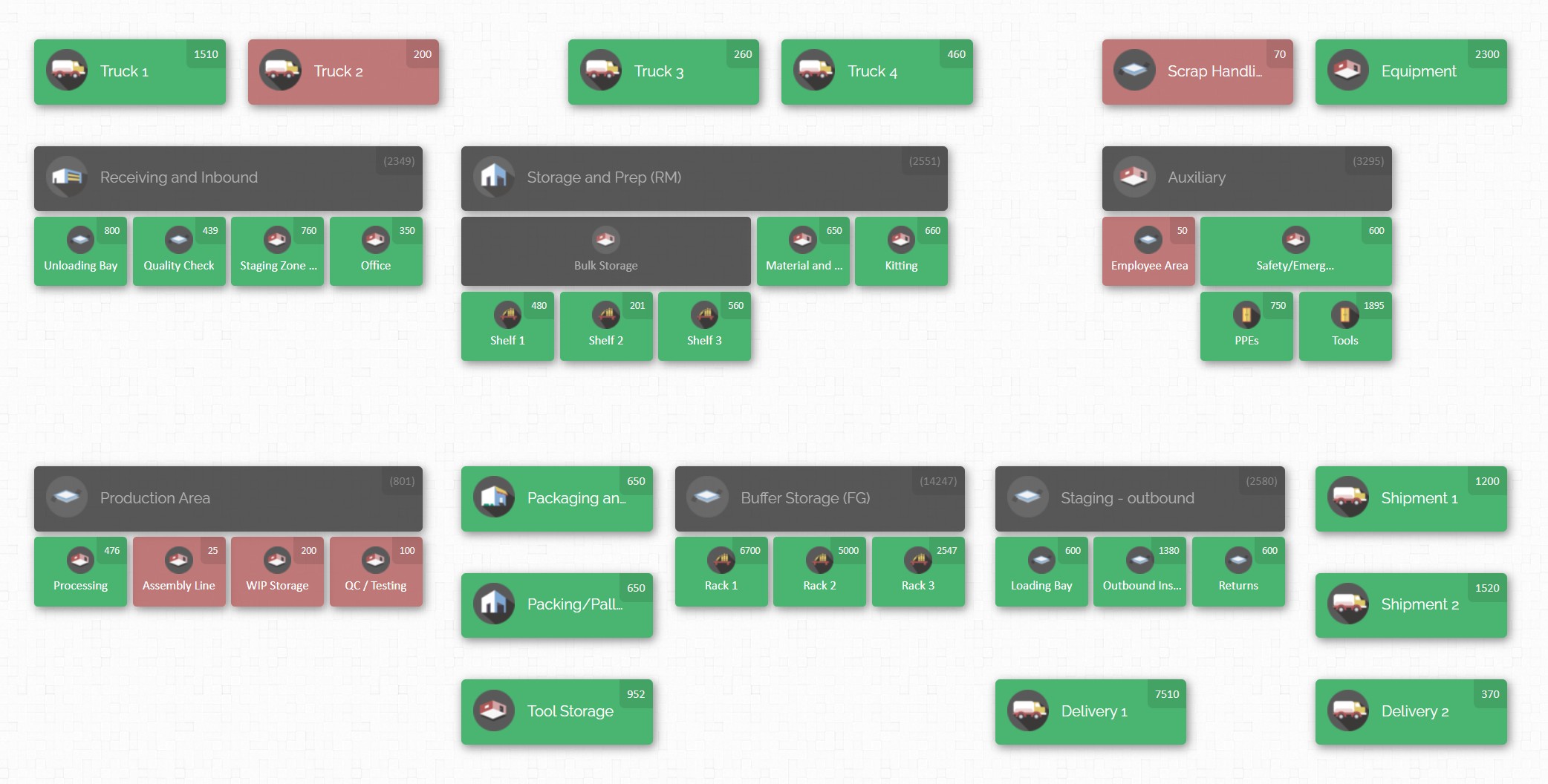
A robust inventory management system – especially one that uses visual maps and automated tracking – can turn a complex supply chain into a transparent, auditable operation. In this guide, we’ll show you how to implement inventory management practices that guarantee traceability and meet compliance requirements in manufacturing.
Manufacturers are under growing pressure to provide product history and quality documentation. In fact, traceability “is crucial for ensuring product quality, safety, and compliance”. Consider aerospace or medical devices: these industries mandate that every part be logged by lot or serial number, from receipt of raw materials through to final shipment. With the right inventory practices, you can meet these demands – and even turn them into competitive advantages like faster recalls and better customer trust.
“In aerospace and defense manufacturing, rigorous inventory tracking and traceability…are essential for regulatory compliance and quality assurance. Each item must be traceable by a lot/batch or serial number, enabling manufacturers to address quality or safety issues quickly and effectively.”
Why Traceability Matters: Quality, Safety and Compliance

Traceability means tracking materials and products through every stage of production, from incoming parts to outbound shipments. In practice, this involves assigning unique identifiers (like lot or serial numbers) and logging their movement in a system. The payoff is huge: if a defect or safety issue is discovered, traceability lets you quickly isolate the affected items. Instead of guessing which batches might be bad, you can target the exact lot numbers and prevent a larger failure. In industries like aerospace, food, pharmaceuticals and medical devices, this ability to trace parts is mandatory. It not only protects consumers but also shields your company from fines and reputation damage.
Traceability also streamlines quality control. For example, if a subassembly fails a test, you can pull the lot of raw material that went into it and verify whether more assemblies might be suspect. The manufacturing genealogy – a full record of parent material to final product – “makes compliance much less of a headache” by simplifying audits. In practical terms, that means being able to generate reports that show exactly which serial numbers went into which customer orders, and which documentation (like Certificates of Conformance or test logs) applies to them. Many companies find that once they have this data centrally logged, regulatory inspections and customer audits become routine rather than stressful.
Beyond compliance, traceability drives continuous improvement. It gives you data on everything from material supplier performance to yield rates, letting you spot bottlenecks or defect trends early. As one industry guide notes, “traceability highlights previously invisible problems” and empowers data-driven decisions across the plant. In short, it turns raw inventory data into actionable quality and efficiency improvements.
Regulatory Standards and Quality Requirements
Most manufacturing standards require strong inventory traceability. ISO 9001 calls for identification of outputs and record-keeping, while AS9100 in aerospace and ISO 13485 in medical devices demand strict lot control. In food, the FDA’s FSMA enforces one-step-forward/one-step-back tracking, and in pharma, cGMP requires every material to be traceable from receipt to production.
These rules all share the same needs: unique identifiers, accurate records, and quick retrieval of lot history. Compliance starts at receiving, where raw materials must be labeled with batch or serial numbers and logged immediately. From there, every movement—storage, kitting, production use, inspections, and shipping—must be captured. Any gaps in this chain risk breaking compliance. A robust inventory system creates a complete audit trail, ensuring you can trace any issue back to its source.
Key Steps to Implement Inventory Traceability

- Assign Unique Identifiers. Ensure every incoming material and finished product gets a unique batch or serial number. Don’t reuse codes. This could be a barcode, QR code, or plate with a serial. As the experts advise, “every single asset needs a unique identifier”. For example, incorporate model numbers, lot numbers, and manufacturing dates into a composite code. Use durable labels or plating that withstand factory conditions. Doing this lays the foundation: without unique IDs, you can’t reliably distinguish items later.
- Log Materials at Receipt. When goods arrive, scan or enter their identifiers into your system immediately. Capture crucial details: lot code, supplier, expiration/inspection dates, quantity, and any quality inspections at receiving. Attach this information to the lot entry in your inventory database. This way, if a defect is found downstream, you can trace it back to this logged receipt. In practice, this means workers should pause at the dock to scan new batches (using barcode scanners or a mobile device) so the system records them with a timestamp.
- Use a Centralized Inventory System. Choose a robust software or ERP that can connect parts to work orders and final products. For example, regulated ERPs create a “Receipt” record with a unique code linked to purchase orders, inspections, and documents. In simpler systems, ensure you at least link each lot number to every job or assembly it feeds into. A good system will let you click on a lot and see all the sales orders or work orders it was used in. Centralization prevents data silos: instead of juggling spreadsheets, you keep one source of truth that auditors can query.
- Label and Scan in Production. Extend scanning into your operations. Whenever a component is added to a kit, consumed by a machine, or moved between areas, scan its barcode to “check it out” of inventory. When parts are moved or stored, do a “check-in.” This digital check-in/check-out creates a precise record of where each lot went. For example, during assembly, workers can’t proceed to the next step until they scan the required parts, ensuring each usage is logged. This method dramatically reduces errors compared to manual entry.
- Document Every Transaction. Every inventory transaction – receipts, issues, transfers, adjustments – should be recorded with user, date/time, location and reason. A modern system will automatically generate an audit trail. That history is gold in an audit: it shows that not only did you move 100 units of part A, but how and when you did it and who approved it.
- Link Compliance Documents. Don’t just track parts – attach the proof. Whenever a lot comes with a Certificate of Conformance, lab report, or inspection form, upload it to the system and link it to that lot number. Some systems even allow you to store these files in the item record. For instance, one ERP solution boasts the ability to “upload, store and tag an unlimited number of compliance documents (COAs, test results, photos, PDFs, etc.)” tied to each inventory item. Having these documents at your fingertips greatly simplifies quality audits and recalls. During a recall drill, you could immediately pull up the COA and test log for the affected lot, proving compliance.
- Implement Tracking and Alerts. Use your inventory software’s alert features to stay compliant. For example, set up warnings for items nearing expiration, or minimum stock levels so no part runs out unexpectedly. These proactive controls help prevent using expired or uncertified material, a critical compliance safeguard in sectors like food and pharma.
- Train Your Team and Document Procedures. Inventory traceability only works if people follow the process. Train all staff on scanning procedures, labeling rules, and how to handle exceptions (e.g., what to do with a damaged delivery). Create clear SOPs detailing “how our company implements traceability” – for example, one guideline suggests an SOP should remove any ambiguity so everyone is on the same page. Refresh training regularly and whenever you update your system. This consistency not only prevents mistakes but also satisfies auditors that your process is standardized and enforced.
- Audit and Improve. Finally, regularly audit your traceability system. This could mean cycle-counting inventory against the system records, or conducting a mock recall (e.g., “simulate a product withdrawal and see how quickly you can identify all units of a given lot”). As you audit, you might uncover gaps (maybe an area of the shop isn’t scanning its parts) – treat these as opportunities to tighten controls. Remember Traceability is dynamic: your systems and staff should adapt to changes in products, regulations, or technology.
Following these steps will embed traceability into your inventory management. Let’s look next at how visual mapping tools can make this even easier.
Leveraging Inventory Maps for Visibility

Traditional inventory records show what you have, but a map shows where. Visual inventory mapping software creates a digital floor plan of your warehouse, plant, or even vehicles and facilities, with each location icon carrying the item data. The result is instant location awareness: you can see at a glance that Material A is on Shelf 1 in Zone B, and Tool X is in Workbench 3.
Inventory maps also improve accuracy. By visualizing where everything belongs, workers can more easily notice discrepancies (e.g. an item placed in the wrong bay) and correct them on the spot. Real-time updates mean that as soon as someone transfers stock on the map, everyone sees the change – preventing blind spots. This transparency directly supports traceability: you’re effectively recording each move in context, and you can visually retrace steps.
Key benefits of using an inventory map include:
- Improved Visibility. Get a top-down view of your entire inventory. Instead of scrolling through lists, managers can see low-stock areas (often color-coded) and high volumes at a glance. This visibility aids planning and quickly highlights any unusual situation (like an empty space or a pile-up).
- Greater Accuracy. With maps integrated into your system, every change in stock is logged to a specific location. This reduces errors like putting an item in the wrong slot. Workers can verify on the map that they’re working with the correct lot. One example benefit is that inventory records stay up-to-date with each barcode scan, making audits “accurate, real-time updates”.
- Optimized Layout. Mapping software helps you spot underutilized space or clogged aisles. You can reorganize storage logically (e.g. by process flow) and see the impact immediately. For example, the warehouse mapping tool highlights underused racks or suggests better allocation, ultimately making the physical process more efficient.
- Streamlined Processes. Visual layouts make training faster. New employees find parts by looking at the map instead of learning codes. Order pickers can plot optimal paths, and you can simulate workflows. In short, an intuitive map reduces wrong picks and speeds fulfillment.
- Traceability & Audit Trails. Perhaps most importantly for compliance, an inventory map doesn’t just show locations — it links every item to a history of transactions. For example, you can click on a shelf and see all the lot numbers stored there along with their check-in/check-out history. This “complete audit trail” makes it easy to trace how an item moved through your operation, which is “invaluable for ensuring compliance with regulations, facilitating recalls”.
Overall, inventory mapping transforms your system from a static record into a live, interactive guidebook to your stock. When it’s time to trace a batch or demonstrate compliance, this visibility means answers are just a few clicks away.

CyberStockroom: Visual Inventory for Compliance
To see these ideas in action, let’s examine CyberStockroom, a cloud-based inventory management platform focused on visual mapping. CyberStockroom lets businesses create a fully custom “map” of their facility – from warehouses and production lines to shelves, cabinets, vehicles, even events setups. This map then holds all your inventory data.
For example, the screenshot below illustrates CyberStockroom’s map interface. Notice the labeled bins and shelves: each one contains product icons and numbers indicating quantity on hand. With a tool like this, you can instantly locate any item by navigating the map.

CyberStockroom emphasizes ease of use and visibility. Key features related to traceability include:
- Unlimited Locations: You can create as many locations and sub-locations as needed. These can be physical areas (rooms, shelves, bins) or even abstract places (workstations, vehicles, carts). Whatever your process flow, the map can reflect it.
- Barcode & Custom Fields: Every item can have a barcode (or QR code) and various custom data fields, such as serial number, batch, expiration date, or compliance notes. When adding an item, you scan or attach its barcode and enter identifying info. Custom fields let you capture any compliance-related attributes.
- Multiple Entry Methods: Items can be added manually, via spreadsheet import, or by scanning barcodes. This flexibility means you’re not locked out of digital tools even if your team prefers certain workflows.
- Drag-and-Drop Inventory: Moving stock is as easy as dragging an item icon from one location to another on the map. This action automatically performs a transfer transaction in the system. Quick cycle counts are also supported – you just tap a location and verify or adjust its quantities in place.
- Complete Transaction History: Every check-in, check-out, transfer, or quantity adjustment is logged with user name and timestamp. In practice, this means CyberStockroom builds a detailed audit trail. As their integration documentation explains, “when your inventory dashboard is a map you can do some very intuitive things… Best of all, you will have a complete activity history of everything that happens with your…assets”. This record-keeping is exactly what auditors look for.
- Cloud-Based Access: CyberStockroom runs on Amazon AWS, so it’s accessible from any internet-enabled device (PC, tablet, or even smartphone browser). This means production staff can use tablets on the floor to scan and update inventory in real time.
- Document Attachment and Compliance: While CyberStockroom doesn’t specifically market a “compliance module,” you can attach files (images, PDFs) to any item. For example, you could upload a Certificate of Analysis under the “product images” or custom field for a batch of material. This way, the documentation lives with the item record. Although a bit manual, this capability supports compliance by keeping evidence with the inventory it pertains to.
Putting it all together: Using CyberStockroom (or a similar system) means implementing the steps we outlined in a visual context. You define your warehouse or plant map, place bins on it, and assign each part to a bin with its barcode and batch info. When materials come in, a worker scans them and “drops” them into the incoming goods zone on the map, tagging the lot number and expiration. If a particular lot goes into production, the worker scans it again at the workstation, and the system automatically links that lot to the production batch. Throughout, everything is recorded and visible on the map.

In summary, CyberStockroom exemplifies how visual inventory management can support traceability. By turning your stockroom into a live map, it helps ensure that everyone sees and records exactly what happens with each item. This level of transparency directly translates into stronger compliance – audits and recalls become largely a matter of querying data instead of digging through paperwork.
Best Practices for Ongoing Compliance
Implementing a traceable inventory system isn’t a one-time event but a continuous process. Here are some additional tips to keep it effective:
- Benchmark and Monitor KPIs. Set goals for traceability performance: for example, target a certain accuracy for cycle counts, or a max time to complete a lot trace during a recall drill. Track metrics like “inventory variance rate” or “recall report time” to measure improvement. As one guide suggests, start with clear goals so you know if your traceability system is working.
- Leverage Reporting Tools. Modern inventory systems often have reporting dashboards. Use them to run daily or weekly summaries: expired lots, stockouts, recent adjustments, etc. Reports help spot trends (like a supplier whose parts frequently get quarantined) so you can tighten quality checks or change vendors.
- Conduct Regular Audits. Besides cycle counts, do random spot audits where you compare the physical map to the system records. Ensure barcodes are still legible and that staff follow scan procedures. Even simple audits like “pick a random location and count everything there” can catch errors early.
- Control Access and Permissions. For compliance, limit who can override stock levels or delete entries. Your inventory software should let you set user roles. For example, only supervisors or auditors might be allowed to adjust recorded quantities. This prevents unauthorized changes that would break traceability.
- Keep Records Long-Term. Regulations often require records to be kept for years. Make sure your system archives historical data. Cloud solutions like CyberStockroom store history indefinitely (unless you purge it), whereas spreadsheets do not. Having a long trail is crucial during audits – agencies may ask to see inventory records from months or years ago.
- Integrate with Quality Management. Tie your inventory system into your broader quality processes. For instance, when a quality control inspection approves a batch, update the lot status in the inventory system. If a batch fails, use the system to locate and quarantine all parts from that lot. The more your inventory system communicates with QA procedures, the smoother compliance becomes.
- Stay Up to Date on Regulations. Manufacturing standards evolve. Assign someone (a quality manager or compliance officer) to stay informed about changes in industry regulations related to traceability. This person can then work with IT or operations to update your inventory practices accordingly.
- Scale Gradually and Train Continuously. If your operation is large, roll out the new inventory tracking in stages (for example, pilot one production line first). Use learnings to refine procedures before expanding. Keep training new hires and refreshing veterans. The guiding principle is: as technology and processes change, your people and documentation must keep pace.
Conclusion

Traceability and compliance go hand-in-hand in manufacturing. The cost of getting them wrong can be immense – from product recalls and lost reputation to regulatory fines. The good news is that with modern inventory management practices, you can bake traceability into your everyday workflow. By assigning unique identifiers, using barcode scanning, and maintaining a centralized, map-based inventory system, you ensure that every material and product is accounted for at all times.
As we’ve seen, tools like CyberStockroom show how visual maps and digital records make traceability achievable even for small to mid-sized manufacturers. But any system – whether simple or advanced – needs clear processes and diligent execution. Follow the steps outlined here: document everything at receipt, link materials to production, keep audit trails, and train your team. Use inventory maps or location layouts to give everyone context and make audits a breeze.
Ultimately, achieving traceability through inventory management is not just about avoiding problems; it’s about building a culture of quality. When your staff can see exactly where things are and where they’ve been, they can focus on preventing defects rather than scrambling to fix them. That kind of confidence in your operations is the hallmark of compliance done right – and it begins with mastering your inventory.







 CyberStockroom
Leave a comment