
In today’s manufacturing environment, it’s common for businesses to run multiple plants, factories, or warehouse sites. Managing inventory across these various locations is mission-critical – yet it becomes extremely challenging when relying on outdated or isolated systems. Many manufacturers (especially smaller ones) still depend on spreadsheets or disconnected software at each site to track stock. The result is often a disjointed view of inventory: one facility might be sitting on excess raw materials while another site is running short, and nobody realizes it until it’s too late.
Cloud inventory systems have emerged as a powerful solution to these problems. By leveraging cloud technology, manufacturers of all sizes – from small job shops to global enterprises – can gain a centralized, real-time view of inventory across every site. Instead of each location acting as an island of data, all inventory information is unified in one cloud platform. This guide will explore how to implement cloud inventory for manufacturing operations, best practices and benefits.
Challenges in Managing Inventory Across Multiple Sites

Operating multiple manufacturing sites or warehouses introduces several inventory management challenges that single-site operations don’t have. Before we dive into solutions, it’s important to understand the key pain points multi-site manufacturers face:
- Lack of Visibility: Each facility might maintain its own inventory records, and without a unified system there’s no single source of truth. Data from different sites must be manually consolidated (often via emails or spreadsheets), which is slow and error-prone. This silo effect means managers only see their piece of the puzzle. If Plant A runs low on a component, they might not realize Plant B has a surplus that could cover the gap. In fact, surveys show that only about 1 in 10 companies have full inventory visibility, while the majority still struggle with blind spots – a clear sign that traditional methods aren’t keeping up with the needs of multi-site operations.
- Out-of-Date Information: When inventory data is tracked separately at each site, by the time reports roll up to headquarters the information may already be days or weeks old. Fast-moving production environments suffer when decisions are based on stale data. It often leads to nasty surprises – like discovering a critical stock shortage only when it’s about to halt a production line, or not knowing that a rush order was already fulfilled by another location yesterday.
- Inconsistent Processes: Different sites may use different tools and methods to track inventory (one uses an ERP module, another uses spreadsheets, another uses a standalone app). These inconsistent processes make it hard to standardize training, reporting, and best practices across the company. Lack of standardization also increases IT complexity and cost, since you might be maintaining multiple systems. There’s greater room for error when each site has its own way of doing things.
- Stock Imbalances (Overstock & Stockouts): Perhaps the biggest consequence of poor multi-site visibility is inventory imbalance. Some locations end up holding excess “just in case” stock while others unintentionally run dry. Without coordination, one warehouse might overstock (tying up capital and storage space) while another site faces a stockout that halts production or delays orders. For example, a factory might reorder expensive raw materials not knowing that another plant’s warehouse has plenty to spare. These imbalances drive up carrying costs and can even lead to waste – think of materials expiring on a shelf at Site A that Site B could have used.
- High Administrative and IT Burden: Managing separate inventory systems at multiple sites means duplicated effort for updates, maintenance, and audits. The IT team might have to maintain servers or software installations in several locations. This decentralized approach is inefficient and costly compared to using a single centralized system. It’s also harder to enforce security, backups, and data integrity uniformly across sites when each runs its own system.
These challenges all boil down to one thing: a lack of unified, real-time control. They hamper a manufacturer’s agility and efficiency. Without a clear, up-to-date picture of inventory across the entire operation, it’s difficult to optimize production schedules, forecast properly, or respond swiftly to supply chain disruptions. This is precisely where cloud inventory systems come in – they are designed to tackle these multi-site pain points head-on.
Benefits of Cloud Inventory Systems for Manufacturing
Adopting a cloud-based inventory management system provides a unified platform to manage stock across all locations. This delivers a host of benefits for both small and large manufacturers, directly addressing the challenges outlined above. Let’s break down some of the key advantages of using cloud inventory for manufacturing operations:
Enhanced Inventory Visibility & Real-Time Tracking

A cloud inventory system creates a central data repository that all sites connect to. Instead of information sitting in local silos, every inventory transaction updates the cloud database in real time. This means a plant manager in one location can instantly see if another warehouse across the country received a new shipment or used up certain parts – everyone is looking at the same up-to-the-minute data.
This real-time visibility is transformative. It allows managers to be proactive instead of reactive. For instance, if inventory of a critical component is running low at Factory A, managers elsewhere will see that immediately and can initiate a replenishment or transfer stock from another facility before it becomes a crisis. No more waiting for end-of-day reports or weekly meetings – every stakeholder can get a live view of inventory levels by location, at any time. In short, cloud systems eliminate the blind spots. Many platforms provide dashboards that show stock across all sites on one screen, so you can monitor inventory anywhere in the world at a glance.
Cost Savings and Efficiency Gains
Better visibility and accuracy translate directly into cost savings. When you know exactly what’s on hand across your entire operation, you can avoid over-purchasing and holding excessive “just-in-case” inventory buffers. Companies often find they can reduce overall inventory levels once they have a cloud system because they no longer need redundant safety stock at each site – the cloud makes it feasible to share inventory between sites effectively. If one location has surplus of an item, another location can draw from that surplus rather than ordering new stock. This reduction in total stock holding frees up working capital and lowers carrying costs (such as storage, insurance, and risk of obsolescence).
Likewise, preventing stockouts avoids the heavy costs associated with halted production lines, emergency shipments, or lost sales. The efficiency gains also extend to labor – less time spent hunting down information or manually consolidating reports means employees can focus on more value-added tasks.
There are IT cost savings too. With a cloud solution, you eliminate the need for on-premise servers and software at each site. The inventory software is hosted by the provider and accessed through the internet, so the vendor handles updates, maintenance, and backups centrally. This reduces the burden on your IT staff and can save significantly on infrastructure costs. For a small or mid-sized manufacturer especially, cloud inventory offers sophisticated capabilities without needing a large IT department or expensive hardware. Overall, a well-implemented cloud inventory system leads to leaner operations and less waste across the board.
Scalability and Flexibility for Multi-Site Operations
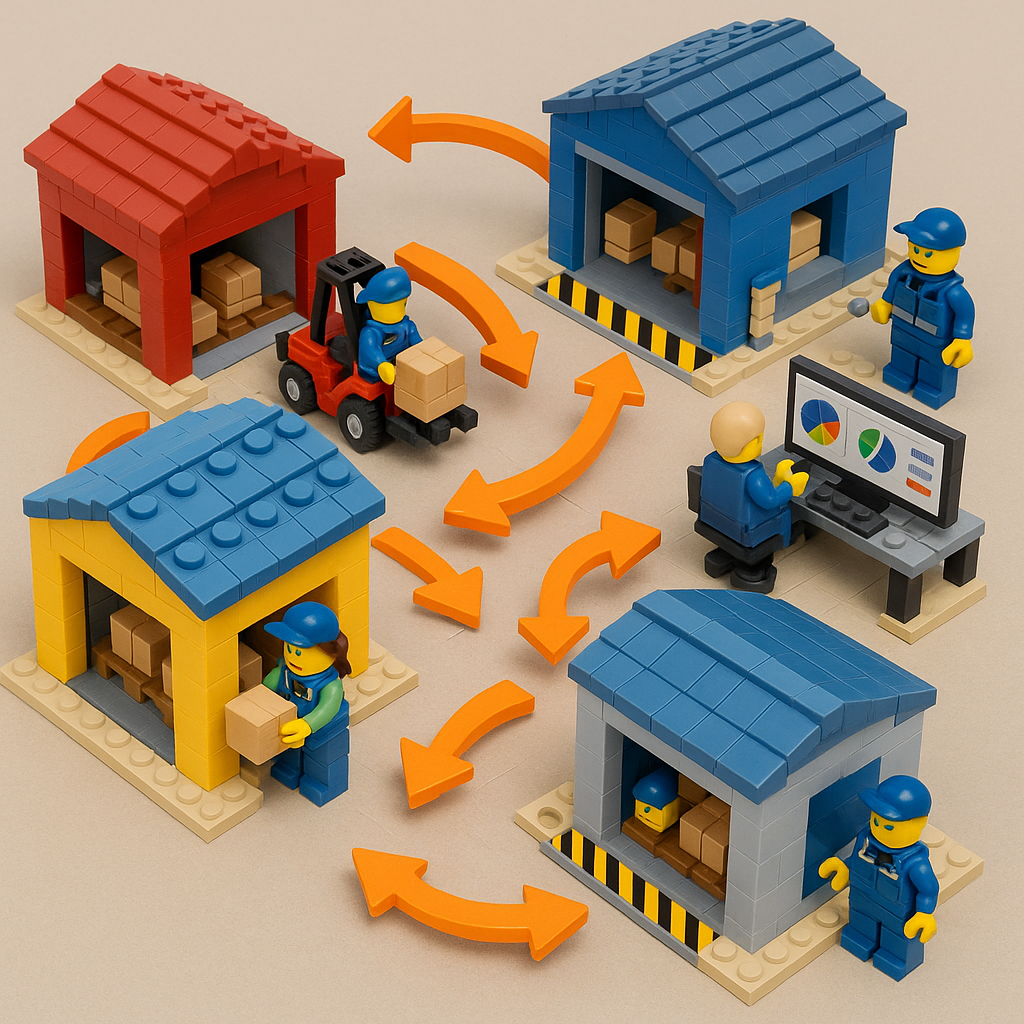
Cloud inventory systems are inherently scalable and flexible, which is crucial for growing companies and dynamic enterprises alike. For small and medium businesses, most cloud solutions use a subscription model – you can start with the functionality and capacity you need, and expand as your business grows or as you add new sites. There’s no massive up-front software purchase; instead you pay as you go and as you need more. This means a smaller manufacturer can afford capabilities that were once only available to large firms with big budgets.
When you open a new warehouse or launch another production facility, simply add it to your cloud inventory platform, and it’s immediately part of your network. There’s no need to set up a whole separate system at the new site – you just log in and begin managing inventory there alongside all your other locations. For large enterprises, cloud software provides the flexibility to onboard new acquisitions or partner facilities quickly, and to give external stakeholders (like a 3PL warehouse or key supplier) limited access if needed.
Cloud platforms can usually handle spikes in usage better than older on-premise systems that are limited by fixed local hardware. Whether it’s a seasonal surge in orders or a sudden need to ramp up production, the cloud service scales behind the scenes to accommodate the load. Another aspect of flexibility is user access: cloud inventory tools typically offer web-based access from any device, so whether a worker is on the factory floor with a tablet, or a regional manager is traveling between sites, everyone can use the system from anywhere. This “anywhere, anytime” access proved especially valuable during recent times when travel might be restricted – remote managers could still monitor and manage inventory virtually.
In short, a cloud system grows with you and adapts to how you operate, rather than forcing you into rigid structures. It’s equally adept at handling a single warehouse or a global network of facilities.
Improved Accuracy and Traceability

Modern cloud inventory systems often incorporate tools like barcode scanning (and sometimes RFID technology) to log inventory movements automatically. When staff at any site receive materials, consume parts in production, or ship finished goods, they can scan items and update the cloud records instantly. This level of automation greatly improves accuracy by reducing manual data entry and human error. Over time, organizations see their inventory records become far more reliable – often achieving 95%+ accuracy in stock counts because every transaction is promptly and properly recorded in one system.
Traceability is another huge plus. Because all inventory changes flow through one centralized system, every addition, movement, or deduction is timestamped and tied to a user or location. It becomes easy to trace when and where something was moved, and who handled it. This is important for quality control and compliance. If there’s a recall or an audit, having a unified trail of inventory across multiple sites is invaluable. For example, you can track a lot number of a raw material from the receiving dock at Warehouse X, through production in Factory Y, to a finished product shipped out of Warehouse Z – all within the same system. Such traceability across sites simply isn’t feasible with scattered spreadsheets or siloed databases.
Additionally, by enforcing consistent processes (like always scanning items in and out, or using standardized SKU codes), a cloud inventory system helps eliminate discrepancies. The classic scenario of “Site A’s spreadsheet says we have 50 units, Site B’s system doesn’t show them” goes away. Everyone is working off the same data, updated in real time, which means fewer surprises and frantic reconciliation exercises.
Centralized Control with Local Empowerment
With a cloud platform, headquarters can maintain central oversight and standardization, while still empowering each local site to operate efficiently. For example, the company can have one consistent product catalog and SKU database shared across all locations – ensuring that a widget is identified the same way everywhere. You can also enforce company-wide inventory policies, like minimum/maximum stock levels or replenishment rules that each site should follow. This kind of central control ensures consistency and high data quality.

At the same time, local teams at each plant or warehouse have the flexibility to manage their day-to-day operations through the system. They can view and update their location’s inventory data, receive and issue materials, initiate transfers, etc., all with appropriate permissions. The cloud system can be configured with role-based access so that, for instance, a warehouse supervisor sees and edits inventory in their facility, while a regional manager might see all warehouses in their region, and corporate leaders see everything. Each person gets the level of visibility and control they need.
This balance of central and local control is ideal for multi-site management. Headquarters gets aggregate reporting and the ability to drill down into any location’s status on demand. Meanwhile, on the shop floor, workers use the system in real time to do their jobs (instead of maintaining separate local records). The result is standardized processes across sites without sacrificing the agility of individual facilities. Policies are enforced by the system (e.g. you can’t issue more material than what the system shows on hand without an override), improving discipline and consistency across the company.
Better Collaboration and Data-Driven Decisions
When everyone from procurement, to production planning, to warehouse teams is looking at the same real-time inventory information, it naturally fosters better collaboration. A salesperson checking an order status can see if stock is available in any warehouse to fulfill it – without having to call around for updates. A factory manager who has a surplus of a certain component can flag it in the system or initiate a transfer so that other sites know those materials are available. Essentially, cloud inventory systems break down the communication barriers between sites and departments.
All stakeholders having access to one source of truth encourages a culture of teamwork. The sales team trusts the data to promise deliveries, the production planners trust that inventory levels are accurate when scheduling work, and the procurement team can consolidate purchase orders knowing what each site truly needs. This reduces miscommunications and the blame game (“I didn’t know you had those parts in stock at Plant B, no one told me!”).

Furthermore, many cloud inventory platforms (CyberStockroom included) offer reporting and analytics across the consolidated data. Managers can analyze usage trends, compare turnover rates between sites, or identify opportunities to streamline the supply chain. For instance, data might reveal that two factories are frequently transferring materials back and forth – which could indicate a need to adjust how inventory is distributed, or maybe to centralize some stock in a closer location. Or perhaps the analytics show one site always lags in inventory accuracy, signaling a need for training there.
Being data-driven in this way leads to smarter decisions: which new warehouse location would optimally shorten delivery times? Is it more cost-effective for a certain product line to be stocked only in one central hub versus at every site? Improved inventory visibility was cited as a top priority by many manufacturers because it directly improves forecasting and responsiveness. Cloud systems provide the live data and big-picture insight needed to make those informed decisions, from daily operational tweaks to strategic supply chain moves.
How Cloud Systems Solve Multi-Site Inventory Problems (Recap)

To connect the dots between the challenges and the cloud-based solutions, here’s a quick recap of how a cloud inventory system addresses common multi-site issues:
- Disconnected Data: Replaced by a centralized cloud database accessible by all sites. Every location logs into the same system, so there’s a single source of truth for inventory company-wide.
- Delayed or Out-of-Sync Updates: Solved with real-time synchronization. The moment stock is added, moved, or used at any site, the cloud updates instantly. No waiting for nightly batch updates or weekly summaries – everyone sees changes as they happen.
- Manual Work and Errors in Reconciling Data: Minimized through automation and standard processes. Barcode scanning and standardized transactions feed the cloud system directly, reducing manual data entry and mistakes. All transactions across sites follow the same workflow, simplifying reconciliation.
- Overstock at some sites & Stockouts at others: Preventable thanks to full visibility and transfer capabilities. Managers can see inventory levels across all locations and redistribute stock or adjust orders to balance inventory. Surpluses and shortages become apparent early, so you can take action before it’s a problem.
- Multiple Systems and High IT Overhead: Replaced by one cloud platform. This means one system to maintain (via the vendor) instead of many. It’s easier to implement security updates and backups in one cloud environment than across disparate local systems, reducing IT headaches and costs.
By addressing each of these issues, cloud inventory systems empower manufacturers to run a much tighter ship. Now that we’ve covered why cloud-based inventory management is so beneficial, let’s look at how to actually get started with implementing such a system in a multi-site manufacturing context.
Implementing a Cloud Inventory System: Key Steps for Multi-Site Operations

Transitioning from legacy or manual inventory tracking to a modern cloud system can seem daunting, but with a clear plan it can be achieved smoothly. Here is a step-by-step approach for plant managers and operations leaders on implementing cloud inventory management across multiple facilities:
- Assess Your Current Inventory Processes and Pain Points: Begin with an honest audit of how inventory is currently tracked at each site. Identify the biggest challenges (like those we discussed earlier): Is it lack of visibility? Frequent stock discrepancies? Cumbersome manual reporting? Quantify issues where possible (e.g. “we had X stockouts last quarter” or “it takes 3 days to consolidate inventory reports from all sites”). This establishes the baseline and goals for the new system. Also take stock of what tools each site uses now (spreadsheets, homegrown database, ERP modules, etc.) and how they differ.
- Define Requirements and Choose the Right Cloud Inventory Software: Based on the pain points, outline what you need from a cloud inventory solution. Important requirements for multi-site manufacturing might include: real-time updates, multi-location tracking support, user-friendly interface for quick adoption, ability to handle your product types (raw materials, WIP, finished goods), barcode scanning support, and good reporting capabilities. If you have other systems (like an ERP or accounting software), you might consider whether basic integration or data export is needed. With these criteria, research and evaluate cloud inventory platforms. Look for providers with experience in manufacturing or multi-warehouse management. During this phase, involve key stakeholders from different sites to get their input (for example, warehouse managers might test the interface to ensure it’s easy to use). Choosing a software that fits your business size and processes is critical – many companies opt for specialized inventory management software if their ERP’s inventory module is too clunky or expensive. Tip: Consider not just current needs but future growth; pick a system that can scale and add locations/users easily.
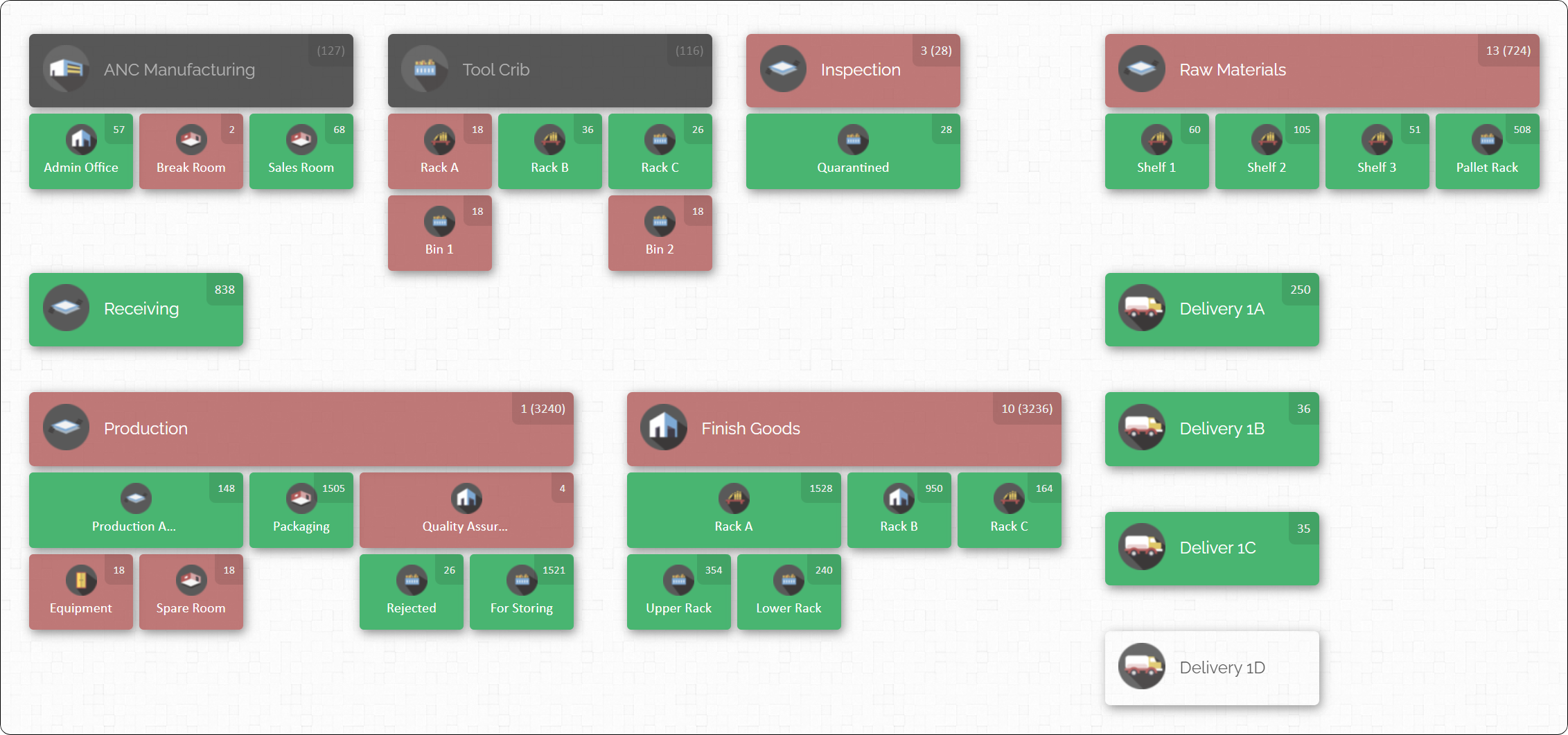
- Plan Your Data Migration and Structure: Once you’ve selected a cloud inventory system, plan out how to migrate and set up your data. This means consolidating item master lists, part numbers, BOMs (if applicable), supplier info, etc., from all sites into one unified format to import into the new system. It’s a great opportunity to clean up data – eliminate duplicate SKU codes, standardize naming conventions, and decide on consistent units of measure. Also plan the hierarchy of locations in the new system: for example, you might represent each factory or warehouse as a top-level location with sub-locations (rooms, zones, or storage areas within each site). Cloud systems like CyberStockroom allow you to create a map or hierarchy of all your locations and sublocations. Design this structure in a way that makes sense for your operations. Involve people from each site in verifying that the data (like starting inventory counts) are accurate before uploading.
- Pilot and Train: It’s usually wise to pilot the new system at one site (or a couple of sites) before rolling out everywhere. Choose a location with willing team members who can test the workflows thoroughly. During the pilot, have the team use the cloud system for all inventory transactions – receiving, production usage, transfers, etc. This will flush out any configuration issues or needed adjustments. Provide hands-on training for staff: even if the software is intuitive, training ensures everyone understands the new processes (like scanning items or updating the system in real time). Gather feedback from the pilot team about what works and what confusion remains. Use that to refine the system setup or your training approach before the big rollout. It’s often helpful to create simple process documents or cheat-sheets for common tasks in the new system to help users get comfortable.
- Roll Out to All Sites in Phases: After a successful pilot, plan the broader deployment in phases. You might bring on one region or one facility at a time, or a group of sites that have similar operations. Staggering the rollout helps manage the change without overwhelming your implementation team. During each phase, ensure there is on-site (or readily available) support for troubleshooting in the first days of use. It helps to designate “inventory champions” at each location – these are point people who are trained a bit more deeply and can assist their colleagues with the new system. As each site goes live, have them perform a full physical inventory count and reconcile it in the new cloud system to establish a clean starting point.
- Integrate and Refine Processes: Once the cloud system is in use company-wide, integrate it into your other business processes. For example, update procedures so that production planning meetings reference the new real-time inventory dashboards, or purchasing decisions are made after checking the cloud system for stock on hand across all sites. If you are keeping some legacy systems, ensure that any needed integrations or data exchanges (even if manual exports/imports) are done on a regular schedule to keep data consistent. Continuously refine your inventory practices now that you have better tools: you might introduce regular cycle counting at each site, or new policies for internal stock transfers, leveraging the capabilities of the software. Use the reporting features to set up key inventory KPIs (like inventory turns, stockout incidents, valuation by site) and track improvements over time.
- Ongoing Training and Improvement: Implementing the system isn’t a one-and-done task. Turnover and expansion mean you’ll need to train new employees on the cloud inventory procedures. It’s a good idea to include system training in onboarding for roles like warehouse staff, plant managers, and anyone involved with inventory. Also, periodically review how the system is being used. Are all sites entering data properly? Are there feature updates from the software provider that you should take advantage of? As your team gets more comfortable, you may find new ways the system can help (for example, using a newly introduced mobile app or advanced analytics module if available, or integrating handheld barcode scanners to speed up logging). Keep communication open for feedback from users – often the people on the ground will have ideas to further improve efficiency now that they see the benefits of real-time inventory tracking.
By following these steps, a multi-site manufacturer can successfully transition to a cloud inventory system with minimal disruption.

The key is careful planning, good training, and involving the people who actually manage inventory daily at each site. Next, we’ll take a closer look at one particular solution and how it addresses multi-site inventory challenges in practice.
How CyberStockroom Helps Multi-Site Manufacturers
To make this discussion more concrete, let’s consider CyberStockroom as an example of a cloud inventory system and explore how it can solve the challenges we outlined. CyberStockroom is a cloud-based inventory management platform known for its intuitive visual approach to managing inventory. Unlike traditional systems that show inventory as lists or spreadsheets, CyberStockroom lets you create a dynamic inventory map of all your locations and sub-locations, then populate it with your products. In other words, if you have five warehouses and two factories (for example), you can visually map those seven sites – even drilling down into different rooms, zones, or shelves within them – and immediately see what inventory is stored where on the live map.

What benefits does this visual, cloud-based approach bring to a multi-site operation? Let’s break down a few of the highlights of CyberStockroom in the context of the needs we discussed:
- Visual Inventory Visibility: CyberStockroom’s map-based interface gives you a bird’s-eye view of inventory distribution across all your facilities. Rather than scrolling through separate reports for each site, you can literally see your entire operation’s inventory layout on one screen. For example, Warehouse A and Warehouse B might each appear as regions on the map – clicking on each location reveals the products and quantities currently there. This makes it incredibly easy to spot imbalances or unusual situations (maybe one location is showing a huge stock of a part while another is nearly empty). CyberStockroom basically combines real-time cloud data with a user-friendly visual representation, so that anyone – even non-technical staff – can quickly grasp the inventory situation across sites at a glance.
- Real-Time Updates and Anywhere Access: Being a cloud system, CyberStockroom is accessible from any location at any time. Teams at each site just log in through a web browser (on a desktop or tablet, etc.) to record inventory movements like receiving shipments, using parts in production, transferring items between locations, and so on. The moment they do, those updates are instantly reflected for everyone else. If a field technician with a tablet checks out a spare part from the inventory in one location, the stock level for that item will immediately decrement on the system, so colleagues at other sites know that part’s availability changed. This real-time aspect ensures decisions are always based on the latest information. Managers back at headquarters can monitor all location inventories live without calling or emailing anyone – they just log into CyberStockroom and see the dashboards. It’s also handy for regional managers or owners who are traveling; they can check inventory on the go from wherever, as long as they have an internet connection. Essentially, it keeps the entire team in sync no matter where they are.
- Simple Multi-Site Management (Great for SMBs): CyberStockroom is particularly well-suited for small to mid-sized manufacturers that have outgrown spreadsheets but don’t want the complexity of a giant enterprise system. It focuses on core inventory control features with an easy learning curve, which means you don’t need a dedicated IT team to implement or manage it. Setting up multiple locations in CyberStockroom is straightforward – you add your warehouses, plants, or storage sites as locations on the map, and you can drag-and-drop products into those locations to record where everything is. This visual drag/drop approach makes tasks like transferring inventory as simple as moving an icon from one location to another on the map. Because it’s so user-friendly, even a business without an internal tech department can get up and running quickly. And as your business grows, adding a new site is as easy as adding a new node to the map and starting to track inventory there immediately. The system scales with you without a lot of overhead. In a way, CyberStockroom gives smaller companies the kind of multi-warehouse visibility and control that was once only available to big manufacturers with expensive custom software – now delivered as an affordable cloud service.
- Accuracy Through Check-In/Check-Out Process: CyberStockroom includes features like check-in, check-out, and transfer for products to specific locations, which enforces a simple discipline that greatly reduces errors. Every time inventory moves, you log where it’s going (or coming from) in the system. One of CyberStockroom’s video tutorials, for instance, demonstrates how a user checks products into a new location on the map when they arrive, and checks them out when they are sent somewhere else. By having users follow this process, the software keeps inventory records accurate and up-to-date at all times. This helps avoid the classic scenario of “Where did those 50 units go? One site’s spreadsheet says we have them, the other site never saw them.” With everyone using CyberStockroom as the single system, those mysteries are eliminated – every unit’s movement is recorded. All transactions are tracked with time and user stamps, so if something doesn’t add up, you can easily trace back to see the last known location and movement of the item in question. It provides accountability and a clear audit trail across all sites.
- Collaboration and Transparency: Because CyberStockroom is cloud-based and all team members log into the same system, it creates a high level of transparency that encourages teamwork. Whether an employee is physically in the warehouse or sitting in the main office, they’re looking at the same inventory data. This means, for example, if the sales department needs to know if a product can ship from a particular warehouse, they don’t have to call the warehouse manager – they can check the availability in real time on CyberStockroom themselves. Conversely, if a warehouse is overstocked on an item, staff there can update that information or leave notes in the system so others know that inventory could be reallocated or used to fulfill orders elsewhere. The platform effectively breaks down communication barriers between sites. Everyone knows what’s going on inventory-wise, which reduces miscommunications. CyberStockroom also supports role-based access control, allowing management to fine-tune who can see or edit what information. For instance, a local store manager might only see their store’s inventory on the map, while a regional manager can see all stores in their region, and the CEO sees everything. This way, people get information relevant to their responsibility without being overwhelmed, and sensitive data can be restricted as needed. The end result is a more collaborative, informed organization where inventory is concerned – issues can be spotted and addressed collectively, and opportunities (like sharing excess stock) are acted on quickly.
In essence, CyberStockroom serves as a practical example of how a cloud inventory solution can make multi-site inventory management dramatically easier. It takes the general benefits of cloud inventory (real-time data, centralized database, etc.) and adds a unique visual layer that makes it very intuitive. For a plant manager or business owner who is a visual thinker, seeing a map of all your inventory spread out across locations can be a game-changer for understanding and controlling your operations.

Of course, CyberStockroom is one solution among many – the right fit always depends on the specific needs of your operation. But the core idea remains: connect your sites under one cloud-based inventory system, use real-time data and visualization to eliminate guesswork, and empower your team to manage inventory proactively.
Conclusion
Multi-site manufacturers have a lot to gain by moving inventory management to the cloud. A robust cloud inventory system creates a single, reliable view of stock across all factories, warehouses, and facilities. This enables better decisions, leaner inventory levels, and faster responses to changes in demand or supply. The benefits range from very practical – like preventing stockouts and reducing excess inventory – to strategic, such as supporting business growth and improving supply chain agility.
Implementing a new system does require effort and change management. Companies need to invest time in training staff and possibly reworking some processes to fit a centralized, cloud-based approach (as we described in the implementation steps). However, the payoff is well worth it. By eliminating the headaches of chasing down spreadsheet updates from multiple sites or dealing with conflicting inventory records, managers can focus on optimization rather than firefighting. Many success stories in the industry show significant improvements in efficiency, cost savings, and service levels once a cloud inventory solution is in place.
In an era where manufacturing supply chains are increasingly complex and distributed, having real-time visibility and control over inventory is no longer a luxury – it’s fast becoming a necessity for competitiveness. Cloud inventory systems provide the tools to achieve that visibility and control. Whether you choose a platform like CyberStockroom with its visual mapping interface, or a larger-scale cloud ERP module, the central principle is the same: connect your sites, see your inventory, and manage it proactively on a unified platform.
By doing so, multi-site operations can finally operate with the confidence of knowing exactly what they have and where they have it at any given moment. That confidence translates into a more resilient and responsive manufacturing operation – one that can adapt quickly, minimize waste, and seize opportunities with a clear view of its resources. In short, cloud inventory for manufacturing is not just an IT upgrade, but a strategic enabler for running a smarter, more connected industrial enterprise.







 CyberStockroom
Leave a comment