
In a manufacturing environment, inventory isn’t just a list of parts or pallets sitting in storage – it’s the lifeblood of production. Whether it’s raw materials, components, or finished goods, managing inventory well can mean the difference between smooth operations and costly bottlenecks. Unfortunately, inventory mismanagement is a quiet killer in manufacturing. It leads to overstocked warehouses tying up precious capital, unexpected shortages that halt production lines, higher operating costs, and frustrated teams scrambling to put out fires. And in today’s lean, demand-driven environment with global competition and supply chain uncertainties, there’s little room for error.
Consider these facts: Inefficient inventory management costs businesses around $1.1 trillion globally each year. More than 60% of manufacturers struggle with inaccurate inventory data, and over half of factories admit they don’t use common best practices like just-in-time delivery or vendor-managed inventory. It’s no wonder inventory carrying costs (storage, insurance, obsolescence, etc.) can run as high as 20–30% of an item’s value per year – a huge drain on profits. Excess stock ties up cash that could otherwise fund new equipment or innovation, while stockouts mean lost revenue and idle workers. Clearly, optimizing inventory isn’t just a nice-to-have; it’s essential for operational efficiency and competitiveness.
So how can manufacturing plants optimize their inventory? This guide will walk through proven, field-tested strategies. These aren’t abstract theories – they are practical best practices and techniques that plant managers, inventory controllers, and operations executives can implement to drive real results. From achieving total visibility on your shop floor to fine-tuning what (and how much) you stock, these strategies will help you reduce waste, cut costs, and keep production running like a well-oiled machine.
1. Achieve Total Inventory Visibility Across Your Plant

If you don’t have full visibility into your inventory, everything else is just guesswork. You can’t optimize what you can’t see. Total visibility means knowing exactly what you have in stock, where each item is located, and even insights like its status, quantity, and value. Many manufacturing issues – from missing parts to over-ordering – stem from poor visibility and communication.
Common problems when visibility is lacking include:
- Parts or materials stored in the wrong locations (or “lost” on the shelves)
- Production delays because workers can’t find a component that should be there
- Overstocking of certain items simply because different departments keep separate stock records or duplicate orders
- Difficulty pinpointing inventory levels for each department or project, leading to surplus in one area and shortage in another
Solutions to improve visibility:
- Integrate your systems – Ensure your inventory management system is linked with production planning, procurement, and sales orders. When a production run consumes materials or a purchase order arrives, your inventory records should update automatically. Eliminating data silos means everyone — from procurement to the shop floor — works off the same real-time information.
- Implement real-time tracking – Use barcodes or RFID tags and scanners to track inventory movements in real time. Every time a component is moved from the warehouse to a production line or from one department to another, scan it. Real-time tracking (via barcode systems or other sensors) updates stock levels instantly and dramatically reduces human error.
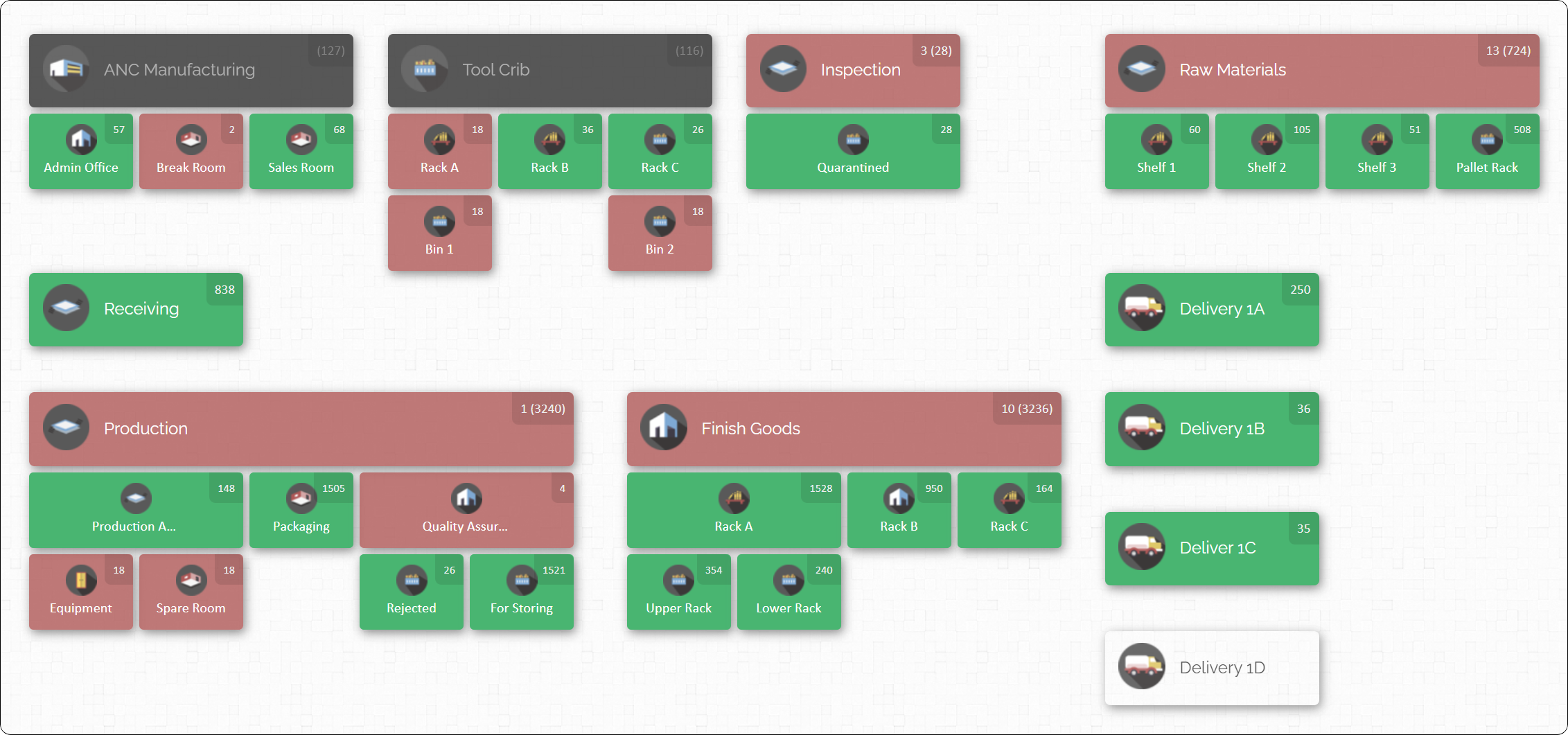
- Build a “virtual inventory map” – Create a visual map of your plant or warehouse that shows where each item is stored, down to specific zones, aisles, or bins. This can be done with modern inventory software that uses a floorplan or map interface. A visual inventory map provides a bird’s-eye view of your operations at a glance – you can see that Part ABC is in “Aisle 5 – Bin 3” or that Tool XYZ is checked out to the Maintenance room, without having to roam the facility. It’s like giving your inventory X-ray vision.
By gaining total visibility, you transform inventory management from educated guesses to data-driven certainty. For example, one medium-sized electronics assembly plant discovered that frequent production holdups were due to parts that were actually on-site but simply couldn’t be located in time. After switching to a cloud-based, location-tracking system with barcode scanning and a visual map of their stock, they reduced those delays by over 30% in just a couple of months. When every item’s location and quantity are transparent to your team, you eliminate the “I think we have it somewhere” problem and empower faster, smarter decisions.
2. Use ABC Analysis to Prioritize What Matters Most

Not all inventory should be managed with the same level of attention. In reality, some parts or materials are far more critical to your operations (or cost far more money) than others. ABC analysis is a classic technique to categorize inventory based on its importance, helping you focus your time and resources where it counts most.
Here’s how ABC classification typically works in manufacturing:
- A-items: High-value items or vital components that are relatively low in volume but hugely important to production. These might be expensive parts or proprietary components. They make up a large portion of inventory value. If an A-item is missing or short, production could grind to a halt. (Example: a specialized engine component or a proprietary microchip.)
- B-items: Mid-value or moderate-usage items. These are important but not as critical as A-items. They still require good management, but a short delay on a B-item might be manageable. (Example: standard motors or common sub-assemblies that are important but can be sourced fairly quickly.)
- C-items: Low-value, high-volume items that are abundant and cheap. These include things like basic fasteners, screws, packaging materials, or shop floor supplies. They usually account for a small portion of total value but a large number of items. Running out of C-items is inconvenient but usually not catastrophic, and carrying extra C stock doesn’t tie up too much capital.
How to use ABC analysis effectively:
- Categorize and review: Start by auditing your inventory list and assigning each SKU or item to an A, B, or C category based on its annual usage value (or criticality). A-items might be the top 10-20% of items that constitute 70-80% of inventory value; B-items might be the next 20-30%, and C the remaining bulk that only accounts for a small value share. Don’t worry about getting the percentages perfect – the idea is to segment into high, medium, and low priority groups.
- Prioritize management by category: Once categorized, manage them differently. For A-items, consider reviewing their levels daily or weekly. Keep very tight control: frequent cycle counts, strong supplier relationships, and maybe higher safety stock (because a missing A-item is unacceptable). For B-items, perhaps review monthly and manage with normal reorder rules. For C-items, you can afford to review quarterly or even set them to be replenished automatically (since their cost impact is low – you just don’t want to completely run out). Many companies automate reorders for C-items using min/max levels, so they never think about ordering staples like nuts and bolts – the system handles it.
- Allocate resources accordingly: Focus your best forecasting and monitoring efforts on the A group. This is where stockouts hurt the most and excess is most costly. Meanwhile, simplify and streamline handling of C-items (e.g., bulk orders occasionally, or vendor-managed inventory for basic supplies) so they don’t consume too much admin time.
The reason ABC analysis works is the 80/20 rule (Pareto principle) in action: a minority of items usually account for the majority of value or impact. By classifying inventory, you avoid the trap of giving every single part “equal attention” – which is inefficient. Instead, you ensure the critical few are always available and optimized, while the trivial many are managed with lighter touch. Companies that implement ABC analysis often find they can reduce excess on the low-value items (freeing up cash and space) and simultaneously improve availability for high-value items (reducing costly downtime). It’s about working smarter, not harder: spend time where it matters most.
3. Forecast Demand Based on Real Production Data and Trends

Many manufacturers struggle with finding the balance between stocking too much versus too little. A major cause is relying on guesswork or outdated assumptions for inventory levels. Demand forecasting is a critical strategy to align your inventory with what will actually be needed in the future, rather than what was needed in the past or what someone thinks might be needed. In short, it’s about using data to predict demand and plan accordingly.
Key steps for smarter demand forecasting in manufacturing:
- Leverage historical data: Start with your production and sales history. Look at how much of each material or product you used or sold in comparable past periods. Historical usage is a baseline for future demand – if you consume 1,000 units of Part X every August for the last 3 years, that’s a strong clue for next August (barring changes in business). Modern analytics tools or even spreadsheets can help identify trends and seasonality.
- Factor in production plans and market trends: Historical data alone isn’t enough. Talk with your sales team about upcoming orders or contracts, and with product development about new launches or retirements. Incorporate your production schedule and any known changes (e.g., a new product line ramping up next quarter may increase demand for a certain component). If you serve multiple customers or markets, consider their forecasts or industry trends. For example, if you manufacture packaging and you know a big customer is planning a holiday promotion, their orders may spike – build that into your forecast.
- Use technology for forecasting: Consider demand planning software or forecasting tools that use algorithms to predict future demand. These can range from simple moving average or exponential smoothing models to more advanced AI and machine learning systems that detect complex patterns. Advanced forecasting tools can analyze big data sets (like years of sales, market indicators, even economic data) to fine-tune predictions. They can adjust forecasts dynamically as new data comes in. While you don’t need AI to forecast well, it can add accuracy, especially in complex manufacturing scenarios with many products and influencing factors.
- Differentiate forecasting by workflow: In manufacturing, one size might not fit all for forecasting. If you have make-to-stock products (produced to inventory based on expected sales) and make-to-order products (produced only when a customer order is in hand), handle them differently. Make-to-stock items rely heavily on forecasts so you produce the right amount for stock. For make-to-order, you might just hold raw materials based on forecast but only assemble when order comes. Don’t treat a custom-built machine part the same as a standard off-the-shelf item in terms of forecasting – their demand signals differ.
By forecasting demand more accurately, you can prevent the extremes: avoid the glut of excess inventory that sits unsold (incurring holding costs), and avoid those mid-production crises when you run out of a key input. Good forecasting leads to just the right amount of inventory at the right time. For instance, a manufacturer that started using a data-driven forecasting tool saw their stockouts drop dramatically because they were no longer guessing – they noticed that every December they needed 20% more of a certain raw material for seasonal orders, and planned ahead instead of being caught off guard.
Advanced tip: Factor in supplier lead times and reliability into your forecasts and inventory plans. If a certain material has a 3-month lead time, your system should forecast far enough ahead to reorder it in time. If a supplier is inconsistent, forecasting can also incorporate a buffer or earlier reorder trigger for that supplier’s items. Essentially, forecasting in manufacturing isn’t just about predicting customer demand – it’s about translating that demand into what you need to procure and produce when, so that supply meets demand with minimal slack.
4. Automate Replenishment and Standardize Your Restocking Rules

Relying on memory or ad-hoc decisions to replenish inventory is a recipe for inconsistencies. One month you might order too late and cause a stockout; the next month, over-order “just in case.” To optimize inventory, standardize your restocking process and let automation maintain the routine. This ensures you’re keeping the right levels without constant manual intervention.
Key practices for automated and consistent replenishment:
- Set clear Reorder Points (ROP): For each item, determine a threshold at which you should reorder. This could be based on average usage and lead time. For example, if you use 100 units of a part per week and the supplier lead time is 3 weeks, you might set a reorder point around 400 units (300 for the upcoming weeks’ usage plus a safety buffer). When inventory hits 400, it’s time to reorder. Calculating ROP for all your key items takes some effort initially, but once set, it provides a trigger that prevents both stockouts and overstock.
- Define Safety Stock levels: Safety stock is the buffer inventory kept to account for variability in demand or supply. If an item’s demand or lead time fluctuates, hold a small extra quantity as insurance. For critical A-class items or any item with unpredictable swings, decide on a safety stock level (maybe a couple weeks’ worth of extra supply, or a certain percentage of cycle stock). This safety stock is only used if something unexpected happens (like a supplier delay or a spike in demand). By clearly defining it, you know that anything below that level is “danger zone” and triggers urgent replenishment.
- Automate purchase orders or alerts: Use your inventory management system to automatically generate purchase orders or at least send alerts when an item hits its reorder point. Most modern inventory or ERP software allows setting min/max levels. When stock falls to the minimum, it can auto-create an order draft to the supplier for the standard quantity, or send an email notification to the purchasing manager. Automation takes the human forgetfulness out of the equation. Instead of someone remembering to check stock, the system is always watching.
- Standardize order quantities (EOQ): While setting up these triggers, also consider Economic Order Quantity (EOQ) or another standard batch size for orders. Perhaps ordering certain materials in lots of 500 is most economical due to price breaks and handling costs. If so, incorporate that – when reorder triggers, the system knows to order 500, not a random number. This prevents constantly changing order sizes that confuse suppliers or your receiving team.
Real-world scenario: A plant that manufactures industrial machinery components implemented automated reordering using their inventory software. They configured each critical raw material with a reorder point and safety stock. For instance, steel castings used in multiple products were set with a reorder point that automatically emailed their purchasing department to issue a PO when stock got low. As a result, they eliminated the frantic, last-minute calls to suppliers for rush orders. Over a six-month period, this plant cut down “emergency” expedited shipments by 40%, saving on hefty rush shipping fees and avoiding production line stoppages that previously occurred when materials ran short.
The goal is proactive, not reactive inventory management. By standardizing and automating restocking rules, your inventory system essentially runs in the background, topping up stock at the right times so you can focus on running production rather than putting out fires. Just remember to periodically review those parameters – if demand patterns change or supplier lead times shift, adjust your reorder points and safety stocks accordingly. But day-to-day, let the system do the heavy lifting on replenishment.
5. Minimize Work-in-Progress (WIP) and Excess Materials on the Shop Floor

Work-in-progress (WIP) inventory – the partially finished goods moving through your production line – is one of the trickiest types of inventory to manage. Excess WIP or piles of extra materials at workstations can quietly accumulate and cause multiple problems. They clutter the production floor, tie up capital in half-finished product, hide quality or process issues, and make it hard to pivot if design changes occur. Lean manufacturing philosophy teaches that WIP is one of the seven wastes (specifically, the waste of inventory).
Strategies to reduce and control WIP in manufacturing:
- Implement visual controls for WIP: Use tools like Kanban boards, WIP racks, or digital dashboards that clearly show how much work is in each stage of production. For example, a Kanban system might use cards or bins to limit how many items can be in process at once. Only when a downstream process is ready (signaled by an empty slot or a Kanban card returned) do you release more material into production. This prevents overloading a station with more work than it can handle. Many factories now use electronic Kanban or dashboard screens at each line to monitor WIP levels in real time.
- Break production into smaller batches: Huge batch sizes lead to large WIP sitting around. By adopting smaller lot sizes (where feasible), you reduce the amount of inventory waiting between steps. For instance, if you previously processed 1000 units before passing them to the next stage, try batches of 200. Smaller batches flow faster through the system, meaning less idle inventory stacking up. This is closely tied to the concept of single-piece flow in lean manufacturing – the ideal of moving one unit at a time through each step continuously (though not always achievable, it’s a guiding goal).
- Identify and eliminate bottlenecks: Often, WIP piles up in front of a slower process or bottleneck. Analyze your production stages to see where items queue up. Is QA inspection taking too long, causing parts to sit and wait? Is one machine slower or prone to breakdowns? Once you identify bottlenecks, you can address them (add capacity, improve the process, or adjust scheduling) to keep WIP flowing. The rule of thumb: WIP should only exist where work is actively being done. If items are just sitting, ask why.
- Set WIP limits and enforce them: A practical tip is to set a policy like “Only enough WIP for the next 24 hours of production should be on the floor.” If more than that accumulates, pause releasing new raw materials into production and let the system catch up. This kind of discipline forces issues into the open – if WIP is constantly exceeding the limit, investigate why. Perhaps scheduling is releasing too much, or a process needs improvement. Another approach is “WIP cap by station” – e.g., Station A should never have more than 3 jobs waiting. It might feel counterintuitive to deliberately stop feeding work in, but overloading the system only creates more chaos later.
Lean best practice: Many lean practitioners suggest that any WIP that cannot be finished within a very short time window (like a day or two) is a red flag. If half-built products are sitting for a week, that’s essentially dead inventory. Reducing WIP not only saves space and cost, it also quickly highlights problems – because you’ll see immediately when a process can’t keep up (rather than hiding it behind stacks of inventory).
For example, a furniture manufacturing plant adopted a Kanban system and strict WIP limits in its assembly area. Initially, they found about a week’s worth of partially assembled furniture piled up behind one assembly line, mainly because the next step (painting) was slower. By re-balancing the line and adding a second paint booth, they cut WIP in that area by 60%. The production floor became less cluttered and lead times shrank, since items flowed through without long idle times. Additionally, they discovered a side benefit: with less WIP, any quality issues became immediately apparent (it was easy to trace a defect to a specific small batch and fix the process) rather than being buried in a mountain of inventory.
Bottom line: Strive to keep WIP as low as possible by aligning production rates and using visual signals. You’ll get a cleaner, more efficient operation and free up cash from half-completed products. Plus, a neat and controlled WIP level often impresses visitors or auditors – it showcases good management and a lean mindset on the shop floor.
Using CyberStockroom to Supercharge Inventory Optimization

Technology can be a game-changer for inventory management, and CyberStockroom offers an innovative approach that aligns perfectly with the strategies we’re discussing. CyberStockroom is a cloud-based inventory management platform known for its visual map interface. Instead of static spreadsheets or generic tables, it allows you to create a dynamic inventory map of your business – including your plant floor, warehouses, storage areas, and even vehicles or job sites.
Here’s how CyberStockroom can help manufacturers optimize inventory:
- Interactive Inventory Mapping: CyberStockroom’s standout feature is its visual map dashboard. You can lay out a map that mirrors your actual facility – for example, divisions like Main Warehouse, Assembly Line A, Quality Control, Finished Goods Storage, etc. Each location on the map displays the items and quantities currently there. This means at any moment you get a bird’s-eye view of what you have and where it is. For our strategy #1 (Total Visibility), this is invaluable. Need to find a specific part? Just click on it in the map or search, and see exactly which room or bin it’s in. The map-based approach makes it much easier for teams to visualize inventory than scrolling through rows on a spreadsheet. It’s inventory management for visual thinkers.
- Real-Time, Cloud-Based Updates: Because CyberStockroom is cloud software, it updates in real time and is accessible from any device with an internet connection (computer, tablet, etc.). When an item is moved or a transaction is made, everyone on your team sees it instantly on the map. This supports multi-location management seamlessly. If your manufacturing operation spans multiple buildings or even multiple sites, CyberStockroom can track inventory across all of them in one unified system. For example, if you transfer raw material from the central warehouse to a satellite facility, that transfer is immediately reflected on the inventory map for both locations. Real-time visibility across departments or locations helps eliminate those “Where did that pallet go?” mysteries and supports #7 on our list (tracking inventory across departments).
- Drag-and-Drop Transfers & Full Audit Trails: Moving inventory within CyberStockroom can be as simple as dragging an item icon from one location on the map to another. This user-friendly design encourages teams to record movements as they happen, rather than after the fact. Every transfer or adjustment you make on the map triggers the system to log the transaction automatically. The platform maintains a detailed activity history – who moved what, from where to where, at what time. This audit trail promotes accountability (useful for preventing loss or theft) and makes it easy to trace errors. For instance, if a part is missing, you can check the log to see the last time it was moved and who handled it. This feature directly supports better visibility and loss prevention, tying into strategies like maintaining accuracy and even helping with cycle counts (#6) because you have a historical record to reconcile with.
- Mobile and Remote Inventory Management: While CyberStockroom doesn’t require a special mobile app, it is accessible via web on various devices. It supports inventory tracking for mobile or remote environments – say you have maintenance technicians with parts in their service vans or a temporary project site with its own inventory. You can include those as locations on your map (e.g., a truck or a job site) and manage inventory there the same way you do in the main plant. This capability helps manufacturing operations that extend beyond a single building maintain control of stock everywhere. Real-time updates from the field (using a tablet or laptop with a scanner) ensure that, for example, if a technician uses a part from their van stock, it’s deducted from inventory on the spot. This level of tracking can reduce “shrinkage” and surprises, improving coordination between central stock and field usage.
- Barcode Integration and Quick Scanning: CyberStockroom supports barcoding out-of-the-box. You can print unique barcodes for your items directly from the system, or use existing manufacturer barcodes. Every interface in the software accepts input from barcode scanners, meaning you can scan an item to instantly pull it up, add it to inventory, or perform a transfer or checkout. There’s even a Quick Scan mode designed to perform many scans rapidly (useful for doing cycle counts or moving a lot of items at once). By integrating smoothly with scanners, CyberStockroom helps eliminate manual data entry errors and speeds up processes – which is crucial for accuracy (#6 cycle counting, #4 automated updates, etc.). No more scribbling notes and updating later; a quick beep of the scanner updates the stock in real time.
- Custom Fields and Flexibility: Manufacturing inventory can have a lot of specific data (like lot numbers, expiration dates for perishable materials, supplier batch, or quality status). CyberStockroom allows custom fields, so you can tailor the system to track what matters to you. You might tag certain items with fields like “Quality Hold” or “Expiration Date” or “Unit Cost”. This way, the system isn’t just counting widgets; it’s capturing useful info for decisions (like when something might expire or which batch to use first – think FIFO support). This flexibility helps implement practices like FIFO rotation and ensures data needed for KPIs (#10) is being collected.
- Supports Lean and JIT Practices: By providing such clear visibility and quick update capabilities, CyberStockroom makes it easier to run lean. You can comfortably reduce buffer stocks because you trust the system to tell you exactly when to reorder and exactly where everything is. If you’re experimenting with Just-In-Time deliveries or consignment inventory, CyberStockroom can track those materials with precision. It essentially acts as the central nervous system of your inventory – connecting all the moving parts (literally and figuratively). Teams can confidently implement lean inventory strategies knowing that if something is out of stock or at risk, the system will make it immediately obvious.
- Centralized Data and Reporting: Being cloud-based and centralized, CyberStockroom becomes your single source of truth for inventory data. It generates reports and activity logs you can review to spot trends – for example, an Activity Report might show that a particular component is being transferred between locations too often (maybe indicating a process inefficiency), or that a certain part frequently hits below safety stock. You can export data on inventory levels over time to calculate metrics like turnover or accuracy. This reporting ties directly into tracking KPIs (#10) and continuous improvement. Essentially, CyberStockroom doesn’t just store data; it helps you analyze it through its interface and logs.

CyberStockroom can be a powerful enabler of the inventory optimization strategies we’re covering. It gives you the tools to implement best practices with less effort: visual maps for visibility, real-time updates for accuracy, easy scanning for efficiency, and robust tracking for accountability. By correlating with our earlier points – it helps achieve total visibility (#1), manage multi-location and departmental inventory (#7), streamline cycle counts (#6) and reorders (#4), and maintain an organized layout (#8) because you can literally design your digital layout to reflect an optimized physical layout. While adopting any new system requires change management, the payoff is significant: manufacturers using CyberStockroom can expect clearer insight into their operations, reduced instances of lost or misplaced inventory, and ultimately a leaner, more responsive inventory that supports production rather than hindering it.
6. Implement Cycle Counting Instead of Annual Physical Counts

Counting inventory is the only way to verify that what your system says is actually what’s on the shelf. Traditionally, many manufacturing companies have done a full physical inventory count once a year (often at year-end for financial reporting). But annual counts are labor-intensive, disruptive (sometimes requiring shutdowns), and prone to errors from the huge volume of items to count in one go. A better approach is cycle counting: counting small subsets of inventory on a frequent, rotating basis so that over time you’ve counted everything without a massive single effort.
Cycle counting best practices for manufacturers:
- Focus on important items more frequently: Using the earlier ABC categorization, schedule A-items to be counted very frequently (some do weekly or even daily if critical), B-items maybe monthly, and C-items quarterly or biannually. This way, the items that matter most are always kept accurate. If an error or discrepancy arises in an A-item count, you catch and correct it quickly, before it becomes a big problem.
- Spread counts throughout the year: Instead of one big count, create a cycle count calendar. For example, every day (or week) assign a small section of the warehouse or a list of 10-20 SKUs to count. These mini-counts can be done without halting operations – often during regular shifts. Over a month or two, you might cover your whole inventory, then start again. The idea is continuous verification.
- Use mobile scanners or devices for counting: Equip your staff with barcode scanners or tablets when they do counts. Scanning each item’s barcode and entering the quantity can automatically compare to what the system expects and flag discrepancies. This reduces manual recording errors and speeds up the process. Modern inventory software (like the one we discussed above) often has a “cycle count” mode where an employee can quickly scan and count, and the system will update differences. It’s a huge time saver and improves accuracy.
- Investigate and adjust discrepancies: When cycle counts find an item is off (e.g., system says 50 but only 47 are on the shelf), use that as a learning opportunity. Adjust the inventory record, yes, but also ask why. Was there a transaction not recorded? Is there theft or loss? Or perhaps a supplier delivered short? By continuously cycle counting, you not only keep numbers accurate, you also detect process issues that cause discrepancies. Over time, your overall inventory accuracy percentage will climb dramatically.
- Eliminate the year-end crunch: With frequent cycle counts, many companies find they can eliminate the need for a full shutdown annual inventory count. Auditors generally accept cycle count programs if they’re well-documented and effective, because they actually lead to better accuracy. Your team will thank you for not having to spend a holiday weekend counting bolts in a freezing warehouse!
Outcome of cycle counting: A real example – an automotive parts supplier switched from annual counts to daily cycle counts (about 15 minutes a day counting a rotating selection of parts). Initially, they found some significant errors in certain SKUs (some parts had 10% less stock than believed, likely due to unrecorded scrap or misplacements). They fixed the records and also fixed the procedures that caused the errors. After a few months, their inventory accuracy rose to over 98%. During their next audit, discrepancies were nearly zero, and they no longer had to shut down for a week to count everything. Moreover, employees preferred this method – it became a quick routine rather than an dreaded yearly all-hands-on-deck event.
In summary, cycle counting turns inventory accuracy into a regular maintenance task rather than a massive ordeal. By keeping the pulse on your inventory continuously, you maintain a high accuracy rate, which means planning and production can rely on the data in the system confidently. No more surprise write-offs or “found” inventory during annual counts, because there are no surprises – you’ve been monitoring all along.
7. Track Inventory Across Multiple Departments, Locations, and Bins

Most manufacturers have inventory spread across various places and not just a single stockroom. You might have raw materials in a warehouse, WIP at different production lines, spare parts in a maintenance crib, finished goods in a staging area, and so on. Sometimes different departments (production, maintenance, R&D) each hold their own small inventory stashes. Optimizing inventory means you need to track and manage all these stocks collectively, not in isolation. In other words, inventory shouldn’t disappear from oversight just because it left the main stockroom.
Steps to manage inventory across the plant (and beyond):
- Define virtual locations for each area: In your inventory system, set up all the relevant locations and sub-locations. For example: Main Warehouse, Line 1 Station A, Line 1 Station B, Quality Inspection Area, Tool Crib, Maintenance Closet, etc. Even a delivery truck or off-site storage can be a location. By creating these locations in the system, you can log inventory moving into and out of each. This granularity ensures that if 100 units leave the warehouse to “Line 1 Station A”, you still know where they are (they haven’t vanished; they’re now in Station A’s inventory).
- Record movements and handoffs: Treat internal transfers almost like you would a shipment to a customer. Develop a habit (ideally using scanners or an easy interface) of performing a transaction whenever inventory is transferred from one area to another or checked out to a person. For instance, if Maintenance takes 5 replacement bearings from the storeroom, log a transfer of those 5 to “Maintenance” or mark them as consumed. If production sends a batch of semi-finished goods to QA hold, record that movement. Tracking these flows prevents mysterious inventory black holes (“I swear we had more of Part X, maybe maintenance took some?” — you’ll know if they did).
- Consolidate data visibility: Ensure that all departments use the same inventory system or that systems are linked. A common problem is each department using its own spreadsheet or method to track their portion, leading to no one having a complete picture. It might require some change management to get, say, the Maintenance team to log their parts usage in a central system, but the payoff is big. When everyone can see all inventory, you might discover, for example, that a part is sitting unused in one area while another area is ordering more of it.
- Conduct inter-department inventory audits: Now and then, check that what one department thinks they have matches the central record. For example, do a monthly reconciliation of the Assembly floor’s kanban stock bins versus the system counts. These mini-audits will keep every area disciplined in updating movements.
- Identify bottlenecks in transfers: By tracking movement history, you might spot inefficiencies. Perhaps you notice items sitting too long in a “QC hold” state – meaning your quality check process is slow and tying up inventory. Or you see that materials often move from Warehouse A to B and then to production, suggesting you could deliver direct to production and save time. The movement logs can highlight such opportunities.
Why this matters: You need end-to-end visibility of inventory from the moment it arrives as raw material to the moment it leaves as finished product (or is scrapped). If one piece of that journey isn’t tracked, you’ll get discrepancies and confusion. For instance, one manufacturer found that a lot of components were “missing” from the central warehouse inventory, only to realize later they had been issued to the production floor but never recorded properly. By implementing a check-in/check-out system for the production team, they could see exactly how many components were at each line at any time and reclaim unused ones afterward. This prevented them from reordering parts that were actually just sitting on a cart somewhere on the factory floor.
In multi-site operations, this point extends to tracking inventory across different plants or stock locations. If Plant A can’t fulfill an order but Plant B has extra of a needed part, a unified system will show that so you can transfer stock and avoid an unnecessary purchase. Even within one plant, treating every nook and cranny as part of the inventory ecosystem ensures no part gets forgotten or lost in the shuffle. It’s all about closing the loop on inventory movement: every journey an item takes is accounted for until its final use.
8. Optimize Your Inventory Layout for Efficiency and FIFO

Inventory optimization isn’t only about how much stock you hold – it’s also about where and how that stock is stored. The physical layout and organization of inventory in your plant or warehouse can have a big impact on productivity, waste reduction, and even inventory accuracy. A well-organized and optimized layout means employees spend less time searching for parts, materials flow in a logical order, and older stock gets used before newer stock (preventing expiry or obsolescence issues).
Tactics for optimizing layout and organization:
- Use FIFO (First-In, First-Out): Organize storage so that older stock (the first in) is the easiest to access (first out). For example, in shelving units, place newer inventory behind older inventory, or use flow-through racks that feed from the back. This way, when someone grabs a component, they naturally take the oldest one. FIFO is critical for perishable or time-sensitive materials (like chemicals with shelf lives, or components that might become obsolete with design changes). It prevents situations where you find a batch of material expired in a corner because people kept using the newer stock first. Clearly label receive dates or lot numbers and train staff to pick the oldest.
- Place high-turnover items near their point of use: Identify which parts or materials are used most frequently (especially A-items or heavily used B-items). Store those as close as possible to where they are needed in production, or at least near the front of the main storage area. For example, if a particular bolt or resin is used every day on Line 3, keep a bin of it right next to Line 3 (with regular refills from the main stock). This reduces the travel time for workers and speeds up operations. In a warehouse, a common practice is to put the fastest-moving SKUs in the most accessible locations (near packing stations, ground-level slots, etc.) and slow movers up top or farther away. In a plant, it could mean setting up satellite storage racks for commonly used items by each workstation.
- Group items by workflow or usage: Store items that are usually needed together in the same area. For instance, if assembling a certain product requires 5 specific components, consider locating those components close to each other in the warehouse or kitting them together. Or group by type: all electrical components in one aisle, all raw metal materials in another. The goal is to minimize the “treasure hunt” when someone is picking for production – they shouldn’t have to crisscross the entire warehouse for one job. Logical grouping also helps prevent mistakes (picking the wrong part) because similar items are in a defined zone.
- Clear labeling and signage: A simple but often overlooked aspect – make sure every shelf, bin, and aisle is clearly labeled with what belongs there (item codes or names) and possibly quantity info. When everything has a designated place (a home for every part), it’s obvious when something is out of place or missing. This supports both accuracy and efficiency – workers can quickly find items and also quickly spot if the stock in a bin is running low or not the right item. Consider using color-coded labels or floor markings for different categories of items to further visually organize the space.
- Ergonomics and Safety: Optimize layout not just for speed, but also for safety and ease. Heavy items should be stored in lower positions to avoid injuries when lifting. Frequently picked items should be between waist and shoulder height (the “golden zone”) to reduce bending or use of ladders. Creating a safe, ergonomic inventory layout means workers can operate faster and with less fatigue or risk, which indirectly improves inventory handling accuracy and speed.
By reorganizing the physical inventory layout, companies often see immediate gains. For example, a packaging manufacturing plant analyzed their pick paths and found workers were walking excessively to gather materials for each job. They rearranged so that the highest-use items were right by the production lines and re-sequenced storage so that the order of items in the warehouse matched the order they were used in the assembly process. The result? They reduced employee walking distance and searching time significantly – one case study showed a 22% reduction in operator travel time after moving fast-moving SKUs closer to the assembly area. That translates into more time doing actual value-added work (assembling or packing) instead of just fetching parts.
Furthermore, a well-thought-out layout means better inventory control: when items are neatly in their proper places, it’s easier to spot discrepancies (if something is in the wrong bin or an empty spot that should be filled). It also makes cycle counting (strategy #6) easier because items are where you expect them to be. Overall, the motto is “a place for everything, and everything in its place” – it boosts efficiency and sets the stage for inventory accuracy and optimization.
9. Collaborate with Suppliers to Streamline Inventory (Supplier Partnerships)

Inventory optimization doesn’t stop at your factory’s walls. Your suppliers and the inbound supply chain play a huge role in how much inventory you need to carry. By working more closely with suppliers, you can both lower your inventory levels and reduce the risk of shortages. The idea is to treat key suppliers as extensions of your operation – sharing information and responsibilities so that the right stuff shows up at the right time with less need for you to stockpile it.
Strategies for supplier collaboration in inventory management:
- Share demand forecasts and consumption data: Don’t keep your suppliers in the dark about your future needs. If you’ve done the demand forecasting in strategy #3, pass along relevant forecasts to your critical suppliers. For example, let them know “we expect to produce 5,000 units next quarter, which means we’ll need roughly 5,000 of Part A and 10,000 of Part B.” If you have a sudden change in demand or a new big order, update them as soon as possible. By giving suppliers a heads-up, they can plan their production or stock to meet your needs without you holding excess “just in case.” This is a step toward Just-In-Time delivery – aligning their output with your consumption.
- Implement Vendor-Managed Inventory (VMI) or consignment stock: In a VMI arrangement, the supplier is responsible for keeping your inventory of their product at agreed levels. They might even have personnel or access to monitor your stock levels directly. For instance, a fastener supplier might come in and restock bins on your line, or get electronic signals when your bin is low and then ship more automatically. With consignment inventory, the supplier keeps ownership of the stock at your site until you use it; you only pay when you consume it. These models can dramatically reduce the capital you tie up in inventory and ensure a steady supply. It works best for high-volume standard parts where the supplier is willing and able to be closely involved.
- Develop backup suppliers or dual sourcing: This might seem counterintuitive to collaboration, but it’s part of a healthy supplier strategy. Relying 100% on one source for a critical item can force you to hold more inventory as a hedge against that supplier’s problems. By qualifying a second supplier (or more), you introduce competition and flexibility. You might split orders so each gets some business – and you have a fallback if one hits a snag. Knowing you have a backup can allow you to keep leaner inventory because a disruption won’t be as dire.
- Monitor supplier performance and work on improvements together: Track metrics like on-time delivery, lead time consistency, and quality from each supplier. Share this data with them in a collaborative spirit (“Let’s work together to improve these numbers”). If a supplier consistently delivers late or with quantity errors, it forces you to hold more safety stock to compensate. By discussing issues – maybe they need forecasts earlier, or maybe you can adjust your order schedule to align with their production cycles – you can find solutions that benefit both sides. Some suppliers might offer faster replenishment if you agree to certain terms, like blanket purchase orders or minimum order quantities, which can be a good trade-off if it slashes lead time.
- Consider supplier-managed “milk runs” or frequent small deliveries: Instead of large infrequent deliveries (which make you hold a lot at once), see if key suppliers can deliver in smaller batches more frequently. Some manufacturing clusters set up daily milk-run logistics, where a truck goes around delivering parts to multiple plants every day. Frequent deliveries align with Just-in-Time and keep inventory low. It requires trust and coordination – you need to be confident the supplier will show up as planned. That trust is built over time by communication and reliability.
Why it works: When you and your suppliers operate in sync, there are fewer surprises. You can comfortably keep less inventory on hand because you know more is coming when needed. And from the supplier’s perspective, they get better information to plan their production, which can make them more efficient too (they won’t be stuck with your last-minute huge orders, for instance). It’s a win-win that ultimately cuts costs out of the whole supply chain.
For example, an appliance manufacturer partnered closely with the supplier of electronic control boards (a critical A-item). They moved to a VMI system where the supplier kept a small onsite storage of boards and was responsible for refilling it. The manufacturer gave the supplier direct access to their production schedules and inventory levels. As a result, the manufacturer reduced the on-hand inventory of control boards by about 50% (freeing a lot of cash), yet never experienced a line stoppage due to board shortages. The supplier, on their end, was happy because they could plan their factory to produce boards in a steadier cadence rather than rushing to fulfill sporadic big orders.
In short, treat your key suppliers as partners in your inventory optimization journey. By aligning goals (both want to reduce waste and cost) and sharing information, you can both reap the benefits of a leaner, more responsive supply chain. Inventory optimization extends beyond your four walls, and those who embrace collaboration will outperform those who operate in isolation.
10. Set Key Inventory KPIs and Continuously Improve Your Process

Optimization is not a one-time project – it’s an ongoing commitment. The most successful manufacturing operations treat inventory optimization as a continuous loop of measuring, adjusting, and improving. To do this effectively, you need to establish Key Performance Indicators (KPIs) that will track how well your inventory management is supporting your goals (like cost reduction, efficiency, customer service). By monitoring these metrics, you can spot trends early and make informed decisions. Furthermore, a culture of continuous improvement keeps the entire team focused on getting better rather than becoming complacent.
Important inventory KPIs for manufacturing and how to use them:
- Inventory Turnover Ratio: This measures how many times your inventory is used/sold and replaced over a period (usually a year). It’s calculated as Cost of Goods Sold divided by average inventory value. A higher turnover means you’re managing stock efficiently (not holding it for too long). If your turnover is low, it means stuff is sitting idle. Compare your turnover to industry benchmarks – for example, an automotive parts maker might aim for a turnover of 8, whereas a heavy machinery manufacturer might be okay with 3 due to longer production cycles. Use this KPI to judge if you’re becoming more “lean” over time. If you implement changes like better forecasting or JIT, you should see turnover increase (and carrying costs drop) as a result.
- Stockout Rate (or Fill Rate): Stockout rate is how often you run out of stock when it’s needed (e.g., percentage of customer orders or production orders delayed due to inventory shortage). Conversely, fill rate is the percentage of orders fulfilled without issue from stock. This directly measures service level. If you’re optimizing inventory, you want to minimize stockouts while also not overstocking – a balancing act. Track how frequently production has to stop or scramble because something wasn’t available. If stockouts are above zero for critical items, that’s a red flag. Your goal might be, say, 99% fill rate for all A-items to production. If you introduce improvements like safety stocks or better supplier delivery, watch the stockout rate to see if it falls.
- Carrying Cost of Inventory: We mentioned that inventory has a carrying cost (often estimated ~20-25% yearly). This KPI might be expressed as a percentage of inventory value per year or simply measured in dollars – including warehousing costs, insurance, depreciation/obsolescence, and cost of capital. If you reduce average inventory levels, you should see carrying costs drop correspondingly. It’s a more abstract number but important for financial impact. Management will appreciate seeing this cost go down. You can also track total inventory value as a simpler proxy – ensure it’s not creeping up without good reason.
- Days of Supply (or Days Inventory Outstanding): This tells you how long your inventory would last if you stopped buying more, at the current usage rate. It’s like the inverse of turnover. For example, you have 60 days of supply of raw materials on hand. Perhaps your goal is to reduce that to 45 days by year-end through better optimization. This KPI is easy to grasp and can be set as a target (“reduce average Days of Supply by 10%”). Just be mindful not to cut too aggressively without safeguarding against stockouts.
- Inventory Accuracy Percentage: How accurate are your inventory records compared to physical count? If you cycle count regularly, you can compute accuracy = (1 – error rate). For instance, if out of 1000 items counted, 20 had discrepancies, your accuracy might be 98%. High accuracy is both a result of good processes and an enabler of other improvements (forecasts and reorder systems are useless if data is wrong). So track this and aim for, say, >95% accuracy consistently. If you see accuracy dip, that signals issues in transaction processes that need fixing.
- Order Fulfillment Lead Time (or Order Cycle Time): In manufacturing, this could be the time from receiving a production order to having it completed (which inventory availability heavily influences). Or for delivering to customers, time from order to shipment. While not purely an inventory metric, inventory optimization should shorten lead times (because waiting for parts or excess handling is reduced). If you cut down on WIP and improve material availability, you might see production cycle times improve. Use this as a high-level gauge of operational efficiency.
- Dead Stock / Slow-Moving Stock: Track the percentage of inventory that hasn’t moved in, say, over 6 months. One goal of optimization is to minimize such dead stock. If you started with $100k of slow movers and through SKU rationalization or clearance you got it down to $50k, that’s a big win. Keep an eye on items that become non-moving and take action (like discontinuing or finding alternate uses).
Establish a dashboard: It’s very helpful to set up a simple dashboard (many inventory or ERP systems have this, or use a spreadsheet) that updates these KPIs regularly – weekly or monthly. Share these metrics with your team and management. When everyone sees, for example, that inventory turnover is gradually improving and stockouts are near zero, it reinforces that the efforts are paying off. If a metric worsens, it spurs investigation.
Continuous improvement mindset: Encourage your team to constantly look for ways to improve inventory processes. This might mean scheduling regular meetings (perhaps monthly) to review inventory KPIs and discuss what’s working or not. It could involve soliciting feedback from warehouse staff or line workers – often they have great ideas on how to fix practical issues that managers might not see. Celebrate small wins (like “hey, we achieved 98% inventory accuracy this quarter, up from 90% last year – great job everyone!”). Also, don’t be afraid to adjust strategies as the business evolves: maybe a new product launch means revisiting safety stock levels, or a shift in supplier market might allow more JIT.
One useful practice is performing a root cause analysis whenever something inventory-related goes wrong (e.g., a stockout occurred or a large variance was found). Dig into why it happened (“Why did we run out of Part X? The answer might be: because the usage spiked and forecast was off. Why was forecast off? Because sales didn’t inform us of a promotion… etc.”). Then implement a fix (improve communication with sales in this example). This way, every issue becomes an opportunity to strengthen the system.
In a case study, a certain automotive manufacturer set up a weekly inventory review meeting where cross-functional leaders looked at a dashboard of KPIs. Over a year, they saw their inventory turnover improve by 15%, on-time delivery to the line reached 99%, and carrying costs as a percentage of sales dropped significantly. They attributed this to the constant attention on inventory health – by catching problems early (thanks to metrics) and experimenting with improvements, they made steady gains.
Final Thoughts: Inventory optimization is a journey, not a destination. By setting concrete KPIs and fostering a culture that regularly assesses and refines inventory practices, you ensure that improvements stick and new opportunities for optimization are continually discovered. As conditions change – demand shifts, new products, new technologies – this iterative approach will help your manufacturing operation adapt and keep inventory management at peak performance.

From Reactive to Proactive – Transforming Inventory Management
Optimizing inventory in a manufacturing plant is admittedly a challenging endeavor. It requires a blend of process discipline, analytical thinking, and often the adoption of modern tools and technology. But as we’ve outlined, the payoff is well worth it: less money tied up in stock, fewer emergency shortages, smoother production schedules, and a healthier bottom line.
If you’re feeling overwhelmed about where to start, remember the mantra: start small, think big. You don’t have to overhaul everything at once. Begin with a pilot project – maybe implement cycle counting in one area, or do an ABC analysis on one product family, or try out an inventory map tool in a single department. See the results, learn from them, and then expand the successful practices plant-wide. Inventory optimization is an iterative process; each step gives you data and experience to tackle the next.
Also, lean on technology wisely. We highlighted how a solution like CyberStockroom can facilitate many of these best practices. The right inventory management software acts as a force multiplier for your efforts, giving you real-time visibility and control that simply isn’t possible with manual methods. However, remember that tools don’t replace strategy – they support it. You still need the human insight to set up good systems (like deciding those reorder points or analyzing forecast inputs) and to respond to the information the tools provide.
By moving from a reactive approach (“Oh no, we’re out of X, quick order more!”) to a proactive one (“We have a plan and real-time info, we know exactly when we’ll need more of X and it’s already arranged”), you transform inventory management from a constant headache into a strategic asset. Manufacturing is complex enough – your inventory shouldn’t add chaos to the mix.
With clear visibility, smart planning, lean execution, strong partnerships, and continuous monitoring, you can maintain just the right inventory: enough to keep production humming and customers happy, but not so much that it drags down efficiency and cash flow. In doing so, you free your team to focus on building quality products on time, rather than firefighting inventory issues.
Ultimately, world-class inventory management gives your plant a competitive edge. It means you can respond faster to changes, fulfill orders more reliably, and operate with lower costs. Companies that master these strategies often find that inventory optimization goes hand in hand with overall operational excellence. So take the first step – conduct that audit, try that new system, set those KPIs – and begin optimizing. Over time, you’ll cultivate a robust, resilient inventory process that truly supports your manufacturing goals and drives your success in the marketplace. Here’s to turning inventory from a pain point into a point of pride in your organization!







 CyberStockroom
Leave a comment