
Inventory management is the backbone of efficient warehouse and manufacturing operations. From tracking raw materials in a factory to keeping shelves stocked in a warehouse, having the right system to manage inventory is critical. But one major decision can leave operations managers scratching their heads: Should you use a cloud-based inventory management system or an on-premise solution? Each approach has its own strengths and weaknesses, and the choice can have big implications for cost, efficiency, and scalability.
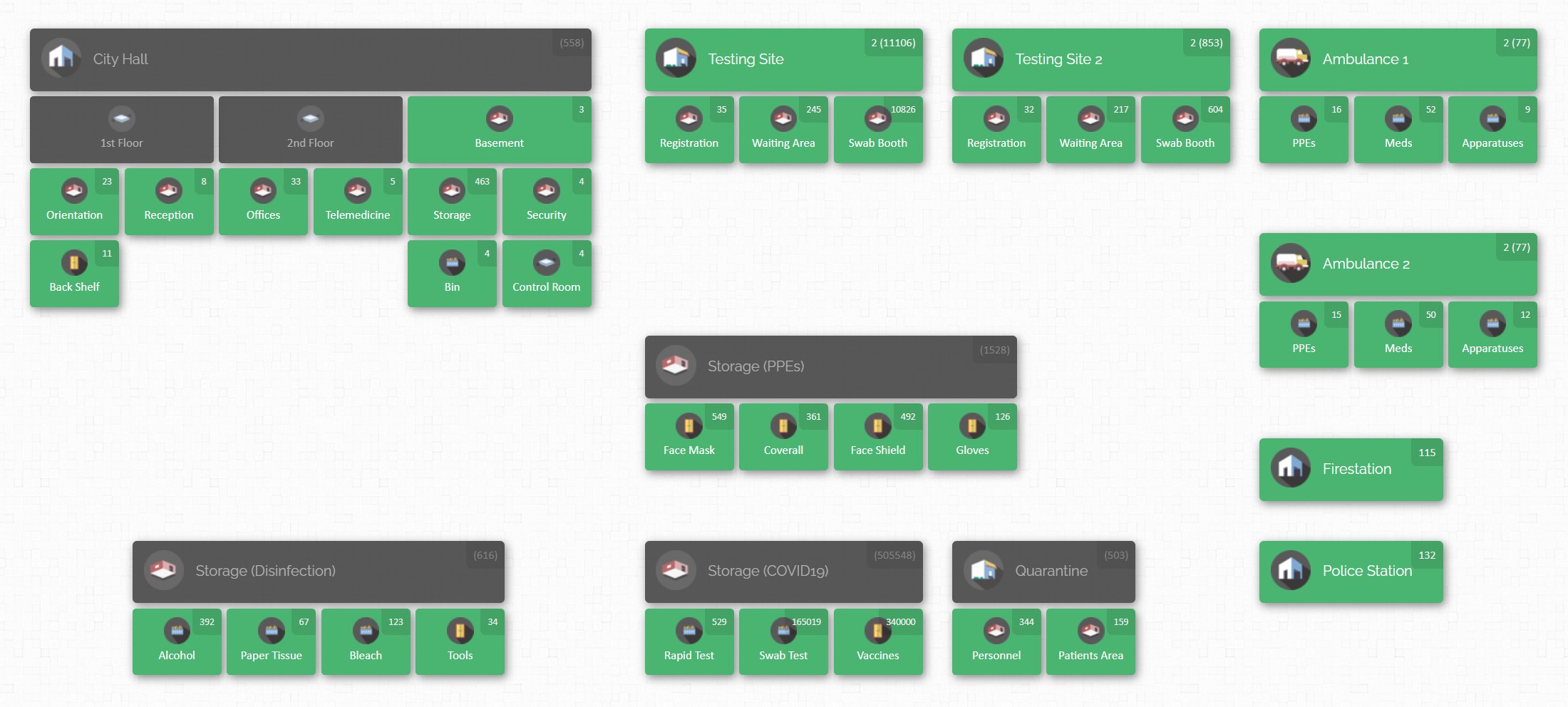
Cloud technology enables innovative tools like interactive maps that give you a bird’s-eye view of your entire inventory. It’s a level of insight that traditional on-premise systems might struggle to provide without significant customization. In this comprehensive guide, we’ll dive into cloud vs. on-premise inventory management and break down the pros and cons of each. Whether you’re a warehouse operations manager overseeing global supply chains or a manufacturing business evaluating new tools, this comparison will help you make an informed decision.
What Does Cloud vs. On-Premise Mean in Inventory Management?
Before jumping into pros and cons, let’s clarify the difference between cloud-based and on-premise inventory management systems:
- Cloud-Based Inventory Management: This is inventory software hosted on remote servers (the “cloud”) and accessed via the internet, usually through a web browser. The software is provided as a service (often subscription-based), and your data is stored in secure data centers managed by the vendor. In practice, that means you can log in from anywhere – your office, home, or on the go – and see real-time inventory information. The provider takes care of maintenance, updates, and backups behind the scenes. You don’t need to install software on your local computers beyond a web browser.
- On-Premise Inventory Management: This refers to software that is installed locally on your company’s own servers or computers, typically at your warehouse, office, or data center. All the data resides on-site within your organization’s IT infrastructure. With on-premise systems, you usually purchase a software license (often a large one-time cost) and are responsible for setting up the servers, installing the software, and maintaining it. Users access the system over your local network (and possibly through a VPN or remote desktop if they need to connect from outside). You have full control over the system’s environment, but you also shoulder all the responsibility for keeping it running and up-to-date.
In simpler terms, cloud-based inventory management is like renting a fully serviced apartment – the landlord (software provider) handles the plumbing, electricity, and upkeep, while you just use the space. On-premise is like owning a house – you have the freedom to make any changes you want, but you’re also in charge of all the maintenance and repairs.
Over the past decade, many industries have been shifting from traditional on-premise software to cloud solutions. Inventory management is no exception. However, the best choice depends on your business’s specific needs and constraints. Let’s break down the advantages and disadvantages of each option to see how they stack up for warehouse operations and manufacturing contexts.
Advantages of Cloud-Based Inventory Systems

- Access from Anywhere, Anytime: Cloud inventory systems let your team view and update stock information from any location in real time. Whether you’re a warehouse manager on the floor with a tablet or a regional director traveling between sites, you can log in through the internet and get the latest data. This real-time visibility across multiple warehouses or manufacturing plants means everyone works off the same up-to-date information, improving coordination and reducing communication lags.
- Lower Upfront Costs & Quick Setup: With a cloud solution, you typically pay a subscription (monthly or yearly) rather than investing in expensive servers and software licenses upfront. There’s no heavy hardware installation on-site – you often just sign up and start using the software through your browser. This reduces capital expenditure and makes it faster to get started. It’s especially beneficial for small and medium businesses that want powerful inventory management without a huge initial investment.
- Scalability and Flexibility: Cloud-based systems are built to scale with your business. If you open a new warehouse, launch a new production line, or suddenly need to onboard more users, a cloud platform can accommodate it with just a few clicks. You can upgrade your subscription or add capacity as needed – no need to purchase and set up new servers. This flexibility is great for growing companies or seasonal businesses. During peak manufacturing or shopping seasons, the cloud can handle usage spikes, then scale back down, all without you needing to reconfigure infrastructure.
- Automatic Updates & Less IT Headache: With cloud inventory software, the provider takes care of software updates, bug fixes, and system maintenance for you. You’ll always be on the latest version with the newest features, and you won’t have to schedule downtime to install patches. This means zero maintenance hassle for your IT team – no more manually updating every computer or worrying about system crashes due to missed updates. Your internal IT staff can focus on other tasks while the cloud vendor keeps the inventory system running smoothly.
- Integration with Other Tools: Modern cloud inventory systems often provide easy integrations or APIs to connect with your other business software. For example, a cloud inventory platform might link up with your e-commerce store, accounting software, or shipping carriers, enabling data to flow seamlessly between systems. Such integrations can automate processes (like updating online stock levels or generating invoices) and reduce duplicate data entry. While on-premise software can also integrate with other tools, it usually requires more custom setup – cloud platforms often make it plug-and-play.
- Reliability, Backup, and Security: Reputable cloud providers invest heavily in infrastructure and security. Your data is typically stored in redundant servers across multiple locations, meaning even if one server fails, your inventory data remains safe and accessible. Regular backups are usually part of the service, protecting you from data loss. Security measures like encryption, firewalls, and 24/7 monitoring are implemented at a level that many individual companies couldn’t easily afford on their own.
In short, a good cloud service offers high reliability and peace of mind that your system will be up and running when you need it, without you having to implement disaster recovery plans from scratch.
Disadvantages of Cloud-Based Systems

- Dependence on Internet Connectivity: A cloud-based inventory system needs an internet connection to work. If your warehouse’s internet goes down or your connection is slow, it can halt or hinder access to your inventory application. For businesses in areas with unreliable internet or those that operate in remote locations (like a factory floor far from good broadband), this dependency is a serious consideration. There are ways to mitigate it (redundant internet links, offline modes if the software provides one), but it remains a key factor – without internet, your cloud system is essentially unreachable.
- Ongoing Subscription Costs: While the upfront cost is low, a cloud solution comes with continuous monthly or annual fees. Over multiple years, these subscription costs can add up and potentially even exceed the one-time cost of an on-premise license (especially if you have a large number of users or high data volumes). Budgets may prefer a predictable ongoing expense, but it’s still an expense that never goes away as long as you use the service. In contrast, an on-premise system might involve a big one-time purchase and smaller maintenance fees thereafter. Companies need to consider the long-term total cost of ownership – cloud is more like an operating expense (OpEx) whereas on-premise is often a capital expense (CapEx).
- Data Security and Compliance Concerns: Even though cloud providers invest in security, some organizations are uneasy about having sensitive inventory data off-site. For industries dealing with very confidential information or strict compliance regulations (healthcare, defense manufacturing, etc.), there may be policies that require data to be stored on-premise or within certain geographic boundaries. Trusting a third party with your data means doing due diligence on their security certifications and practices. It’s not that the cloud is inherently insecure – often it’s very secure – but the perception and regulatory requirements can be a hurdle. Companies might worry about data breaches, or unauthorized access, even though cloud vendors typically offer robust protection.
- Less Direct Control & Customization: With a cloud service, you’re using a standardized platform that is the same for all customers (aside from configurations). This means you might have limited ability to customize the software’s code or deeply tailor it to an extremely niche workflow. You generally rely on the vendor’s roadmap for new features. If there’s something you want to change, you may have to request it and wait, or use whatever workarounds the software allows. Additionally, because the vendor manages the environment, you have less control over timing of upgrades or interface changes – the provider might roll out updates on their schedule, and you have to adapt. In an on-premise system, you could decide when to upgrade or even modify parts of the system (if you have the technical skill) to fit your needs. That extra control is sacrificed when you opt for cloud convenience.
- Vendor Dependency: Relying on a cloud inventory provider means your fate is somewhat tied to theirs. If the provider experiences downtime on their servers, you experience downtime. If they go out of business or discontinue the product, you would have to scramble to migrate your data to another system. While established cloud vendors try to offer export tools and uptime guarantees, it’s still a layer of dependency that on-premise users may not worry about as much. With on-premise, you have the software running in-house and can often keep using it (even if the vendor stops supporting it) for as long as it runs on your hardware. With cloud, you’re entrusting a lot to the vendor’s reliability and longevity.
Advantages of On-Premise Inventory Systems

- Complete Data Control and Privacy: With on-premise software, all your inventory data resides on servers that you own and control, right within your facility (or company data center). This can give peace of mind to companies who handle sensitive or proprietary data. You’re not transmitting information over the public internet to a third-party host. For industries with strict data security or privacy regulations, keeping data in-house can help meet compliance requirements. Essentially, you have full oversight of who can access the servers and how the data is stored, since it’s all under your roof.
- Operates Without Internet Reliance: An on-premise system typically runs on your local network, which means your staff can use the inventory software even if the internet connection goes down. Warehouse workers on the shop floor, for example, can continue scanning and updating inventory in the system via your intranet. This is valuable for locations with spotty internet or in scenarios where constant connectivity isn’t guaranteed. The system’s performance is also not tied to internet bandwidth – as long as your internal network is robust, users may experience very fast response times because the server is nearby (no latency from going out to the cloud and back).
- One-Time License Cost (Potential Long-Term Savings): Many on-premise solutions are purchased via a one-time license or upfront fee. While this cost is often high, you pay it once and then you own the software rights (though you might pay annual support or maintenance fees). Over a span of years, this can be cheaper than paying subscription fees indefinitely. If you plan to use the same system for, say, 5-10 years, an on-premise license could potentially save money in the long run compared to a cloud subscription that accumulates costs every month. It’s a CapEx vs OpEx consideration – some companies prefer to invest once and depreciate that investment rather than have ongoing operational expenses.
- Deep Customization and Integration: When you host the software yourself, you often have more leeway to customize it or integrate it tightly with other internal systems. For instance, you might have a custom database or a legacy ERP system on-site that you want the inventory software to interface with. With on-premise access, your IT team can sometimes directly modify the database or use custom scripts to achieve integrations that a cloud vendor might not support. You could even modify aspects of the software (if the license and technical structure allow it) or add specialized plugins. This level of customization can be crucial for businesses with very unique workflows or niche requirements that off-the-shelf cloud services can’t accommodate.
- Control Over Upgrades and Changes: In an on-premise environment, you decide when to apply software updates or upgrades. If the current version is working well, you can choose to skip or delay an update to avoid disrupting operations. You won’t be forced into a new interface or feature set until you’re ready. This control can be beneficial if your team needs training or if you have stable processes built around a specific version of the software. Essentially, you’re on your own schedule, not the vendor’s schedule, which can be a relief for operations that value stability over having the newest features immediately.
Disadvantages of On-Premise Systems

- High Initial Investment: Deploying an on-premise inventory system often requires a significant upfront expenditure. You’ll need to buy servers or high-end computers to run the software, purchase the software license itself (which can be pricey for enterprise-level systems), and possibly acquire database licenses or other supporting software. On top of that, there’s the cost of implementation – paying IT professionals or consultants to set it up correctly. This capital investment can be a barrier, especially for smaller businesses. Even though it might pay off over many years, the immediate hit to the budget is much larger compared to starting with a cloud subscription.
- Ongoing Maintenance & IT Burden: Once the system is up and running, all maintenance is your responsibility. That means handling regular software updates (including security patches), upgrading hardware when it ages, troubleshooting any issues, and ensuring the system’s performance is optimal. You likely need IT staff or contractors available to support the inventory software. If something breaks at 2 AM, it’s your team that has to fix it. For companies without a dedicated IT department, this can be challenging. Additionally, tasks like setting up data backups, virus protection, and system monitoring all fall on your shoulders with an on-premise solution.
- Limited Remote Access and Collaboration: On-premise systems are typically accessed within the facility or through a company intranet. If you want to use the system from home or a different site, you might have to establish a VPN (virtual private network) or remote desktop connection into your network. This can be cumbersome and may not provide the real-time ease of access that cloud systems offer. For a business with multiple warehouses or manufacturing plants in different locations, running a single on-premise system for all of them can be complicated; you might end up maintaining separate installations at each site or dealing with slow connections as remote sites access a central server over the WAN (wide area network). In short, geographical flexibility is not a strong suit for on-premise software.
- Scaling Requires Significant Effort: If your business expands, scaling up an on-premise system means investing in more hardware and possibly purchasing additional user licenses or modules. Adding a new warehouse or facility might mean setting up a new server at that location or increasing the capacity of your central server. This scaling isn’t instantaneous – it could involve weeks of deployment and configuration. By contrast, a cloud system might let you add a new site in a day by simply connecting it to the online platform. On-premise setups can struggle to keep pace with rapid growth or sudden changes in scale without a lot of advanced planning and expenditure.
- Risk of Downtime or Data Loss if Not Managed Well: With great control comes great responsibility – if your server crashes or if there’s a power outage or disaster at your facility, your inventory system could go down completely. Unless you have robust backup generators, off-site data backups, or a failover server, an on-premise system has a single point of failure. Small companies might be especially vulnerable if they have only one server running everything. Without careful planning for redundancy (which adds even more cost), an on-premise solution can potentially lead to more downtime in worst-case scenarios. In contrast, cloud vendors typically promise higher uptime through distributed data centers. So, you need to create and manage your own disaster recovery plan to approach the same level of reliability.

CyberStockroom: A Cloud Solution Tailored for Warehouse & Manufacturing Needs
When weighing cloud vs. on-premise, it helps to look at a real example of a cloud-based system and what it offers. CyberStockroom is one such platform – a modern inventory management software built in the cloud – and it embodies many of the cloud advantages we’ve discussed. It’s particularly well-suited for warehouse operations and manufacturing businesses that want clarity and control over their stock without the IT headaches.
Visual Inventory Mapping
One of CyberStockroom’s standout features is its map-based approach to inventory. As shown in the demo map earlier, users can create a virtual map of all their inventory locations: warehouses, rooms, shelves, work stations, you name it. This means as a manager you’re not just reading lines in a spreadsheet – you’re literally seeing your warehouse or factory floor layout on screen with icons or markers for products. For a warehouse operations manager, this visual context makes it easier to navigate inventory. You can quickly zoom into a specific aisle or bin and see what’s there. For a manufacturing team, you could map out the flow from raw materials to production lines, to finished goods storage. Every item’s location is visually trackable, so nothing falls through the cracks. This kind of intuitive visualization is hard to achieve in a traditional on-premise system without expensive customization, but CyberStockroom provides it out-of-the-box as a cloud service.

Real-Time, Multi-Location Tracking
CyberStockroom updates inventory data in real time across all your sites. If a part is used on the shop floor or a box is moved in the warehouse, as soon as the transaction is recorded (with a quick barcode scan or an entry), it’s reflected on the inventory map for everyone to see. This is invaluable for companies with multiple warehouses or manufacturing facilities. Let’s say you operate a main warehouse and a regional warehouse – with CyberStockroom, both teams are on the same system, seeing the same inventory counts simultaneously. If one location ships product to a customer, the stock level decreases and is visible company-wide instantly. This eliminates the silos that you often get with separate on-premise systems in each site. Managers at headquarters can get a bird’s-eye view of inventory across all global locations without having to call each site or merge spreadsheets.
Ease of Use and Reduced Training
The combination of a cloud platform and visual interface means that CyberStockroom is user-friendly even for non-technical staff. Warehouse workers and floor supervisors can learn the system quickly – moving an item on the map might be as simple as drag-and-drop, and checking stock is as intuitive as clicking on a location on the map. Because it’s a web-based tool, anyone who can use a browser can use CyberStockroom; there’s no complicated local software to install on individual scanners or terminals. The learning curve is gentle, which is important in environments with high staff turnover or where you might have temporary workers. The conversational, straightforward design of the interface (including clear labels on the map, and simple check-in/check-out buttons for inventory) means the technology enhances operations rather than complicating them.
Mobile Access on the Warehouse Floor
CyberStockroom doesn’t require a special mobile app, but it offers a mobile-optimized web view. This means team members can use a tablet or smartphone browser on the warehouse floor or out at a job site to manage inventory on the fly. For example, a worker receiving a delivery can use their phone or a tablet to scan barcodes and check items into stock right through the CyberStockroom mobile interface – the system will update immediately and everyone else will know those items are now available. Similarly, if a technician needs a part from inventory, they can check it out on their mobile device as they take it, deducting it from the available count in real time. This supports the kind of on-the-ground efficiency that modern warehouses and manufacturing plants need, all while using the cloud to sync data instantly. There’s no waiting to “upload” data at day’s end as might happen with older systems; it’s all live.
No Infrastructure, No Hassle
Because CyberStockroom is cloud-based, you don’t have to set up local servers or worry about software installs. This is a huge relief for businesses that either lack a full IT department or want to keep their IT team focused on other projects like improving production technology. CyberStockroom’s team handles the uptime, backups, and security of the system. So you get the benefit of that robust cloud reliability we talked about: your data is backed up and secure, and the system is available whenever you need it. You also automatically get new features and improvements as they’re rolled out, without having to manually upgrade anything. For instance, if CyberStockroom introduces a new reporting dashboard or a new barcode feature, it becomes available to you seamlessly through the cloud.
Designed for Industrial Workflows
Unlike generic inventory tools, CyberStockroom has flexibility to model complex workflows. If you’re in manufacturing, you can set up locations on the map for each stage of your process (e.g., Receiving -> Quality Check -> Assembly -> Finished Goods). You can then track how inventory moves through these stages, not just static locations. This is extremely useful for tracing items and managing work-in-progress. In a warehouse setting, you might map out storage zones, picking areas, packing stations, and more – giving you clear visibility of where orders are in the fulfillment process.
CyberStockroom lets you assign inventory to projects or departments too, which is great for companies that want to manage stock for different teams separately within one system. All of this is achieved with a few clicks in a cloud interface, rather than hiring a consultant to heavily customize a program.

Making the Right Choice for Your Business
Every business is unique, so the cloud vs. on-premise decision comes down to evaluating your specific situation. Here are some final considerations to help guide you:
- Geography & Workforce: If your inventory is spread across multiple warehouses or you have teams that need access on the go (regional managers, field technicians, etc.), a cloud system is generally more convenient. Cloud shines in multi-site coordination and remote accessibility. On-premise can work for a single-location operation or one with a contained network, but it’s less friendly for a geographically dispersed operation.
- IT Resources & Expertise: Consider how much IT support you have. If you don’t have a dedicated IT team (or if they’re already stretched thin), a cloud solution spares you the technical heavy lifting – no servers to maintain, no software to manually update. If you do have a strong IT department and they prefer having full control, and you’re prepared to invest in hardware, an on-premise solution could be viable.
- Budget & Cost Horizon: Think about your budget structure. Do you prefer a lower upfront cost with ongoing payments (OpEx), or can you afford a large one-time investment (CapEx)? Cloud’s subscription model means fees are spread out over time, which can be easier for cash flow and usually includes support and updates. On-premise demands more money up front for licenses and equipment, but might pay off after many years if you avoid high recurring costs. Just remember to factor in “hidden” costs of on-premise like IT labor, downtime risks, and future upgrade fees.
- Regulatory and Security Needs: If your industry has strict data residency rules or if you handle highly confidential information that executives are uncomfortable placing in the cloud, on-premise might seem more attractive. For example, some government or healthcare organizations with sensitive data might lean on-premise for compliance reasons. However, also weigh the fact that major cloud providers often have certifications and security measures to meet industry standards – and they can dedicate more resources to security than most small IT teams. If security and compliance are crucial, you may need to involve your security officers in evaluating cloud vendors or consider a private cloud/on-prem hybrid.
- Customization Requirements: Do you have specialized workflows that off-the-shelf software doesn’t cover? On-premise systems sometimes allow deeper customization or integration with legacy systems, which can tip the scale if you run niche processes. If your needs are standard (e.g., tracking stock levels, barcode scanning, generating basic reports) then a cloud system like CyberStockroom will likely cover them with configuration options. But if you need to heavily alter the software’s core behavior, you might find more flexibility in an on-premise solution – or you might consider a cloud provider that offers custom development or extensive configuration capabilities.
In many cases, cloud inventory management wins out for today’s warehouse and manufacturing operations due to its flexibility, accessibility, and lower maintenance burden. It aligns well with the fast pace and distributed nature of modern supply chains. That said, on-premise systems still have their place, especially in environments with stable, specific needs and strong in-house IT support.
The key is to match the system to your business priorities. You might even start with cloud for quick wins (e.g., get a system running quickly to replace spreadsheets) and find that it scales effortlessly as you grow. Or you might commit to on-premise because you have a clear long-term plan to support it internally. Either way, understanding the trade-offs means you can proceed with confidence.

Conclusion: Inventory management is too critical to leave to chance. Whether you choose the convenience of cloud or the control of on-premise, make sure it’s a conscious decision based on the factors above. And remember, the ultimate goal is to have visibility, accuracy, and efficiency in managing your stock. The good news is that today’s technology offers solutions on both fronts – and with platforms like CyberStockroom delivering cloud innovation, you have more options than ever to keep your operations running smoothly.







 CyberStockroom
Leave a comment