
Many businesses start managing inventory with the trusty Excel spreadsheet. It’s familiar, cost-effective, and gets the job done in the early days. However, as your operation grows and inventory becomes more complex, you may find that spreadsheets begin to buckle under the pressure. If you’re considering switching from Excel to inventory software, you’re not alone.
In today’s fast-paced, data-driven world, moving from Excel to a dedicated cloud inventory management system isn’t just an upgrade – it’s a game-changer for efficiency, accuracy, and growth.This comprehensive guide will walk you through why Excel often falls short for inventory management, the benefits of cloud-based inventory systems, how to make a smooth transition, and how inventory management solutions can revolutionize the way you track and control stock.
Excel: The Old Faithful Tool with New Challenges
Excel has been the go-to tool for inventory tracking for decades, especially for startups and small businesses. In the beginning, it’s easy to see why – Excel (or Google Sheets) is readily available, flexible, and most people have at least basic spreadsheet skills. You can list your products, add columns for quantities, costs, and sales, and perhaps even set up some formulas to sum totals or highlight low stock levels. For a while, this DIY inventory management works fine.
However, Excel was never designed as a full-fledged inventory management system. It’s a general-purpose spreadsheet program being stretched to handle a specialized task. As your business expands, what was once a simple sheet can turn into a labyrinth of tabs, formulas, and data that’s increasingly tough to maintain. The very strengths of Excel – its freeform flexibility and user-driven nature – can become weaknesses when applied to complex inventory operations.

Let’s examine some of the key limitations you may face when relying on Excel to manage inventory:
- Prone to Human Error: Inventory spreadsheets require manual data entry and updates. It’s all too easy to type a wrong number, mis-sort a list, or copy-paste in the wrong place. A simple mistake like entering “100” instead of “1000” in the quantity column can throw off your entire inventory count. These errors often go unnoticed until they result in a stockout, an oversell, or a discrepancy during an audit. In a busy business, where multiple people might be handling stock and updating files, the risk of mistakes multiplies.
- Lack of Real-Time Updates: In Excel, data doesn’t update itself. If you make a sale or receive new stock, someone has to manually enter that change into the spreadsheet. If you have multiple sales channels or locations, there’s no automatic sync – one team member’s file might not reflect a sale made by another team member five minutes ago. This means your inventory data is often out-of-date, sometimes by hours or days. Relying on stale information can lead to selling items that are actually out of stock or ordering more of an item that you already have plenty of (because the spreadsheet wasn’t current).
- Single-User and Version Control Issues: Ever tried to have two people edit the same Excel file at once? Unless you’re using an online shared sheet, it’s a recipe for “version chaos.” One person’s changes can overwrite another’s, or you end up with multiple copies of “Inventory_Final.xlsx”, “Inventory_Final2.xlsx” and so on. Even with cloud-shared spreadsheets, simultaneous editing can be clunky. Excel isn’t a multi-user real-time platform in the way dedicated inventory systems are. This makes collaboration slow and cumbersome – if one person is updating the inventory sheet, others often have to wait their turn or risk messing up the data.
- Difficulty Scaling Up: What happens when your product list triples in size? Or when you expand from one stockroom to three warehouses? Excel spreadsheets tend to become unwieldy as data grows. More items mean more rows (potentially thousands of rows) and possibly dozens of columns if you’re tracking details like SKU, location, supplier, lot number, etc. Large spreadsheets can become slow to open or calculate. They also become harder to navigate – you might have to scroll endlessly or use complex filters to find information. The complexity often requires advanced Excel knowledge to maintain, with intricate formulas or even macros, which themselves are prone to breaking. In short, Excel doesn’t scale gracefully for inventory. A system that once took a few minutes a day to update might turn into a time-consuming chore as your inventory expands.
- Limited Inventory Features: Out-of-the-box, Excel has no specific inventory management features – it’s just a blank canvas. Any functionality (like alerting you when stock is low, tracking inventory across multiple locations, or generating purchase orders) has to be manually built or constantly monitored by you. For example, you might set up conditional formatting to flag low stock levels, but Excel won’t automatically send you a notification or place an order with your supplier. Similarly, handling multiple locations in Excel means perhaps having separate columns or sheets for each location and then manually consolidating data to get a total view. It’s easy to lose sight of the big picture. And if you need serial number tracking, batch tracking, or expiration date alerts (common in electronics, food, or pharmaceutical inventory), Excel will struggle – you’d need complex workarounds.
- Poor Visibility and Reporting: While it’s possible to create charts or pivot tables in Excel, getting actionable insights from a spreadsheet is not straightforward for most users. Let’s say your boss asks, “What were our top 10 selling items last quarter, and what’s the current stock level for each?” or “How is inventory turnover for Category A vs Category B products?” With Excel, you’ll likely need to manually crunch those numbers or build a report by hand every time the question is asked. There’s no easy dashboard or one-click report. Plus, if data isn’t updated in real-time, any analysis could already be outdated. This lack of quick insight means you might miss trends – like a product that’s quietly running out of stock or one that’s sitting unsold for too long – until they become bigger problems.
- Integration Constraints: Modern businesses often use a suite of tools – point-of-sale systems, e-commerce platforms, accounting software, barcode scanners, etc. Excel isn’t built to seamlessly integrate with these. Sure, you can import/export data, or maybe use some scripting to connect Excel to other systems, but it requires manual effort and technical know-how. So you end up copying data between systems. For instance, when you make sales online, you have to deduct that stock in your Excel sheet at day’s end (assuming you remember). When purchase orders are fulfilled, you re-enter the received quantities into Excel. This double-entry is not just inefficient, it’s another opportunity for mistakes. In an era where systems can talk to each other instantly via APIs and integrations, a standalone spreadsheet keeps you stuck in an information silo.
In summary, Excel is a powerful general tool, but managing a growing business’s inventory on spreadsheets is like trying to run a marathon in dress shoes – you might reach the finish line eventually, but you’ll face a lot of unnecessary pain along the way. The good news is that there’s a better way, and that’s where dedicated inventory management software comes into play.
Why Switch to Cloud-Based Inventory Software?
Upgrading from Excel to a specialized inventory management system (IMS), particularly a cloud-based one, can feel like moving from a bicycle to a high-speed train. Suddenly, tasks that were slow or manual become automated, and you gain capabilities that simply weren’t possible with a static spreadsheet.

Let’s explore the key advantages of using cloud-based inventory software:
- Real-Time Accuracy: Perhaps the biggest leap is that all your inventory data updates in real time. The moment a sale is made, a shipment is received, or a transfer is executed, the system adjusts the stock levels instantly. This means what you see on your screen is always the current truth. Real-time tracking eliminates the guesswork and delay that come with Excel. You won’t sell an item only to discover later you were actually out of stock, because the system would have prevented the oversell. If you have multiple sales channels (like an online store, a retail location, and a wholesale operation), a cloud inventory system can update all channels immediately when a product is sold. This live synchronization is crucial for avoiding stockouts and backorders that frustrate customers.
- Anywhere, Anytime Access: Because it’s cloud-based, you’re not tethered to a single computer or a file on a local drive. You and your team can access the inventory system from the office, at home, on a business trip, or even via a mobile app on the warehouse floor. Need to check stock on your phone while you’re at a trade show? Easy. Want to create a purchase order from your home office in the evening? No problem. This flexibility ensures that your inventory management keeps up with the on-the-go nature of modern business. It’s also great for managers or owners who want oversight without being physically present – you can always log in and see what’s happening.
- Multi-User Collaboration: Cloud inventory platforms are built for teamwork. Multiple users can log in and work simultaneously on the system without stepping on each other’s toes. One person can be receiving new stock in the warehouse while another is adjusting a sale in the store, and a third is running an inventory report – all at the same time, all in the same system. User roles and permissions can be set up so that each team member has appropriate access (for example, your warehouse staff can update quantities, but maybe only managers can approve new orders). This collaborative environment is a huge improvement over passing around a spreadsheet. It means everyone is working off the same updated information, and there’s a clear record of who did what, when – a built-in audit trail.
- Automation & Efficiency: Think of all the little tasks you do around inventory that are repetitive or time-consuming. With the right software, many of those can be automated or streamlined. For instance, you can set reorder point alerts that automatically notify you (or even create a purchase order draft) when stock of a particular item falls below a threshold. Instead of manually typing in data from a supplier’s packing slip, you could import it or scan a barcode. If you use barcoding, a good inventory system will let you simply scan items in and out, instantly updating counts, rather than manually recording them. Automation reduces the burden of daily inventory management and frees up your time for more strategic tasks – like analyzing sales trends or improving operations.
- Integration with Other Systems: Modern inventory software often plays nicely with other business tools. For example, it can integrate with your e-commerce platform (Shopify, Amazon, etc.), your accounting software (QuickBooks, Xero), your shipping software, and more. This means when an online order comes in, it can automatically decrement inventory and even push order details to fulfillment or accounting without manual input. By connecting these dots, you create a unified business ecosystem. No more duplicating data entry across systems. Integration not only saves time, it also ensures consistency of data across your business – your sales, inventory, and financial figures all line up because they’re sharing information through the software.
- Better Analytics and Reporting: A dedicated inventory system comes with reporting tools to give you insight at the click of a button. You can generate reports on sales by product, inventory turnover rates, aging stock (items that haven’t sold in a long time), valuation reports for accounting, and more. Dashboards might show you key metrics like “stock on hand”, “on order”, “allocated to orders”, etc., in real-time charts. These insights help you make data-driven decisions: Which products are your best sellers that you should stock more of? Which items are slow-moving and maybe should be discounted or not re-ordered? How’s your overall inventory value trending over time? With Excel, getting these answers was tedious; with an IMS, it’s often just a few clicks. Essentially, you get actionable intelligence rather than just raw data.
- Scalability and Growth: Cloud inventory solutions are built to handle large volumes of data and many users. If you double your inventory items or open new warehouses, the system can accommodate that without grinding to a halt. There’s typically no need to “start a new spreadsheet” because you ran out of space. Software can also often be upgraded with higher plans or add-ons as your needs grow (for instance, adding advanced forecasting modules or more user licenses as you hire staff). Knowing that your inventory platform can grow with you provides peace of mind – you won’t outgrow it like you did with Excel.
- Improved Accuracy with Barcoding & Scanning: Most inventory management software supports barcode scanning or even RFID integration. Scanning items in and out drastically cuts down on data entry errors (the system is reading item codes directly). It also speeds up processes like annual inventory counts or receiving shipments. In Excel, you might do a tedious count and then type results; in a good system, you could scan through all your items and the system tallies everything for you in real time. This not only improves accuracy but makes inventory management faster and more granular (you can, for example, pinpoint exactly which items moved at which time).
- Security and Backups: Storing critical business data on a single Excel file (or even a few files) has inherent risks. Files can get corrupted, laptops can crash or get stolen, or someone might accidentally delete important data. Cloud software, on the other hand, typically stores your data on secure servers with automatic backups. Providers invest in security measures like encryption, secure data centers, and regular backups – the kind of data protection that an average small business can’t implement on its own easily. Additionally, user-level security (like passwords, 2-factor authentication, user roles) helps ensure that only authorized personnel can access or modify certain data. In essence, your inventory data becomes safer in the cloud than it ever was sitting in a spreadsheet on your desktop.
- Happier Customers and Employees: While this is more of an outcome than a direct feature, it’s worth noting. When your inventory is well-managed, customers feel the benefits. They encounter fewer “out of stock” surprises, get their orders fulfilled faster, and can trust that what your system says is available is truly available. For your team, a good system reduces the headaches and firefighting – they spend less time chasing errors or dealing with stock discrepancies and more time on productive work. Morale can improve when the tools actually help make their jobs easier instead of being a source of frustration.
With all these benefits in mind, the case for switching to a cloud-based inventory software becomes very compelling. That said, timing is important. How do you know when you should make the leap? Let’s look at some signs that it’s time to retire those spreadsheets.

Signs It’s Time to Move On from Excel
Upgrading your inventory management system is an investment, so you might wonder: “When is the right time to switch?” Here are some telltale signs that your business has outgrown Excel and would significantly benefit from a dedicated system:
- Frequent Stock Discrepancies: If you’re often finding that the numbers in your Excel sheet don’t match the actual stock on the shelves, it’s a red flag. Maybe you thought you had 50 units on hand, but only 45 are physically there (or vice versa). Occasional small discrepancies are normal in any inventory process, but if it’s become a regular occurrence that requires constant reconciliation, Excel might be to blame. A lot of these errors stem from manual entry or delayed updates inherent to spreadsheets.
- Inventory Management Eats Up Too Much Time: When you or your staff are spending hours every week fiddling with spreadsheets – consolidating data from multiple files, performing manual calculations, or double-checking entries – that’s time taken away from strategic, growth-oriented tasks. If inventory tracking has turned into a full-time job of its own (or you’ve had to hire additional people just to manage the Excel files), a more automated system could save you a tremendous amount of time and money.
- You’ve Expanded (Products, Channels, or Locations): Business growth is fantastic, but it adds complexity. Perhaps you’ve added dozens of new product lines, started selling on additional platforms (like adding an Amazon store alongside your website, or opening a second retail outlet), or you’re storing inventory in multiple locations. Each of these expansions makes your Excel-based process exponentially more difficult. If you notice that your current process can’t easily accommodate new SKUs or it becomes confusing to track which items are where, it’s a clear indicator that you need a more robust solution.
- Multiple People Need to Update Inventory: If inventory management is no longer a one-person job, Excel often becomes a bottleneck. You might have salespeople, warehouse staff, and purchasing managers all needing to work with inventory data simultaneously. With spreadsheets, you might be constantly emailing files around or stepping on each other’s toes in a shared sheet. If your team is complaining about “waiting on the spreadsheet” or errors creeping in because of mis-coordination, it’s time for a multi-user system.
- Lack of Visibility and Reporting Hurts Decisions: Have you ever had a situation where you’re not sure how much you should reorder because you don’t fully trust the Excel numbers or can’t easily analyze sales trends? If decision-making feels like guesswork due to poor data visibility, that’s a sign the current toolset isn’t meeting your needs. For instance, maybe you got burned by overstocking a product that wasn’t selling well because you didn’t notice the trend in your manual records. Or you ran out of a hot seller because the spreadsheet didn’t flag it in time. When gut feel starts replacing data in planning, it’s time for a change.
- Audit or Compliance Concerns: Some businesses (especially in sectors like food, pharma, or electronics) need to maintain detailed records for audits, recalls, or regulations. If you find it challenging to trace lot numbers, expiration dates, or the history of inventory movements using Excel, that’s a big concern. A specialized system can provide traceability (e.g., which batch of products went to which customer) that spreadsheets really can’t without heroic effort. Similarly, if preparing end-of-year inventory valuations for your accountant is a nightmare of spreadsheets, an inventory system will make your life much easier.
- “There Has to Be a Better Way”: This one is a bit subjective, but if you or your team members express constant frustration with the process – if you hear things like “Why is this so painful? There must be a better way to do inventory,” – it’s a strong signal that you’ve hit the limits of what Excel can comfortably handle. Employees might be coming up with their own ad-hoc fixes or simply dreading inventory tasks, indicating the current system is not user-friendly.
If you recognize any of these scenarios in your business, it’s probably time to seriously consider upgrading to an inventory management software. Fortunately, choosing the right system doesn’t have to be daunting. Let’s discuss what to look for and how to pick a solution that fits your needs.
Choosing the Right Inventory Management Software

Once you’ve decided to make the leap from Excel to a proper system, the next step is figuring out which software to use. Not all inventory management solutions are the same – they vary in features, complexity, and target audience (some are geared for large enterprises, others for small businesses, some for specific industries).
Here are some key factors and tips to consider when choosing your new inventory platform:
- Assess Your Business Requirements: Start by listing what you need that Excel couldn’t give you. Do you need multi-warehouse tracking? Barcode scanning? Integration with Shopify or QuickBooks? Serial number tracking? Perhaps you want an app for mobile inventory counting, or specific reporting capabilities (like assembly/kitting if you bundle products). Separating your “must-haves” from “nice-to-haves” will help narrow down options. For example, a small online retailer might prioritize e-commerce integration and easy order syncing, whereas a manufacturer might need raw material tracking and work-in-progress inventory features.
- Ease of Use: The whole point of switching is to make life easier, so the software should be user-friendly. Look for an intuitive interface, clear dashboards, and perhaps customizable views. If a system requires days of training or feels overly technical, your team might resist using it (or make mistakes). Most modern cloud solutions offer clean, web-based interfaces with logical navigation. It’s a good idea to take advantage of free trials or demos – get hands-on and see if you can perform basic tasks without frustration. Also consider the learning curve for your team: since they are used to Excel, a system that provides a smooth transition (maybe with familiar concepts like rows and columns, but supercharged) can help.
- Scalability and Capacity: Consider not just your current inventory size but where you’ll be in a few years. If you have 500 SKUs now but plan to expand to 5,000, make sure the software can handle it. Likewise, user count: today it might just be you and one employee using the system, but if you grow to a whole team across departments, the system should allow adding users with appropriate permissions. Cloud systems typically are quite scalable – you might just move to a higher pricing tier as you scale – but double-check if there are any hard limits (like maximum transactions per month, or data storage limits).
- Integration Ecosystem: Ensure the inventory software can connect or integrate with the other tools you rely on. If you’re heavy on selling through online marketplaces, check for Amazon/eBay/Etsy integrations. If you want to sync inventory with an offline point-of-sale system, see if that’s supported. Also, think about accounting: many businesses want inventory value and cost of goods sold to flow into their accounting software, so an integration there is useful. Some inventory platforms have native integrations, and for others you might use third-party services or APIs. The more “plug and play” it is, the less work for you.
- Customization and Flexibility: Every business has its quirks. Maybe you need to track a custom attribute for your products (like fabric type, or vehicle VIN, or a specific compliance code). Or you might want to organize your locations in a certain hierarchy. Check if the software allows custom fields, custom reports, or other personalization to fit your operations. This is one area where spreadsheets shine (you can always add a new column for something), so you want a system that isn’t one-size-fits-all rigid. Many inventory systems let you add custom data fields or adjust what’s shown in the interface. The more you can tailor it to mirror your business, the smoother the adoption will be.
- Vendor Support and Training: No matter how user-friendly a platform is, transitioning to it will come with questions. Evaluate the level of support offered – is there 24/7 customer service? Do they provide onboarding assistance, tutorials, or a knowledge base? Especially if you’re not super tech-savvy, having a responsive support team can make a huge difference during setup and beyond. Look for reviews or ask about the customer support experience. Some vendors, like CyberStockroom, emphasize personalized onboarding and even help with data migration for new customers, which can significantly lower the stress of switching.
- Cost and ROI: Budget is always a factor. Inventory software can range from free (for very limited versions) to hundreds or thousands of dollars a month for enterprise systems. The key is to assess the value you’re getting. When comparing costs, factor in how much time it will save (time = money), how it might reduce errors (what’s the cost of a serious inventory error to your business?), and how it can improve sales (for example, by preventing stockouts or by illuminating sales patterns that boost revenue). Many cloud solutions have tiered pricing – be sure to choose one that fits your current budget but also check what the next tier up costs if you grow. Also, watch out for hidden costs: some systems charge extra for additional modules, users, or support. Ideally, choose a transparent pricing model with no surprises. The good news is that several reputable inventory management systems for small to mid-sized businesses are quite affordable, especially compared to the expense of errors or inefficiencies from sticking with Excel too long.
- Reviews and Reputation: Before committing, do a bit of homework on what other users say. Look at reviews on software comparison sites or case studies on the vendor’s website. If possible, talk to someone in your network who uses the software. This can give you insight into any potential drawbacks or particularly beloved features. Keep in mind no solution is perfect – the goal is to find one that aligns best with your needs and whose minor shortcomings (if any) are ones you can live with or work around.
Armed with these criteria, you’ll be in a good position to select an inventory platform that will serve you well. Next, let’s spotlight a modern solution that exemplifies many of these benefits – and one that brings a unique approach to the table.
CyberStockroom: A Modern Solution with a Visual Twist
While there are many inventory management tools out there, CyberStockroom stands out for its innovative map-based approach to inventory. It’s a cloud-based inventory management software designed with small and mid-sized businesses in mind, and it tackles many of the challenges we’ve discussed in a refreshingly visual way.
What is a map-based inventory system?
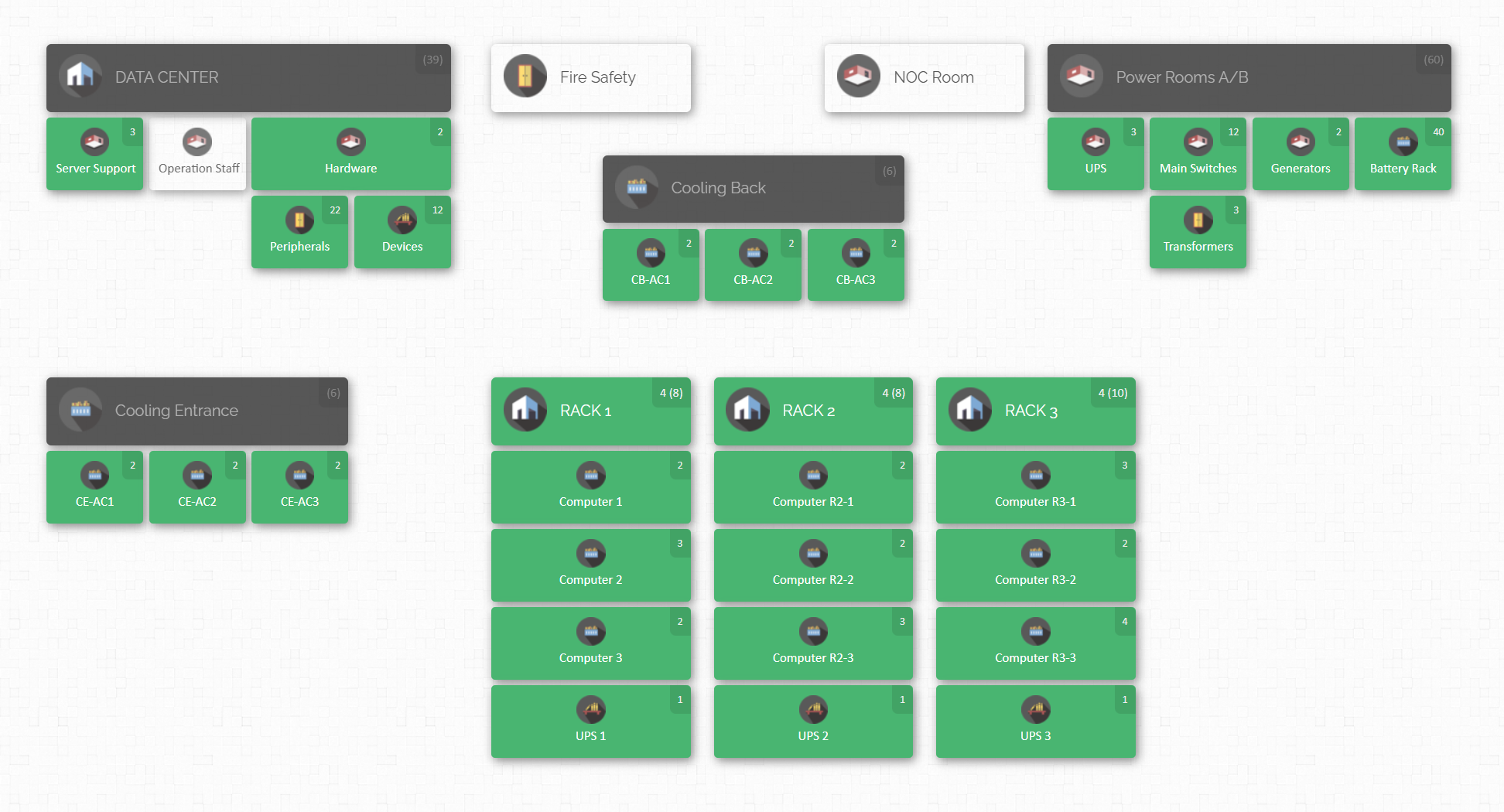
In CyberStockroom, you don’t just see rows and columns of data; you actually build a virtual map of your business’s inventory locations. Think of a bird’s-eye view of all the places where your products live – your warehouses, stockrooms, retail stores, delivery trucks, or even specific sections within a warehouse. On this map, each location is an interactive element. You can click on your “Main Warehouse” or “Store #2” and instantly see what items are there and in what quantities.
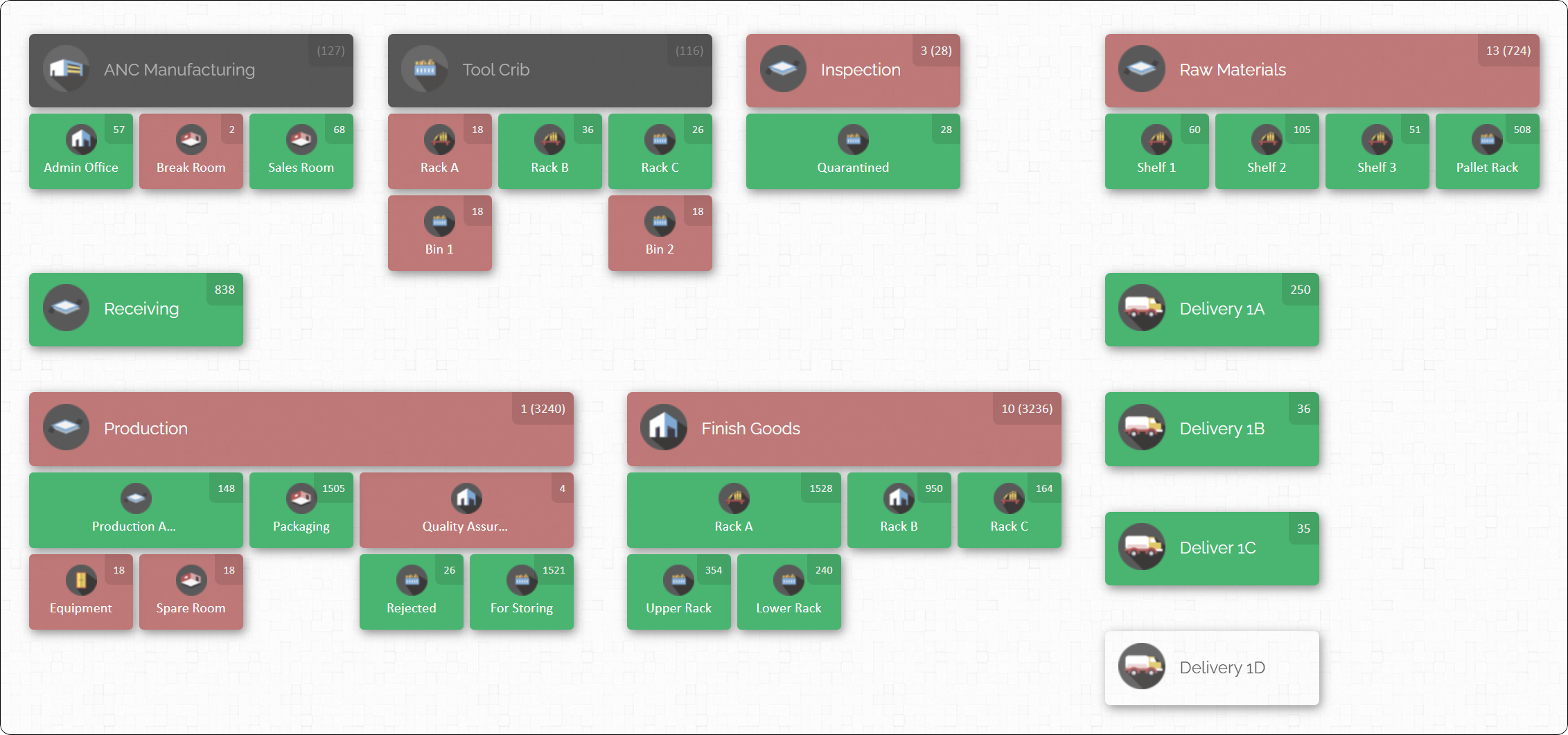
Why does this matter? For one, it gives you an intuitive, at-a-glance understanding of how your stock is distributed. For example, let’s say you have five locations and you want to find where a specific product is currently stored. Instead of scanning through a spreadsheet or running a report, CyberStockroom lets you select that product and visually highlights on the map how many units are in each location. It’s like having X-ray vision for your inventory – incredibly useful when you’re managing stock across multiple spots.
Another cool feature is drag-and-drop inventory transfers. If you need to move items from one location to another (a very common task in inventory management), CyberStockroom allows you to simply drag the item icon from, say, Warehouse A and drop it into Warehouse B on the map. The system will automatically adjust the quantities in both locations and record the transfer. This is not only satisfying, but it reduces the friction of what would otherwise be a manual adjustment process in Excel (find the row, change the numbers, make sure to subtract here and add there, etc.). The drag-and-drop metaphor aligns with how we think about physical movements, making the digital operation more intuitive and less error-prone.
CyberStockroom also includes all the critical features you’d expect from a robust inventory system: barcode scanning support, customizable fields (so you can track those unique data points for your products), reporting and analytics, user permissions, and integration capabilities. Being cloud-based, it delivers the benefits we covered earlier: team collaboration, remote access, and real-time updates. If your team is used to Excel, they’ll appreciate that they can still import/export data easily (such as doing a bulk import of an initial product list from your old spreadsheet). But once inside the system, they’ll find a much richer experience.
Use Case Example: Consider a small wholesale distributor who supplies products to retailers. They might have a warehouse and a couple of delivery trucks that function as mobile inventory locations. With CyberStockroom’s map, they can represent the warehouse as a big node and each truck as another node. As stock is loaded onto a truck for delivery, they drag it on the map from the warehouse to that truck. If a customer order needs to be redirected last-minute, they can easily see which truck (or warehouse) has the stock to fulfill it. This level of visibility and control is hard to replicate in a spreadsheet without complex, error-prone processes.
For a retailer with both a physical storefront and an online store, CyberStockroom’s real-time sync ensures that when an item sells in the store, the online inventory is updated instantly (and vice versa). The map might show the backroom storage and the storefront as two sub-locations, giving the staff insight into how inventory is allocated and making it simple to transfer items from the stockroom to the sales floor while keeping track of that movement.
Visualizing Your Business: Early in this blog, we asked you to imagine your inventory on a map – CyberStockroom turns that into reality. The system allows you to create any number of sub-locations as well. For instance, within a warehouse you could map out specific aisles or shelves. Within a store, you might map a stockroom versus the shop floor. This hierarchical mapping means no matter how detailed or spread out your operations are, you can get a complete visual overview. It’s like Google Maps for your inventory, but interactive.
From a training perspective, this visualization helps teams quickly grasp the state of inventory. New employees can literally see how the company’s inventory is organized without poring over confusing spreadsheets. It’s a much more approachable way to represent inventory data, which can shorten the learning curve.
CyberStockroom also emphasizes ease of onboarding. They understand that switching systems can be daunting, so they offer personalized support, a 14-day free trial (so you can play with the map and features yourself), and even assistance with migrating your data from Excel. The goal is to correlate your inventory management directly with how your business physically operates – something that Excel users often try to do with lots of separate sheets or complex workarounds, but here it’s baked into the core design.

In summary, CyberStockroom exemplifies what modern, cloud-based inventory software can do: it resolves Excel’s shortcomings (like lack of real-time updates, multi-user access, and automation) and adds an extra layer of user-friendly innovation through visual mapping. This isn’t to say it’s the only choice out there, but it’s a shining example of the direction inventory management is heading – more visual, more interactive, and more aligned with real-world operations. If your interest is piqued, you might consider checking out their demo or trial to see this map-based system in action with your own inventory data.
Now that we’ve covered the “why” and given an example of the “what,” let’s move on to the “how” – how to actually transition from Excel to an inventory software smoothly without disrupting your business.
How to Transition from Excel to a Cloud Inventory System
Change can be intimidating, especially when it involves core operations like inventory. But with some planning and structured steps, you can switch from Excel to your new system with minimal hiccups.

Here’s a step-by-step game plan to upgrade your inventory management process:
- Evaluate and Plan: Begin by assessing your current process and pinpointing the pain points (many of which we’ve discussed above). What do you want the new system to solve or improve? Also, gather all your existing inventory data files and review them. How many products do you have? Do you track lots, serials, or special attributes currently? Identifying these elements will help you set up the new system properly. Make a high-level plan of the transition timeline – for example, you might decide to do the switch at the end of a month or quarter so it’s easier to reconcile records.
- Choose Your Software and Get Familiar: Assuming you’ve done the homework and selected your inventory platform, sign up and explore it. Take advantage of any onboarding resources: attend webinars, read user guides, and involve key team members in this learning phase. Many systems allow you to create a sandbox or use the trial period to simulate your operations. Use this time to configure basic settings – like creating your locations in the system, setting up user accounts for your team, and establishing any needed integrations.
- Clean Up Your Data: Before importing anything into the new system, make sure your Excel data is clean and well-organized. This is a golden opportunity to eliminate clutter and errors you may have been living with. Check for duplicate product entries, inconsistent naming conventions, or missing information (like SKUs or supplier names). If you’ve been meaning to standardize how things are described or categorized, do it now in the spreadsheet – it will make your new system cleaner from the get-go. Think of it as prepping the foundation for a new house; you want it solid and level.
- Migrate Your Inventory Data: Most inventory software offers import tools (often using CSV files). Export your cleaned Excel data in the format the new system requires – some platforms provide templates you can copy your data into. Typically, you’d import a master product list with all item details first, then perhaps import current stock quantities per location. Take care to match the data fields correctly during import (e.g., ensure “Item Name” lines up with the equivalent field in the software, “Quantity On Hand” with the stock level field, etc.). After running the import, do some spot checks: pick a few items and verify that their details (description, quantity, location) came through correctly. This is also where you’ll enter or set up things that might not have existed in Excel, like reordering thresholds or supplier details, so that the new system is fully informed.
- Run Parallel (Optional Safety Net): It can be wise to run both systems in parallel for a short period as a safety net. For example, during your first week using the new software, you might also update the Excel sheet in the background as a backup. This way, you can cross-verify that the new system’s outputs match your expectations. If all goes well (and it likely will), you’ll soon find the dual entry is unnecessary. The parallel run is mostly to build confidence and catch any setup mistakes early, not a long-term crutch.
- Train Your Team: Even if an inventory system is intuitive, don’t skip training your staff. Gather the team and walk them through the common tasks they’ll need to do: how to look up an item, how to enter a sale or adjust inventory counts, how to receive new stock, how to run a basic report, etc. Emphasize the new benefits – like “now you can all see stock levels live, no more waiting for me to send the spreadsheet.” If possible, create a simple process document or cheat-sheet specific to your company’s use of the system for quick reference. Encourage questions and take it slow until everyone feels comfortable. Often, involving staff in the transition (even in choosing the system) helps get buy-in, so they feel positive about the change rather than feeling like a new system is being forced on them.
- Go Live and Monitor Closely: Decide on a go-live date when the new system becomes your single source of truth for inventory. From that day, the Excel file becomes archival (or is used only for reference, not updated). In the first few days and weeks after going live, monitor the processes closely. Verify that transactions are being recorded properly. Do a few random physical stock checks and compare to what the system shows, just to confirm accuracy. If you spot any discrepancies, investigate and resolve them promptly – it could be a missed step in the new workflow or a data import issue that needs correction. Use any analytics or logs in the system to track activity, so you know things like incoming orders or stock adjustments are flowing as expected.
- Leverage New Features: Once basic operations are running smoothly, gradually explore and activate the more advanced features of your inventory software – the things that Excel never did for you. Set up automatic low-stock alerts via email or notifications. If the system supports it, configure integration with your sales channels or accounting software so that data moves automatically. Try out the forecasting or demand planning tools if available. The idea is to make sure you’re getting the full benefit of the system. A common scenario is that after a few months, businesses discover they can streamline even more tasks (like automated purchase ordering or advanced barcode labeling) now that the base system is in place.
- Continuous Improvement: Inventory management is an ongoing process. Schedule periodic reviews (say, monthly or quarterly) to assess how well the new system is meeting your needs. Gather feedback from the team – is there anything they are struggling with, or features they wish they understood better? Many software providers update their platforms regularly, so keep an eye on release notes or newsletters for new features that could help you. Adjust your processes as needed; for example, you might find that doing a weekly cycle count of a few items keeps everything highly accurate, whereas before you only did annual counts. Now that the system makes counts easier (with scanning and quick updates), you can adopt better practices that weren’t feasible with spreadsheets.
By following these steps, the transition to a cloud inventory system can be managed in a structured and relatively smooth manner. Most businesses report that after moving to a new system and adjusting, they would “never go back” to spreadsheets – the benefits become that obvious.
So, what kinds of businesses stand to gain the most from this switch? Let’s explore that next.
Who Benefits Most from Upgrading to Cloud Inventory Management?

Virtually any business that deals with physical goods can reap benefits from moving off Excel, but certain types of operations will feel the impact more profoundly. If you’re in one of the following categories, the case for switching to an inventory management system is especially strong:
- Retailers (Brick-and-Mortar & Omnichannel): If you run a retail store, whether it’s a single boutique or multiple locations, keeping accurate inventory is directly tied to sales and customer satisfaction. Running out of a product means lost sales, while overstocking ties up capital and shelf space. Retailers who also sell online absolutely need a centralized system to manage inventory between the physical store and e-commerce channels. A cloud IMS ensures your in-store sales and online orders update the same inventory pool, preventing double-selling and simplifying fulfillment (you’ll know whether to ship from a store or from a warehouse, for example). It also helps with seasonal forecasting and quick reordering of popular items.
- E-Commerce & Online Sellers: Online-only businesses might think Excel can do the trick if they’re small, but as soon as order volume ramps up, it becomes unsustainable. With an inventory system, an order coming in from your website can automatically reduce available stock, update your marketplace listings (if you sell on platforms like Amazon or eBay), and even trigger a reorder if needed. If you’ve ever oversold an item and had to deal with an angry customer or scramble to restock, you know the pain of not having real-time sync. Plus, inventory software can integrate with your shopping cart or marketplace APIs to streamline everything from printing shipping labels to updating tracking information, saving you time and reducing errors.
- Wholesalers & Distributors: When you’re supplying products to other businesses, you often handle larger quantities, bulk orders, and a wide range of SKUs. Spreadsheets quickly become unmanageable in these scenarios. Inventory software helps track stock across multiple warehouses or distribution centers, manage backorders and pending orders, and maintain clear records of what’s allocated to each client. Features like setting aside (reserving) stock for certain orders, or generating pick lists for the warehouse team, are built into many systems. Wholesale operations also benefit from the ability to analyze buying patterns of clients and ensure they always have the right stock on hand for their top customers – something that’s difficult to do with Excel alone.
- Manufacturers & Assemblers: If your business involves making products (even light assembly or kitting), you have the extra layer of raw materials or components to track. Excel might manage a simple Bill of Materials (BOM), but it won’t update component inventory when you build a finished product without a lot of manual work. Inventory (or Enterprise Resource Planning – ERP) systems can automatically deduct components when you manufacture an item and add the finished goods to stock. They help plan production by warning you if you’re short on any components for upcoming builds. This kind of coordination and materials requirement planning is nearly impossible in Excel in real-time. Manufacturers also often need lot or batch tracking for quality control – features designed into many inventory systems (know exactly which batch of raw material went into which finished product, for example, in case of a recall or defect).
- Service Businesses with Parts Inventory: Even if you primarily provide services, if there’s a parts or supplies component, a good inventory system can be a lifesaver. Think about an HVAC repair company, an IT support firm, or an auto repair shop – they all have inventory of spare parts that must be tracked. If a technician uses a part from their van, you want to know so you can bill the customer and replenish the van stock. With Excel, techs might update a sheet occasionally or not at all, leading to missing parts when needed. A cloud system allows each technician to update inventory from the field on a mobile device. It can also centralize requests for restocking. The result is fewer delays on jobs (because the part you thought was in Truck #3 is actually there) and less over-purchasing (because you have clear visibility of what’s already in stock across all your service vehicles and locations).
- Multi-Location Businesses: If your inventory is spread over more than one site – be it multiple stores, warehouses in different cities, or even distinct areas within a large facility – you’ll benefit from an inventory system that can give you both the granular view and the big picture. Spreadsheets might force you to handle each location separately or maintain a very complex combined sheet. A cloud system will let you drill down into one location or view all stock at once. It will also simplify transfers between locations (no more adjusting two spreadsheets; just record a transfer in one system and all locations update). This ensures that you can easily rebalance inventory – for example, moving stock from Store A to Store B if one is overstocked and the other is running low – with full visibility.
- Regulated Industries (Food, Pharma, Aerospace, etc.): Any industry where you have to maintain strict records for safety, traceability, or compliance will find dedicated software invaluable. These systems can track lot numbers, expiration dates, and chain-of-custody for each inventory movement. If you discover a defective batch from a supplier, a good system can show you exactly which finished products and customers that batch went into. If you need to quickly pull up records for an audit, it’s a matter of running a report instead of digging through spreadsheets. Excel would require intense manual record-keeping to approach this level of traceability and still might fall short. The risk of non-compliance or a failed audit often far outweighs the cost of proper software in these fields.
- Growing Small Businesses (Planning to Scale): Finally, any small business that plans to grow will benefit from putting an inventory system in place sooner rather than later. It’s often better to implement it when your operation is manageable, then grow into it, than to wait until you’re drowning in inventory chaos. If you foresee increasing product lines, expanding sales channels, or higher sales volume, a cloud-based system will save you from future headaches and potentially costly mistakes. It’s about being proactive – setting up scalable processes now so that a surge in orders is a joy (more revenue!) and not a catastrophe (lost orders or customer complaints due to poor inventory control).
If you identify with any of the above, the advantages we discussed earlier – improved efficiency, accuracy, time savings, and insight – will likely pay off in a tangible way. Businesses have reported everything from a reduction in total inventory holding (by eliminating overstock and duplicate ordering) to increased sales (by never missing a sale due to stockouts) after moving to an inventory management system.
Conclusion: Embrace the Future of Inventory Management
Excel has been a reliable friend for a long time, helping countless businesses get off the ground with basic inventory tracking. But as the saying goes, what got you here won’t necessarily get you there. In a world where speed, accuracy, and data-driven decision-making are paramount, upgrading from Excel to a cloud-based inventory management system is not just a technical change – it’s a strategic evolution.
By making the switch, you’re equipping your business with tools that reduce manual workload, prevent costly mistakes, and provide clearer insights into your operations. You’re empowering your team to collaborate more effectively and to focus on serving customers rather than wrestling with spreadsheets. And perhaps most importantly, you’re positioning your business to scale and adapt in an increasingly competitive and omnichannel market.
Transitioning to a new system may feel like a big step, but as we’ve outlined, with proper planning it can be a smooth journey. Once you’re on the other side, you’ll likely wonder how you ever managed with those old Excel files. The time saved, the confidence in your inventory data, and the ability to leverage features like real-time tracking and automated alerts will make a tangible difference in your day-to-day operations.
If you’re standing at this crossroads, take the leap. Whether you opt for an intuitive solution like CyberStockroom’s map-based platform or another reputable inventory software, know that you’re investing in the backbone of your business. Inventory is money – it’s products you’ve invested in to sell. Managing that investment with the best tools available just makes good business sense.
So say goodbye to the days of scrolling through endless rows and manually reconciling stock levels. Say hello to a live, cloud-powered dashboard that tells you exactly what you have, where it is, and what needs your attention. From Excel grids to dynamic cloud insights, this upgrade is the path to smoother operations and greater success. The future of inventory management is here – and it’s time to embrace it and leave those static spreadsheets behind.








 CyberStockroom
Leave a comment