
Companies often operate multiple warehouses, factories, and job sites simultaneously. Managing inventory across multiple locations is critical to keep projects running on time and budgets under control. Without a unified approach, materials can sit unused at one site while another site runs out of stock, leading to costly delays.
Best Practices for Multi-Site Inventory Management
Effective multi-location inventory control relies on coordinated processes and visibility. One core practice is standardizing procedures across every site. Use common purchase-order approvals, receiving protocols, and restocking guidelines so that each warehouse or jobsite follows the same steps. This prevents confusion when staff move between locations and makes it easier to train new employees.
Next, adopt a centralized inventory system – whether it’s a cloud-based platform or a robust ERP module. All stock movements and data should feed into one system so managers can see total inventory at a glance.

Real-time tracking tools (barcodes, QR codes, RFID) keep this central database up to date. In practice, every item receipt, transfer, or consumption is scanned into the system, instantly updating stock counts across locations.
- Real-Time Visibility: Implement scanning and mobile apps so stock levels update immediately. When a technician checks out tools or a shipment arrives, the system should automatically reflect the change. This prevents surprises like finding out too late that a needed part was already used at another site. Dashboards and alerts (for example, low-stock notifications) help everyone stay aware of stock levels across the network.
- Regular Audits and Cycle Counts: Even with automated tracking, periodic physical counts are essential. Schedule routine audits at all locations to reconcile digital records with on-hand inventory. Classify items by value or criticality (using methods like ABC classification) so you focus extra counting effort on high-value or fast-moving parts. Audits catch data entry errors and shrinkage early, keeping your books accurate. They also reveal process issues (for example, if certain parts go missing at one jobsite more than others) so you can tighten controls.
- Demand Forecasting and Planning: Use historical data and project schedules to estimate future needs at each site. Construction and manufacturing often run on project timelines, so plan materials based on upcoming work phases. For example, if a new building site will need cement in three weeks, pre-order and ship it from the nearest warehouse before it’s urgently needed. Modern systems can analyze usage trends and lead times to generate intelligent reorder suggestions. Pair these forecasts with just-in-time (JIT) methods: order or transfer inventory so it arrives just as it’s needed on-site. This minimizes excess stock sitting idle across locations, freeing up cash and space.
- Efficient Logistics and Transfers: Plan internal transportation so moving parts between sites is smooth. Use an inventory system that tracks items in transit and ensures transfers are logged at pickup and delivery points. Consolidate shipments to save cost (for instance, batch separate jobsite orders in one truck). Prioritize that high-demand or fragile items move with care and speed. For distributed operations, consider a network of regional distribution centers that serve nearby job sites, reducing transit time. In all cases, use data – know what inventory is where and route it accordingly.
- Collaboration and Communication: Break down silos between teams. Field staff, warehouse managers, and procurement should all see the same inventory data. Hold regular coordination meetings or use shared project schedules so everyone knows which sites need what materials. Keep suppliers in the loop about multi-site needs and consolidate orders when possible for better pricing. When plans change (common on construction sites), communicate those changes quickly so purchase orders and deliveries can adjust without confusion.
By enforcing uniform processes, leveraging a centralized tracking system, and fostering communication, companies can streamline their multi-location inventory. These practices reduce errors, avoid stockouts or overstocks, and ensure supplies are on hand wherever projects demand them.
Challenges Unique to Industrial Construction and Manufacturing

Managing inventory across multiple locations in industrial construction and manufacturing comes with distinct challenges. These include:
1. Site-to-Site Variability
- Geographic Differences: Warehouses, factories, and job sites may be spread across urban and remote areas, each with unique climate, storage conditions, and logistics.
- Space Constraints: Job sites may lack proper storage, increasing the risk of material damage or loss.
2. Diverse Inventory Types
- Material Complexity: Construction uses a wide range of materials (lumber, steel, concrete), while manufacturing must track raw materials, work-in-process (WIP), and finished goods.
- Asset Management: Expensive tools, equipment, and machinery also need tracking, making the process more complex.
3. Dynamic Project Requirements
- Unpredictable Needs: Project scopes can change suddenly, requiring new materials or returning unused items.
- Rush Orders: In manufacturing, emergency repairs or customer requests may demand immediate access to critical parts.
4. Logistics and Transportation Challenges
- Extended Supply Chains: Sites may be far from suppliers, with longer lead times and higher shipping costs.
- Cross-Border Coordination: International projects must account for customs, tariffs, and compliance regulations.
5. Workforce Management
- Rotating Teams: Construction crews may move between sites, making it harder to enforce consistent inventory processes.
- Training Gaps: Workers may lack familiarity with digital inventory systems, leading to data errors.
6. Safety and Compliance
- Regulated Materials: Certain construction materials (e.g., hazardous chemicals) have strict handling and storage rules.
- Compliance Tracking: Manufacturing may involve regulated parts that require traceability and reporting.
How to Overcome These Challenges
- Standardize Processes: Implement consistent inventory tracking, receiving, and transfer protocols across all sites.
- Invest in Training: Ensure that all staff, including temporary workers, know how to use inventory tools.
- Centralize Inventory Data: Use cloud-based systems like CyberStockroom for real-time visibility across all locations.
- Leverage Mobile Solutions: Equip workers with mobile devices to update inventory on the go.
- Maintain Regular Audits: Use cycle counting to catch data errors and maintain accurate records.
These challenges are not insurmountable, but they require a strategic approach, combining clear processes, digital tools, and ongoing training.

International Perspectives
Inventory management practices can vary around the world, shaped by regional preferences, technologies, and challenges. Here’s a breakdown of how different regions approach multi-location inventory management:
| North America U.S. and Canadian manufacturers maintain centralized distribution hubs feeding regional warehouses, with cloud inventory software ensuring all locations stay in sync | Focus: Large-scale distribution networks and cloud-based systems. Common Practices: Many companies use ERP platforms to integrate inventory with finance and sales, handling cross-border operations, tariffs, and multiple currencies. Technology: On-site mobile scanning and cloud platforms are popular due to wide cellular coverage. |
| Europe German automotive manufacturers use integrated WMS with IoT-enabled machinery, while large infrastructure projects in Scandinavia link digital inventory to BIM data. | Focus: Lean and Just-in-Time (JIT) principles, with an emphasis on waste reduction. Common Practices: Multi-site factories with Kanban systems and advanced Warehouse Management Systems (WMS) that integrate with quality control for full traceability. Technology: Digital inventory permits and strong focus on Industry 4.0 concepts. |
| Asia-Pacific – Japanese manufacturers perfected Kanban systems, now enhanced with IoT sensors. In China, smart warehouses use drones and mobile apps. | Focus: Automation, robotics, and mobile-first solutions. Common Practices: Highly industrialized countries (Japan, South Korea, Singapore) leverage automation and RFID, while developing regions favor mobile apps for inventory tracking. Technology: IoT, RFID tracking, and AI-driven optimization are common. |
| Latin America and Emerging Markets – A Brazilian manufacturer might centralize imports at a single port for distribution, while on-site teams in developing regions use mobile apps for inventory tracking. | Focus: Overcoming infrastructure gaps and import restrictions. Common Practices: Regional consolidation (one main port feeding multiple inland sites) and a mix of digital and manual tracking. Technology: Mobile-first solutions and basic cloud tools for smaller firms. |
While the fundamentals of multi-location inventory are universal, each region brings unique adaptations. North America emphasizes cloud connectivity, Europe focuses on lean manufacturing, Asia innovates with automation, and emerging markets leverage mobile flexibility. Understanding these perspectives helps companies tailor their own multi-site inventory strategies.
Physical (Manual) vs. Digital Inventory Systems


Physical (Manual) Inventory Systems
Manual inventory systems rely on paper logs, spreadsheets, whiteboards, and direct human input. These systems are straightforward and low-cost, but they come with significant limitations:
- Limited Visibility: Each location maintains separate records, often leading to outdated or conflicting data.
- Human Error: Manual entry is prone to mistakes, from counting errors to misplaced records.
- Slow Updates: Changes take time to process, making it difficult to get a real-time view of inventory.
- Labor Intensive: Employees must spend time manually counting, recording, and reconciling stock.
When Manual Systems Might Work
- Small Projects: Limited scope where inventory volumes are low.
- Temporary Sites: Short-term job sites without the need for digital infrastructure.
- Backup Methods: As a fallback when digital systems are down.
B. Digital Inventory Systems
Digital inventory systems leverage software (cloud or on-premises) to automate tracking, data entry, and reporting. These systems can scale to cover multiple locations with real-time visibility.
- Real-Time Updates: Stock levels automatically update whenever items are received, transferred, or used.
- Accuracy: Scanners, RFID, and mobile apps reduce human error, providing precise tracking.
- Centralized Data: All locations share one inventory view, accessible to authorized users.
- Automation: Reorder alerts, automated transfer requests, and real-time reporting simplify management.
When Digital Systems Are Essential
- Multi-Location Operations: Managing stock across warehouses, factories, and job sites.
- Large-Scale Projects: Where high volumes of materials need constant tracking.
- Remote Teams: Field workers need mobile access to inventory data.
Choosing the Right System
Companies with multiple locations benefit most from digital inventory systems due to the need for speed, accuracy, and scalability. Manual systems may still work in limited scenarios, but they are increasingly being replaced by digital solutions that offer clear advantages.tions transition to digital inventory management, because it brings the visibility, control, and efficiency that manual methods lack.
CyberStockroom: Visual Inventory Tracking in the Cloud
One example of a modern digital solution is CyberStockroom, a cloud-based inventory tool designed for tracking stock across locations.
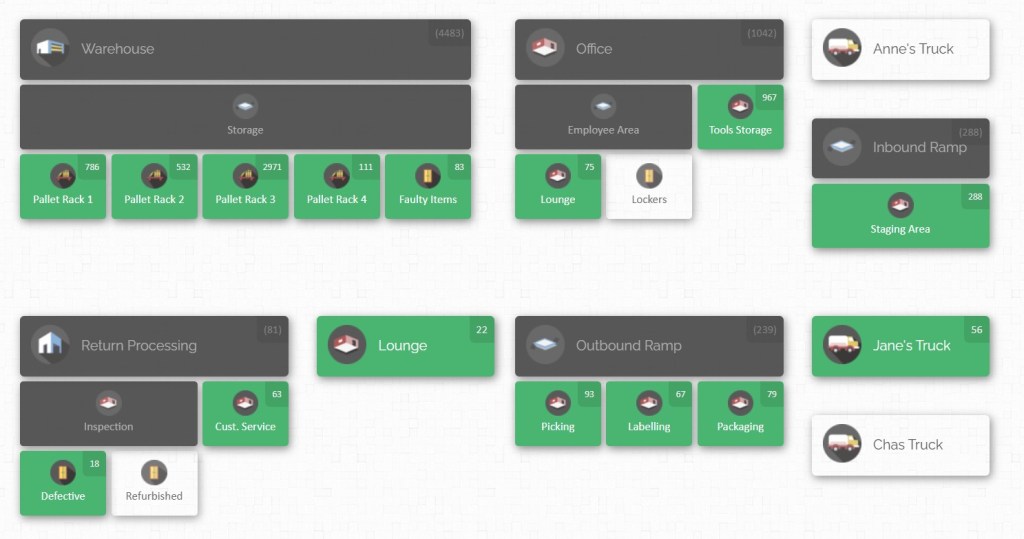
CyberStockroom distinguishes itself with an intuitive map-based interface: users literally see a diagram of all their warehouses and sites, populated with bins, shelves, and equipment areas.
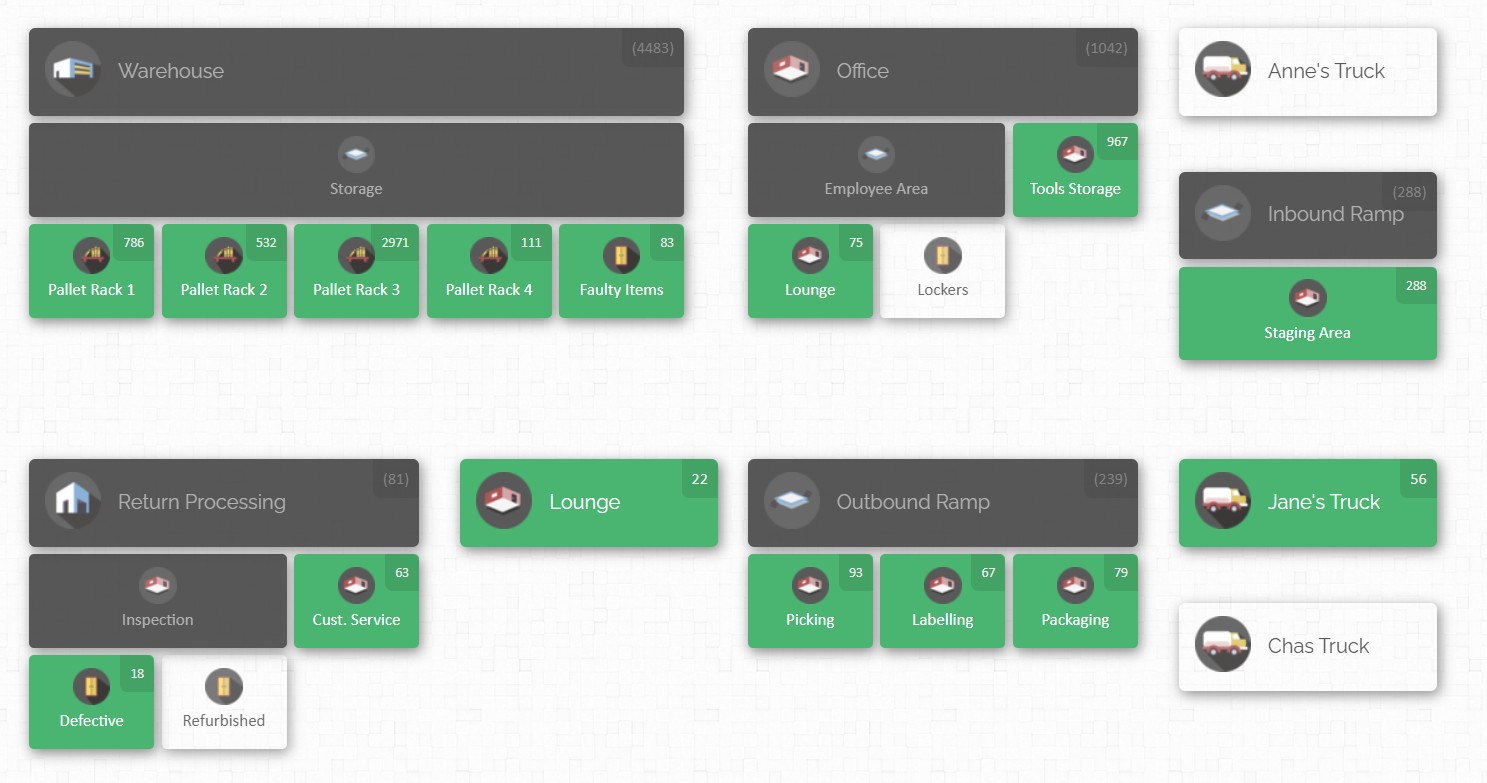
This visual approach helps anyone – from warehouse clerks to project managers – quickly grasp where inventory sits without digging through lists. Key features of CyberStockroom include:
- Real-Time Updates and Accessibility: Being cloud-based, CyberStockroom updates inventory immediately as transactions occur. If a technician at a construction site uses an item and scans it on a mobile device, the change is visible instantly to everyone. A headquarters planner anywhere in the world can log in through a browser to see current stock levels. This ensures decisions are made with the latest information. Managers no longer need to email or call sites to check stock – they simply review the live map or inventory dashboard. Remote workers and traveling executives can view inventory on the go from tablets or phones, ensuring global teams stay coordinated.
- Visual Multi-Site Management: CyberStockroom excels for multi-location operations, especially for small and medium-sized businesses. Setting up is straightforward: administrators add their warehouses, factories, stores, or job sites as “locations” on the map. Then they can drag and drop products into each location and sub-location (racks, bins, vehicles, etc.). The map color-codes items (for example, highlighting low-stock areas) and makes it easy to spot imbalances. A warehouse manager might see that Warehouse A has excess connectors while Warehouse B is nearly out – prompting a transfer request. Because the interface is graphical and user-friendly, even staff with minimal training can navigate it. There’s no need to memorize menu trees or field names – you work visually with the map and lists.
- Inventory Movement and Accuracy: CyberStockroom streamlines the process of moving items between locations. It uses a simple “check-out/check-in” system: whenever a shipment leaves one location or arrives at another, the user logs it in the app. This one-touch logging keeps the data accurate. For example, if a bundle of cables is checked out from the central warehouse and checked in at a site office, CyberStockroom automatically updates both ends. This avoids the classic “50 units gone missing” problem: because every transfer is recorded, managers can always audit the trail. In practice, companies find that using CyberStockroom drastically reduces stock discrepancies and guessing. Any mystery shortfalls get traced back through the system’s history logs.
- Collaboration and Transparency: With everyone looking at one shared data source, cross-team collaboration improves. Salespeople, warehouse staff, and project engineers can all see the same inventory picture. For example, if a sales rep in the office needs a certain part, they can log into CyberStockroom, see which site has it, and request it without interrupting the warehouse staff. Likewise, if a warehouse is overstocked on a slow-moving item, someone can flag that in the system and coordinate its use elsewhere. Role-based permissions let administrators control who sees or edits which data. For instance, a site manager may only view local inventory, while a regional director has a global overview. This keeps sensitive data secure while still empowering teams with the information they need.
- Scalability and Ease for SMEs: Unlike heavy enterprise ERPs, CyberStockroom is built for flexibility and ease of use. It offers the essentials – tracking, reporting, alerts – without unnecessary complexity. This makes it affordable and quick to deploy. As a business adds new sites, the owner simply adds a new node to the map and starts managing stock there. No costly server installations or specialist IT personnel are needed. Because it’s subscription-based SaaS, updates and support come from the provider. For a growing construction firm or a mid-sized manufacturer, CyberStockroom brings multi-warehouse capabilities once reserved for large corporations.
By leveraging a visual, cloud-first design, CyberStockroom addresses the common pain points of multi-location inventory. It turns the abstract task of “where is our stock?” into a clear, interactive map that anyone can understand.
While many inventory systems require training and spreadsheets, CyberStockroom’s interface lets teams see the big picture at a glance.

Practical Workflows and Visibility Strategies
Putting theory into practice means defining clear workflows that cover the flow of goods across locations. Here’s a typical multi-site inventory process:
- Receiving and Putaway: When goods arrive at a warehouse or site, they should be scanned into the system immediately. The receiving clerk verifies the shipment against the purchase order, then uses a barcode or mobile app to log each item. The system updates the location’s stock levels right away. Items are then put away into designated storage bins or shelves. Digitally, the staff will record the bin location (e.g., “Rack A, Bin 3”) so they know exactly where each SKU is stored. Good practice is to print labels or use RFID tags on pallets so future picks are straightforward. This workflow ensures that as soon as new inventory arrives, it is accounted for and visible to all locations.
- Inter-Site Transfers: If a site needs materials from another warehouse, a transfer order is created in the system. Logistics staff pick and prepare the shipment at the source location, scanning items out of that site’s stock. When the shipment reaches the destination, those items are scanned into the receiving site’s inventory. This two-step scan process ties up loose ends. The system can automatically generate transfer reports to track shipments in transit. During transit, both source and destination managers can monitor the incoming quantities. This eliminates errors where shipments get lost or unrecorded. It also enables just-in-time principles: if Site B is low on concrete, the system can trigger a transfer from Site A that afternoon, all logged digitally.
- On-Site Usage: In construction or manufacturing, many items move straight from inventory to production or job tasks. With mobile devices, workers can scan items as they are used. For example, a technician on a jobsite might scan each box of cables taken from the local storeroom. The inventory system deducts these quantities in real time. This ties material consumption directly to cost centers or project codes. It also prevents “phantom inventory” – counting something as available when it was already used. Digital tools let on-site teams update usage on the spot, often via smartphones or tablets. This keeps the headquarters aware of consumption rates so they can replenish stock promptly.
- Returns and Redistributions: Sometimes excess or unused inventory needs to be returned to stock. In our workflow, such items are also scanned back in. The system records the return and adjusts the site’s inventory upward. This is especially important for high-value or sensitive items, to ensure nothing slips through. Returns often happen at project milestones or after overruns. A proper workflow might require approval or inspection before restocking, and the digital system can route those approvals automatically.
- Reordering and Replenishment: The inventory system should alert managers when stock falls below safety levels at any location. Automated reordering rules can be set per item and per site. For example, if Site C’s bolts drop below 100 units, the system could automatically generate a purchase order or internal transfer. This blends into procurement – the workflow connects inventory status with purchasing. A common strategy is to calculate safety stock and reorder points using the system’s analytics. Then the process is: when the threshold triggers, either a replenishment email is sent or a workflow task appears for the inventory team. This way, human error is reduced and stockouts avoided.
- Cycle Counting and Auditing: Instead of doing one big annual inventory, many companies use continuous cycle counting. The workflow schedules counts of specific items at specific sites each month. Workers have mobile scanners that show them which items to count and expected quantities. Discrepancies found during counts automatically become adjustment entries in the system. The counts are recorded electronically, giving managers a history of accuracy. This ongoing process is far smoother than shutting down for a full audit. Importantly, it maintains trust in the system’s data – employees see that the records are verified regularly.
Across all these workflows, visibility strategies play a crucial role. Key tactics include:
- Central Dashboards: Use software dashboards that display inventory summaries by location, value, or criticality. Executives and planners should be able to pull up a report of “Stock by Site” or “Top 10 Low Items” at any time. Visualization tools (charts, heat maps) help spot patterns (e.g. one site consistently under-orders a common part).
- Alerts and Notifications: Configure the system to send alerts for exceptions. These include low stock, no activity on a critical item for a set period, incoming shipments, or safety stock breaches. Alerts can go to mobile phones or email, ensuring timely reaction. For example, if a scaffold supply runs low, an urgent alert to the warehouse manager can prompt an immediate restock.
- Mobile Access: Empower field teams with mobile apps or mobile-optimized interfaces. Foremen should update usage and raise stock issues from site using tablets or smartphones. Many modern inventory tools offer offline modes so even in spotty connectivity, transactions queue and sync later.
- Integration with Other Systems: Visibility is enhanced when inventory data links with project management or ERP systems. For instance, when a project timeline is updated, the inventory tool can highlight items tied to that project. Or when an ERP triggers manufacturing of a batch, it can reserve required materials in the warehouse software.
By following clear, step-by-step workflows and leveraging mobile/cloud tech, companies create a living, breathing picture of their multi-site inventory. Decisions – from urgent reorders to long-term investments – are then based on accurate, real-time information, rather than gut instinct or outdated spreadsheets.
Common Mistakes and Pitfalls to Avoid
Effectively managing inventory across multiple locations requires a strategic approach, but many companies fall into common traps. Here are the most frequent mistakes and how to avoid them:
1. Overreliance on Spreadsheets and Paper
- Problem: Many businesses rely on Excel sheets or handwritten logs at each site, leading to outdated or inconsistent data.
- Solution: Transition to a centralized digital inventory system with real-time updates, such as CyberStockroom.
2. Lack of Standardized Procedures
- Problem: Each location uses its own inventory methods, causing confusion and errors.
- Solution: Implement uniform standard operating procedures (SOPs) for inventory management, including receiving, counting, and transferring stock.
3. Skipping Regular Counts
- Problem: Without regular cycle counting, small inventory errors accumulate over time.
- Solution: Schedule periodic cycle counts for high-value or fast-moving items and use mobile devices to speed up the process.
4. Failing to Track Usage at Job Sites
- Problem: Materials and tools disappear because they aren’t logged when taken.
- Solution: Implement a digital check-in/check-out process for all materials, even on job sites.
5. Reactive Ordering Instead of Forecasting
- Problem: Sites constantly rush to order items because of poor demand planning.
- Solution: Use historical data to set reorder points and automate low-stock alerts with your inventory system.
6. Inadequate Training
- Problem: Staff are unaware of how to use the inventory system properly, leading to mistakes.
- Solution: Provide comprehensive training and ongoing support. Use quick reference guides and ensure there is always someone to answer questions.
7. Storing Excess Inventory
- Problem: Sites order in bulk without checking existing stock, leading to overstocking.
- Solution: Regularly review inventory levels and enable inter-site transfers to balance stock.
8. Ignoring Data Integrity
- Problem: Manual adjustments are not logged properly, causing inaccuracies.
- Solution: Ensure that all stock changes, including damages or returns, are immediately recorded in the system.
By catching these mistakes early, you ensure that your multi-site strategy doesn’t collapse under its own weight. In short, maintain organized processes, keep everyone on the same digital page, and use data proactively. The cost of prevention (training, system checks) is far less than the cost of correcting repeated inventory blunders.
Trends in Multi-Location Inventory Management (2025)
Multi-location inventory management is rapidly evolving, driven by technology and changing business needs. Here are the key trends for 2025:
Human-Centric Technologies: Mobile apps, AR guidance, and wearable devices empower workers, reducing training time and error rates.
AI and Predictive Analytics: Automated demand forecasting using historical data, supplier lead times, and external factors. Systems predict stockouts before they occur.
Internet of Things: Smart sensors track stock levels in real-time, while RFID tags streamline bulk scanning. Automated alerts for low stock.
Cloud-First Solutions: Inventory platforms are fully cloud-based, offering real-time visibility across all locations. Mobile access for remote teams.
Warehouse Automation: Robots and autonomous vehicles handle picking, packing, and intra-site transfers. Drones perform stock checks.
Real-Time Collaboration: Integrated platforms allow inventory data to flow directly to ERP, procurement, and project management tools.
Sustainability and Circular Inventory: Companies track not just stock but also carbon footprint, material reuse, and recycling rates.
Resilience and Contingency Planning: Inventory systems simulate supply chain disruptions, ensuring preparedness for unexpected events.
Conclusion
Managing inventory across locations in industrial construction and manufacturing is a complex task, but it is manageable with the right approach. By following best practices—standardizing processes, centralizing data, leveraging real-time tracking, and fostering communication—companies can keep all their warehouses and job sites in sync.
Digital tools like CyberStockroom make these tasks much simpler by giving teams a unified, visual interface for stock management. Meanwhile, learning from international examples and avoiding common mistakes ensures processes stay robust even as projects grow. Looking forward, embracing trends such as AI forecasting, and mobile/cloud technologies will further streamline multi-site inventory flows.
Ultimately, whether moving material from the warehouse to a remote site or balancing parts across factories, the goal is the same: to have the right inventory in the right place at the right time. With a strategic mix of practical workflows and modern technology, companies can achieve that goal, turning a potential logistical headache into a smooth, efficient operation.








 CyberStockroom
Leave a comment