
Why Inventory Tracking Is the Key to Staying on Time and on Budget
In the world of industrial construction, time is money. Every hour lost due to a missing part, a delayed delivery, or a misplaced tool has a ripple effect on labor costs, project timelines, and client relationships. And yet, many of these disruptions aren’t caused by poor workmanship or engineering problems—they stem from something much simpler: bad inventory management.
From structural steel to specialty tools, every piece of material and equipment on a job site matters. Without accurate, real-time tracking, even the best-planned project can fall apart.
The Problem: Inventory Chaos on Fast-Moving Job Sites
Industrial construction environments are incredibly dynamic. Materials move in and out constantly. Equipment is shared across crews. Job sites evolve daily. And amid that chaos, inventory management often becomes an afterthought.
Why it’s challenging:
- Multiple moving parts: Materials come from warehouses, suppliers, and subcontractors
- Temporary storage: Laydown yards, tool trailers, and trucks serve as mobile warehouses
- No central system: Teams rely on spreadsheets, text messages, or whiteboards
- Lost tools and overstock: Equipment is misplaced or reordered unnecessarily
- Minimal accountability: No one knows who last had what, or where it went
Without a proper system, even basic inventory questions are hard to answer:
- Do we have enough conduit for the next electrical rough-in?
- Where’s the generator we used last week?
- Who signed for the steel delivery?
The Impact: What Poor Inventory Tracking Costs You

It might seem minor at first—just a few lost items or late deliveries. But over time, poor inventory tracking snowballs into serious risk:
- Project delays from waiting on missing materials
- Duplicate purchases due to uncertainty about what’s already available
- Tool loss and shrinkage, especially on high-turnover sites
- Inefficient labor, as crews stand idle or look for parts
- Budget overruns due to rush orders, errors, and poor planning
In short, a few missed check-ins can delay weeks of work, especially on critical path activities like concrete pours, mechanical installation, or structural steel placement.
The Solution: Smart Inventory Management for Industrial Construction
Modern inventory tracking systems—especially cloud-based and mobile-friendly ones—offer construction teams the real-time visibility they need to stay ahead of problems and keep the job on track.
Let’s break it down step-by-step.
1. Use a Centralized, Cloud-Based Inventory System
Instead of multiple spreadsheets, phone calls, or walkie-talkie updates, centralize everything in one place. A cloud-based inventory platform updates instantly across all locations and devices.
Benefits:
- Warehouse, office, and field teams stay synced
- Everyone knows what’s available, where it is, and how much is left
- Reduced confusion and duplicate ordering

Scenario:
A mechanical contractor managing three job sites moved to a cloud inventory platform. Previously, foremen would call the warehouse to “guesstimate” stock. With live data, they cut wasted ordering by 25% in the first month.
2. Track Inventory Across Job Sites, Warehouses, and Vehicles
Your materials live in more than one place. Set up a visual location structure in your inventory system that mirrors your real-world setup.
Track across:
- Job sites and trailers
- Trucks and containers
- On-site staging areas and laydown zones
- Tool rooms and mobile units
Why it works:
You get full traceability. You know where everything is—even if it’s in the back of a foreman’s pickup.

How CyberStockroom Helps Industrial Construction Stay on Track
If your teams are managing inventory across warehouses, trucks, job trailers, and temporary storage zones, CyberStockroom gives you a powerful visual way to bring everything together.
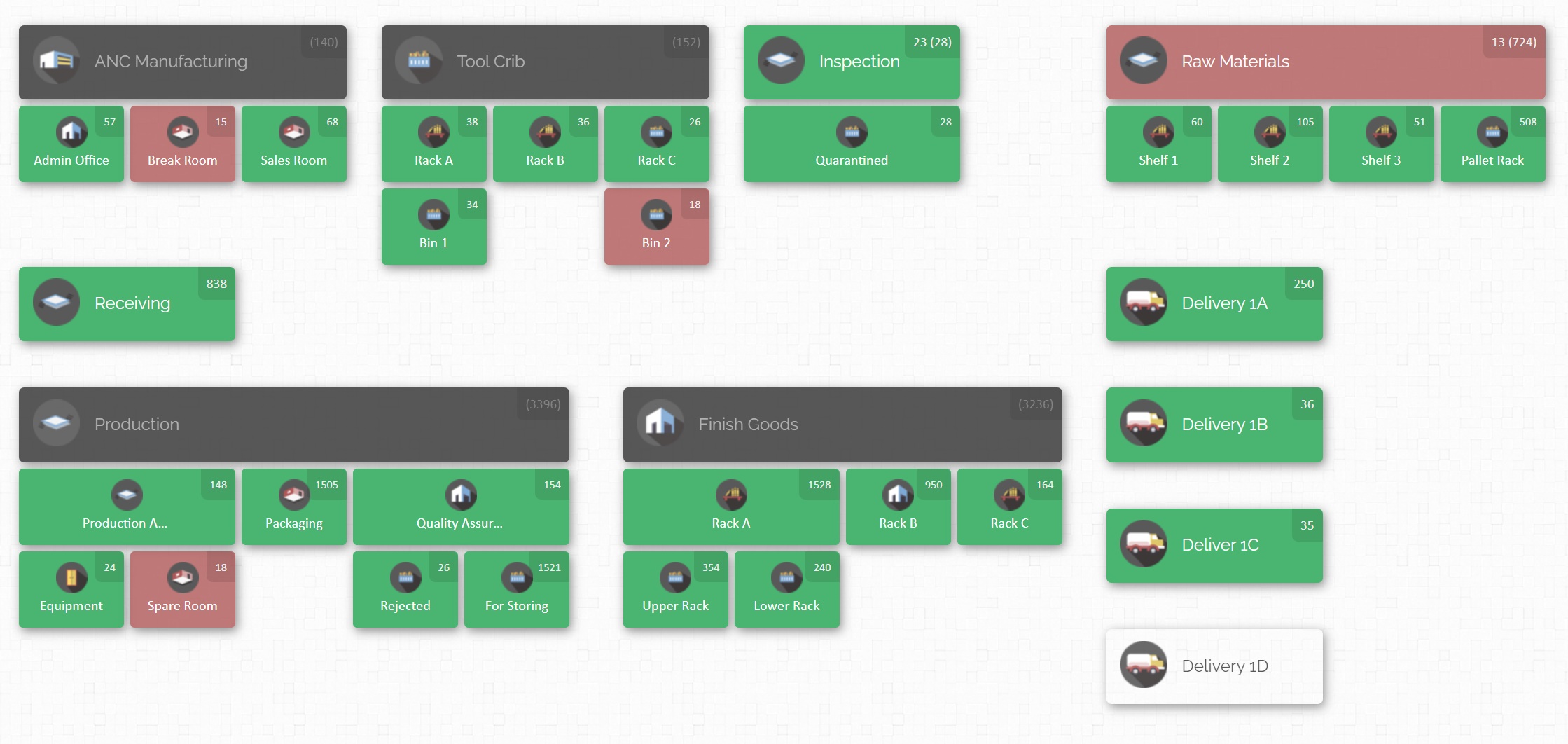
You can create a custom inventory map of your entire operation—from the warehouse to every active job site—and track exactly where each item is located in real time.
With CyberStockroom, industrial construction teams can:
- Move inventory digitally between locations (e.g., from warehouse to Site A, then to Truck 12)
- Check tools in and out to individuals or crews with full history tracking
- Scan items on the go—even in remote areas
- Keep materials visible at every stage of the job without relying on paper or spreadsheets
Whether you’re managing one site or ten, CyberStockroom helps ensure your teams have what they need, where and when they need it—so the project never slows down for a missing part.

3. Use Barcode or QR Code Scanning
Barcoding isn’t just for retail. It’s a simple, low-cost way to bring automation into the field.
How to apply it:
- Attach QR/barcode labels to tools, materials, boxes, and kits
- Use mobile phones or scanners to log check-in/check-out
- Create permanent item records with location history

Result:
No more guesswork. Teams simply scan items when they move them. Logs stay clean and accurate.
4. Schedule Just-in-Time Deliveries to Match Project Phases
Job sites aren’t warehouses—you don’t want materials sitting idle and in the way.
Use inventory data to:
- Plan phased material drops
- Align deliveries with project timelines
- Free up space and reduce damage or theft
Pro tip:
Tie inventory levels to your construction schedule. When one phase is 80% complete, trigger the next shipment.
5. Build Task-Specific Inventory “Kits”
Instead of issuing items one by one, bundle materials based on job functions or phases.
Examples:
- “Electrical Rough-In Kit”
- “Concrete Pour Package”
- “HVAC Startup Box”
Why it helps:
Crews don’t waste time gathering parts. Warehouse teams prepare in batches. And everything needed is tracked as one unit.
6. Track Consumables and PPE
Small items—gloves, drill bits, bolts—add up fast and often go untracked. This leads to budget leaks and surprise shortages.
Track them like any other item:
- Set minimum stock levels
- Group by trade or crew
- Bundle into weekly issue boxes
Bonus:
PPE tracking helps safety compliance teams ensure the right gear is being used.
7. Assign Inventory Roles and Responsibilities
No system works if no one uses it. Assign specific people on each crew to handle inventory updates and accountability.
How to structure it:
- Appoint a site inventory coordinator
- Make leads responsible for check-outs and returns
- Use system permissions to track who did what
Why it works:
It reduces finger-pointing and ensures tools don’t just “go missing.”
8. Use Mobile Apps for Real-Time Field Tracking
Construction doesn’t happen at a desk. Your inventory solution should travel with your crew.
Mobile features should include:
- Barcode scanning
- Transfer logging
- Alerts for low stock or delivery updates
- Offline tracking with cloud sync
Example:
A concrete contractor used mobile inventory apps to log deliveries and usage on remote sites without internet. Data auto-synced back to HQ later that day.
9. Build a Digital Audit Trail for Accountability
A robust audit trail helps protect your company in case of disputes, missing equipment, or backcharges.
Audit trail includes:
- Time-stamped records
- Movement logs and transfer history
- Check-in/check-out details per team member
Use case:
On a major industrial retrofit, a subcontractor was wrongly blamed for lost tools. The audit trail showed they returned everything on time—saving thousands in replacement fees.
10. Integrate Inventory with Your Construction Software
Don’t let inventory data live in a silo. Integrate it with your PM, accounting, and scheduling platforms.
Connect to:
- Project management software (e.g., Procore, PlanGrid)
- Accounting and job costing tools
- Purchasing systems and ERP platforms
Why it matters:
Inventory decisions impact budgets, billing, and scheduling. Connected systems mean smarter decisions.
11. Track Usage Against Cost Codes and Budgets
Every piece of material impacts your bottom line. Tie your inventory data to cost codes, job phases, and crew usage.
You can track:
- Material usage per job or phase
- Cost overruns by team or trade
- Opportunities to reduce overages or delays
Result:
Smarter purchasing, better budget forecasting, and tighter job control.
12. Plan Inventory in Pre-Construction—Not as an Afterthought
Many project delays start with poor material planning in the early stages.
Avoid this by:
- Including material workflows in preconstruction plans
- Building lead-time buffers for long-lead items
- Defining clear material milestones tied to the schedule
Why it helps:
Proactive planning reduces surprises and helps procurement and operations stay aligned.
Final Thoughts: Better Inventory = Better Projects
Inventory tracking might not be as exciting as cranes or concrete—but it’s one of the most powerful ways to protect your schedule, your budget, and your reputation.
When you implement a smart inventory system tailored for industrial construction, you unlock:
- Real-time visibility
- Lower material waste
- Clear accountability
- Fewer delays and fewer surprises
- Increased productivity and profitability
Where to Start?

If you’re ready to bring order to the chaos, here’s your starting checklist:
✅ Audit your current inventory tools and workflows
✅ Identify your biggest points of friction (missing tools, overages, delays)
✅ Choose a system that supports cloud access and mobile field use
✅ Set up visual maps for all your locations, trucks, and sites
✅ Assign team roles for inventory management
✅ Track everything—tools, materials, consumables
✅ Review reports weekly to catch trends and improve planning
Better inventory isn’t a luxury—it’s a necessity for staying competitive in industrial construction.







 CyberStockroom
Leave a comment