
Why site-level inventory accountability is so hard on a construction site
If you manage projects long enough, you learn a frustrating truth: inventory problems rarely announce themselves as inventory problems.
They show up as schedule friction.
A crew is ready to install, but the fixings are “around here somewhere”. A lift sits idle while someone hunts for a battery. The right consumable does not exist when the task begins, so a foreman improvises a substitute, then quality issues appear later. A bulk order gets duplicated because nobody trusts the numbers. A tool goes missing and the team spends more time arguing about “who had it last” than actually resolving the gap.
In all these moments, the site pays twice:
- once in direct cost (replacement purchases, express deliveries, hire costs, write-offs)
- once in time (lost labour hours, disrupted flow, delayed handoffs, rework)
Research on materials management in construction repeatedly links material management practices to performance outcomes like time, efficiency, and waste, which matches what most site leaders already know from lived experience: getting materials and tools wrong destabilises everything else.
The real issue is ownership, not counting
Counting tells you quantity. Ownership tells you accountability. Site-level accountability means the project can answer, quickly and consistently, a small set of questions that decide whether work moves or stalls:
- What do we have?
- Where is it right now?
- What condition and status is it in?
- Who is responsible for it at this stage?
When the site cannot answer those questions fast, ownership becomes informal. Informal ownership works only when the same people stay on the same job, and only until pressure spikes. The moment the job gets busy, knowledge fragments into side conversations and memory, and the “record” becomes whatever the most confident person says.
Construction amplifies every weakness in inventory control

Most industries can stabilise inventory in controlled spaces. Construction is different, and not in a small way. Construction inventory lives in environments that are:
- distributed across yards, containers, floors, rooms, vehicles, and temporary zones
- dynamic because the physical layout changes as the job progresses
- multi-stakeholder because many trades and roles touch the same stock
- weather-exposed and often access-constrained
- time-sensitive because sequencing makes materials usable only in certain windows
General construction inventory guidance describes this as coordination across multiple stakeholders and remote locations that are always changing. That description is accurate, but it understates the operational reality: on many sites, inventory is in motion more often than it is at rest.
When movement is constant, the failure mode is predictable. Items drift away from their “home”. Without a system that captures that drift, the site gradually loses confidence that inventory records match the physical world. Once trust breaks down, compliance drops further because people stop believing that updates matter, and the cycle accelerates.
Safety and accountability are linked, even when nobody says so
There is a reason many safety guides talk about designated storage areas, clear access routes, controlled waste, and tidy compounds. Those practices are not only about preventing incidents. They are also the physical foundation of inventory control.
When storage “spreads” informally into walkways, when returns pile up in random corners, and when materials get stacked wherever there is space, the site loses both:
- physical control (where things are)
- process control (who owns them and what status they are in)
In other words, the same behaviours that create safety exposure usually create inventory exposure. A visual accountability system can support both by making “where items belong” explicit and visible, not assumed.
Why spreadsheets and lists often fail the field
Many teams start with a spreadsheet. That is normal. The problem is not that spreadsheets are bad. The problem is that spreadsheets are not how a jobsite behaves.
A spreadsheet is an item-first model: a list of things, with columns for notes and locations. The field is usually place-first: “Go to the site store”, “Check the north yard container”, “It’s on Level 6 staging”, “It’s in the van”, “It was with the framing gang”.
When the system forces place-first work into an item-first shape, people inevitably work around it. They take short cuts. They leave updates for later. Later never happens. The record becomes stale, and accountability disappears.
What a construction site inventory accountability visual system looks like in practice

A construction site inventory accountability visual system is not a piece of software. It is an operating model.
It is how you structure the site so that ownership is clear enough to be enforced in real time, even during chaos.
The simplest way to define it is this:
A construction site inventory accountability visual system is a location-based method of tracking tools, materials, and equipment where:
- every critical item has a defined home
- every movement can be recorded quickly
- status is visible, not implied
- exceptions stand out so they are corrected early
- the system matches how crews actually navigate the job
That is a lot of words, so here is what it looks like on a real project.
Visual accountability begins with a map, not a list
On many projects, the first meaningful improvement happens when the team sketches the site’s storage reality and agrees on it. It does not have to be perfect. Even basic site sketches help teams coordinate delivery, staging, and storage because they turn assumptions into a shared plan. That is true for laydown yards, but it is just as true for tool cribs, floor staging zones, and mobile storage.
A map-based model gets more powerful as it becomes more specific. For example:
- “Laydown yard” becomes zones (A, B, C), then grid sections, then racks or bays for high-value items
- “Container” becomes shelves and bins
- “Floor staging” becomes corridors, rooms, or trade cages
- “Truck” becomes a location with assigned accountable inventory
Research that discusses laydown yard practices notes that dividing a yard into identifiable sections is a common way to log where items are placed, precisely because “the yard” alone is too vague to support retrieval and control.
Every item needs a home, including returns and damaged stock
Most sites have some version of:
- a site store or container
- a laydown area
- a few trade-specific caches
- a returns pile
- a “broken stuff” corner
The last two are where accountability goes to die.
A strong visual system treats exceptions as first-class citizens:
- Returns have a defined return zone, not “back wherever”
- Damaged or questionable items have a quarantine zone with clear decision ownership
- Surplus has a defined surplus zone, so it is visible and does not blend into active stock
This matters because “status” is not optional in construction. Items can be physically present but unusable for today’s work. A visual system makes that status legible.
Movement recording must be frictionless

Sites do not fail at receiving. They fail after receiving. The fracture points are almost always:
- receiving to storage
- storage to staging
- staging to crew
- crew to return
- one job to another job
- one truck to another truck
If every one of those movements requires slow admin work, the updates will not happen under pressure. If the updates do not happen, trust collapses.
That is why the best systems focus on three basic transaction types:
- check-in (items arrive or return)
- check-out (items leave a controlled location to be used)
- transfer (items move between locations)
The goal is not bureaucracy. The goal is to capture custody changes in the least painful way possible.
Visual cues are what turn “tracking” into “accountability”
Visual systems do something lists do not: they highlight the abnormal.
Good cues include:
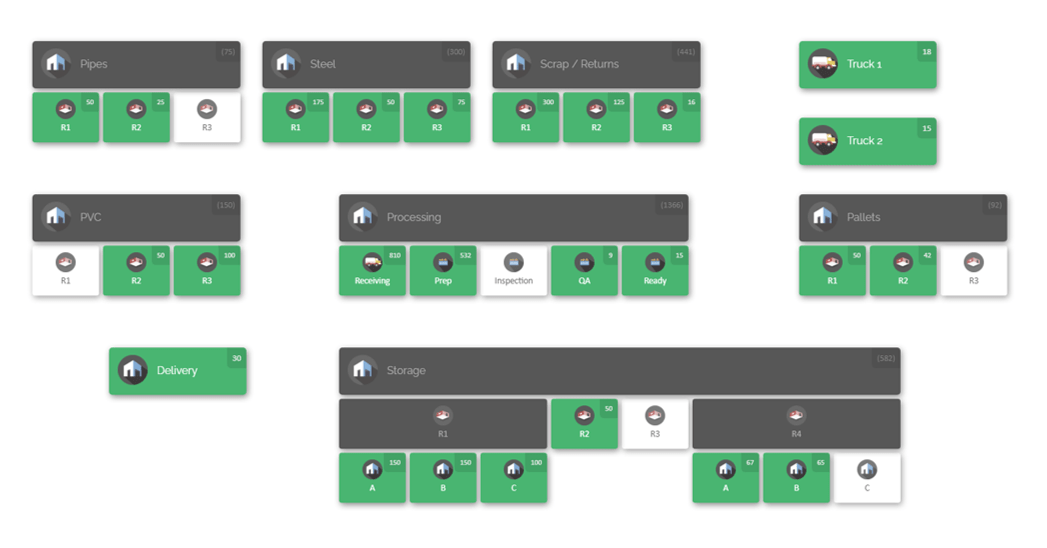
- colour-coded location states (empty, populated, partially populated via sub-locations)
- low-stock highlights for critical consumables
- product distribution views that show “where it all is” across the site
When you can see exceptions quickly, you correct them before they become missing-item emergencies.
The system must match field language and field behaviour
A visual accountability system works when it reflects the words and routes crews already use:
- “north yard”
- “container 2”
- “Level 5 east”
- “MEP cage”
- “returns”
- “truck 7”
- “site store”
If the system uses labels the field never uses, adoption becomes fragile. People will comply when reminded, then revert to informal habits.
So the best practice is simple: build the system for the field first, then make sure office reporting can still live on top of it.
CyberStockroom and site-level visual ownership
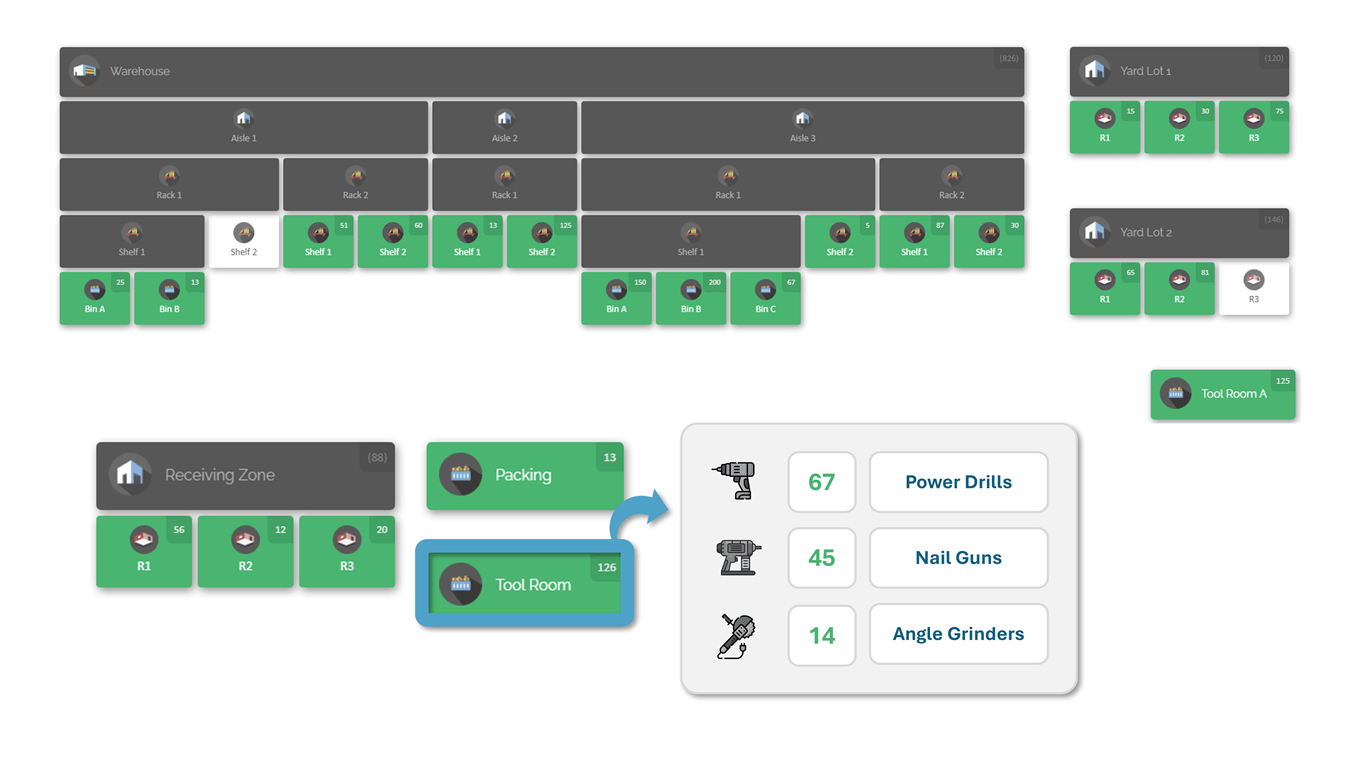
A visual accountability model becomes much easier to sustain when the system representing the site behaves like the site.
That is where CyberStockroom fits.
CyberStockroom is built around an inventory map approach where you model locations and sub-locations and then place inventory into those locations. Its core interaction style is designed for the exact “place-first” problem construction has: you want to answer “how many of what do I have where” without digging through a flat list.
This section stays strictly within confirmed capabilities and documented behaviour.
Map-based locations and sub-locations that mirror jobsite reality
CyberStockroom supports building a map with locations and sub-locations and rearranging layout to match the way you see your operation. That is the foundation for modelling a jobsite: laydown zones, containers, racks, floor cages, a site store, and vehicles treated as locations.
The help documentation also describes creating locations that can represent everything from buildings and warehouses down to shelves and bins, which is the level of detail needed to reduce “search time” and prevent drift in high-value areas like tool storage and critical materials.

Check-in, check-out, and transfers are designed as everyday actions
CyberStockroom supports:
- checking products in and out of locations and sub-locations
- selecting locations through the map and through transaction pages
- transferring products between locations, including drag-and-drop transfers on the map
For a construction workflow, that means you can formalise the common custody chain:
Receiving zone → laydown zone → floor staging → crew location → returns zone → home storage
This is not theoretical. The transfer workflow explicitly supports a defined source and destination location, which is the core requirement for site-level ownership changes.
Barcode support for both locations and products, without slowing crews down
CyberStockroom supports barcode scanning in a way that is particularly relevant when movement is frequent:
- locations have barcode numbers that can be generated and optionally replaced
- products can also have numbers generated or set by the user
- a “Quick Scan” mode supports fast back-to-back transactions (check-in, check-out, transfer)
Quick Scan includes a defined scanning logic (scan locations, scan products, confirm transaction), which is the kind of repeatable pattern that helps field adoption.
Activity history and auditability that supports real accountability conversations
Accountability systems fall apart when you cannot resolve disputes quickly. CyberStockroom records transactions and allows you to review inventory operations through an activity history, including:
- check-ins, check-outs, transfers, adjustments
- product and location creation and edits
- user, date, time, and transaction comments
- filtering by date, location, product keyword, user, and comments
CyberStockroom also supports downloading activity history as a spreadsheet report, with documented fields such as activity type, source and destination, and comments, which makes it easier to audit patterns and investigate discrepancies.
For construction leaders, this has a practical cultural effect: “who had it last?” stops being a debate and starts being a query.

Visual exception cues: colour coding, thresholds, and product distribution
CyberStockroom’s help documentation confirms:
- map location colour states to show whether locations contain products (and whether sub-locations contain products)
- a threshold feature where locations can highlight low totals visually
- product distribution views that show where a specific item exists across the map and in what quantities, including using a map filter by keyword, custom field, or barcode scan
These features matter in construction because many shortages are not “zero stock”. They are “stock exists, but not where the crew needs it” or “stock exists, but not in usable status”.
Files attached to products and locations
CyberStockroom supports attaching files and documents to products and to locations. That is useful in construction when inventory items need context: manuals, inspection sheets, delivery paperwork, or photos for condition tracking.
Web access via browser
CyberStockroom is documented as cloud-based access from internet-enabled devices, including smartphones and tablets.
Best practices playbook for visual accountability on jobsites
This section is written as a usable blueprint. It includes both the physical site practices and the system practices that make a visual inventory programme stick.
Build your location model

The best practice is to start with the site as it exists, then build a location model that is true enough to be used daily:
- receiving zone
- primary laydown yard zones (by quadrant, grid, or functional group)
- containers and internal shelves/bins
- site store or tool crib
- floor staging areas (by floor and side, or by logical work zones)
- mobile locations (trucks, trailers)
- exceptions (returns, damaged/quarantine, surplus)
This mirrors established laydown yard tracking habits that divide storage into identified sections so items can be logged to a “place”, not an area.
Once the map exists, import inventory and assign it to homes. CyberStockroom supports importing inventory from spreadsheets, which is useful when migrating from legacy lists.
Adopt a “home-first” rule with one exception
The rule: every item must have a home location. The exception: items that are actively staged for near-term work can be in a staging location, but staging is still an official location with a defined boundary and naming convention.
The goal is not to stop movement. Construction needs movement. The goal is to keep movement visible. A useful implementation detail is to ensure staging locations are time-bound in practice:
- daily staging zones for today/tomorrow
- longer staging requires reclassification (reserved, surplus, or phase stock)
This aligns with core construction inventory guidance about coordinating material availability with project phases and avoiding disorder that breaks workflow.
Define status categories that match how work really happens
Many inventory systems are too binary. Construction is not. A practical set of statuses that most sites can use without confusion:
- available
- reserved
- staged
- in use
- damaged
- quarantined/hold
- return pending
- surplus
These statuses are meaningful because they represent decisions:
- Can a crew use it now?
- Should anyone touch it?
- Is it committed to a future install?
- Does it need inspection?
Material management research showing strong relationships between stock control, waste control, and time performance supports the point that status and control are not “extra”. They are part of delivery.
Make movement recording part of “doing the work”
If you want people to record movement, the action must feel like part of the job, not admin work. A practical minimum set of movements to record:
- receiving check-in
- put-away transfer to home
- transfers between storage locations
- issue to crew locations
- returns
- moves into damaged/quarantine
- moves into surplus
CyberStockroom’s documented transaction model (check-in/out/transfer) matches this pattern and includes transaction comments, which are critical in construction because “why did it move?” often matters as much as “where did it go?”.
Use barcodes to reduce arguments, not to add complexity

Barcodes on a construction site are not about perfection. They are about speed, consistency, and reducing “close enough” behaviour. A jobsite barcode plan should start small:
- label core locations (receiving, key yard zones, containers, tool crib)
- label high-value tools and constraint materials
- label returns and quarantine zones immediately
Then expand to:
- floor staging zones
- trade cages
- consumable bins
CyberStockroom’s Quick Scan feature is designed for the reality of repeated transactions, and the help documentation confirms scanning patterns for check-in, check-out, and transfers. That is exactly what you need when you want recording to keep pace with work.
Create an ownership model that matches jobsite roles
Accountability fails when everyone thinks someone else owns it. A practical ownership model:
- Site inventory owner: Owns the map structure, naming conventions, and the weekly “system health” review.
- Receiving owner: Owns check-in accuracy and the receiving zone staying empty by end of shift.
- Crew owners: Foremen or supervisors who own crew locations, returns discipline, and tool custody.
- Project support owner: Someone who uses reports and history to resolve disputes, validate write-offs, and reduce repeat failures.
Construction inventory guidance often highlights multi-stakeholder coordination, and this ownership model is a direct response: accountability spreads across roles, but responsibility is explicit.
Establish operational rhythms that keep the system real
Visual systems degrade slowly, then suddenly. These rhythms prevent that:
Daily close-out
- clear receiving
- scan or confirm returns
- review the “exception zones”
- confirm high-value tools are in home or assigned crew locations
Weekly drift correction
- review items sitting in temporary/staging longer than planned
- verify that locations match the current site layout
- reconcile top constraint consumables
Monthly accountability audit
- targeted cycle checks by location
- review repeated “loss patterns” in activity history
- adjust storage zoning and signage based on what the site is actually doing
Cycle counting guidance describes the advantage of smaller, regular counts over disruptive full counts, and that approach fits construction better than annual stocktakes that never happen at the right time.
CyberStockroom’s downloadable product reports and activity reports can support these rhythms: product reports allow location-level snapshots, while activity reports allow movement review and pattern recognition across a defined period.
Make the system easy to understand at a glance
If the field needs training to interpret the system, it is too complex.
Visual comprehension is often improved by:
- consistent naming
- predictable location depth (yard > zone > container > shelf)
- colour cues for emptiness vs populated areas
- low-stock highlights for key consumables
- product distribution views for “where did it go?”
CyberStockroom’s documented colour coding and distribution views are examples of how visual cues can reduce cognitive load for busy teams.
Use attached files to prevent “information hunts”
Inventory issues often trigger information hunts:
- “Where is the manual?”
- “Which version is correct?”
- “What did the delivery note say?”
- “Do we have an inspection checklist for this?”
Attaching documents to products or locations reduces these side quests. CyberStockroom explicitly supports files attached to both products and locations, which can be useful for keeping operational context close to the item and the place where it is used.






 CyberStockroom
Leave a comment