
Imagine your business preparing for a busy stretch of projects. At any given time, dozens of homes may be fully furnished while others are being prepared, dismantled, or refreshed. That constant movement of furniture and décor demands careful planning. How can a staging business keep track of everything without losing control of its inventory? The key is having a proactive inventory management system.
Managing inventory effectively can make or break an interior design or home staging business. That’s why you need to organise your entire catalogue so you always know what you own and where it is.
Visual Inventory Mapping: See Everything At A Glance
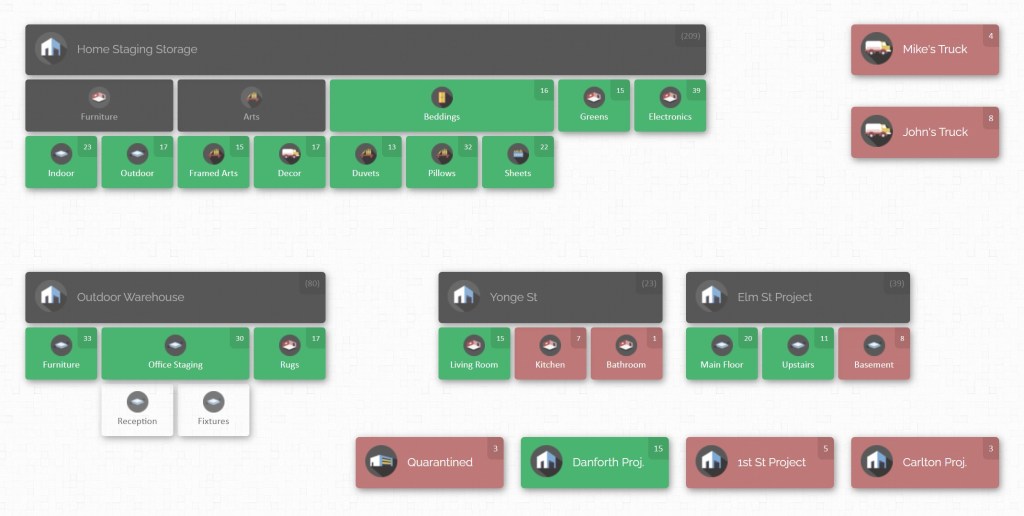
Imagine being able to look at a digital map of your entire staging business, every warehouse, every room in every house, every truck or container – all laid out graphically. That’s exactly what visual inventory mapping provides. Instead of endless lists and dusty spreadsheets, you get a bird’s-eye view of your assets. Each location on the map shows how many items it contains, and with a single click, you see exactly what they are. For example, you might see that House A has 12 sofas and House B has 5 extra area rugs, letting you quickly plan who needs what.
Visual maps let you scan through your inventory and even attach photos to items for quick recognition. If a designer on your team needs to find all 4 black leather armchairs across all houses, she can search by SKU or category and see on the map exactly where each one is. This eliminates frantic phone calls and guesswork – you see real-time status at a glance.
Inventory Visibility: Know Where Every Item Is
When your staging business manages dozens of houses, the biggest headache is not knowing where things are. Maybe the last time a matching lamp was at House #22, but on site, you find only one of the pair. Or perhaps a seasonal rug was loaned out, and its location was never logged. Without real-time visibility, staff waste hours searching through storage or making extra trips.
A robust system lets you search by SKU, description, or category (e.g. “navy linens”, “outdoor dining set”) and see the location and quantity of every match. Many staging companies treat each property as a project or location in their software – so “Villa Spruce”, “Lakefront Loft” or “Main Street Warehouse” become labels you can click. As soon as items are assigned (checked in) to that project, the system knows they’re there. Later, when those items are moved out, checking them out or transferring them updates everything automatically.
This visibility is particularly crucial during the peak season, when you might have 150–200 homes staged simultaneously. You need to plan ahead: for example, if Villa Spruce’s guests would love the contemporary coffee table currently at Beachside Bungalow, you can quickly confirm it’s available (and schedule a move) without loading it into a truck first. The result is confidence. At any hour, you can answer “How many king beds do we have? Where are they?” and avoid surprises like canceling a job because the needed items were actually already at another property.
Organizing Your Inventory: SKUs, Categories, and Projects

Visibility is only possible when your inventory is well organised. That starts with a solid catalogue of all your items. Assign every piece of furniture or decor a unique SKU or product number – even smaller items like accent pillows. This way, your system can distinguish between a taupe Victorian armchair and a gray modern armchair, or between two similar area rugs. Each SKU record should include a description and an image if possible; pictures help anyone quickly confirm that the corner lamp on the list is the same one in hand.
Grouping items by category or style also helps. For instance, mark certain pieces as “Summer Collection” or “Outdoor Furniture,” so seasonal inventory can be filtered easily. Most systems allow adding custom fields – you might add fields for room type (living room vs. bedroom), material, or current condition. These custom fields let you filter and sort effectively. You could, for example, quickly generate a list of all “modern lamps – brass” or “dining tables – mid-century” in your entire inventory.
It’s also important to treat each house as a project or location. When staging a home, “assign” the selected items to that location by checking them in on the map. As soon as items are checked in, they count toward that property’s inventory. Then, if you dismantle that setup later, you can transfer or check them out to the next place. This way, you always know the contents of each project, and moving goods between projects becomes as simple as moving icons on a screen.
Another key to organisation is having clearly defined storage areas. Even if you ship items directly from one house to another, it helps to have a virtual “warehouse” in the system. Label shelves, rows, containers, or even trucks as sub-locations. When new furniture arrives or comes off a truck, you check it into the correct spot. This structured approach means that at any time you can drill down and see, for example, that Closet 3 in Oak Cottage holds 5 floor lamps and 2 rugs, or that Bay 4 of the truck has 6 dining chairs. Having these details at hand prevents double-booking and mix-ups.
Streamlining Day-to-Day Operations

With a well-organized system, daily tasks become much simpler. One of the most valuable operations is generating itemized lists on demand. For any given house or project, you can produce a detailed inventory list showing every piece currently staged there – typically with columns for SKU, description, and quantity. For example, the lead designer on a job might say, “I need to confirm what’s already in the Marketing Office setup.” They simply select that location on the map and print or share the list of its contents.
Similarly, when scheduling furniture moves, itemized checklists are invaluable. Before sending a moving crew to Cottage A, generate a list of everything that needs to be moved out or relocated. The crew can use this list to load items into the truck without missing anything. Upon arrival, they tick off items as they go. The system can even support on-the-go scanning (with a handheld scanner) to log each item’s departure or arrival. This means each change in location is recorded immediately, so nothing falls through the cracks.
Daily cycle counts become straightforward too. When your team finishes staging a home, they can quickly scan or mark each item to verify it’s in the system and in the room. Any discrepancy (for example, a lamp that was mixed up with another job) can be addressed on the spot. Over time, this regular auditing boosts accuracy: you won’t end up with missing inventory at the season’s climax because “bedside table #7” was listed in storage but actually left on a job site. Instead, your records stay in sync with reality.
Here are some best practices for smooth daily operations:
- Pre-print item lists: When moving furniture, always prepare lists of items (by SKU or name) for the crew. This ensures nothing is forgotten or double-booked. Label each list with the destination property so it’s clear where everything goes.
- Label and scan: Attach barcodes or labels to items (and even to high-value containers), so team members can quickly use a scanner to check pieces in and out. This cuts errors and saves hours that would otherwise be spent transcribing.
- Update on the go: As soon as items are placed in a new location, update the system. If a decorator calls needing the list of the new living room setup, the inventory will already reflect the latest information.
Preparing for Peak Season and Scaling Up

Before the busy spring and summer season hits, take proactive steps to make sure you can handle the surge. Begin with a full audit of your current inventory. Walk through all your storage areas and staged properties, making a list of furniture and decor. Mark each piece as Keep, Repair, or Retire/Sell. Clean or fix what you keep, and sell or dispose of worn items. For example, you might categorize Keep (ready), Repair (needs some work), and Retire (outdated or damaged). Knowing this in advance means your staging crew only works with reliable stock.
Next, highlight the items you expect to use most. Move the light and bright summer-friendly pieces to easily accessible locations. In your inventory system, tag or move them to the top of categories. For instance, if outdoor wicker furniture and light linens will be in high demand, make sure they’re clearly categorized as “Outdoor” or “Summer” and grouped together. This way, when a client wants a beach-house vibe, you can grab those items immediately without rummaging.
Create staging kits for common scenarios. Combine frequently paired pieces into kits (either physically or in the software) so they function as a set. For example, put a sofa, accent chair, coffee table, and floor lamp into a “Living Room Kit,” and a bedroom set into a “Master Bedroom Kit.” Then in your system, those items can be tagged as one set. Pre-made kits save tremendous time because you can pull a whole room setup at once instead of hunting for each part individually.
It’s also smart to ensure team responsibilities are clear. With your inventory system in place, delegate tasks like adding new items or updating counts to reliable staff members. That way, the knowledge doesn’t just live in the owner’s head. Train your crew to use the system (even a quick tutorial on scanning or reading lists) so that everyone follows the same process. As a result, a new hire or seasonal helper can hit the ground running without constant supervision. That institutional knowledge – now recorded digitally – means your operations stay smooth even as you bring on extra hands.
Finally, prepare your logistics. If demand will spike, make sure your software and hardware can handle it. Most cloud-based inventory tools scale automatically (no new servers needed). Just ensure all team members have login credentials and (if using wireless scanners) that your connectivity is strong. Back up critical data if needed and double-check that all your products have a place on the map. If you anticipate adding many new items, do it before the rush so that as jobs come in, each new piece can be checked in from day one. A little planning now means you spend less time scrambling later.
Monetizing Your Inventory: Sales and Turnover
In many staging businesses, roughly half to 70% of the inventory eventually gets sold. A client might love the look of a staged home and decide to purchase several pieces. Your inventory system should handle this smoothly. Each product record can include pricing fields (for example, Buy Price and Sell Price). When a sale happens, you can generate an itemized quote or invoice based on the contents of the house. Simply export or print the list of all staged items (including the sell price column) for that property. The client sees exactly what they’re buying and at what price.
Once items are sold, update the system by marking those pieces as sold or removing them from active stock. The remaining inventory (the items not sold) can then be checked back into your warehouse or storage location. In practice, this might mean scanning the sold items out of the house (moving them into a “Sold” status) and scanning the rest back into storage. The advantage of managing it this way is twofold: you immediately see what revenue was realized, and you keep your inventory count accurate.
This process also helps with financial tracking. Because sell prices were stored in the system, you always have records of what you originally paid for an item versus what you sold it for. Over time this gives you insight into profit margins on your staging pieces. The key is consistency: every time an item changes status – be it moving to a new house, getting loaned out, or being sold – record it in the system, so your counts and financial records stay aligned.
Delegating Inventory Knowledge and Saving Time

A central goal of any good inventory solution is to get the knowledge out of one person’s head. The owner or founder may know offhand which sofa is at which house, but that’s a risky single point of failure. By contrast, if every detail is logged in the system, any team member can find or update information. This delegation means that if the owner is busy on a design project, a project manager or inventory clerk can still operate independently using the same data.
It also directly saves time. Instead of rummaging through storage or calling colleagues, your team can look up items instantly. For instance, if a decorator asks “Where are the white side tables?”, the answer should be one search away, not minutes of phone calls. The result is more efficient staging crews and happier clients – rooms get furnished faster because nobody is waiting while someone hunts for a missing piece.
With everyone using the shared system, meetings and planning become smoother too. You might run a quick daily stand-up where you open the inventory map on a screen and confirm that all items needed for today’s jobs are in place. If something is off (an item is missing or misallocated), you catch it before it delays the project. In short, digital inventory management allows your team to work from one source of truth, rather than fragmented notes or memory.
Leveraging Technology: The CyberStockroom Approach
All of the above practices are possible using a modern cloud-based inventory platform. One example is CyberStockroom, a software designed around a map-based inventory concept. While we won’t dwell on every feature here, a few highlights illustrate how it addresses staging-specific needs:
Interactive Visual Map: CyberStockroom starts with a virtual map of your warehouse and each house. On this map you can see inventory levels at a glance and drill down into any location to view its contents.
Easy Item Transfers: Inventory can be moved between any locations by simply dragging items on the map. Transfers automatically adjust counts and logs – no manual paperwork needed.

Barcode Scanning Support: While CyberStockroom itself runs in your browser, it fully supports standard barcode scanners. Tagging items and bins with barcodes lets you scan to add or move items, reducing errors and speeding up check-in/out.
Custom Fields and Pricing: Each item record can store SKU, description, and pricing. This means when a piece is sold out of a staged home, you can include its price in the quote and then mark it sold in the system.
Spreadsheet Import: If your staging business has kept lists in a spreadsheet, CyberStockroom can import them all at once. This bulk import preserves your SKUs, quantities and any notes, so you don’t have to re-enter data by hand.
Audit Trail: Every change is logged. The system records who moved or updated each item and when, which is useful if something goes missing or if you need to review past actions.
Cloud-Based Access: Being cloud-based means any authorized user (even out in the field) can access the latest inventory data via a web browser. There’s no local server to set up and all data stays in sync automatically.

Getting Started: Putting It All Together
Implementing a digital inventory system takes some upfront effort, but pays off quickly. Begin by listing out your physical storage layout and homes in the software as locations (often drawing a simple map or using room/section names). Populate your item catalog (possibly by importing your existing lists). Then train your team: show them how to scan items or enter transfers. Encourage a routine check-in process (for example, scanning items into each house on setup day, and scanning them out afterwards).
By the time the busy season arrives, you’ll have a living, breathing inventory record. You’ll face fewer lost items and make quicker decisions during staging. Your team can focus on creativity and client satisfaction – not panicked phone calls about missing tables or lamps.

Conclusion
Running a seasonal staging business is demanding, but improving your inventory management can give you a major advantage. With everything catalogued and mapped, your team can stage faster and handle growth without falling apart. Instead of scrambling at the last minute or relying on memory, every item is tracked. The result is fewer mistakes, quicker turnovers, and often higher profits (since you know exactly what you have to sell or reuse).
In short, every minute saved on inventory is extra time you can invest in creating beautiful spaces and delighting your clients. These strategies empower your team to focus on design, not paperwork, ensuring smoother staging projects and better bottom lines.
The time and effort spent setting up an inventory system pales in comparison to the hours saved during the busy season. Modern cloud-based tools (like CyberStockroom and other platforms) turn scattered spreadsheets into a real-time, visual inventory, letting you focus on creating beautiful interiors rather than chasing furniture. At the end of the day, it’s not magic — just smart management that keeps schedules tight and clients happy, all while knowing your inventory is fully under control.






 CyberStockroom
Leave a comment