
Imagine navigating a dark warehouse aisle without lights—without regular inventory audits, your business operates in much the same way. Unexpected stockouts, hidden shrinkage, and financial errors can lurk around the corner if your inventory counts aren’t accurate and up-to-date. An inventory audit acts like the spotlight, helping you verify that your stock records match the physical reality on the shelves. By following robust inventory process audit best practices, you can uncover discrepancies early, maintain financial accuracy, and optimise operations before small issues become costly problems.
Inventory Map Demo
Below is a sample inventory map that illustrates how a visual layout can help track items across your warehouse:
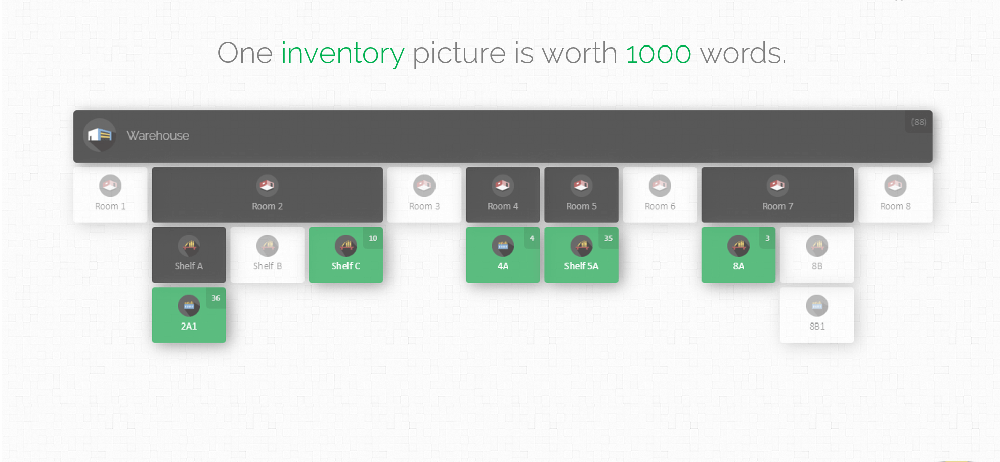
An interactive inventory map like the one above lets you see stock levels at a glance and provides a framework for planning counts and audits. The visual layout helps auditors follow a clear route through the warehouse, ensuring nothing is missed. The sections below walk through the key steps and checklists for conducting effective inventory audits in any organisation, whether you’re counting hardware assets, retail stock, or manufacturing parts.
Why Inventory Audits Are Essential
Inventory audits are more than an accounting formality. They are a vital tool for operational success. Regular audit cycles help you verify that your stock counts match your records, catch shrinkage or theft, and identify data entry errors. Accurate inventory levels mean confident financial reporting, tighter control over stock, and fewer last-minute surprises at year-end.
A good audit uncovers issues such as stock discrepancies (which may indicate loss or misplacement), damaged goods that should be written off, or outdated items still being tracked in your system. Finding these problems early allows you to adjust inventory levels in your system and take corrective action, such as improving procedures or training staff. Because inventory is often a major asset on the balance sheet, audits ensure your financial statements are accurate. Miscounted stock can overstate profits or understate costs, leading to trouble during audits. A thorough count aligns your warehouse totals with your accounts, preventing surprises when investors or regulators review your books.
In short, auditing your inventory process gives you visibility, accountability, and peace of mind. It reveals exactly what you have in stock, ensures compliance with accounting standards, and lays the foundation for continuous improvement in your supply chain. Below we outline the audit process step by step and highlight best practices to make each cycle as effective as possible.
Types of Inventory Audits
Before diving into the audit itself, it helps to understand the different audit methods:
Full Physical Inventory (Annual or Periodic Count): Every item in stock is counted, typically at the end of a fiscal period. This thorough approach ensures complete reconciliation but often requires pauses in operations.
Cycle Counting: Instead of one big count, smaller portions of inventory are counted on a regular schedule (for example, daily or weekly by category or zone). This keeps counts current without disrupting workflow.
Spot Check Audits: Random spot checks are performed on select items or locations to verify accuracy. While not comprehensive, spot checks can flag issues that trigger a wider audit.
ABC Analysis Audit: Inventory is classified by value or turnover rate (A being high value/fast moving, C low value). Audits then focus more frequently on ‘A’ items to ensure accuracy where it counts most.
Reconciliation Audits: These specifically compare recorded transactions (receipts, shipments) to accounting entries, often using cut-off analysis to ensure all movements were logged correctly in the right period.
Most organisations use a mix of these methods. For example, a warehouse might rely on cycle counts throughout the year and still do a full count at year-end. In an ABC approach, you might schedule weekly counts for ‘A’ items (top 20%), monthly for ‘B’, and quarterly or annually for ‘C’ items. Patterns vary by industry: the right approach depends on your industry, warehouse size, and business needs. In every case, the same best practices apply to keep the process accurate and efficient.
Preparing for an Inventory Audit

Proper preparation lays the groundwork for an efficient and error-free audit. Before counting a single item, make sure you have:
- Clear Objectives and Scope: Define what the audit will cover. Will it be a full warehouse count, a cycle count of high-priority items, or a targeted check? Set a date (or series of dates) and communicate these goals to stakeholders.
- Updated Inventory Records: Verify that your existing inventory data is as accurate as possible. Update any recent transactions, and ensure items are in the correct categories or locations. This prevents confusion when counts are compared to the system.
- Organised Warehouse: Tidy and organise storage areas before the audit. Group similar items together, label shelves and bins clearly, and clear aisles. An orderly layout speeds up counting and reduces missed items.
- Assigned Team and Roles: Designate who will perform the count, who will supervise, and who will record data. Train them on the counting method (for example, one person counts while another records) and make sure everyone understands the procedure.
- Necessary Tools and Supplies: Ensure you have enough stock tags, labels, clipboards, pens, and if available, barcode scanners or mobile devices. Pre-print count sheets or setup software forms ahead of time to match locations or categories.
- Training and Briefing: Before count day, hold a short briefing for the team. Review the counting method, SKU conventions, and how to handle partial boxes or multi-unit cases. Well-trained counters make fewer mistakes.
- Perform a Trial Count: If this is the first audit or you have a new system, run a practice count in one area to test your methods and tools. This helps catch procedure issues before the real audit.
- Communication and Schedule: Notify all affected departments about the audit timing. It may be necessary to pause receiving, shipping, or transfers during counting. Coordination helps prevent stock movements during the count.
A quick checklist for the planning phase might be:
- Define audit type (full count, cycle count, etc.) and scope.
- Gather and update item master data (names, SKUs, categories, etc.).
- Label all locations/shelves clearly.
- Prepare count teams: assign roles and train them.
- Lay out tools: scanners, tags, clipboards, count sheets.
- Establish cut-off rules: when to stop moving stock for counting.
This front-end work avoids chaos on count day. For instance, pausing all incoming shipments and recording the cut-off point ensures that what you count truly matches the accounting period. By the time you begin counting, everything should be clearly labelled and documented so that the count process can be orderly and systematic.
Conducting the Physical Count

With preparation done, it’s time to physically count the inventory. Follow these guidelines during the counting phase to maximise accuracy:
- Choose a Systematic Approach: Count in an orderly fashion, such as aisle by aisle or zone by zone. Start from one end of the warehouse and move logically to the other, so you don’t lose your place.
- Establish a Starting Point: Mark the first bin or shelf as your starting point. This ensures no area is skipped. If you pause the audit, note where you left off to resume seamlessly.
- Tag or Label Counted Items: After counting a location, label it as “counted” (for example, with a sticker or marked tag) to prevent double-counting. Label empty bins as counted too, to avoid repeated checks.
- Use Scanning Technology: Whenever practical, scan item barcodes with a handheld scanner or device. This speeds up the process and reduces manual entry errors. If you lack full scanning, even taking a photo of a completed tally sheet and importing it digitally can cut transcription mistakes.
- Double-Check Unusual Counts: If you count an unusually high or low quantity, verify it immediately. Mistakes often occur with multi-unit packs or partial cases, so resolving discrepancies on the spot saves time later.
- Separate Complex Items: Count high-value, fast-moving, or complex items (different sizes, SKUs, etc.) first or as a separate task. This keeps the main counting flow smoother and ensures focus on critical stock.
- Maintain Team Communication: If counters work in pairs, one should count aloud while the other records it. This cross-checking reduces bias. Supervisors should randomly spot-check areas during counting to catch errors early.
For example, you might divide the team so one group counts bins on the left side of the warehouse and another covers the right. Rotate team members periodically to avoid fatigue, as tired counters make more mistakes. Always use a standard unit of measure (count individual pieces unless your system tracks by box, in which case convert accordingly). Keep track of any partial cases, returns, or quarantined items separately. At every step, the goal is accurate, verifiable data. Once counting is complete for each area, ensure all counts are logged in your system or consolidated sheet before moving on.
After the Audit: Reconciliation and Action

The audit doesn’t end when the counting stops; that’s when the crucial reconciliation begins. Here’s what to do after the physical count:
- Compare Counts to Records: For each item and location, compare the physical count with the quantity in your inventory system. Compute the variance (counted minus recorded) to identify discrepancies.
- Investigate Discrepancies: Examine any variances closely. A few missing items might be due to recent shipments, theft, or simple misplacement. Larger gaps warrant deeper investigation: check purchase orders, delivery receipts, or sales invoices to see if a transaction was missed.
- Adjust Inventory Records: Once discrepancies are understood (or if no explanation is found), update your inventory management system to match the physical count. Document every adjustment: note who made the change, why, and attach any supporting evidence (for example, a tag for a broken case).
- Document Findings and Causes: Record common causes of errors encountered. Did bins lack labels? Were items frequently double-counted? Documenting these insights helps improve processes for next time.
- Generate Audit Reports: Create summary reports that show accuracy percentage ((items with zero variance ÷ total items counted) × 100), total shrinkage value, and any significant discrepancies. Share these with stakeholders (finance, warehouse management, etc.) so everyone understands the outcomes.
- Conduct a Debrief: Meet with all participants after the audit. Discuss any challenges or errors. Document what went well and what needs improvement. Use this feedback to refine the process for the next audit.
- Update Financial Records: Ensure the final inventory values from the audit are updated in your accounting system. This will accurately reflect on your balance sheet and cost of goods sold.
- Develop Corrective Actions: Based on your findings, decide on improvements. This might include better training, reorganising storage areas, enhancing security (for example, locking up high-value items), or tightening data entry controls.
- Schedule Follow-Up Counts: Plan when the next counts should occur. If you found systemic issues, you might increase the frequency for affected categories. Setting a regular cycle count calendar ensures ongoing accuracy.
For instance, if an audit reveals that 5% of high-value items were unaccounted for, one action might be to lock those items in a separate cage and only allow supervisors to handle them. If missing labels were a problem, relabel and update your location scheme. The key is not just correcting the numbers, but using the audit as a learning opportunity. Each audit builds confidence in your process. Keeping detailed records turns every audit into a step toward better inventory control.
Best Practices for Inventory Audits

To summarise, here’s a checklist of best practices to follow during your inventory audits:
✔️Plan Ahead: Schedule audits during slow periods if possible and prepare all documentation in advance.
✔️Involve the Right People: Include personnel from finance, warehouse, and operations. Multiple viewpoints ensure no blind spots.
✔️Standardise Procedures: Use the same counting methods and documentation formats every time. Consistency makes audits faster and comparisons more meaningful.
✔️Use Barcoding/Scanning: Automate data capture as much as possible to reduce manual errors. Make sure your system can scan item and location barcodes.
✔️Maintain a Tidy Workspace: Ensure all aisles are clear and bins are clearly labelled. Good lighting and an organised area help counters find items quickly and avoid confusion.
✔️Pause Stock Movements (Cut-Off): Define a cut-off time for transactions (receipts, shipments, transfers). This ensures counts represent a single point in time.
✔️Rotate Counting Teams: Avoid fatigue by rotating staff. Fresh eyes catch mistakes that tired workers might miss.
✔️Record Special Cases: Tag damaged, expired, or partial items separately so they can be handled appropriately (for example, written off) without mixing with the main count.
✔️Communicate Changes: If you make any on-the-spot corrections (like relabelling a bin), note it so auditors know the context during reconciliation.
✔️Maintain an Audit Trail: Document every adjustment. Modern inventory systems should log user IDs and timestamps for all count changes.
✔️Review and Improve: After each audit, discuss what went well and what didn’t. Update your process and training accordingly.
✔️Set a Cycle Count Schedule: Maintain a calendar of when different aisles or categories will be audited so you never miss a scheduled count.
By following this checklist, you make your audits more reliable and repeatable. Over time, these practices reduce errors and may even shorten how often you need full shutdown counts. Regular cycle counts combined with occasional full counts often yield the best of both worlds: high accuracy and minimal disruption.
Common Audit Pitfalls to Avoid

Even well-prepared teams can hit snags. Watch out for these common pitfalls:
- Inadequate Preparation: Skipping planning leads to confusion on count day. For example, not labelling locations can double-count or miss areas.
- Not Freezing Inventory Changes: Allowing stock movements (sales, new receipts, internal transfers) during the count will corrupt the results. Always enforce a strict cut-off and record any exceptions.
- Poor Documentation: Failing to document procedures or adjustments makes it impossible to audit the audit. Keep clear records and use system logs whenever possible.
- Relying on Memory: Don’t let counters estimate quantities by sight. Every item and bin must be physically counted or scanned.
- Lack of Training: Counting sounds simple but requires attention to detail. A common mistake is mixing up SKUs or misreading item codes. Ensure your team knows how to read labels and count accurately.
- Counting Errors (Double-Counting or Skipping): Without a proper system (like placing counted tags), it’s easy to count the same shelf twice or skip one. Clearly mark counted items and communicate across teams.
- Not Investigating Variances: Some teams simply adjust records without asking why. Always investigate large discrepancies to prevent the same mistakes from recurring.
- Irregular Audit Frequency: Relying solely on an annual count allows errors to accumulate. Regular cycle counts or spot checks catch issues sooner.
- Ignoring the Human Factor: Tired counters make mistakes. If your inventory is large, split the audit into shifts or use rotating teams so no one works too long at a stretch.
- Ignoring Safety and Environment: Poor lighting, clutter, or busy aisles can impact counts. Ensure the workspace is safe and comfortable so counters can focus.
- Isolation of Teams: Audits should be transparent. Involving multiple departments and sharing results prevents blame games and promotes accountability.
Each audit should aim to improve your control and efficiency. Use past mistakes as lessons: avoiding these pitfalls helps you build a stronger inventory process over time.
Key Metrics to Monitor
To measure the effectiveness of your inventory management and audits, track metrics such as:
- Inventory Accuracy (%): The percentage of items that match between your system and physical count. Calculate it as (items with zero variance ÷ total items counted) × 100. High accuracy (for example, 95%+) is the goal.
- Inventory Shrinkage: The value or percentage of inventory missing from records (often due to theft, damage, or errors). Shrinkage = (Book Value – Counted Value). A spike in shrinkage indicates process issues.
- Cycle Count Variance Rate: The average discrepancy found per cycle count. Trending this over time shows if accuracy is improving or deteriorating.
- Recount Rate: How often items need to be recounted because initial counts were inconsistent. A high rate can highlight confusing processes or training needs.
- Inventory Turnover: Measures how often inventory is sold and replaced over a period. Higher turnover usually indicates efficient inventory management.
- Perfect Order Fulfillment: The percentage of orders delivered correctly on the first attempt. When inventory is accurate, this rate rises. Tracking it shows how inventory accuracy supports customer satisfaction.
Regularly reviewing these KPIs helps you gauge the health of your inventory system. They also provide targets for improvement. For example, if accuracy is at 90%, set a goal to reach 95% by focusing on error-prone areas identified in your audit.
Leveraging Technology and Tools

Modern tools can make audit tasks much simpler and faster. Consider these technological aids:
- Cloud Inventory Software: A cloud-based system (like CyberStockroom) centralises your data and makes it accessible from anywhere. You can view real-time stock levels, start counts, and update quantities instantly.
- Barcode Scanning & Mobile Devices: Handheld barcode scanners or smartphones with scanning apps drastically reduce manual entry and speed up counting. Scanning item barcodes into the system automatically logs quantities as you count.
- Visual Warehouse Maps: Interactive maps show exactly where each item is stored. A mapping tool lets teams navigate the warehouse more efficiently. Instead of searching blind, a counter sees where to go and what to count.
- Spreadsheet Integration: Even without specialised audit software, live spreadsheets can help. For example, counters could share a cloud spreadsheet to enter counts simultaneously, merging data on the fly.
- ERP and System Links: If possible, integrate your audit process with purchasing and sales systems. For instance, ensure any receipts or shipments in transit are accounted for during the audit. Some inventory platforms can connect with ERPs to synchronise these figures.
- Reporting Dashboards: Good audit software provides dashboards to track count progress, discrepancies, and history. With live reports, managers can spot issues without waiting for manual tallying.
- Automatic Backups: Cloud-based inventory tools often auto-save data in real time. If a device fails or a power loss occurs, your count progress is preserved and can be resumed without re-work.
- Dedicated Audit Modes: Some systems offer specialized audit features or mobile app modes (even if web-based) to guide counters through the process.
When choosing tools, look for user-friendly software that fits your team’s needs. Training is essential—without proper use, even the best tools can fail. Technology should augment your process, making audits quicker and more reliable. A well-integrated inventory management solution lets you spend less time on manual counting and more on analysis and optimisation.
CyberStockroom: Bringing Audits to Life
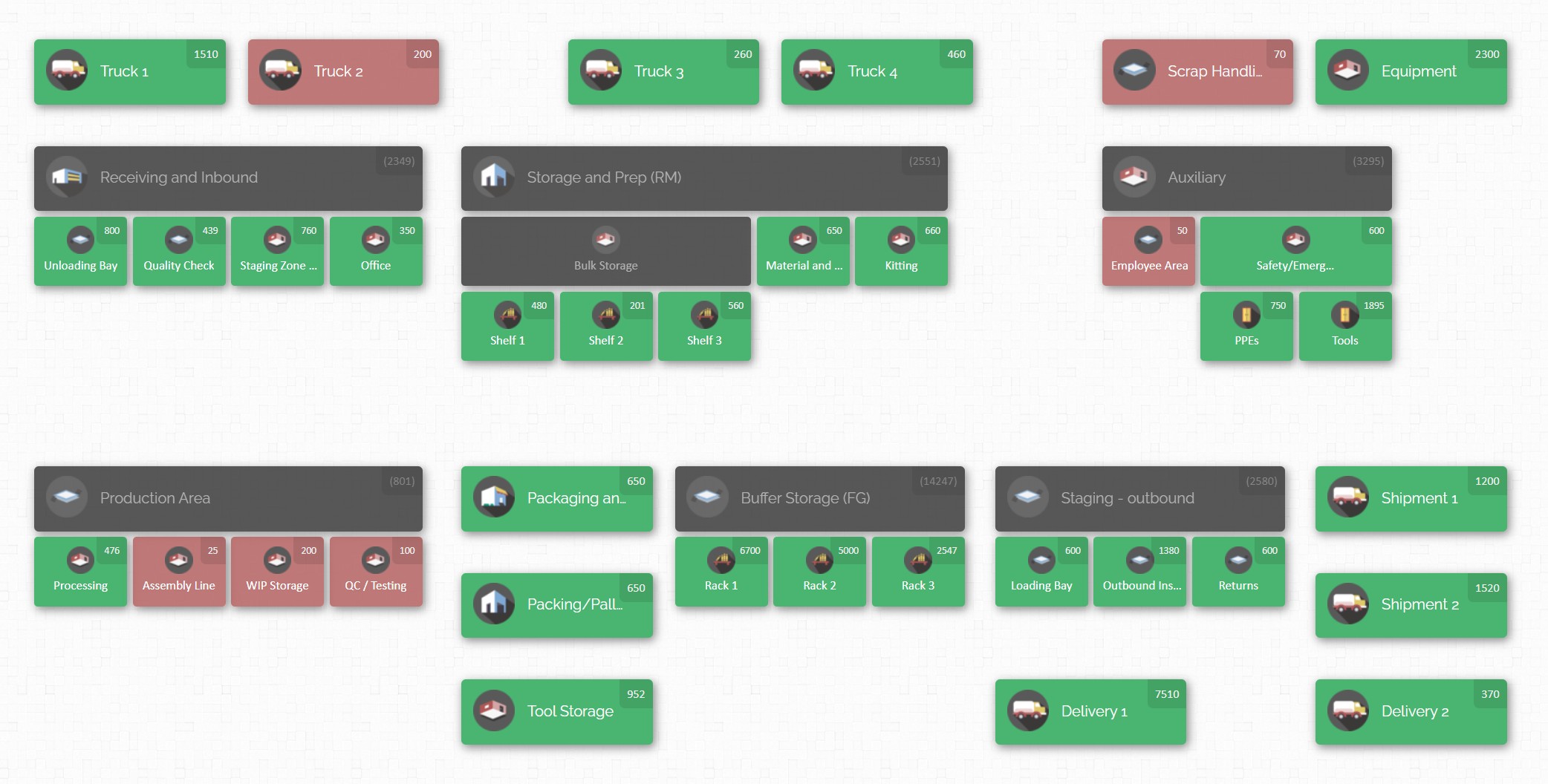
Putting these best practices into action is easier with inventory software like CyberStockroom. This platform specialises in visual, map-based inventory control and offers features aligned with audit needs:
Visual Inventory Map
CyberStockroom lets you create a digital map of each location. During an audit, counters can quickly locate every bin or shelf on this map, ensuring nothing is missed.
Cycle Counting Support
The software includes built-in cycle counting. You can assign specific areas or products for counting and track progress in real time.
Barcode Scanning Support
CyberStockroom works with barcode scanners through a device’s browser. Your team can use handheld scanners or even a smartphone’s browser to scan items and update counts instantly.
Detailed Audit Trail
Every transfer, count, and adjustment is logged with user and timestamp. These records are filterable by location or item. At audit time, you can export logs to see who made changes and when.
Cloud Access Anywhere
Because it’s cloud-hosted, CyberStockroom is accessible from any internet-connected device. Managers can review audit progress and reports from the office while teams are in the warehouse.
Easy Data Import/Export
To start an audit, import your existing stock list (for example, from a CSV file). After counting, export summary reports and variance logs directly to share with auditors or stakeholders.
Role-based Permissions
You can restrict who can adjust or approve inventory changes. Limiting inventory modifications to authorised staff adds an extra layer of control during audits.

In practice, using CyberStockroom might look like this: before an audit, import your inventory data and set up the warehouse map. During the count, counters open the map on their devices, select a location, and scan items in or out. If discrepancies arise, clicking on that location shows its full history in CyberStockroom – revealing who made the last update and when. This audit trail makes it easy to investigate variances and correct mistakes confidently.
By aligning each step with the checklist above, CyberStockroom helps you streamline the entire process. Its visual layout means counters never lose track of where they are, and inventory data is updated instantly with each scan or transfer. In short, using dedicated inventory software turns manual bottlenecks into automated checks, reinforcing every best practice in our audit guide.

Conclusion
Auditing your inventory process is not a one-time task, but a continuous journey towards excellence in inventory management. By following the best practices outlined above—preparing carefully, counting systematically, using technology wisely, and learning from each audit—you can achieve highly accurate inventory records. Accurate inventory fuels better decision-making, whether that means ordering materials more intelligently, avoiding stockouts that disappoint customers, or preparing financial statements with confidence.
Regular, well-executed inventory audits keep operations humming and accountants satisfied. With a detailed checklist in hand, a trained team ready, and tools like CyberStockroom at your side, you can turn the complex process of stock auditing into a routine that powers your business forward.
Approach audits as continuous opportunities for improvement, not just a chore. Each count you complete builds trust in your data and increases confidence in every decision you make. By embedding these audit best practices into your regular routines, your team will operate on reliable information. The clearer your inventory picture, the faster you can adapt to changes and seize new opportunities.
After all, when your inventory matches your records, you see clearly – and nothing can stand in the way of your success. Clear inventory records are the foundation of a thriving business. When you measure and manage your stock diligently, everything else falls into place. Treat inventory accuracy as a competitive advantage — every count is a step toward operational excellence.






 CyberStockroom
Leave a comment