
Managing inventory across multiple projects and locations is a common challenge in industries from construction to manufacturing and retail. Instead of each project site or warehouse holding its own separate stock, inventory pooling brings these supplies together. By creating a shared pool of parts, tools, or materials, companies can use one consolidated inventory to serve all projects or sites. This can save costs and improve efficiency – but it requires careful planning and coordination.
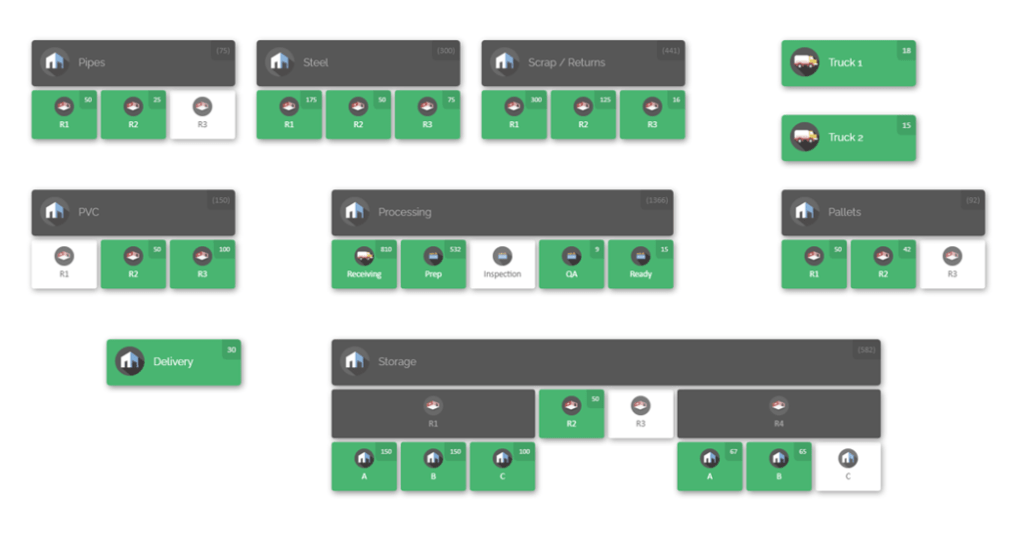
In this guide, we’ll explain how inventory pooling works, why it’s beneficial, and how to implement it effectively.
What Is Inventory Pooling?
Inventory pooling is a supply-chain strategy where stock is consolidated into a shared pool rather than siloed at individual locations. In simple terms, instead of each project site or branch keeping its own exclusive inventory, all projects draw from the same combined supply. Orders or usage from any project are fulfilled out of the common pool. This can be done in one central warehouse or a network of coordinated locations. The main idea is that all units of a given item are “pooled” together, so no single site needs to maintain a large surplus of every part.
For example, imagine a construction company that normally stocks scaffolding frames and power tools at each jobsite. With pooling, they might keep most frames in one regional yard and send them to whichever site needs them, instead of buying duplicates for each site. A centralized inventory system would manage requests so that when Site A needs ten frames and Site B needs five, the company allocates them from the pooled stock, shipping as required. As one guide puts it, inventory pooling means maintaining “a centralized stock supply that serves multiple locations and sales channels” from a single inventory source. In practical terms, this might look like having a single warehouse (or set of warehouses) that all projects pull inventory from, rather than each project maintaining its own small stockpile.
There are two common models of pooling:
- Centralized pooling: All inventory is physically stored in one (or a few) main location(s). Orders from any site are shipped from this central pool. This is simplest for tracking and often cheapest for storage costs, since you only pay rent on one warehouse. However, it can increase transportation needs to get items to remote sites.
- Decentralized pooling with centralized control: Inventory is held in multiple distribution centers or warehouses, but a single system or software oversees all of it. Each location can serve nearby projects, yet a central management system keeps track of the total pooled stock. This hybrid approach offers faster local delivery while still benefiting from a shared inventory plan.
Both models rely on strong coordination and a central management system. In fact, even with multiple locations, the key is to treat the stock as one combined supply under a unified system. That way, no matter how many projects or sites you have, everyone is effectively sharing the same inventory.
How Inventory Pooling Works

In an inventory pooling setup, the mechanics are governed by rules that allocate stock based on demand. Typically, businesses first consolidate their inventory data into one platform – often an enterprise resource planning (ERP) system or specialized inventory software. All items are entered into this system, along with stock levels at each storage location (even if one location holds all stock, the software must record it as such).
When a project needs materials or parts, the order is entered into the system. The pooling strategy then kicks in. The system identifies where in the pool the requested items are available and reserves them for that project. For example, if two project managers submit requisitions for the same part, the software will allocate the stock in the most efficient way (for instance, sending from the nearest site, or splitting between them if needed). Crucially, no single project “owns” its own stock—every request is treated as coming from the common pool.
This unified approach allows companies to share safety stock across projects. Instead of having separate buffers for each site, they can hold a smaller total safety stock for the combined demand, relying on the pool to catch spikes in one project with stock from another. As a result, the total amount of inventory needed can often be reduced. For instance, if three projects each used to keep 100 units of a fast-moving part on hand, they might cut that down to a single pool of 150 units and still meet demand, because the peak usage rarely happens simultaneously for all projects.
However, making this work requires accurate tracking of exactly how many units of each item are in the pool and where. That is why real-time visibility is so important. Modern systems use techniques like barcode scanning or RFID tags (avoiding manual spreadsheets) so that whenever stock is moved or used, the change is immediately reflected. In some cases, companies even run their software in the cloud so managers can check inventory levels from anywhere. This way, if Project Site A wants an item, they can instantly see if it’s available at Site B or in the central warehouse.
Inventory pooling also changes how orders are fulfilled. Instead of fulfilling local requests first, the system often follows a rule like “ship the nearest available stock.” For example, if two projects need the same part, it might send it from the pool location closest to each site. This can minimize shipping costs and delivery time while still drawing from the shared inventory. In essence, when pooling is set up properly, the pool system automatically handles allocation, ensuring each project gets what it needs from the common supply.
Centralized vs. Decentralized Pooling
Inventory pooling can be done in different configurations:
- Fully Centralized: All stock is in one location. This is easiest to manage, since there’s just a single warehouse. All projects get shipments from that one pool. This minimizes duplicate inventory and reduces warehousing overhead. The trade-off is that delivery times to distant sites may be longer, and the central warehouse must be well-managed to handle all demand.
- Distributed Pools with Central Control: Here, stock is in multiple regional sites or warehouses. Each region’s pool serves local projects, but all pools are managed by a single system. For example, a company might have one pool on the East Coast and one on the West Coast. Projects on each coast draw from their nearest pool, but a central inventory system tracks them together. This can reduce shipping time while still pooling inventory to cut costs.
Regardless of model, the key is visibility. If you use multiple stock locations, you must ensure the system knows exactly what’s available at each. One company described this as having “mini inventory pools” at each facility, but with a centralized inventory management system tying them together. That way, you have the benefits of local pooling (fast access) plus the benefits of a global pool (overall efficiency).
Benefits of Inventory Pooling

Pooling stock across projects or sites brings several major advantages:
- Lower Inventory and Holding Costs: By consolidating stock, companies often need less total inventory. Instead of separate buffers at each location, the shared pool can be smaller. This reduces carrying costs (less capital tied up in warehousing, insurance, spoilage, etc.). Fewer warehouses or storage areas may be needed, saving rent and utilities. Overall storage and overhead expenses can drop significantly.
- Improved Customer (or Project) Service Levels: With a large shared pool, it’s easier to avoid stockouts. If one project suddenly needs more of something, the pool can supply it as long as overall inventory is adequate. This means projects rarely have to wait for parts that are sitting unused at another site. Faster fulfillment from the nearest available location leads to higher satisfaction (and on construction sites, it can prevent costly delays).
- Higher Efficiency and Simplified Logistics: Managing one inventory system instead of many simplifies processes. Workflows like receiving, inspection, and put-away happen once (or a few times) rather than repeating at every site. For example, instead of each project manager ordering and receiving materials separately, the company can place larger consolidated orders and distribute from the pool. This often streamlines purchasing and invoicing. A shared pool also allows bulk purchasing discounts since quantities are larger.
- Risk Mitigation through Demand Diversity: Pooling inherently provides a form of risk pooling. Fluctuations in demand at one site can be balanced by available stock at another. For example, if Project A unexpectedly needs twice the normal parts one month, while Project B is under-running demand, the extra from B’s allocation covers A’s needs. This reduces the chances that any single project will suffer a shortage. It also helps with supplier disruptions – if one supplier is late, the pooled stock from other orders may cover the gap.
- Better Forecasting and Analytics: With a pooled system, demand data from all projects aggregates in one place. This provides more data points for forecasting algorithms. Patterns (like seasonal spikes or slow-moving items) become more apparent. Companies can then fine-tune reorder points for the entire pool, often cutting down on excess safety stock. In effect, data-driven planning and analytics become more accurate when using a shared inventory base.
- Reduced Waste and Greater Sustainability: Because pooling reduces duplicate stock and excess inventory, companies typically see less waste from obsolescence or spoilage. This is an indirect benefit but important for sustainability goals. For example, if two sites were each keeping 50 units of a rarely-used part “just in case,” pooling might show they only need 30 units total. Those extra 20 units can be invested elsewhere or phased out. A literature review even notes that inventory pooling can align with sustainable practices by minimizing wasted resources.
In summary, pooling inventory across projects leverages scale. It acts like one large warehouse that serves all needs. In many cases, businesses find that overall service (speed and reliability) goes up while total costs go down. The key trade-off is that coordination and system complexity increase – but with a good plan, the benefits usually outweigh the challenges.
Challenges of Inventory Pooling

Despite its benefits, inventory pooling is not without hurdles. Organizations should be aware of several potential pitfalls:
- High Initial Investment: Pooling often means creating a larger centralized inventory than any single site currently needs. That requires an upfront investment in stock. For instance, if each of three projects usually holds 100 units of an item, a pooled strategy might require, say, 200 units in one location to feel safe. This could increase initial purchasing and storage costs. Companies must be prepared to fund a bigger shared stock.
- Complex Management and Coordination: Sharing stock means every project is dependent on the others for inventory. This adds complexity. You must closely coordinate and update stock levels in real time to avoid mistakes. Without a robust system, one project could accidentally reserve (or even physically move) items without others knowing. This raises the risk of overselling stock or unexpectedly running out. For example, if two sites simultaneously request the last 10 units of an item, the system must correctly decide how to split or prioritize those orders. This requires strong software or rigorous manual procedures.
- Forecasting and Planning Difficulty: Pooling relies on good forecasting for the combined demand. If you guess wrong, the whole pool can be understocked (leading to stockouts) or overstocked (tying up excess cash). Forecasting becomes trickier because you’re predicting the aggregate demand of multiple projects instead of one. Companies often need to invest in advanced demand-planning tools or take more careful approaches (like more frequent reviews) to keep the pool at optimal levels.
- Dependency and Risk of Single Points of Failure: With a central pool, any disruption at the pool location can impact all projects. For example, if the main warehouse floods or a critical system goes down, every site is affected. Even with decentralized pools, one pool location failing can strain the others. Businesses must have contingency plans – like secondary suppliers or backup storage – to mitigate this.
- Cultural and Process Changes: Internally, teams may resist pooling if they fear losing control of their own stock. Project managers may worry that a pooled inventory could be “diverted” to other projects or that their urgent needs won’t be met first. Implementing pooling often requires clear policies, accountability (tracking who uses what from the pool), and sometimes training staff on new processes. Standardizing check-in/out procedures and enforcing discipline is critical.
- Logistical Complexity for Transfers: Physically moving items between sites can add extra work. If Site A needs a part and Site B has it, the company must arrange the transfer. This can be time-consuming or costly if distances are large. Pooling works best when internal transfers are efficient. Some companies address this by limiting transfers to a few strategic routes or by using cross-docking programs where items move through transit hubs.
Being aware of these challenges is crucial. In practice, successful inventory pooling often involves detailed planning up front. Businesses usually run pilots or phased rollouts to refine the process. In any case, the added complexity must be managed with good communication, clear rules, and supportive software tools.
Best Practices for Multi-Site Inventory Pooling

To make pooling work smoothly across projects and sites, companies typically follow these best practices:
Centralize Inventory Data
Use a single inventory management system or platform that all projects access. This ensures everyone sees the same real-time stock levels. Cloud-based solutions or shared ERPs are ideal, as they automatically sync all location data. For example, even if you keep stock in multiple warehouses, log all transactions (receipts, issues, transfers) in one system so you always have an accurate global view.
Implement Visual Inventory Mapping
Leverage tools that show inventory locations graphically. A visual map helps teams quickly understand where each item is, down to the bin or shelf. When everyone can see pooled stock on a map, it reduces confusion. Staff can locate parts faster and plan transfers more effectively. In fact, mapping software often allows drag-and-drop moves, making internal transfers intuitive.
Set Clear Reorder and Safety Stock Rules
Define reorder points and safety stock at the pool level rather than per site. In other words, decide how much pooled inventory to carry for each item based on total demand. Automate reorder alerts so that when the pooled inventory dips to a threshold, the system flags it. This way, you avoid reactive “expedite orders” from individual sites. Modern inventory systems can distribute incoming shipments automatically across the pool based on needs.
Use Barcoding or Scanning
Reduce errors by automating data entry. Equip each item with a barcode or RFID tag and use scanners when you move inventory. This greatly improves tracking when items enter or leave the pool. For instance, when a technician takes 10 nuts from the pool, scanning them out will instantly update the pooled quantity, keeping all sites accurately informed.
Standardize Processes
Develop uniform procedures for all sites and employees. For example, create standard “check-out/check-in” forms or digital processes for when a project withdraws or returns items to the pool. Make sure all teams use the same naming conventions and categories in the system. This consistency prevents confusion – everyone is “speaking the same language” about inventory.
Conduct Regular Audits and Cycle Counts

Even with a great system, discrepancies can occur. Schedule periodic inventory audits across the pooled stock. Cycle counting (counting a subset of items on a regular basis) is highly effective for multi-site inventory. This ensures your records match reality. If a count finds a mismatch at one location, you can investigate (maybe it was moved and not scanned) and correct it before it causes a bigger problem.
Foster Collaboration
Encourage open communication between projects. Pooling works best when site teams share forecasts, urgent requests, and feedback with each other. Consider regular meetings or a shared digital channel for discussing inventory needs. When one project finishes with a lot of stock, they could offer it to another rather than leaving it idle. This level of teamwork can unlock more value from the pooled inventory.
Plan for Scalability
As the number of projects grows, the pooling system should scale accordingly. Start with pilot projects and prove the concept before rolling out more broadly. Select processes and tools that can handle dozens of locations if needed. The idea is to treat inventory pooling as a core strategy, not just a one-off fix.
By following these practices, organizations turn pooling from a risky experiment into a managed asset. The goal is to make the pooled inventory visible, controlled, and adaptable, so that it reliably serves all projects.
CyberStockroom and Inventory Pooling
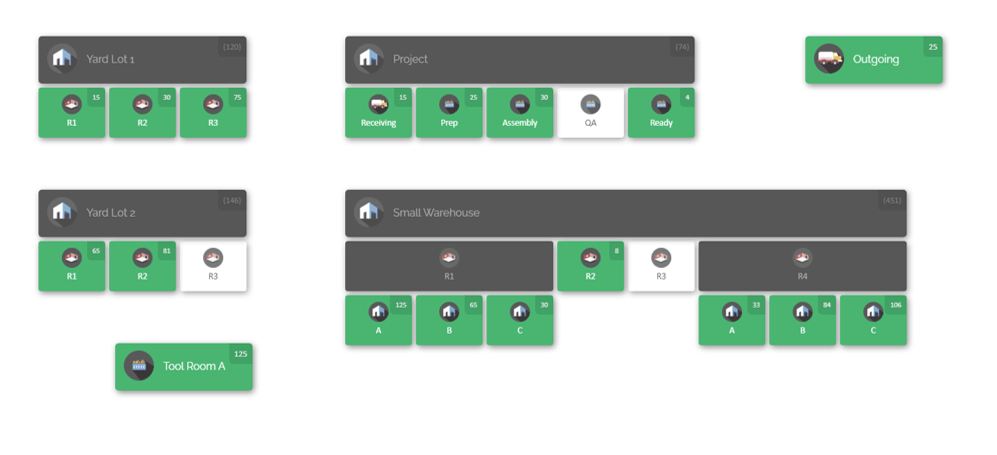
To put these ideas into action, many companies use specialized inventory software. CyberStockroom is one example of a cloud-based inventory platform that brings pooling strategies to life with visual maps. Here’s how CyberStockroom aligns with the needs of inventory pooling:
- Visual Inventory Maps: At its core, CyberStockroom uses interactive maps (like the ones shown above) to represent warehouses, laydown yards, job sites, or any custom location layout. Each map acts as a digital blueprint of a storage location. Products are placed into the map at specific bins, shelves, or sections. This visual approach makes the pooled inventory tangible. Managers can look at a screen and instantly see where items are, how many are left, and where the next storage spot is available.
- Check-In/Check-Out Tracking: CyberStockroom lets users “check in” items to inventory or “check out” items for use. Every movement is logged on the map. When a project withdraws an item, the map’s quantity automatically decreases, and when stock is returned, it increases. It even records transfers between locations. As their documentation notes, the inventory map “can track the movement of products as they are checked in or out of inventory, transferred between locations, or moved within a warehouse, maintaining an accurate record of transactions”. This is ideal for pooling because it enforces accountability: if one site uses part of the pool, everyone can see it immediately. The audit trail helps prevent losses and errors.
- Cloud Access and Collaboration: CyberStockroom is cloud-based, meaning it runs in a web browser on any internet-enabled device (laptop, tablet, etc.). This ensures that everyone – from office staff to field technicians – sees the same live information. There’s no need for desktop-only software or complex networking. Staff can update inventory on the go (e.g. via tablet in a warehouse) and the central pool is updated in real time. This ubiquitous access is crucial for multi-project teams who may be working from different offices or even different cities.
- Customization for Different Sites: The platform supports multiple maps or sub-location groups. For inventory pooling, a company might create separate map “sites” for each project or warehouse. Alternatively, it could use one large map with labeled zones for each location. CyberStockroom allows unlimited custom fields, so each item can carry tags like project name or site location. Custom reports can be run to show, for example, “all items used by Project X” or “stock available in Zone Y”.
- Security and Control: In a pooled system, security is important. CyberStockroom provides user permissions, so access to the inventory map can be restricted by role or project. You can control who can move stock on the map or just view it. Each action is logged, creating an audit trail that discourages unauthorized use. This way, one site’s manager can’t quietly remove items from the pool without it being recorded.
- Support for Barcode Scanning: CyberStockroom supports barcoding workflows. Teams can scan items into and out of locations using a barcode. This speeds up stock movements and improves accuracy. When a user scans an item, the system can automatically update the mapped quantities. In a busy multi-site environment, this feature helps keep the pooled inventory data error-free.
Together, these features mean CyberStockroom ties into the best practices of inventory pooling. For example, the visual map gives the real-time visibility mentioned earlier. Check-in/check-out with barcoding provides scan-based tracking. And cloud access guarantees that as projects request stock, everyone sees the updated pool quantities instantly.

Practical Steps and Example
To make inventory pooling concrete, here’s a step-by-step overview of how a company might set it up (illustrated with CyberStockroom as the tool):
- Audit existing inventory: Begin by listing all the inventory across projects. Identify duplicates and common items. For instance, Site A and Site B both have the same model of pump. Determine current quantities at each site.
- Select a pooling strategy: Decide whether you’ll keep all stock at one hub or distribute regionally. For example, if sites are far apart, you might use two hub warehouses. If they’re nearby, one central yard may suffice.
- Implement inventory software: Set up a system like CyberStockroom. Create a map for each hub or site. Import your inventory items into the system and place them on the map (by dragging icons to locations).
- Define policies: Establish rules such as how to request inventory from the pool, how to approve transfers, and safety stock levels. Train all project managers on these rules.
- Set reorder rules: In the software or procedure, decide when to replenish the pool. For instance, you might reorder when total pool falls below a threshold, rather than letting one site trigger a reorder alone.
- Monitor and adjust: After launching the pool, watch your KPIs (stockouts, turnover, etc.). Adjust safety stock and processes as needed. If a particular project consistently needs more, you might allocate extra buffer for it in the pool.
- Maintain communication: Have a process (meetings or digital alerts) for projects to signal urgent needs. Make sure everyone knows to update the pool status after using materials.
Example: A manufacturing firm runs three separate assembly projects. They pooled their inventory of electrical components. Using CyberStockroom, they created one map of their main warehouse and marked sections for “Project 1”, “Project 2”, and “Project 3”. Components were tagged with custom fields indicating which project typically uses them, but all were stocked together. When Project 2’s requirements jumped unexpectedly, the team checked the map and saw that excess parts were available in the pool reserved under Project 1’s area. They quickly initiated a transfer. In parallel, the system sent an alert to reorder those parts since the pooled count had dropped below the safety level. The visual map ensured there was no guessing about availability or location; everything was clear at a glance.
Conclusion
Inventory pooling – sharing stock across projects and sites – is a powerful strategy for resource optimization. By consolidating inventory, companies can reduce costs, improve service levels, and respond more flexibly to changing project demands. The trade-off is the need for careful coordination and the right tools. Best practices include centralizing data in one system, standardizing processes, and maintaining clear communication among sites. Visual inventory management tools like CyberStockroom can make pooling practical by providing real-time maps of pooled stock. These maps show exactly where every unit is, so teams can quickly allocate shared inventory where it’s needed most.

When done correctly, inventory pooling turns multiple project sites into a single, integrated supply network. Teams avoid overstocking each site and instead leverage the total pooled inventory. Projects benefit from higher availability and faster fulfillment, while the business saves on warehousing and waste. The key is to approach pooling methodically: audit your inventory, set up a robust system, define clear rules, and then monitor performance. Over time, a well-managed inventory pool will keep operations agile and cost-efficient, freeing your teams to focus on the projects themselves rather than the logistics of parts.






 CyberStockroom
Leave a comment