In today’s fast-paced supply chains, warehouses can no longer rely on spreadsheets and paper maps to manage inventory. Instead, many businesses are turning to digital twins – virtual replicas of their warehouses – to see and optimise every bin, shelf and pallet. Imagine walking through your entire warehouse on a computer screen: every rack, bin and forklift is represented, and every stock movement is reflected in real time. This “mapping your warehouse virtually” offers unprecedented visibility and control. A digital twin in inventory management means creating a dynamic, data-driven model of your storage facility and stock levels. It combines the layout of aisles and racks with live inventory data, so managers can visualize what’s in stock, where it is located, and how it’s moving – all without stepping foot on the warehouse floor.
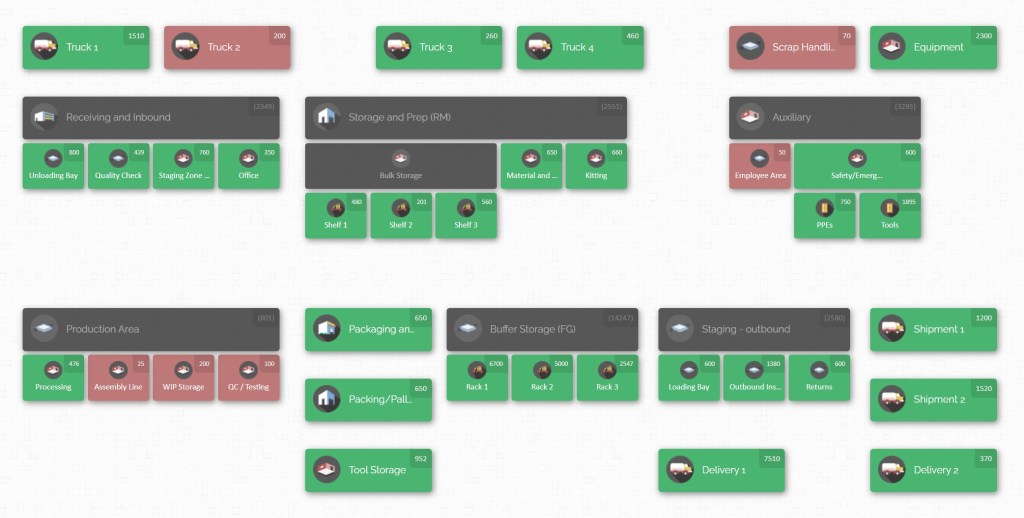
Digital twins are far more advanced than traditional inventory tools. Whereas an ordinary warehouse management system (WMS) might record “Aisle 5, Shelf C” in a text field, a digital twin understands the physical layout and dimensions of that shelf, knows exactly what fits on it, and can even help staff navigate to it. In effect, it turns raw data into an interactive warehouse map. These virtual maps are not static either – they can be overlaid with real-time inventory counts, equipment positions, and staff activity. With this virtual model, businesses can run “what-if” scenarios (for example, testing a new shelf layout or adding more stock) and see the likely outcomes before making costly physical changes. The result is smarter decision-making, fewer errors, and a more agile warehouse operation.
What Is a Digital Twin for Inventory?
A digital twin of a warehouse or inventory system is essentially a live, digital mirror of your physical facility and stock. It captures layout (aisles, shelves, bins, workstations, rooms, and vehicles as locations) and inventory items (SKU quantities, lot numbers, expiration dates). In practice, building a digital twin involves mapping out your warehouse floor plan and then adding inventory data to that map. What makes it “live” is the data feed: the digital twin is updated continuously or in batches from the inventory management system, scanner inputs or other sources. This way, the virtual model reflects the true state of inventory at any moment.
Crucially, a digital twin knows space and position. Unlike a spreadsheet, it tracks where every item lives in physical terms. For example, if your legacy system says “Widget A, quantity 20, location A5-3,” the twin puts 20 Widget A on the 5th shelf in aisle A in the virtual map. Many digital twin systems let you assign images or diagrams to items, attach documents like manuals, and even use barcodes to verify inventory. In essence, you get a digital version of your warehouse that can be “driven” like a simulation.
This concept has been embraced in industries from manufacturing to logistics. Large companies already use digital twin tech to plan warehouse layouts and test equipment installations before committing to construction.
Benefits of Warehouse Digital Twins
Creating a digital twin of your inventory unlocks a host of advantages. Some of the key benefits include:
- Total Inventory Visibility: You can see everything at once. From a single dashboard, the digital twin shows exactly how much stock is in each location. For example, clicking on “Shelf 3” in the map reveals the names and quantities of all items there. This eliminates guesswork and reduces errors from misread labels. In one glance, managers answer “How many of what, where?” – a question that traditionally required poring over reports. Visualizing inventory also makes it easy to spot anomalies, like a box that got put in the wrong place or an unexpected stockout in a bin.
- Faster, More Accurate Picking and Counting: Instead of workers wandering blindly or scanning numerous codes, a virtual map can guide them directly to the needed item. Imagine a picker clicking on Order #123 in the system and seeing a highlighted path on the map that leads to all required SKUs. This cuts walking time and mistakes. Additionally, during cycle counts or audits, workers can verify stock against the twin, correcting discrepancies on the spot.
- Lean Operations and Waste Reduction: The visual clarity of a twin helps reveal hidden inefficiencies. Teams can then investigate and rebalance flow through the map. In lean manufacturing terms, the twin supports Just-in-Time by showing exactly where WIP buffers are and whether adjustments are needed. It also serves as a powerful visual management tool – akin to a Kanban board but for physical stock – making daily reviews and andon alerts much more intuitive. If a section of the map suddenly goes below a threshold (say, spare parts bin running low), everyone sees it immediately and can respond faster.
- Risk Simulation and Flexibility: Digital twins let you simulate disruptions safely. What happens if a large shipment is delayed, a power outage occurs, or demand for a product spikes unexpectedly? You can adjust the virtual model (e.g. raising reorder points) to see potential outcomes. This sort of scenario testing means warehouse managers can prepare contingency plans. For instance, they might increase safety stock in the twin and note if more shelf space is needed. When unusual events occur, having tested these changes in the digital twin beforehand ensures a smoother real-world response. In turbulent markets, this agility – the ability to adapt workflows and inventory in real time – can be a game changer for service levels and cost control.
- Improved Collaboration and Training: A shared digital twin brings everyone onto the same page. Different teams (warehouse, production, purchasing, etc.) can all view the map, making communication about locations or stock much clearer. Training new staff becomes easier too: rather than memorizing coded location labels, trainees can explore the visual map to understand where goods are stored.
In summary, a warehouse digital twin is like having supercharged inventory glasses. It shows you what’s happening in the warehouse in vivid detail and lets you manipulate the digital environment to optimise for things like speed, space and cost. This goes well beyond any traditional inventory system, which is why it’s considered one of the most important tech trends in warehousing today.
How Digital Twins Fit into Inventory Systems

Digital twins do not replace your core inventory data; they augment it. Think of them as a powerful layer on top of existing systems. A warehouse’s WMS or inventory database feeds the digital twin with stock levels and item info, while the twin adds the spatial intelligence. In practice, implementing a twin often involves:
- Mapping the Facility: Input the floor plan, dividing the warehouse into zones (receiving, storage, packing, etc.), and define shelf and bin locations.
- Uploading Inventory Data: Pull in item master and stock-on-hand from your inventory system or spreadsheet. The software then assigns each SKU to the correct location on the virtual map, either automatically or via barcode scanning during setup.
- Ongoing Synchronisation: The twin updates with each stock move. Some systems integrate directly with scanning guns, while others can import transfers/cycle counts via file uploads. The goal is that the twin’s view stays current with reality.
- Custom Fields and Metadata: Most twin platforms let you tag products with extra info (like batch numbers, images or custom fields). For example, adding a photo to each product can make searches faster. You might also attach documents (manuals, purchase orders) to an item in the system for quick reference.
- Permissions and Sharing: The twin can grant different access levels – perhaps warehouse staff can update locations, while managers have read-only oversight. This secures the data and prevents accidental changes.
While fully automated real-time data is possible, many digital twins in inventory management thrive on manually or semi-automated inputs. For instance, a team might perform a weekly barcode scan of new stock, which the twin uses to update levels. The emphasis is on clarity and flexibility: even a manual refresh can transform how you interpret data.
Crucially, creating a digital twin doesn’t require overhauling your entire system. For many businesses, it starts as a visual front-end: a simple map linked to their inventory list. Over time, it can grow more sophisticated with additional data sources and automation. Either way, the key is that the inventory and location information is unified into one visual model. This single source of truth prevents the silos and delays that plague warehouses relying on paper lists or disjointed spreadsheets.
Building a Warehouse Digital Twin: Technology

Behind the scenes, digital twins combine mapping tools with data streams and sometimes simulation engines. The technology can range from 2D to 3D:
- 2D Mapping and Visualization: Many solutions use a top-down view or a simple floor plan. You might draw your warehouse outline and then place icons or blocks to represent storage areas. CyberStockroom, for example, offers a 2D “map” where shelves, bins and even trucks appear as colored rectangles. This approach is intuitive and easy to set up with nothing more than a web browser. It provides a clear visual overview of all locations at once.
- 3D Modeling and Scanning: Advanced twins go a step further by creating a full 3D model of the space. Some high-tech warehouses use LIDAR scanning (laser scanning) to capture point clouds of the facility – walls, pillars, conveyors, etc. This raw data is then transformed into a detailed 3D map. For new warehouse projects, companies like Amazon use this technique: engineers walk the space with a 3D scanner to build an accurate virtual replica. That model becomes the canvas for planning new racking and equipment. Even in existing sites, some firms deploy mobile robots or augmented reality devices to scan as-built layouts, speeding up the digital twin creation. Once you have a 3D model, you can render realistic warehouse scenes, simulate line-of-sight, or integrate with AR devices for worker guidance.
- Data Integration and Real-Time Feeds: The “twin” aspect means staying in sync with reality. Often this involves pulling data from barcodes, RFID readers or inventory systems into the digital model. Some solutions connect directly to cloud APIs or databases so that every stock movement in the WMS immediately updates the virtual map. Others may rely on CSV/Excel imports or manual updates for smaller operations. While true IoT connectivity (sensors on shelves, GPS trackers on forklifts, etc.) is one way to make a twin truly live, many warehouses get great value even with periodic human-fed data. The key is that whichever method is used, the digital twin reflects actual counts and positions so that decisions made on the model hold true on the floor.
- Advanced Analytics: Modern digital twins often layer on analytics. Because the twin knows warehouse geometry and inventory levels, it can run optimization algorithms. For example, artificial intelligence can analyze picking frequency patterns and suggest relocating SKUs to faster-access areas. Some systems even compute optimal pick paths or robot routes on the map. In effect, the digital twin becomes a testing ground for AI-driven improvements. Future trends point to agent-based modeling and machine learning within the twin: it could learn, for example, that temperature-sensitive stock should be clustered near a cooler zone, or that congestion always happens near one aisle and needs decongestion.
- Simulation and “What-If” Scenarios: Many digital twin tools include simulation engines. These let managers run scenarios such as: “What if we add a second shift?”, “What if a palletizer goes down?”, or “What if demand for product X doubles next month?”. By simulating pickers, forklifts and conveyors in the virtual environment, the twin can highlight likely bottlenecks or underused capacity. For inventory, simulations might adjust reorder points or reorder quantities and show the impact on stock levels. This kind of modeling used to be reserved for large firms with specialized software, but it’s increasingly accessible for mid-sized businesses too.
In practical terms, building a digital twin often starts small. You might begin by sketching out your warehouse zones and uploading current stock positions. Then you refine the model by adding more details (dimensions, product images, etc.) and integrating live data. Thanks to modern cloud platforms, this can often be done without any heavy IT hardware – you just need a subscription to the software. The twin then lives online, available to managers on any device.
Use Cases: Digital Twin in Action
Inventory Audits and Traceability: In a regulated manufacturing facility (pharmaceuticals, for example), traceability is critical. The company built an inventory map as a digital twin of their raw materials area. Each lot of material was mapped to a specific bin. When an audit flagged a discrepancy in raw material stock, managers opened the twin and easily spotted which bin the missing lot belonged to. Because the twin tracks “who moved what and when” (via log history), the team quickly pinpointed a mix-up and corrected it. Without the map, they would have had to physically search multiple rooms.
Warehouse Relocation and Setup: A retailer relocating to a larger distribution centre used digital twin planning to design their new racking layout. They input the exact dimensions of racks, aisles, and equipment into the model. The twin allowed them to test various layouts virtually, measuring fill rates and ensuring safety aisles met standards. Once the new center opened, the warehouse team imported existing inventory data into the twin ahead of receiving goods. On day one, they already had a map showing where incoming shipments should be stowed – shaving weeks off the startup period.
CyberStockroom: A Visual Inventory Mapping Case
One practical example of digital inventory mapping in action is CyberStockroom – a cloud-based inventory management platform that emphasizes visual location mapping. CyberStockroom’s core feature is its Inventory Map, which treats every shelf, bin, or even vehicle as a location on a visual dashboard. Here’s how it works and ties into the digital twin concept:
Interactive Inventory Maps
Users can draw their warehouse layout within CyberStockroom. Each storage area – whether it’s a shelf, closet, pallet, or even a delivery truck – is represented by a tile or block. The map is fully customizable, letting businesses build it to match their actual layout. For example, sections of a plant or zones in a yard can be created and named. The result is a bird’s-eye view of the business, where inventory is organized visually.

Drag-and-Drop Transfers
Moving stock around is as simple as drag-and-drop. Need to relocate 50 units from “Shelf 3” to “Bin 1”? You just click and drag the quantity on the map. This intuitive interface significantly speeds up data entry compared to toggling through text fields. As you drag, the numbers on the map update in real time, so everyone immediately sees the new allocation. This also makes conducting cycle counts very visual – if the map shows 10 items in Bin 1 but your count finds 12, the discrepancy jumps out.
X-Ray Vision for Items
A clever feature is the “X-ray vision” of products. Click on a product in the catalog, and CyberStockroom will highlight on the map every location where that item is stored, along with quantities. This is like turning on an X-ray to see an item’s entire footprint in the facility. It’s invaluable for fast-moving or critical parts, as you instantly know whether stock is running low or buried in multiple spots.
Product Images and Details

Each inventory item can be assigned a photo. When browsing the map, you’ll see the item’s thumbnail beside its name, which reduces confusion (especially for items with similar SKUs). You can also attach documents (manuals, datasheets, etc.) to items, so the map becomes a knowledge hub. This visual aid helps workers identify the right parts quickly and even facilitates training new staff, who can match items by image as well as label.
Unlimited Locations and Items
CyberStockroom’s platform supports as many products and location layers as needed. There’s no artificial limit on the number of bins or SKUs you can create, making it scalable as your business grows. One CyberStockroom user, for instance, can map their entire multi-warehouse operation, including racking, vehicles, and spare-parts areas, all in one system.
Cloud-Based Accessibility
Because CyberStockroom is cloud-based, the inventory map is accessible from any device with an internet browser. Technicians on the floor with a tablet, managers in the office and even remote auditors can all log in and see the same map. Changes sync instantly, so the digital twin of inventory is always live.
Here is a sample CyberStockroom inventory map interface:
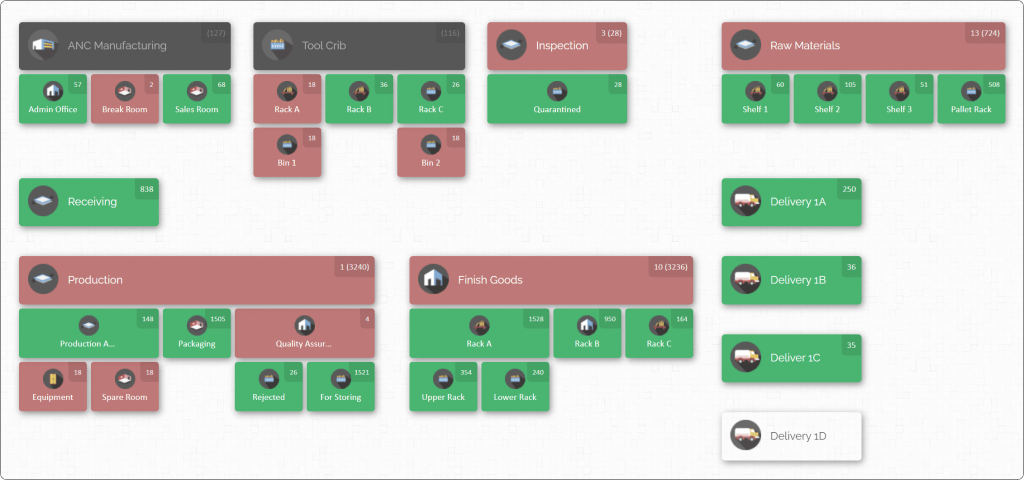
This map-based view is itself a form of digital twin – a simplified one – because it gives managers a real-time mirror of their warehouse layout and stock. Through CyberStockroom’s interactive map, teams can immediately grasp stock levels and locations. All movement is logged, and the system maintains traceability: you can review history to see who moved what and when, adding accountability.
By converting inventory data into visuals, CyberStockroom addresses the same challenges digital twins target: cluttered spreadsheets and hidden information become clear, actionable insights. Users report that with the map, picking errors drop (because it’s obvious when an item is not in its expected spot), and planning new layouts is easier. In effect, the CyberStockroom Inventory Map offers many of the benefits of a digital twin at an accessible scale – especially suited for small to medium operations that may not have full 3D scanning tech but still want a virtual overview.

Emerging Trends and The Future Outlook
The momentum behind digital twins in warehousing is strong and growing. Analysts project the global market to expand by about 30–40% per year, reaching well over $100 billion by the early 2030s. North America currently leads adoption, but Europe and Asia are rapidly catching up as more SMBs digitize their warehouses.
Several trends are shaping this future:
- AI-Driven Twins: Artificial intelligence is making digital twins smarter. Beyond static visualization, AI algorithms are now being embedded in twin platforms. These algorithms analyze the data in the twin (stock levels, order patterns, movements) and proactively suggest optimisations. For example, some systems can forecast stockouts on the map or predict the best re-slotting of goods for the next sales season. AI can even create autonomous “agents” that adjust labor allocation or re-routing on the fly, based on the twin’s simulation of demand. In short, the twin evolves from a passive model to an active decision support engine.
- Real-Time Synchronization: Advances in data capture mean digital twins are becoming more real-time. While earlier versions might have been updated daily or weekly, now many warehouses employ continuous barcode or RFID scanning, automated weigh scales on conveyor belts, or periodic drone scans to feed data instantly. Even without heavy IoT deployment, video analytics and computer vision can update inventory counts. The faster the twin updates, the more “live” it feels – managers can trust its readings almost as much as being on the floor.
- Augmented and Virtual Reality (AR/VR): We are beginning to see AR and VR interfaces layered on top of digital twins. For instance, a warehouse manager wearing AR glasses could look at a rack and see overlay data about stock on that shelf, pulled from the twin. Or a training session might use VR to let new employees practice picking in the digital twin environment. These immersive technologies blur the line between the physical space and its twin, making navigation and learning even more intuitive.
- Collaboration and Cloud Ecosystems: As digital twins grow in importance, integration with other supply chain systems will deepen. We might see standardized APIs where a warehouse twin automatically syncs with procurement software to suggest ordering or with transportation systems to coordinate dock scheduling. For example, a surge in inbound shipments (from the ERP) could auto-update the twin to reserve staging space. Although many current twin tools are standalone, the trend is toward interconnected “digital thread” platforms that cover the entire inventory lifecycle. CyberStockroom’s cloud approach is a step in this direction, enabling easy data exchange (via file imports, for example) without the friction of on-premise installs.
- Workforce Enrichment: Labor management is another area where twins are making an impact. By simulating human workflow, twins can help plan staffing and reduce fatigue. In some cutting-edge projects, digital twins allocate tasks to workers or guide pickers via tablets, minimizing travel and optimizing rest breaks. This human-centric optimization improves productivity and safety. As warehouses cope with labor shortages, having a twin that integrates people into the model is becoming invaluable.
Looking ahead, the goal is a fully adaptive warehouse. Imagine a twin that not only reflects current operations but also continuously learns and adjusts. Such a system might automatically re-optimize layout overnight after processing sales data from the day, or self-adjust safety stock levels based on real-time demand trends. Some industry leaders are already calling this vision the “self-driving warehouse,” where the digital twin and AI effectively run routine decisions, and humans focus on strategy and exception handling.
Of course, challenges remain. Building a useful twin requires accurate data and thoughtful setup; poor quality input leads to a “garbage twin.” Businesses must invest time in mapping and data hygiene. However, as tools improve, even mid-sized companies can tackle these challenges. The alternative – manual control of complex inventory – simply doesn’t scale in modern logistics.
Getting Started with Your Warehouse Digital Twin

If the idea of a digital twin excites you, here are some steps to begin:
- Start Mapping: Draw out your warehouse. Whether on paper or using software, sketch the floor plan and major zones. Label key areas (receiving, packing, cold storage, etc.). The effort here pays off in clarity.
- List Your Locations: Make an inventory of all storage points: each rack, shelf, bin, and special area. Give them logical names. This forms the skeleton of your twin.
- Populate Inventory Data: Export your current inventory list (item SKUs, descriptions, counts, locations) from your existing system or spreadsheets. Import these into the mapping tool. Initially, don’t worry if some locations are outdated – this exercise will quickly reveal gaps to fix.
- Compare with Reality: Walk the warehouse with your half-complete map in hand. Verify each location and item, adjusting the virtual model as needed. It’s normal to discover extra nooks or unlabeled racks. Update the map on the spot so it matches real life. By now you have the first version of your inventory twin.
- Use It Daily: From day one, start using the map for routine tasks – picking lists, cycle counts, even team huddles. The more you rely on it, the faster your team will spot mistakes (like “this should be in Aisle 2, not 5”).
- Experiment: Try small simulations in the twin: rearrange a couple of racks, or test picking through a new route. Note how the system predicts changes. This builds confidence in the twin’s value.
- Refine with Analytics: As the twin grows, consider adding data layers: label scanning, historical demand, or even forklift traffic. These can turn your twin into an even richer model.
Throughout the process, you’ll find that a digital twin becomes not just a nice-to-have, but a day-to-day partner in managing inventory. It turns routine questions into visual answers, and gut feeling into data-driven insight.
Conclusion
The warehouse of the future is here today in the form of digital twins. By translating warehouse and inventory data into live, interactive maps, businesses gain a commanding view of their stock. This map-guided approach simplifies complex tasks: it becomes obvious where every item is, where bottlenecks are forming, and how changes will ripple through operations. Whether it’s by deploying full 3D models or adopting more accessible 2D mapping tools like CyberStockroom’s Inventory Map, the benefits are clear. Warehouse teams report fewer errors, faster training, and the confidence to reconfigure layout and staffing on the fly.
In a world where every hour and every pallet counts, having a digital twin is like upgrading from a blindfold to X-ray vision. It unlocks smarter storage, picking and planning. As technology advances, these virtual warehouse replicas will only become more powerful – predicting problems before they happen and suggesting solutions in real time. For any business serious about inventory optimisation, mapping your warehouse virtually is not just a trend; it’s the new standard. By embracing digital twins, you ensure that your inventory management is not just modern, but truly visionary.






 CyberStockroom
Leave a comment