
Renovation and retrofit projects are inherently complex endeavors that go beyond simply tearing down walls and installing new fixtures. A critical yet often overlooked aspect of these projects is inventory management – the way materials, tools, and equipment are sourced, stored, tracked, and utilized throughout the job. If you’ve ever managed a renovation as a general contractor, project manager, renovation firm owner, or facility manager, you know how quickly things can spiral if the right materials aren’t in the right place at the right time. Missing parts, surplus supplies cluttering the site, or tools mysteriously “walking off” can all derail a project’s schedule and budget.
To set the stage, imagine walking onto a renovation site on day one. There’s a flurry of activity: contractors are unloading lumber, pipes, wiring, HVAC components, fixtures, and countless other items. In a perfect world, every piece of inventory needed for the project is accounted for and will be used exactly when and where it’s supposed to be. In reality, renovation projects face constant changes and surprises – a burst pipe here, an unforeseen structural issue there – that can throw off even the best-laid plans. Without a robust system to manage inventory in renovation projects, teams may find themselves scrambling to locate a particular part or reordering something they thought they had (leading to delays and extra costs). In fact, studies have shown that up to 30% of all building materials delivered to a construction site can end up as waste – often due to over-ordering, damage, or mismanagement. This kind of waste not only hurts a project’s profitability but also contributes to environmental issues.
Unique Inventory Challenges in Renovation and Retrofit Projects
Renovation and retrofit projects share many inventory challenges with general construction, but they also come with their own twists. Unlike a new construction site where you might have the luxury of open space and predictable sequences, a renovation often means working in tight, occupied, or evolving environments with limited room for error. Here are some of the most common inventory challenges that crop up in renovation scenarios:
1. Limited On-Site Storage and Space Constraints
One of the first hurdles in a renovation project is space – or lack thereof. Construction sites for new buildings might have ample space (or empty lots) to stockpile materials, but renovation projects usually occur within or alongside an existing structure. This means you can’t just drop off endless pallets of materials and park equipment anywhere you please. Hallways, rooms, and loading docks often double as temporary storage, and these areas can quickly become overcrowded.

Unlike other industries that might have fixed warehouses or stockrooms, construction teams often lack a dedicated on-site stockroom for materials. In a renovation, you might be working in a functioning facility – for example, renovating one wing of a hospital while the rest remains operational. Storage space is at a premium and must be carefully managed. Every piece of inventory (pipes, drywall, tiles, etc.) that you bring in early needs to be stored safely out of the way of ongoing work and building occupants. Too much material on-site too soon can create a logistical nightmare and even safety hazards; too little means workers sit idle waiting for supplies.
Storage limitations also force renovation teams to coordinate deliveries in smaller batches or use off-site storage facilities. You may end up storing materials in multiple locations – a bit at the job site, some in a nearby warehouse, and maybe overflow in trucks or temporary containers. Keeping track of what’s stored where is a huge challenge in these conditions. Without a clear system, it’s easy to lose items in the shuffle or waste time shuttling back and forth searching for that one box of specialty screws that “has to be here somewhere.”
2. Coordinating Material Deliveries and Lead Times
In a renovation project, timing is everything. Since on-site space is tight, you often can’t afford to receive all materials at once. Instead, successful renovation inventory management leans on a just-in-time delivery approach – getting the right materials delivered in the right quantities, in the right order, at the right time. This requires careful coordination of lead times and delivery schedules for a wide variety of items coming from numerous suppliers.
For example, imagine you’re refurbishing an office floor. You need drywall and wiring first, flooring materials later, and light fixtures towards the end. If the light fixtures show up too early, they’ll clutter the site (and could get damaged before installation).

If they arrive too late, your electricians might be twiddling their thumbs. The sequencing is critical: workers can’t install what they don’t have, and they shouldn’t have what they can’t install yet.
Now add the complexity of change orders and supply chain disruptions. Renovation projects are notorious for surprises – you open a wall and find mold, or discover that the existing plumbing needs an upgrade not originally planned. Each change can introduce new materials that must be ordered on the fly or alter the quantities needed. Meanwhile, external factors like fluctuating material prices or supplier delays can throw your schedule off. A strike at a manufacturing plant, a sudden lumber shortage, or shipping delays due to global events can all hit in the middle of your project, forcing you to adjust orders and find alternate suppliers quickly.
Coordinating all these moving parts means you need real-time visibility into your inventory and pending orders. If a supplier is late, you need to know immediately what tasks will be impacted and whether you have backup stock to tide you over. In a renovation, any delay can cascade – if the doors aren’t delivered on time, the finishing crew can’t install them, which might hold up painting, which delays inspections, and so on. Keeping a tight alignment between the project schedule and inventory deliveries is a delicate dance. It demands close communication with vendors, a good handle on lead times, and contingency plans for when things change last-minute.
3. Unpredictable Scope Changes and Hidden Conditions

Renovations are like opening a can of worms – you never know exactly what you’ll find behind those old walls or under the floors. Unlike new construction, where you’re working from scratch, renovations deal with existing structures (sometimes decades or centuries old). This means scope changes are common as you discover hidden conditions. Perhaps you find outdated wiring that must be replaced, termites in wooden beams, or asbestos that requires special handling. Each surprise can trigger change orders that alter your material needs mid-project.
This unpredictability makes inventory forecasting in renovation projects especially difficult. You might have estimated materials based on plans, only to have those plans evolve. For instance, a retrofit project might plan to reuse some existing components to save cost, but once demolition begins, you realize those components aren’t salvageable. Suddenly you need new materials that weren’t in the original inventory list – and you need them fast to avoid delaying the project. On the other hand, sometimes a design change means certain ordered materials are no longer needed or must be swapped for different specs, leaving you with excess inventory or the need to return items.
The challenge here is maintaining flexibility and fast response in your inventory management. Renovation project managers often keep a buffer stock of critical items (or quick access to suppliers) to handle the unexpected. But too much buffer can tie up capital and space for things you might not actually use. It’s a fine balance. If your inventory system is not agile – for example, if it’s just a static spreadsheet created at project start – it will be out of date the moment a big change order hits. Teams need real-time methods to adjust inventory records, reallocate materials from one part of the project to another, and update procurement plans on the fly.
In short, “predicting the unpredictable” is part of renovation inventory management. You have to plan for surprises as a rule, not an exception. That means closely tracking usage rates and remaining quantities so you can quickly spot when something is running low or when a change order will require a fresh batch of materials. It also means having contingency plans, like backup suppliers for critical materials, so a surprise doesn’t halt the entire project. The more visibility you have into your current inventory status, the better you can adapt to the curveballs a renovation throws your way.
4. Tracking Materials and Tools Across Multiple Locations
Renovation projects often aren’t confined to a single site. A contracting firm might be handling multiple projects simultaneously – for example, a company could be retrofitting three retail stores across town or renovating several units in an apartment complex at once. Even within one project, you might have materials split between the main site, an off-site warehouse, and maybe some items in transit or stored in company trucks. This distributed nature creates an inventory tracking headache: how do you keep tabs on thousands of moving parts across many locations?

A common scenario: A project manager asks the foreman, “Do we have that batch of tile trim for the bathroom remodel?” The foreman might reply, “It might be in our storage unit across town, or maybe it’s still on the delivery truck – let me check.” If you’ve ever had to make a frantic call to a warehouse or drive to another job site to borrow materials, you know the pain of poor visibility. Manually tracking items across multiple job sites and storage areas is time-consuming and error-prone. Things inevitably fall through the cracks. Perhaps an expensive electrical panel was delivered to Site A when it was actually needed at Site B, and nobody noticed the mix-up until an electrician is standing idle waiting for it.
Another layer is tool and equipment tracking. In renovations, power tools, specialized equipment, and even vehicles (like generators, scissor lifts, company trucks) are part of your “inventory” too. These often float between sites. For example, a set of laser levels might be scheduled to be used on Project X this week and Project Y the next. If someone forgets and leaves them at the wrong location, Project Y could face delays. Without a system assigning tools to crews or sites, it’s easy to lose track of who has what. And when tools go missing, you’re left wondering whether they were misplaced, taken home by a worker accidentally, or stolen.
The real-time location tracking of inventory is crucial. If each site is updating a spreadsheet independently, headquarters has no easy way to know the total stock on hand or where everything is. This can lead to over-ordering (because each site orders as if it has nothing from the others) or under-utilizing what you already have (one site may have surplus materials that another site urgently needs). Duplicate orders, project delays due to “missing” inventory that actually exists elsewhere, and lack of accountability are all symptoms of this challenge. The bottom line: renovation projects need a centralized way to see “how many of what do we have, and where?” across all locations at all times.
5. Environmental Risks and Material Damage
Renovation sites can be harsh environments for inventory. You’re often dealing with partially deconstructed areas, exposure to the elements, or makeshift storage conditions. Materials that are delivered to a site might sit in a hallway, an open courtyard, or a temporary tarp shed, exposing them to risks like weather and accidental damage. Unlike the controlled environment of a warehouse, the job site is full of hazards for your inventory.

Weather is a big culprit. If materials are stored outdoors or even in an unsealed building, a sudden rainstorm or high humidity can wreak havoc. For instance, sheets of drywall can absorb moisture and become warped or unusable if not kept dry. Lumber left in the rain might swell or grow mold. Freezing temperatures can ruin paints, adhesives, or any liquids. On the flip side, extreme heat can cause some materials to warp or chemicals to degrade. UV exposure can discolor or weaken certain plastics, fabrics, or finishes. In a renovation, you might not have the luxury of climate-controlled storage, so you have to get creative in protecting sensitive inventory – using tarps, temporary heaters, fans, or dehumidifiers as needed.
Aside from weather, site conditions and construction activities pose risks. Dust and debris from demolition can settle on equipment and materials, potentially damaging electronics or contaminating finishes. If you’re renovating part of an occupied building, you might have to stash materials in corridors or rooms that still have foot traffic, increasing the risk of things getting bumped or moved. There’s also the classic scenario of “oops” damage – a crew member might accidentally step on a stack of tiles, or a piece of equipment might knock over a container of expensive fasteners. In the chaos of a busy site, these things happen.
All this means that inventory in renovation projects is vulnerable to damage or spoilage if not carefully monitored and stored. When damage does occur, it’s not just the loss of the material that hurts – it’s the downtime to get a replacement. If a batch of custom-cut granite countertops cracks because it wasn’t stored flat, you’re looking at a costly delay to reorder and waiting for new ones. Best practices dictate having proper storage protocols: elevate materials off the ground, cover them, maintain reasonable indoor conditions if possible, and segregate delicate items. Regular inspections of stored inventory are also important – catching a minor water leak in the storage area early can save a ton of materials from ruin.
6. Theft and Loss on the Job Site

Unfortunately, renovation and construction sites are prime targets for theft. They often contain high-value materials and equipment lying around, and security may be relatively lax, especially after hours. In a retrofit project, you might have everything from pricey power tools to copper pipes and new appliances on site – a tempting trove for thieves. It’s estimated that in the U.S., losses due to construction site theft exceed $1 billion annually, which gives an idea of how rampant the problem is. Materials like copper wiring, for example, are hot targets because of their resale value, and tools can disappear surprisingly easily if not monitored.
Theft isn’t always an outsider job; it can also be internal or accidental. A worker might inadvertently take a tool home or a subcontractor might help themselves to extra materials for a side job, assuming it won’t be noticed. These small “leaks” – a missing drill here, a few bags of cement there – add up to significant inventory shrinkage over time. In fact, theft (whether internal or external) is a leading cause of inventory shrinkage on construction projects. For renovation firms operating on tight margins, that shrinkage can mean the difference between a profitable job and one that barely breaks even.
Renovation sites are often harder to secure than a new construction site. If you’re renovating a facility that still has people coming and going (like a school or office building), completely sealing off the area is tough. There may be many access points and workers from various trades on site, making it challenging to keep track of who is authorized to be where at all times. Plus, renovation work may pause overnight or on weekends without 24/7 security. Thieves take advantage of these gaps. A common scenario: over the weekend, someone cuts the padlock on a temporary fence and walks off with power tools or bundles of wire. By Monday, the crew arrives and discovers the loss.
Dealing with theft and loss requires a combination of security measures and inventory tracking. Basic security steps help (fencing, lighting, locks, maybe cameras or even a security guard for high-risk projects). But equally important is an inventory control system that flags discrepancies quickly. If materials are supposed to be in a storage room and suddenly they’re gone, you want to know as soon as possible – not weeks later during an audit. This is where having a clear log of check-ins/check-outs of tools and materials is valuable. For instance, assigning tools to individual workers or logging when materials are used can establish accountability. When everyone knows that every piece of inventory is being tracked, there’s less temptation for “borrowing” items without permission. We’ll talk more in the best practices section about how to prevent theft, but suffice it to say, theft is a very real challenge that renovation projects must actively mitigate.
7. Manual Tracking and Limited Visibility
Given all the challenges above, it might surprise you that many renovation and construction teams still rely on manual or outdated methods to track inventory. Spreadsheets, paper forms, or just word-of-mouth are not uncommon, especially in smaller firms or projects. If you’ve ever tried to maintain a giant Excel sheet of every nut and bolt for a project, you know how quickly it becomes a mess. People forget to update the sheet when they take something, or they input data incorrectly. The result is an inventory record that doesn’t match reality.
Manual tracking struggles to keep up with the fast-paced, dynamic nature of a construction project. Imagine a scenario: a delivery arrives with 50 light fixtures, and the site supervisor checks them off in a log. Over the next few days, electricians install 40 of them. A couple get broken during installation (oops), and 2 are temporarily moved to a different floor. If these movements aren’t meticulously recorded, your log might still say “50 on site” when in reality you have 8 in a closet and 0 needed for the project (because 40 installed + 2 broken). Now, if someone doesn’t catch that and reorders another 50 because they think they’re all used up, you end up overstocked – or vice versa, you run out because the log said you had more than you did.

Without real-time visibility, project managers can’t answer basic questions like: How many do we have left? Where exactly are they? Who took the last one?
This lack of oversight leads to problems like duplicate orders, stockouts, and inability to hold people accountable for misuse or loss. For example, if a tool goes missing and there’s no record of who last used it or where it was, it’s hard to investigate or prevent it from happening again.
Furthermore, without a centralized system, if you want an update, you have to call or text folks on-site, which isn’t always efficient. Information can be siloed – each foreman might know their slice of the inventory, but no one has the full picture. This makes it nearly impossible to optimize inventory at a company level (like sharing surplus materials between projects) or even at a project level (like adjusting orders proactively).
In short, using outdated tracking methods is itself a major challenge, because it amplifies all the other issues. It’s like trying to navigate with an old paper map versus a live GPS – you’ll get somewhere eventually, but you’re likely to take a lot of wrong turns on the way. Modern renovation projects increasingly recognize that investing in better inventory tracking tools is not a luxury but a necessity to maintain control and efficiency. We’ll explore that in the next sections.
8. Communication Gaps Among Teams
Renovation projects involve a hive of different stakeholders: the general contractor’s team, subcontractors (plumbers, electricians, carpenters, etc.), architects or engineers, suppliers, and the client or facility managers. With so many players, communication can easily break down, especially regarding inventory and materials. Maybe the site manager assumed the purchasing department ordered more cement, but the message never got through, and now the crew is short. Or a supplier delivered to the warehouse, but the site crew wasn’t notified that their materials are ready for pickup.
Cross-functional communication is vital to keep inventory flowing smoothly. If the plumbing subcontractor doesn’t tell anyone that they used more pipe than expected on the last job, nobody will know to reorder in time for the next phase. If the project schedule changes (say a delay in one area means another task is pulled forward), the teams need to communicate that shift to suppliers so deliveries can be rescheduled accordingly.
A common challenge is the lack of a structured way to communicate material needs and updates. Many projects rely on ad-hoc emails, calls, or meetings. Important details can get lost in the shuffle. For instance, an inspector requests an upgrade to a certain material to meet code – if that request isn’t clearly passed to the purchasing team and the inventory manager, the project might screech to a halt waiting for something everyone thought someone else ordered.
Another scenario: different departments use different terminology or item codes for the same thing. The field crew might say “we need more 3/4 inch PVC pipes,” while the procurement system calls it “Item #4567 Polyvinyl Pipe.” If communications aren’t clear, you could end up with the wrong items delivered. Standardizing how inventory information is communicated (common item names, consistent request forms, etc.) is often overlooked but can save a lot of headaches.
Finally, consider that on many renovation projects, especially big ones, the client or facility management might need updates on material usage for billing or transparency. If you can’t quickly compile what’s been used where (because records are messy), it not only makes your internal management harder but can also erode trust with the client. In facility management contexts, they might want to know, for example, how many replacement light fixtures were installed versus purchased for a retrofit – to ensure efficient use of budget.
All these communication challenges mean that inventory management is not just a logistical task but a team coordination task. The better everyone shares information and stays on the same page, the fewer inventory surprises you’ll have. In best practices, we’ll touch on how to improve this, such as regular inventory coordination meetings or having a single point of contact for inventory on each team.
These challenges might seem daunting, but the good news is that the industry has developed effective strategies to handle them. From old-fashioned planning techniques to cutting-edge software, there are ways to turn these inventory challenges into opportunities for efficiency. In the next section, we’ll discuss best practices for inventory management in renovation and retrofit projects, and we’ll see how applying them can save time, money, and a lot of stress.
Before that, let’s take a closer look at how technology – specifically a tool like CyberStockroom – can directly address many of the pain points we’ve just described.
Leveraging Technology: How CyberStockroom Streamlines Renovation Inventory Management
When facing the multitude of inventory challenges in renovation projects, one category of solutions stands out as a game-changer: modern inventory management software. In particular, CyberStockroom offers a unique, visual approach that directly tackles issues like poor visibility, manual tracking errors, and multi-location chaos. Let’s discuss how incorporating a tool like CyberStockroom can make life significantly easier for construction and renovation teams.
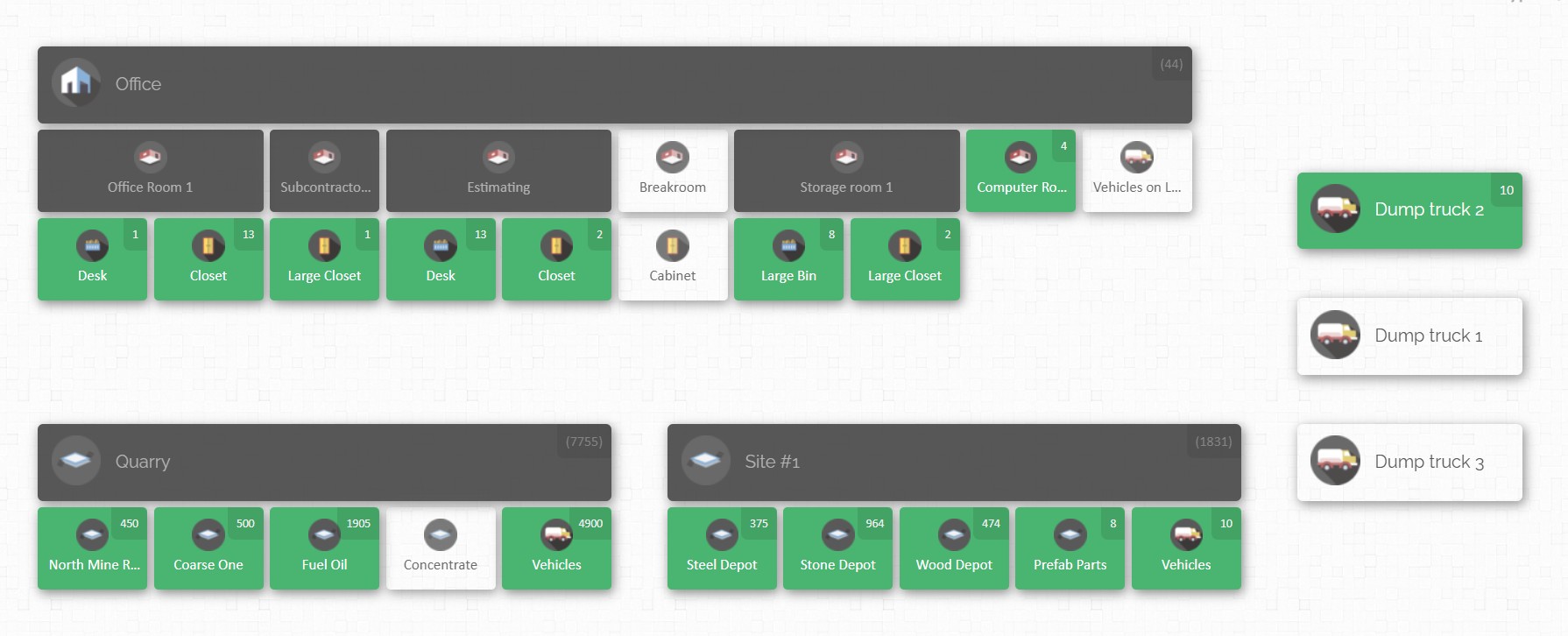
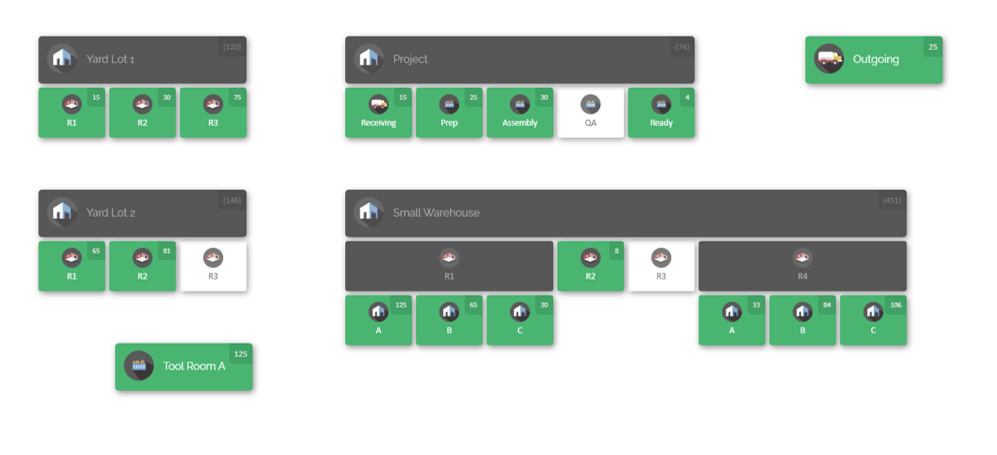
Visual Inventory Map: One of CyberStockroom’s flagship features is its map-based inventory system. Instead of viewing your inventory as just rows in a spreadsheet, CyberStockroom lets you create a virtual map of all your locations – be it different rooms on a job site, various floors of a building, multiple project sites, warehouses, or even vehicles like trucks and storage containers. Each location on the map is interactive and holds real-time data about inventory in that spot. For example, you could zoom into “Project A – 2nd Floor” on your map and immediately see what materials and tools are currently there. This visual layout is incredibly intuitive, especially for field teams. It mirrors how contractors mentally organize a site (by physical areas), making the information easier to digest at a glance. In essence, it answers the all-important question: “HOW MANY of WHAT do we have, and WHERE?” in a user-friendly way.
This directly addresses the limited visibility and multi-location tracking problem. Instead of juggling separate logs for each site or storage unit, the CyberStockroom map consolidates everything. You can see if those spare light fixtures are at the warehouse or already on site, or if the set of power tools you need is still in Truck #5. The days of calling around asking “who’s got the ladder jack?” are over – a quick glance at the live map tells you. And because the map updates in real-time as inventory is moved or used, everyone from the project manager in the office to the foreman on site can stay on the same page.
Real-Time Updates and Cloud Access: CyberStockroom is a cloud-based platform, which means your inventory data is accessible from anywhere – in the office on a computer or on the go via a tablet or smartphone browser. As long as you have an internet connection, you can log in and view or update the inventory. For a renovation project, this is gold.
Moreover, being cloud-based and accessible on any device means field teams and office teams share one source of truth. The general contractor, subcontractors, and even clients (if you choose to share access) can all view relevant inventory info. CyberStockroom allows setting user permissions too, so you could let a subcontractor update only the tools they borrow, or let a facility manager view overall progress without messing with data. This connectivity streamlines cross-team communication: everyone sees updates in real time instead of waiting for end-of-day reports or chasing paper trails.
Drag-and-Drop Transfers & Assignments: Renovation work is very fluid – materials move from the warehouse to the site, from a staging area to a specific room, from one crew’s truck to another’s. CyberStockroom accommodates this with simple drag-and-drop inventory transfers on the map. If you want to move 10 light fixtures from “Main Storage” to “Building A – Second Floor”, you can just drag the item icon on the map to the new location, and the system will deduct and add quantities accordingly. It’s an intuitive way to record movements that might otherwise be forgotten. Likewise, you can assign items to people or teams within the system. Say a power drill is handed to Crew #2 – you can assign that drill on the map to Crew #2’s location (or even to a specific person if you have them set up as “locations” on the map). Now you know who is responsible for it.
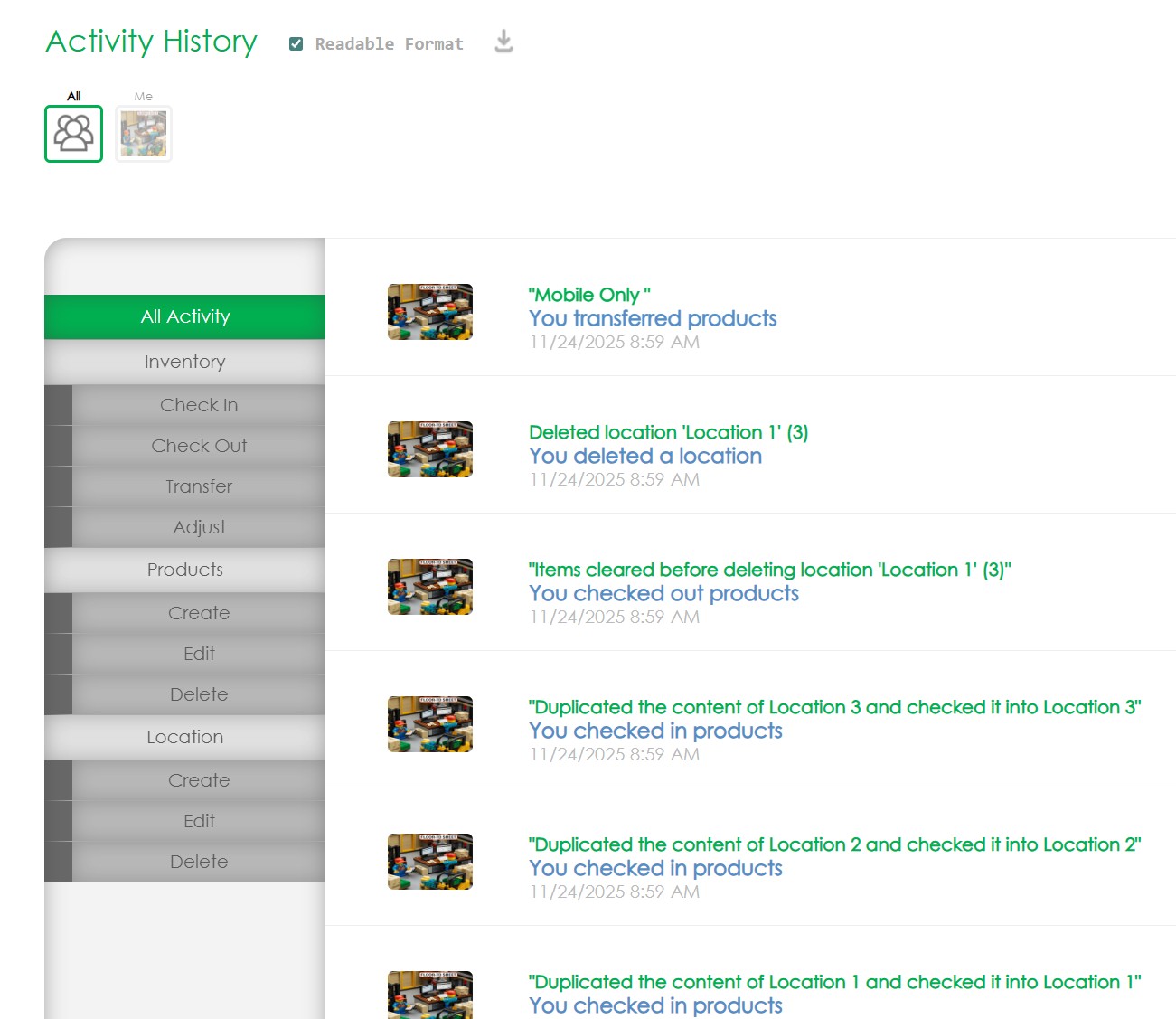
These features directly help with accountability and theft prevention. When every item’s movement is logged and every tool is “checked out” to someone or somewhere, there’s a clear trail. CyberStockroom even keeps an activity history for each item, so you can see who moved or used it last. If something goes missing, you can quickly trace its last known location and user. This creates a culture of accountability – crew members know that if they take something, it’s being tracked, which dissuades casual losses. And for intentional theft, the system can flag unusual activity (like if expensive equipment is removed from a site at an odd hour, you’d notice it’s suddenly not where it should be).
Barcode Scanning: Another powerful feature for accuracy is CyberStockroom’s support for barcoding. You can tag your materials and tools with barcodes or QR code and use a scanner to quickly check items in and out or move them on the map. Scanning reduces the chance of human error that comes with typing in item names or counts. For example, as materials are delivered, you can scan them to instantly add them to the inventory. When issuing materials to the crew, scan again to mark them as used or relocated. This not only saves time but ensures your digital inventory matches the physical reality. No more forgotten entries or fat-finger mistakes causing discrepancies.

Also, there’s no hard limit on the number of locations or items in CyberStockroom. So if your renovation company grows or you take on multiple large projects, the same system scales with you. You can map out an entire portfolio of projects if needed, all accessible in one place. This is great for a global or multi-project perspective – company management can get a bird’s-eye view of inventory across all ongoing jobs, identifying opportunities to redistribute resources efficiently (for example, transferring surplus materials from one project to another rather than buying new).
Ease of Use: Importantly, all these sophisticated features are wrapped in an interface designed for simplicity. Construction crews are busy; they’re not interested in fiddling with complicated software during a hectic day. CyberStockroom’s visual approach means that even team members who aren’t tech-savvy can quickly grasp it – “click on the map, see what’s there” is a straightforward concept. Many actions are point-and-click or drag-and-drop, with minimal typing. The learning curve is low, so you can get your team on board without extensive training. This is crucial because the best inventory system is one that actually gets used consistently by everyone. If it’s easy and clearly helpful, workers are more likely to update it as part of their routine (instead of viewing it as a chore).

Best Practices for Inventory Management in Renovation Projects
Having looked at both the challenges and the technological aid that a system like CyberStockroom provides, let’s now distill some best practices for managing inventory in renovation and retrofit projects. These practices are drawn from industry experience and successful construction management strategies. They’re essentially the habits and policies that help you anticipate problems, stay organized, and maintain control over your materials and tools. Whether or not you use specialized software, these principles are valuable – though, as you’ll see, a tool like CyberStockroom can greatly facilitate many of them.
1. Plan Ahead and Build Contingencies
In renovation work, you should expect the unexpected. A hallmark of good inventory management is proactive planning. Start by thoroughly reviewing the project scope and identifying all materials and equipment you’ll likely need. Use data from past projects (if available) and input from all stakeholders (the trades, suppliers, etc.) to estimate quantities. But don’t stop at the “happy path” plan – also develop contingency plans for potential risks.
For example, consider what you’d do if a critical material shipment is delayed or if you discover mid-project that you need additional materials. Identify key risk factors (supplier reliability, long-lead items, weather impacts on deliveries, theft-prone materials, etc.) and have backup options for each. This might mean lining up alternate suppliers, keeping a small buffer stock of crucial items (like always having a few extra sheets of drywall or a spare motor for an HVAC retrofit), or allocating budget for last-minute purchases if necessary. Contingency planning also includes having a bit of time flexibility in your schedule – perhaps scheduling critical materials to arrive slightly before they’re absolutely needed, to cushion against delays.
Communicate these contingency plans to your team. Everyone should know, for instance, that “if we run short on X material, we have Y supplier on standby” or “if theft occurs, here’s our protocol for reporting and replacing the items.” This preparedness means that when a surprise hits, it doesn’t devolve into panic and finger-pointing; instead, you execute the pre-thought-out Plan B. As one best practice example, some contractors set aside a contingency budget (often a percentage of project cost) specifically earmarked for unforeseen inventory needs. Using it is never ideal, but it’s better to have it and not need it than vice versa.
2. Regularly Audit and Reconcile Inventory
Accuracy in your inventory records is paramount. Don’t wait until the end of the project (or a crisis) to reconcile your inventory. Implement a schedule of regular cycle counts or audits to verify that the physical count of materials and tools matches what’s in your tracking system. This could mean doing a quick weekly inventory check of high-value or critical items, and a monthly check for everything else, as an example. By continuously verifying inventory, you catch discrepancies early – before they impact the project.

A good approach is the ABC analysis method: count the A-items (very important/high value) most frequently, B-items regularly, and C-items occasionally. In a renovation context, A-items might be things like expensive electrical fixtures or heavy equipment, B-items might be mid-range tools or bulk materials that are important but not costly, and C-items could be minor consumables like nails or tapes that are cheap and plentiful. If a discrepancy is found (say, you expected 100 units but only have 90 on hand), investigate immediately: Was there a recording error? Theft? Damage? By addressing it, you can adjust orders or security as needed to prevent a small issue from growing.
When using software like CyberStockroom, a lot of the “audit” can be done on the fly – every time an item is scanned or moved on the map, that’s effectively keeping the count accurate. But even then, a periodic physical walk-through is wise. It can also be an opportunity to tidy up storage and ensure items are in their designated places (which helps everything run smoother).
3. Minimize Last-Minute Purchases with Forecasting
Emergency runs to the supplier or overnight shipping of materials will inflate your costs and can throw off the project schedule. A best practice is to limit the need for last-minute purchases by improving how you forecast and monitor inventory levels. Utilize the data from your inventory system to set reorder points – thresholds at which you need to order more of an item so that it arrives before you run out. For instance, if you know you’ll eventually need 200 light fixtures but only can store 50 at a time on site, plan to reorder the next batch when you drop to, say, 15 in stock to account for lead time.
Historical data is invaluable here. If you’ve done similar projects, analyze material consumption patterns: how quickly were certain materials used, and in what project phase? Tools like CyberStockroom can help by giving you usage logs – you might see that you typically go through 20 plumbing valves a week during the peak plumbing stage of a renovation. With that knowledge, you ensure you always have slightly over that amount ready, plus a buffer for surprises.
Also, keep an eye on external factors. If there’s news of a supply shortage (like insulation materials becoming scarce, or a price spike in lumber), consider ordering critical items a bit earlier or securing a reserve. It’s a balance – purchasing too early or too much ties up cash and space, but purchasing too late risks downtime. The sweet spot comes from continuously adjusting your forecasts with real-world feedback. A modern inventory system can sometimes trigger alerts for low stock automatically, which is a helpful safety net. And always maintain good relationships and communication with your suppliers; if they know your project timeline, they can often help ensure you get priority or at least warn you of potential delays.
4. Standardize Inventory Processes and Naming
Chaos loves to breed in inconsistency. One crew labels a batch of cables “electrical wires”, another labels the same type as “copper cable 12AWG”, and the purchasing team calls it “Item #E-401”. If these refer to the same thing but live in different lists, you’re bound to get confused. That’s why standardizing your inventory practices and nomenclature is a best practice that pays off.
Start by establishing uniform naming conventions for materials and tools. Create a master inventory list or catalog where each item has a single agreed-upon name or code. This way, whether someone is ordering it, logging it in the system, or requesting it on site, everyone uses the same language. It might be as simple as deciding “we’ll use manufacturer model numbers for all major equipment” or grouping items by category consistently (e.g., always classify screws, nails, bolts under “Fasteners” with sub-types).
Next, implement consistent procedures across all sites and teams for how inventory is handled. This includes how items are received (e.g., always count and inspect deliveries with a checklist), how they are issued to workers (perhaps a sign-out sheet or using the software to assign items), and how transfers between locations are documented. If you have multiple project managers, make sure they’re all following the same playbook. This consistency means if an employee moves from one project to another, they won’t have to relearn how to do things – reducing training time and errors.
Standardization also applies to how you handle returns, damaged goods, and write-offs. For example, set a rule that any damaged material is reported with a simple form and updated in the inventory system within 24 hours. Or decide that excess materials from a project will always be either returned to the main warehouse or officially handed over to the client, and document whichever happens. Clear, written SOPs (standard operating procedures) for inventory management can be a bit of effort to set up initially, but they become a backbone that holds everything together. They ensure that inventory data stays clean and useful, which in turn makes forecasting and decision-making far more reliable.
5. Optimize On-Site Storage and Organization

Even if you don’t have a lot of space, how you organize that space can make a big difference. Optimizing storage is about making the most of limited areas and structuring them so that materials are protected and accessible. Start by designating specific zones for different types of materials. For example, on a renovation floor, you might allocate one corner for plumbing supplies, another for electrical, and a section for lumber/boards. Clearly label these zones (a simple sign or color-coding can do wonders). This way, when a delivery comes in, everyone knows roughly where things should go, and when someone needs a part, they know where to look.
Within each zone, use appropriate storage solutions. Shelving, racks, and bins can help utilize vertical space and keep things off the ground (important for moisture protection). Small items like fittings or screws should go in bins with labels, rather than in random piles. Large sheet materials can be leaned against walls or stacked flat on pallets with spacers to avoid warping. If you have rolling carts or containers, even better – these can serve as mobile mini-warehouses that move with the work (just remember to update the inventory location if you relocate them, which is easy if using a map system).
Safety and accessibility should guide your layout. Heavy items on lower levels of shelving (for stability and easier lifting), frequently-used items in the most accessible spots (so people don’t have to dig every time), and clear pathways so materials can be moved without obstruction. Also, keep critical emergency areas clear – it’s both a safety issue and best practice to not block exits or firefighting equipment with stored materials.
It’s wise to assign a team member (or rotate the duty) to be in charge of maintaining the storage area. This person ensures things stay organized, puts back misplaced items, and can track usage (like noticing “hey, we’re down to our last two rolls of insulation in the rack, time to restock”). In a way, treat the on-site storage like a micro-warehouse: it needs management. This effort pays off in efficiency – crews spend less time searching for things, and materials suffer less damage because they’re stored properly rather than tossed in a corner.
6. Protect and Secure Your Inventory
Given the risks of theft and environmental damage we discussed, a best practice is to implement layered security and protection measures for your renovation inventory. Think of it as fortifying your materials both from human threats and Mother Nature.
For security: Control access to the site and storage areas. This could mean having a lockable storage room or container for valuable items and tools – essentially a job site “stockroom” even if improvised. Use fencing and locks for the site perimeter if feasible, and good lighting around the area to deter after-hours intruders. Some contractors invest in simple security cameras or motion sensors for larger projects, which can be a deterrent (and nowadays these can be temporary setups that are easy to deploy on a job site). Also, keep a log of who checks out major tools or equipment – whether on paper or within a system like CyberStockroom, make it routine that if someone takes the laser level or the heavy-duty drill, it’s noted with their name and the date. Not only does this hold people accountable, it also highlights if an item isn’t returned on schedule.
If theft has been an issue historically or the site is in a high-risk area, consider additional steps: serial-number all your tools and keep a record (so stolen items can be identified or reported), and mark materials in subtle ways (some companies spray a unique paint on lumber ends, for example). Some high-value assets might warrant GPS trackers or RFID tags – technology that helps locate stolen gear – though these are usually more common on heavy machinery. The idea is to make stealing anything as inconvenient and traceable as possible; thieves generally go for easy targets.
For environmental protection: Cover and elevate materials susceptible to weather. Use tarps or plastic sheeting to cover wood, drywall, bags of cement, etc., especially if rain is in the forecast. Elevate materials on pallets or blocks so they’re not in direct contact with the ground (avoids moisture seepage and critter damage). If you’re in a place with high humidity or rain, consider investing in a portable storage shed or renting a storage container to act as a dry shelter for sensitive items – it can pay for itself by preventing ruined materials. For items like paints or adhesives, try to store them in a more temperature-stable environment (maybe a conditioned part of the building or an insulated box) to avoid extreme heat or cold ruining them.
Also, implement a first-in, first-out policy for materials with shelf life or that can degrade. If you got a batch of something last month and then a new batch this month, use the older stock first so it doesn’t sit until it expires or deteriorates. Regularly inspect stored materials – catch that leak in the ceiling above your material stash before it drenches everything, or notice if any tarp has come loose before a storm hits.
Lastly, train your crew on these security and protection protocols. Make it part of the daily routine to secure tools at day’s end (e.g., “all power tools back in the locked container by 5pm”) and to cover materials if they see rain clouds gathering. When everyone treats the inventory with care, losses and damage can be cut dramatically.
7. Foster Clear Communication and Accountability
We touched on communication challenges, so the flip side is making good communication a formal part of inventory management. Here are some best practices on that front:
Set up a regular inventory coordination meeting or check-in. Depending on project size, this might be weekly or bi-weekly, often rolled into the general project meeting. In this check-in, discuss upcoming needs (“We’ll start flooring next week, are those tiles on track for delivery?”), current stock status (“We have 5 doors on hand, 15 more coming, which will cover the next phase”), and any issues (“We noticed a shortage in wiring – investigating why and ordering more”). Having representatives from procurement, site management, and key trades can ensure everyone hears the same information and can voice concerns.
Establish a single point of contact (or a small team) for inventory matters on each project. This person (say an inventory coordinator or the site logistic manager) is responsible for maintaining the inventory system and is whom people notify when something’s running low or when there’s a change. For example, if the mechanical contractor needs an extra duct piece, they call the inventory coordinator to log that request, rather than just quietly using the last one and leaving an empty box. This role helps centralize information flow – that person becomes the hub for all inventory-related communication, reducing the chance of messages getting lost.
Use standardized communication tools: for instance, a shared chat group or project management software where inventory requests/updates are posted for all relevant parties to see in real time. Some teams use simple solutions like a whiteboard in the site office listing critical stock levels or deliveries expected today – and then complement it with digital updates via email or an app for those off-site. The key is to make information about inventory status visible and transparent.
Encourage a culture of accountability and openness. If a mistake happens (like someone ordered the wrong item or forgot to report low stock), focus on solving it rather than blame, but also learn from it. Maybe that means updating a process or providing a quick re-training (“Next time, please remember to fill out the material request form so we can get what you need promptly”). When workers see that inventory management is a priority for the project – something the bosses pay attention to – they’re more likely to treat it seriously too.
At the end of the day, good communication ensures that the right people have the right information to keep inventory flowing smoothly. It ties together all the other best practices: plans are useless if they’re not communicated, orders won’t be placed if needs aren’t voiced, and security issues can’t be fixed if they aren’t reported. So, investing time in the human side of inventory management is just as important as investing in the tools and processes.
8. Utilize Inventory Management Software and Tools
Last but certainly not least, leveraging modern inventory management tools is a best practice that can supercharge all the points we’ve discussed. We’ve already delved into how a solution like CyberStockroom can help, but it’s worth reiterating this as a general practice: don’t rely on memory and manual logs alone when technology can offer a better way.
An ideal inventory management software for renovation projects should provide real-time tracking, multi-location visibility, user-friendly interfaces, and reporting capabilities. It should allow field personnel to update inventory status on the fly (via mobile or tablet), and management to see the “big picture” at any time. Features like barcode scanning greatly reduce errors and speed up the logging process – so make use of them. Scanning in a pallet of materials as it arrives takes seconds and ensures your digital count is instantly up to date, whereas manual entry or scribbling on a clipboard might be delayed or mistaken.
Another tool in this arena is RFID tagging for equipment and materials (though as noted, use of IoT and such can be expensive; it’s typically used for very high-value items). If your budget and project scale allow, RFID or GPS trackers on critical assets can automate the tracking (the system logs when an item leaves the site, etc.), but even without IoT, just having a strong software backbone makes a world of difference.
One benefit of digital inventory tools is data analytics. Over time, you accumulate valuable data: how fast certain materials are used, seasonal patterns, supplier performance (late deliveries, etc.), theft incidents, and so on. Good software will let you pull reports – for example, you could generate a report on “materials usage by phase” to refine your estimating for the next project, or “inventory shrinkage by project” to identify if certain sites had unusual loss rates. This transforms inventory management from a reactive task into a source of insight for continuous improvement.
Additionally, integration can be a perk (though with CyberStockroom currently, integrations are limited, the general idea is to eventually connect inventory software with other systems like project management or accounting). Even without full integrations, you can always export data and share it as needed – for instance, giving accounting the list of materials used for proper job costing, or sending procurement a consolidated shopping list generated by the system.
Embracing technology also sends a message to your clients and team: that you are running a modern, efficient operation. It can be a selling point with clients who worry about project delays – you can confidently explain how your inventory system will prevent holdups and waste. For your team, it can reduce a lot of frustration. Many field managers who transition from pen-and-paper to a digital system feel a burden lifted: suddenly they aren’t fielding as many panicked calls about missing stuff, and they spend less time doing tedious paperwork.
In summary, the best practice here is to not shy away from using software as a force multiplier for your inventory management efforts. It ties together planning, tracking, communication, and analysis in one package. In the case of CyberStockroom, its map-based approach aligns perfectly with how renovation projects operate – visually and across multiple moving parts – making it a fitting choice to consider as you upgrade your inventory management game.
Conclusion
Inventory management in renovation and retrofit projects might not be the most glamorous aspect of construction, but it is undeniably one of the most important for keeping projects on track. By understanding and addressing the challenges – from tight storage space and unpredictable changes to theft risks and communication hurdles – project leaders can prevent small inventory slip-ups from snowballing into big delays or cost overruns. We’ve seen that implementing best practices like thorough planning, regular inventory audits, just-in-time delivery coordination, standardizing processes, and leveraging technology can transform how smoothly a renovation project runs.
For general contractors, project managers, and facility managers alike, the goal is to have the right materials and tools in the right place at the right time, all while minimizing waste and loss. Achieving that requires a proactive approach: anticipate issues before they happen, keep everyone informed, and use the tools available to maintain visibility and control. Modern solutions such as CyberStockroom’s visual inventory management platform can be a game-changer, turning what used to feel like an overwhelming juggling act into a more manageable, even intuitive process.
Ultimately, effective inventory management is about efficiency and peace of mind. It means a crew can focus on installing fixtures rather than hunting for them, a project manager can give a client accurate updates instead of excuses, and a company can protect its bottom line by not letting valuable resources slip through the cracks. In the fast-paced world of renovations – where every day counts and surprises lurk behind every old wall – having a firm grip on your inventory can be your secret weapon for success. By applying the best practices outlined above and continuously refining your approach, you’ll be well equipped to tackle inventory challenges head-on and keep your renovation projects running like clockwork.
Remember, the construction industry is evolving, and those who adapt smart inventory strategies not only avoid headaches but also gain a competitive edge. So, invest the time in organizing your inventory processes, train your team in the importance of good inventory habits, and consider tools that give you better oversight. With these measures in place, you’ll turn inventory management from a troublesome chore into a streamlined part of your project workflow – leading to smoother renovations and happier clients in the long run.







 CyberStockroom
Leave a comment