
Companies today often operate multiple warehouses, project sites, and even mobile storage (like trucks or vans) simultaneously. For these businesses, inventory tracking across multiple locations is critical to keep projects running on time and budgets under control.

Without a unified approach, materials can sit unused at one site while another site runs out of stock, leading to costly delays and idle crew time. In fact, studies have found that construction workers spend around 10 minutes every day just looking for tools or materials that aren’t where they should be – adding up to a full work week of lost time per worker each year! Such inefficiencies underscore the importance of having a better system for managing multi-location inventory.
Best Practices for Multi-Site Inventory Management

Effective multi-location inventory control relies on coordinated processes and clear visibility. Here are some best practices and strategies to keep inventory organized when you’re dealing with many locations:
- Standardize Processes: Make sure every site follows the same steps for key tasks like purchasing, receiving deliveries, storing items, and tracking usage. Using consistent standard operating procedures (SOPs) across warehouses and jobsites prevents confusion—especially when staff move between locations—and makes training new employees much easier. For example, use the same purchase order approvals, receiving checklists, and restocking guidelines everywhere so that a tool or material is handled the same way no matter where it is.
- Centralize Inventory Data: Adopt a centralized inventory system – ideally a cloud-based platform or a robust enterprise resource planning (ERP) module – to serve as the single source of truth. All stock movements and updates from every location should feed into one system where managers can see total inventory at a glance. This eliminates data silos and ensures that if Warehouse A ships 50 units to Site B, both locations’ records update immediately in one unified database.
- Real-Time Visibility: Use real-time tracking tools like barcodes, QR codes, or RFID tags to keep the central inventory database up to date. In practice, every time an item is received, moved, or used, it should be scanned or logged immediately. Modern inventory software makes this easy by allowing quick updates via scanners or mobile devices. Stock levels update in real time, preventing nasty surprises—like finding out too late that a critical part was already consumed at another site. Set up dashboards and alerts (such as low-stock notifications) so everyone stays aware of inventory levels across the entire network.
- Regular Audits & Cycle Counts: Even with automated tracking, periodic physical counts are essential to maintain accuracy. Schedule routine cycle counts at all locations to reconcile digital records with what’s actually on the shelf. You might count a different category or area each week rather than doing one massive annual count. Focus extra effort on high-value or fast-moving items (using an ABC classification, for instance). These regular audits will catch discrepancies or shrinkage early, keeping your records reliable. They can also highlight process issues – for example, if one jobsite consistently reports missing items more than others, you know where to tighten security or training.
- Demand Forecasting & Planning: Use historical data and project schedules to forecast needs at each location. Both construction and manufacturing operate on project timelines, so planning inventory for upcoming phases is key. For example, if a new building project will need 1000 bricks in three weeks, plan to transfer or order them to the site ahead of time rather than waiting until the last minute. Modern inventory systems can analyze usage trends and lead times to generate smart reordering suggestions. Combine these forecasts with just-in-time (JIT) principles: aim to have materials arrive right when they’re needed on-site. This minimizes excess stock sitting idle across locations, freeing up cash and space while still ensuring no site runs short.
- Efficient Logistics & Transfers: Plan out how you’ll move inventory internally between locations. If you have your own trucks, create a schedule for moving parts and materials where they’re needed, and use your inventory system to track items in transit. Always log when items leave one location and when they arrive at the other. Consider consolidating shipments to save on transport costs (for instance, if several nearby sites need supplies, combine their orders into one truckload). If your operations are widespread, it might make sense to have regional distribution hubs that serve multiple sites in that area to reduce transit times. In all cases, use your data – know exactly what inventory is where, so you can route and allocate it optimally.
- Collaboration & Communication: Break down silos between your teams. Field staff, warehouse managers, and procurement officers should all have access to the same inventory information. This could be through regular coordination meetings or by sharing project inventory plans in a common system. For example, if a construction plan changes (which is common), the site manager should update everyone – then the purchasing team can adjust orders and the warehouse can prepare different materials, all without confusion. It’s also wise to loop in your suppliers about your multi-site setup; sometimes you can consolidate orders for multiple sites to get bulk discounts or priority service. The key is that whenever something changes at one location (like a usage spike or a delay), all stakeholders find out quickly and can respond in sync.
By enforcing these best practices – uniform processes, a centralized tracking system with real-time updates, regular audits, and open communication – companies can tame the complexity of multi-location inventory. These habits reduce errors, avoid both stockouts and overstock, and ensure that the right supplies are on hand wherever and whenever projects need them.
Challenges Unique to Industrial Construction and Manufacturing
Managing inventory across multiple locations in industrial sectors (like construction and manufacturing) comes with some extra challenges. Understanding these will help us address them effectively. Some of the biggest challenges include:
1. Site-to-Site Variability
- Geographic Differences: Warehouses, factories, and jobsites might be spread across different cities or even different climates. Each location can have unique conditions and constraints. For example, a remote jobsite might have limited road access or extreme weather considerations, whereas an urban warehouse might face space limits and local regulations. These geographic factors affect how you store and transport inventory (materials might need weatherproof storage in one place, or extra transit time to another).
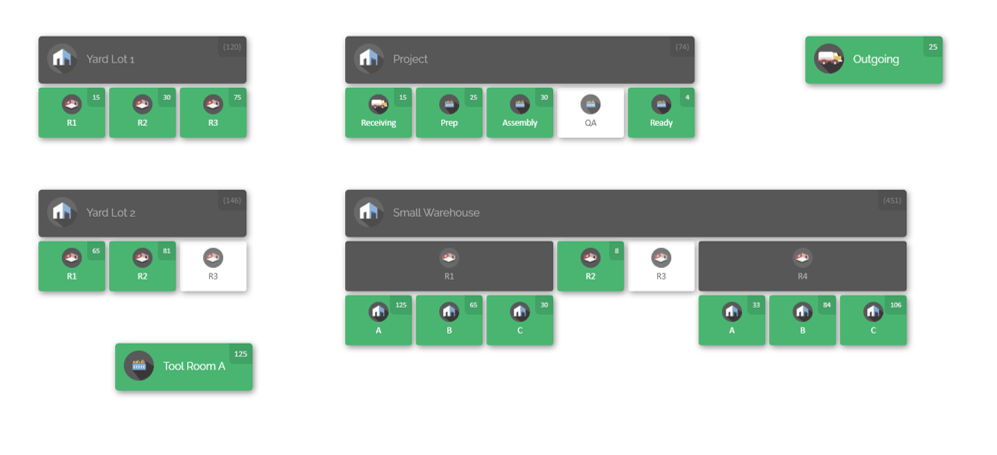
- Space Constraints: Particularly at construction sites or temporary laydown yards, you often don’t have ample storage space. Materials might be piled outdoors or kept in small containers, which increases the risk of damage, loss, or safety issues. A crowded jobsite makes it harder to organize inventory – it’s not like a big warehouse with neat racks. This constraint means you must be very strategic about what and how much inventory to keep on-site versus in a larger hub.
2. Diverse Inventory Types
- Material Complexity: Different industries and projects require tracking a wide range of inventory types. A construction company might need to manage everything from lumber, steel beams, and bags of cement to tiny screws and light fixtures. A manufacturing plant, on the other hand, tracks raw materials, work-in-process components (WIP), and finished goods ready to ship. The more diverse the inventory, the more complex the tracking – you might have perishable materials, bulky items, hazardous chemicals, and high-value machinery parts all in the mix.
- Asset Management: It’s not just consumable materials. Expensive tools, equipment, and machinery often move between locations too. In construction, a generator or an excavator might shift from one project to another; in manufacturing, a special tool might be shared across plants. Keeping tabs on these assets (which are often rented or shared resources) adds another layer of complexity because you need to know who has what, where it is, and its condition at all times.
3. Dynamic Project Requirements
- Unpredictable Needs: Project scopes and schedules can change suddenly. In construction, you might get a change order that requires new materials ASAP, or a planned task gets delayed meaning some materials go unused longer than expected. In manufacturing, an equipment breakdown could require immediate spare parts, or a sudden customer order might need a special component. These shifts mean inventory needs can spike or drop with little warning.
- Rush Orders: When surprises happen, you often face last-minute orders or transfers. For instance, if a critical machine part fails, a factory may need to overnight ship a replacement from another plant or supplier. If a construction site miscalculated and poured more concrete than planned, they might urgently need more rebar or forms to keep on schedule. Rush situations demand having contingency stock or very fast ways to redistribute inventory, otherwise project timelines suffer.
4. Logistics and Transportation Challenges

- Extended Supply Chains: Some sites are far from suppliers or distribution centers. If you’re managing a project in a remote region, resupplying it may involve long lead times and higher shipping costs. An inventory miscalculation at a distant site can’t be fixed the same day – it might take a week by truck or require expensive air freight. Coordinating inventory in these extended chains means planning further ahead and maintaining safety stock to buffer transit delays.
- Cross-Border Coordination: If your multiple locations span different countries or regions, you have to deal with customs, tariffs, and varying regulations. Moving inventory across borders isn’t just a matter of putting it on a truck; you need proper documentation, and delays are common. Additionally, different countries might have different compliance rules (for example, for hazardous materials or electronics), so inventory tracking needs to include those details to ensure smooth transport and legal compliance.
5. Workforce Management
- Rotating Teams: In construction especially, crews might move from site to site as projects start up or wind down. A team that was well-trained on the inventory process at Site A might not be present at Site B next month. This rotation makes it harder to enforce consistent practices—new or rotating staff might not know the procedures of that location. Even in warehouses, shift changes or temp workers during peak seasons can introduce inconsistency in how inventory is handled.
- Training Gaps: Introducing digital inventory systems or new procedures only helps if the workforce actually uses them correctly. In industries like construction, some workers might be less familiar or comfortable with technology (imagine asking a veteran equipment operator to suddenly use a scanning app on a tablet). Without proper training and user-friendly tools, the data that goes into the system may be error-prone. People might forget to log usage or choose not to bother with a complex software interface, leading to data errors.
6. Safety and Compliance
- Regulated Materials: Certain inventory items are subject to strict safety regulations. For example, if you have explosives for demolition, hazardous chemicals like solvents or fuels, or sensitive equipment like calibrated instruments, you must track and store them in specific ways. Multi-location management must ensure each site follows the rules (proper containers, signage, environmental conditions) and that the central system records these materials accurately for compliance audits.
- Compliance Tracking: In manufacturing, some parts might require full traceability (think aerospace or medical device components where you need to know the batch and origin of every part). In construction, there may be compliance paperwork for materials (like certifications for steel quality, or disposal records for hazardous waste). Keeping this info linked with your inventory is a challenge—when materials move from one location to another, their compliance and quality documents need to move with them. Failing to do so can result in fines or safety incidents.
How to Overcome These Challenges
Now that we’ve outlined the challenges, how do we address them? Here are a few key strategies:
Standardize Processes: Implement consistent inventory tracking, receiving, and transfer protocols across all sites (and enforce them!). Everyone should follow the same playbook.
Invest in Training: Make sure all staff – including new hires and temporary crew – know how to use your inventory system and follow procedures. Provide refreshers when needed.
Centralize Inventory Data: Use a cloud-based inventory system (like CyberStockroom or another platform) for real-time visibility of stock across locations. One shared database means no one is working off outdated info.
Leverage Mobile Solutions: Equip workers with tablets, barcode scanners, or other mobile devices so they can update inventory on the go at the jobsite or on the warehouse floor. The easier it is for them to log a transaction at the moment it happens, the more accurate your data will be.
Maintain Regular Audits: Schedule routine cycle counts and audits at each location. This helps catch errors or losses early and keeps the data honest.
These challenges are manageable with a strategic approach. The combination of clear processes, the right digital tools, and ongoing training/communication will greatly mitigate the difficulties of multi-location inventory management.
International Perspectives on Multi-Location Inventory Management
It’s worth noting that approaches to inventory management can vary around the world. Different regions sometimes emphasize different techniques or technologies based on local practices or industry focus.

Here’s a quick look at how multi-location inventory management is approached in various regions:
- North America: In the U.S. and Canada, companies often maintain centralized distribution hubs feeding regional warehouses or jobsites. The focus is on large-scale distribution networks with heavy use of cloud-based systems to keep all locations in sync. Common practices include using ERP software to integrate inventory data with finance and sales, and dealing with cross-border logistics (tariffs, multiple currencies) when necessary. Technology: On-site barcode scanning and robust cloud platforms are popular, thanks to widespread internet and cellular coverage, enabling real-time tracking from coast to coast.
- Europe: European manufacturers (like Germany’s automotive giants) tend to use highly integrated warehouse management systems (WMS) often tied into their production and quality systems for full traceability. There’s a strong emphasis on lean and Just-in-Time (JIT) principles to reduce waste. Common Practices: Multi-site operations often implement Kanban systems and rigorous demand forecasting to keep inventory lean across locations. Technology: Many facilities embrace Industry 4.0 concepts – for example, using automated machinery and sensor-equipped systems to monitor stock. Digital integration with design and planning tools (like linking inventory to Building Information Modeling data in construction) is also on the rise to ensure inventory matches project plans in real time.
- Asia-Pacific: In advanced economies like Japan, South Korea, and Singapore, automation and cutting-edge tech are key. Japanese manufacturers perfected Kanban and continue to enhance it with automation and advanced sensors for inventory monitoring. In China, some smart warehouses use drones for inventory inspection and employ highly automated systems to manage huge volumes of goods. Focus: There’s a big push toward automation, robotics, and mobile-first solutions to manage inventory. Technology: RFID tracking is common in warehouses to monitor goods movement, and AI-driven optimization is emerging to fine-tune inventory levels. Mobile devices are heavily used by staff for scanning and updates, given the region’s mobile-first tech culture.
- Latin America & Emerging Markets: In regions where infrastructure may be developing, companies often need to overcome challenges like longer import lead times and transportation gaps. Focus: They may centralize inventory at a main hub (for example, a Brazilian firm might use one main warehouse near a port to distribute to inland locations) to cope with import logistics. Common Practices: A mix of digital and manual methods is often used. Some smaller or remote operations still rely on spreadsheets or even paper for on-site tracking, but there’s a strong interest in affordable cloud tools to improve visibility. Technology: Mobile solutions are popular — many businesses use smartphones or tablets with basic cloud inventory apps because they’re cheaper and easier to deploy than full-scale systems. The goal is to leapfrog directly to cloud-based management, using cellular networks where possible, to connect far-flung sites without needing extensive IT infrastructure.
While the fundamentals of managing inventory across locations are universal, each region adapts to its realities. North America emphasizes cloud connectivity across vast distances, Europe focuses on lean methods with high integration, Asia-Pacific innovates with automation and sensor tech, and emerging markets prioritize flexible, mobile solutions to bridge infrastructure gaps. Learning from these global perspectives can inspire new ideas for improving your own multi-site inventory strategy.
Physical (Manual) vs. Digital Inventory Systems
Another way to think about multi-location inventory management is by contrasting manual methods versus modern digital systems. Historically, many companies managed inventory with pen-and-paper logs or spreadsheets, but now digital solutions are widely available. Let’s compare:
Physical (Manual) Inventory Systems

Manual inventory systems rely on tools like paper forms, clipboards, spreadsheets, or whiteboards to record stock levels and movements. These methods can work on a small scale, but they have significant limitations, especially as you expand to multiple locations:
- Limited Visibility: With separate records at each site (often only accessible on-site), it’s hard to get an accurate company-wide picture. By the time someone consolidates spreadsheet data from five warehouses, the information might already be out of date.
- Prone to Human Error: Manual entry means typos, missed entries, and calculation mistakes are common. Something as simple as a transposed number or a lost notebook can throw inventory counts off. In a multi-location setup, one mistake at a single site can ripple through and cause wrong purchasing or allocation decisions company-wide.
- Slow Updates: If you rely on people to manually update a sheet at the end of the day (or week), your “system” is never truly up-to-date. You might discover days later that a site ran out of an item, because the records lag reality. Real-time adjustments are nearly impossible.
- Labor Intensive: Tracking inventory by hand is tedious work. Employees spend time counting, recounting, and entering data rather than doing more valuable tasks. When you multiply this by several locations, the labor cost (and burnout risk) grows significantly.
When might manual systems still be acceptable? In some limited scenarios:
- Small or Simple Operations: If you have a very small business or project with only one or two storage locations and a low volume of items, manual tracking might be manageable (at least initially).
- Temporary Sites: Short-term projects or pop-up locations might not justify setting up a full digital system. For a one-off event or a construction project lasting just a few weeks, a simple spreadsheet could suffice.
- Backup Plans: Even companies with sophisticated digital systems should have a manual backup plan (like printed forms) in case of system outages or emergencies. This is more of a contingency than a primary method.
Overall, manual methods become unsustainable as the complexity or scale grows. Many businesses start with spreadsheets, but they often feel the pain once they expand to multiple sites or higher transaction volumes.
Digital Inventory Systems

Digital inventory systems use software (cloud-based or on-premise) to automate and streamline tracking. These systems are designed to handle multiple locations seamlessly. Key advantages include:
- Real-Time Updates: Stock levels adjust instantly whenever items are received, moved, or used. This is huge for multi-location management because you can trust that what you’re seeing on the screen is what’s actually on the shelf right now.
- Improved Accuracy: By leveraging tools like barcode scanners, RFID readers, and user-friendly mobile interfaces, digital systems dramatically reduce human error. Instead of typing numbers into a spreadsheet, staff can scan an item’s barcode and instantly update quantities. Fewer typos and missed entries means far more precise inventory data.
- Centralized Data: All locations share one database or system, accessible to authorized users anywhere. This centralized approach means no more juggling multiple spreadsheets – a manager can log into the system and see inventory across all sites at once (or drill down into one location) without calling around or merging files.
- Automation & Alerts: Digital tools often come with automation features that simplify management. For example, you can set reorder alerts per location – if the stock of concrete at Jobsite X falls below a threshold, the system can alert the purchasing manager or even auto-generate a replenishment order. Transfers between locations can be logged with a few clicks, and the system can produce reports and analytics on demand.
- Scalability: Whether you have 3 locations or 30, a good digital system can scale with you. Adding a new warehouse or project site is usually as simple as creating a new location in the software. You won’t need a whole new process – you just extend the existing system to the new site, ensuring continuity.
When are digital systems essential?
- Multi-Location Operations: If you’re managing inventory across multiple warehouses, plants, or jobsites, a digital system is practically a must-have to maintain coordination and sanity.
- Large-Scale Projects: High-volume operations (hundreds or thousands of SKUs, or frequent stock movements) benefit enormously from digital tracking. The more transactions, the more you need automation to keep up.
- Remote Teams: If you have field workers or remote sites, giving them mobile access to the inventory system ensures they can participate in real-time tracking. This is crucial for things like construction crews that need to update usage from the field, or service technicians who consume parts on the job.
Choosing the Right System: For companies with multiple locations, digital inventory management brings clear advantages in visibility, control, and efficiency that manual methods simply can’t match. Manual systems might work in very limited or temporary cases, but as operations grow, investing in a digital solution pays off quickly. The key is to choose a system that fits your needs – something that isn’t overly complex, supports all your locations, and is user-friendly for your team. In the next section, we’ll introduce one such modern solution and how it addresses the challenges we’ve discussed.
CyberStockroom: Visual Inventory Tracking in the Cloud
One example of a modern inventory management solution built for multi-location needs is CyberStockroom, a cloud-based platform designed specifically for tracking stock across various locations. CyberStockroom distinguishes itself with an intuitive map-based interface: you literally get a visual diagram of all your warehouses, job sites, and storage areas, complete with icons for shelves, bins, and equipment zones. In other words, it brings your inventory data to life as a dynamic map.
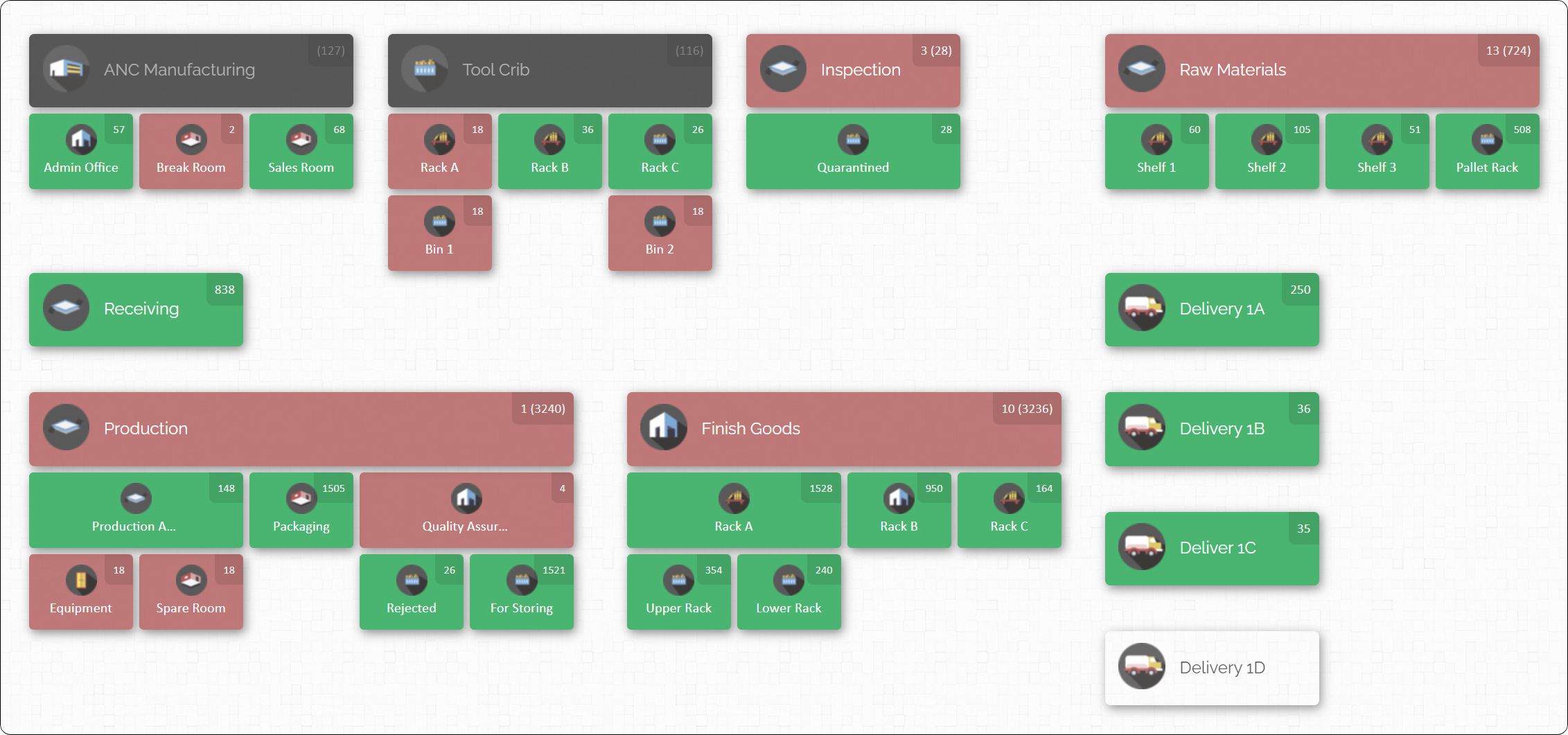
Here are some key features of CyberStockroom and how they help simplify multi-location inventory management:
- Real-Time Updates and Accessibility: Because CyberStockroom is cloud-based, it updates inventory counts immediately as transactions occur, and your data is accessible from anywhere. If a technician at a construction site uses an item and scans its barcode on a mobile device, that change is visible instantly to everyone with access. A headquarters planner across the country can log in through a web browser and see current stock levels at every site without calling or emailing anyone on-site. This real-time, shared visibility ensures that decisions are made with the latest information. Managers no longer have to chase down updates – they can simply check the live map or dashboard. And since it’s cloud-hosted, remote staff or traveling managers can view the inventory on their phone or tablet on the go, keeping the entire team coordinated.
- Visual Multi-Site Management: CyberStockroom really shines in multi-location scenarios, especially for small to mid-sized businesses that need an easy way to manage several sites. Setting up your environment is straightforward: you create a virtual map of your operation by adding all your locations (warehouses, regional depots, project sites, service trucks, etc.) as nodes on the map. Within each, you can define sub-locations like specific rooms, aisles, racks, or storage yards. Then you drag and drop products into each location or sub-location on the map to record where each item is kept. The interface uses color-coding and visual cues (for example, it might highlight areas that are low on stock in red) to make it immediately clear where attention is needed. Because it’s so visual and user-friendly, even staff who are not tech-savvy can navigate it with minimal training. They don’t need to memorize complex menu paths or codes – they just click on the location on the map and see what’s there.
- Inventory Movement & Accuracy: Moving items between locations is often where mistakes happen in inventory management. CyberStockroom streamlines this with a simple check-out/check-in system to log transfers. For example, say a bundle of electrical cable is sent from the central warehouse to a jobsite: a warehouse worker checks it out of “Warehouse A” in the system, and when it arrives at Site B, the site manager checks it in. This two-step logging means the system automatically decreases the quantity at Warehouse A and increases it at Site B, with a record tying the two events together. Every transfer is recorded, so you can always audit the trail of where something went. This approach greatly reduces the chance of stock “disappearing” between locations – no more situations where 50 units are unaccounted for because they were in limbo. In practice, companies using CyberStockroom have found far fewer discrepancies in their multi-site inventory because every movement is tracked in real time.
- Collaboration and Transparency: CyberStockroom provides a single, shared source of data, which improves cross-team collaboration. Everyone from the sales team to project managers to warehouse staff can be looking at the same inventory status, tailored to what they need. For instance, if a sales rep needs to know if a certain part is available for a job, they can quickly check which location has it in stock (instead of calling around). If one warehouse has a surplus of an item that another site needs, this can be flagged and a transfer arranged proactively. The platform supports role-based permissions too, which is important for controlling access. You might allow a site supervisor to log usage and view inventory at their own site, but only let regional managers or executives see all locations. This way, sensitive data is protected, but everyone has the visibility appropriate to their role. The result is greater transparency and teamwork – people can make requests or decisions based on what the system shows, rather than working in isolation.
- Scalability and Ease of Use for SMEs: Unlike some heavy enterprise ERP systems, CyberStockroom is designed to be flexible, affordable, and easy to implement. It covers the essential features – stock tracking, transfers, reporting, alerts – without the bloat that can overwhelm smaller organizations. This means you can get up and running quickly, and you don’t need a dedicated IT team to maintain it. As your business grows or adds new locations, scaling up is as simple as adding another node to your map and populating it with products. There’s no need to install new servers or go through a months-long rollout for each new site. Being a subscription-based Software-as-a-Service (SaaS) product, it also means updates, new features, and support are handled by the provider and delivered automatically, which is great for a growing company that can’t pause operations for software upgrades. In short, CyberStockroom brings multi-warehouse, multi-site inventory capabilities that were once only feasible for large corporations and makes them accessible to smaller teams that need agility.
- Barcode Support and Quick Data Entry: CyberStockroom supports using barcodes (or QR codes) for fast logging of inventory actions. Each location and product can be associated with a barcode. Staff can print labels for, say, “Site B Storage Container 3” or for product SKUs. Scanning the location code and an item code together can instantly move that item in the system. This built-in barcode integration means you don’t need a separate third-party solution for scanning – it’s all part of the platform. By accelerating check-ins and check-outs with scans, the software further reduces errors and the time staff spend on data entry.
- Analytics and Reporting: Beyond day-to-day tracking, CyberStockroom provides reporting tools that let you analyze your inventory data. You can generate reports on inventory levels by location, track historical movements (e.g., how stock moved over the last quarter between sites), and monitor usage rates of certain materials. These insights help identify trends, such as which items are overstocked or understocked and at which location. They complement the visual map by giving you hard numbers and charts to support planning decisions. For example, a report might show that one construction site consistently returns a lot of unused materials – indicating you could deliver less there initially – whereas another site always runs short on certain parts before the project is done.

By leveraging a visual, cloud-first design, CyberStockroom addresses many common pain points of multi-location inventory. It turns the often-asked question “How many of what do we have, and where is it?” into an interactive experience where the answer is literally mapped out for you. Instead of juggling spreadsheets or making phone calls to track down stock, your team can see the big picture at a glance and drill into details with a click.
In summary, CyberStockroom serves as an example of how modern software can make inventory tracking multiple locations far more manageable
Practical Workflows and Visibility Strategies

Having the right tools is important, but you also need clear workflow processes to manage inventory from warehouse to worksite.
Let’s walk through a typical multi-site inventory workflow, incorporating best practices and using digital tools to maintain visibility at each step:
- Receiving and Putaway: Whenever new materials or stock arrive at a warehouse or jobsite, the process should start with immediate recording. The receiving clerk (or whoever accepts the delivery) verifies the shipment against the purchase order, then uses a barcode scanner or mobile device to log each item into the system right away. This might involve scanning a pallet label or selecting the received items in an app. The inventory system instantly updates that location’s stock levels so everyone knows those items are now available. Next comes putaway: the items are moved to their storage spots (e.g., Rack A, Bin 3 in the warehouse, or the “Electrical Supplies” container at a jobsite). The staff will update the system with those specific locations, so if someone later needs that item, they know exactly where to find it. It’s a good practice to label shelves or storage areas and maybe even tag pallets or boxes with barcodes, so that later when picking, staff can scan the location and item to confirm they have the right thing. With this workflow, as soon as new inventory arrives, it’s accounted for in the system and visible to all other locations (so a project manager at another site can see that the main warehouse just got those critical parts in stock, for example).
- Inter-Site Transfers: If one location needs inventory from another (for example, a jobsite runs low on a material that a central warehouse or another site has in surplus), you initiate a transfer order in the system. Think of this like an internal order – Site B requests 100 units of item X from Warehouse A. The warehouse staff will pick and pack the order, and scan those items out of Warehouse A’s inventory (marking them as in transit to Site B). The system might mark them as “in transit” or temporarily allocate them out of Warehouse A’s available stock. When the shipment arrives at Site B, the receiving person there scans them into their location’s inventory. This two-step scan (out from source, in at destination) closes the loop and keeps both locations’ counts accurate. Good systems will show the transfer in progress, so both sides can monitor it. This process prevents scenarios where a box of items gets sent to a site but not recorded – a common issue with email or paper-based transfers. It also enables a sort of just-in-time sharing: if Site B is forecasted to run low next week, the system can prompt a transfer from Site A ahead of time. By logging everything, you can generate transfer reports to analyze how often and how much stock is moving between locations, which can help optimize placement of stock in the future (maybe you realize it’s better to keep certain items permanently at Site B rather than always shipping them over).
- On-Site Usage: At the jobsite or on the factory floor, inventory often gets consumed in the course of work. A crucial practice is to capture that usage at the moment it happens. With a modern system, workers can have mobile devices (smartphones or tablets) or scanning tools to update inventory as they withdraw items. For example, a technician might scan a QR code on a box of bolts when taking it out of the site’s storeroom for use. Instantly, the site inventory count for bolts goes down in the system. This real-time deduction is important for preventing “phantom inventory” – the system showing stock that’s actually been used up. It also ties the consumption to a project or task if needed (many systems let you log usage against a job number or cost center). Capturing on-site usage data helps headquarters see the burn rate of materials and triggers replenishment when needed. It can feel like extra work for field crews at first, but if the tools are easy (just a quick scan or a tap on a screen), it becomes second nature. And the payoff is huge: no more end-of-week shocks that a critical component ran out days ago, because you’ll see it was used in real time.
- Returns and Redistributions: Often in projects, not all materials get used. Perhaps a job wraps up and there are leftover materials, or a batch of parts was defective and needs to be sent back to the supplier. Having a process for returning inventory into stock is as important as tracking it out. In practice, this means when unused or extra items come back from a jobsite or are found during an audit, they should be scanned back into a location (whether a main warehouse or some holding area for returns). The system should increment the stock and note that it was returned from use. For high-value items or tools, you might require an inspection or manager approval before they’re officially returned to available stock (to ensure they’re in good condition). A good inventory system can manage this by having a status for items under inspection or by notifying a supervisor to approve the return entry. The returns process ensures that excess inventory at one site gets recognized and can be reallocated – maybe those leftover pipes from Project X can now be marked available and sent to Project Y instead of buying new ones.
- Reordering and Replenishment: An efficient multi-location operation uses the data from all sites to inform purchasing and internal distribution. Your inventory software should allow setting min/max levels or safety stock thresholds per item per location. For example, you might say Site C should always have at least 50 units of Material Y on hand. If it drops below that, the system flags it. At that point, depending on your workflow, it could either alert a manager to reorder or even automatically create a purchase order or internal transfer request. Replenishment might mean ordering new stock from a supplier or simply moving items from a central warehouse out to the site. Many companies adopt a hybrid approach: critical fasteners or consumables at a jobsite might be replenished from the main warehouse weekly (like a milk run), whereas big items are special-ordered as needed. The key is using the system’s reporting to track what’s low and respond before a stockout happens. Modern systems can aggregate needs – e.g., generate a shopping list that combines low stock across all sites so you can order everything in one go. This ensures that each location gets what it needs just in time, avoiding both downtime (from missing parts) and overstock (from over-ordering “just in case”).
When you piece these workflow elements together, you get a robust end-to-end process: From the moment inventory enters your organization (receiving), through being distributed where needed (transfers), used in the field (consumption), possibly returned or moved around (redistribution), and finally replenished when low – every step is tracked. The common thread is visibility at each step. By capturing data in real time and making it accessible on a unified platform, you always know what you have and where you have it. This level of control turns what could be a logistical nightmare into a well-orchestrated operation.

Conclusion
Managing inventory across multiple locations in industries like construction and manufacturing is undeniably a complex task. However, it becomes manageable and even efficient with the right approach. By following best practices—standardizing processes, centralizing data, leveraging real-time tracking, and fostering open communication—companies can keep all their warehouses, sites, and teams in sync. In other words, multi-location inventory control stops being a scramble and starts becoming a streamlined routine.
Modern digital tools like CyberStockroom make these efforts much easier by providing a unified, visual interface for inventory management. Instead of working with disconnected spreadsheets and guesswork, teams get a clear map and real-time updates to guide decisions.

Learning from international examples and avoiding common pitfalls (like data silos and inconsistent methods) further ensures that your processes stay robust even as you scale up or take on more projects. And looking forward, embracing emerging trends such as AI-driven demand forecasting and mobile/cloud technologies will likely streamline multi-site inventory management even further in the coming years.
Ultimately, whether you’re moving materials from a central warehouse to a remote jobsite, or balancing parts across multiple factory locations, the goal is the same: to have the right inventory in the right place at the right time. With a strategic mix of good processes and modern technology, that goal is entirely achievable. By turning a potential logistical headache into a well-oiled operation, you not only save time and money, but also gain the peace of mind that comes from knowing your inventory is under control—everywhere it needs to be.







 CyberStockroom
Leave a comment